 Claude
  Perplexity
Finding the Best Cold Email Software for Your Sales Team
Discover the best cold email software with our complete guide. We cover key features, deliverability, and how to choose the right platform for your outreach.
TL;DR: Discover the best cold email software with our complete guide. We cover key features, deliverability, and how to choose the right platform for your outreach.
Picking the best cold email software isn’t about finding a single “magic bullet” tool. It’s about finding the right one for your specific goals. The heavy hitters in this space—tools like Saleshandy, Smartlead, and Instantly.ai—all focus on the same core principles: deliverability, personalization, and automation. These are what give a sales team a real engine for outreach.
What Really Makes Cold Email Software the Best?
Choosing the right cold email software is a lot like picking a vehicle for a road trip. You wouldn’t take a two-seater sports car on a rugged camping trip, and you wouldn’t drive a massive RV through crowded city streets. The “best” choice always comes down to where you’re trying to go.
Think of these platforms as more than just email senders. They are complete outreach systems designed to help you start conversations with people who have never heard of you. To do that well, any great tool has to absolutely nail three critical areas.
The Three Pillars of Top-Tier Software
The most effective platforms are built on a foundation of three non-negotiable pillars. As you evaluate your options, measure every single one against these core functions.
- Flawless Deliverability: This is the engine of your car. If your emails end up in the spam folder, nothing else you do matters. The best tools have built-in features like email warm-ups, sender rotation, and spam checkers to give you the best shot at landing in the primary inbox.
- Intelligent Personalization: This is your GPS. Generic, mass-blasted emails get deleted on sight. Great software helps you make every email feel like a one-to-one message by using dynamic fields, conditional logic, and even AI to customize content at scale.
- Powerful Automation: This is your cruise control. You can’t manually follow up with hundreds of prospects; it’s just not possible. Top platforms let you build multi-step sequences that can automatically adjust based on what a prospect does, like opening an email or clicking a link.
To really get the most out of your tool, it’s important to see how it plugs into broader B2B lead generation strategies that scale your entire pipeline. This helps you understand how a simple outreach tool can drive the whole sales process forward.
The core function of great cold email software is to build a scalable, repeatable system for generating conversations. It’s less about sending emails and more about creating opportunities.
To help you compare different tools, I’ve put together a table that breaks down these essential pillars and what to look for in each.
Core Pillars for Evaluating Cold Email Software
| Evaluation Pillar | Why It Matters for Your Campaigns | Key Features to Look For |
|---|---|---|
| Deliverability | If emails don’t reach the inbox, your campaign fails before it starts. It’s the foundation of all outreach. | Email warm-up, sender rotation, custom tracking domains, spam score checker, bounce detection. |
| Personalization | Makes your outreach feel human and relevant, dramatically increasing reply rates. | Custom merge tags, conditional logic (if/then statements), spintax for message variation, image & video personalization. |
| Automation | Saves countless hours and ensures no lead falls through the cracks by systematizing follow-ups. | Multi-step sequences, A/B testing, trigger-based actions (e.g., pause on reply), time zone scheduling. |
| Analytics & Reporting | Provides the data you need to understand what’s working, what’s not, and how to improve. | Open/click/reply rates, bounce tracking, sequence performance reports, team dashboards. |
| Integrations | Connects your outreach tool to your other systems (like your CRM) to create a seamless workflow. | Native CRM integrations (Salesforce, HubSpot), Zapier/API access, integrations with data providers. |
| Pricing & Scalability | The model needs to fit your budget now and grow with you as your team and outreach volume increase. | Per-user pricing, contact-based limits, email sending volume, free trials, scalable plans. |
Thinking through these pillars will give you a solid framework for making a smart decision that fits your business.
Beyond Features: The Rise of an Industry
This focus on building systems has completely changed the market. Cold email software has evolved from a niche tool into a must-have for any modern sales team. In fact, the global market was valued at USD 2.4 billion in 2023 and is projected to hit USD 8.51 billion by 2033. You can dig into the numbers in this comprehensive market analysis.
All this growth means you have more choices than ever, but it also means there’s more noise to cut through. Yet, one thing remains constant: data quality. Even the most powerful platform is worthless if you’re sending emails to dead-end addresses.
That’s why a solid email list verification process is the real starting point for any successful campaign. It protects your sender reputation and ensures you get the best possible return on your software investment.
Mastering Deliverability: The Foundation of Your Outreach

Picture this: you’ve spent hours writing the perfect sales pitch, but the mail carrier throws it in the trash before it even gets close to the recipient’s mailbox. That’s exactly what’s happening when your cold emails have poor deliverability. Your message, no matter how brilliant, is completely useless if it lands in the spam folder.
Deliverability is the bedrock of any successful campaign. It’s all about making sure your emails actually land in your prospect’s primary inbox. Without it, you’re just shouting into the void, waiting for a reply that’s never going to come.
Why Sender Reputation Is Your Most Valuable Asset
Think of your email domain as having a credit score. This is your sender reputation. Every single email you send is a transaction that either helps or hurts that score. Internet Service Providers (ISPs) like Google and Microsoft are the gatekeepers, and they are constantly watching your behavior to decide if you’re trustworthy.
When you send emails that bounce, get flagged as spam, or are consistently ignored, your reputation takes a nosedive. A low score tells ISPs you’re a risky sender, and they’ll start routing your messages straight to the junk folder to protect their users. Just like that, your entire outreach effort becomes invisible.
A high sender reputation, on the other hand, shows you’re a legitimate communicator. You build it with positive signals, like high open rates and low bounce rates—the fundamentals of avoiding common email deliverability issues. Good software can help you manage this, but it can’t salvage a campaign built on a bad list.
The Non-Negotiable First Step: Email Validation
Before you even think about hitting “send,” you have to run a pre-flight check on your contact list. This is where email validation comes in. It’s the essential process of scrubbing your list to get rid of invalid, dormant, and downright dangerous email addresses. Sending to bad contacts is the fastest way to demolish your sender reputation.
An email validation service is like a bouncer for your email list, making sure only qualified addresses get inside.
- It weeds out invalid emails: These are addresses with typos or ones that just don’t exist, which cause hard bounces.
- It flags disposable addresses: People use these temporary inboxes to sign up for things without giving away their real email. They’re useless for outreach.
- It spots spam traps: These are email addresses set up by ISPs specifically to catch spammers. Hitting just one can get your domain blacklisted in a heartbeat.
“Ignoring email validation is like trying to build a house on quicksand. It doesn’t matter how great your architecture is; the foundation will collapse, and your efforts will be wasted.”
This initial cleanup isn’t just a friendly suggestion; it’s a critical requirement. Even the best cold email software is only as good as the data you feed it. The pros know that a bounce rate over 5% is a major red flag, and most deliverability experts will tell you to keep hard bounces under 2% to stay out of the spam folder. You simply can’t hit those numbers without cleaning your list.
Safeguarding Your Outreach with SPF and DKIM
Beyond cleaning your list, you need to prove you are who you say you are. This is where two key technical records come into play: SPF (Sender Policy Framework) and DKIM (DomainKeys Identified Mail). Think of them as your domain’s digital passport.
SPF (Sender Policy Framework): This record tells the world which servers are authorized to send emails for your domain. It’s like telling the post office, “Only mail sent from these specific locations is officially from me.”
DKIM (DomainKeys Identified Mail): This adds a unique digital signature to every email you send, which the receiving server can check. It acts like a tamper-proof seal on your envelope, proving the message hasn’t been faked or altered along the way.
Setting up these records is a one-time task that instantly builds trust with email providers. Most cold email platforms offer simple guides to get them configured correctly. Taking these steps gives your carefully crafted messages the best possible shot at being seen, read, and acted upon.
The Features That Turn Cold Emails into Real Conversations
Once you’ve nailed deliverability, your focus can shift from just getting into the inbox to actually earning a reply. Think of it this way: good deliverability gets you in the door. But what you do once you’re inside—the conversation you start, how you follow up, and what you learn—is what determines whether you walk out with a new client.
The best cold email platforms are packed with tools designed to do just that. They help you turn a generic email blast into a strategic, one-on-one conversation starter. This is where features like personalization, smart automation, and clear analytics become your secret weapons.
Personalization That Actually Feels Personal
Let’s be honest, we all know a generic, mail-merged email when we see one. And what do we do? We delete it. To stand out in a crowded inbox, your outreach has to feel relevant and tailored to the person reading it.
The big challenge is doing this for hundreds or even thousands of people without spending your entire life writing emails. This is the magic of personalization at scale.
Modern tools make this surprisingly easy with a few key features:
Custom Merge Tags: This is personalization 101. You can pull in standard fields like
{FirstName}and{Company}, but great software lets you create your own custom fields. Imagine dropping in a{Competitor}they’re up against or mentioning a recent{Project}they launched. Instantly, your email feels more relevant.Conditional Logic: This is where things get really clever. Using simple “if/then” rules, you can change entire sentences or paragraphs based on your prospect’s data. For example, if the prospect’s
{Industry}is “SaaS,” you can show them a case study about a software company. If it’s “E-commerce,” you show them a retail success story.Spintax: This feature lets you write a few variations of a word or phrase, and the software will randomly rotate them in your emails. It’s a subtle trick, but by making each email slightly different, you look more human to spam filters that penalize sending hundreds of identical messages.
The point of personalization isn’t to fool someone into thinking you spent an hour writing a single email. It’s to show them you’ve done your homework and have a genuine reason for reaching out.
Automation That Works for You, Not Against You
After you send that first carefully crafted email, the real work starts: the follow-up. Study after study shows that most positive replies come after multiple touchpoints. But trying to track who to follow up with and when is a recipe for disaster.
This is where intelligent automation takes over. You can build out a multi-step “sequence”—a series of pre-written emails and tasks scheduled over several days or weeks.
But here’s the crucial part: the automation needs to be smart. If a prospect replies to your second email, the sequence should stop for them immediately. Nothing is more embarrassing than sending an automated “Just checking in” email to someone who has already replied. Good software handles this automatically, so you can jump in and have a real conversation.
Analytics That Tell You What to Do Next
You can’t fix what you can’t see. While most platforms will show you analytics, it’s easy to get lost in “vanity metrics.” An open rate might feel good, but it doesn’t close deals. The best tools focus on actionable analytics that tell you exactly what’s working.
Look for dashboards that clearly show you:
- Reply Rate: This is the ultimate test. Is your message compelling enough to get a response?
- Meeting Booked Rate: This is the true ROI. How many of your emails are turning into actual sales calls?
- A/B Testing Results: Is subject line A or B getting more opens? Does one call-to-action get more clicks than another?
This is the data that helps you stop guessing. You can see precisely which levers to pull to improve your campaigns and get better results.
Integrations That Connect Everything
Your cold email tool shouldn’t be an island. It needs to talk to the other software you rely on every day, especially your CRM. Seamless integrations are what tie your entire sales process together, saving you from mind-numbing manual data entry.
When a prospect books a meeting, their record should automatically update in your CRM. When they reply, the whole team should be able to see that conversation history. This creates a single source of truth and makes your entire outreach process incredibly efficient.
A powerful API is the backbone of these connections. For instance, a well-documented email verification API allows developers to build data quality checks directly into their own systems, ensuring clean data flows through the entire workflow from start to finish.
Building Your Software Decision Matrix
Let’s be honest, picking the right cold email software can feel like navigating a maze. Every vendor claims to be the best, and their feature lists are a mile long. So, how do you cut through the noise?
Instead of getting swayed by slick marketing or a single flashy feature, the smart move is to build a decision matrix. Think of it as your own personalized scorecard. It’s a simple but powerful way to compare your top contenders objectively, based on what your team actually needs to succeed. This little bit of prep work prevents that awful feeling of buyer’s remorse a few months down the road.
Identifying Your Must-Have Criteria
First things first, you need to decide what you’re grading them on. What are the absolute, make-or-break features for your outreach campaigns? A solid matrix will balance the core outreach functions with the practical stuff, like budget and how easy the tool is to use.
Get your team together and brainstorm a list of your essentials. These will become the rows in your scorecard.
- Core Campaign Features: Does it have the essentials like A/B testing, the ability to rotate sending accounts, and smart follow-up sequences?
- Deliverability Tools: This is huge. Does it offer a built-in email warm-up service and a spam checker to protect your domain’s reputation?
- Key Integrations: How smoothly does it talk to your CRM? Whether you use Salesforce, HubSpot, or something else, a clunky integration is a dealbreaker. What about other tools like Slack or Zapier?
- Ease of Use: Be real about this one. How intuitive is the interface? If it looks like it requires a PhD to operate, your team won’t use it.
- Pricing: Is the model predictable? Watch out for pricing per user vs. per contact, and be on the lookout for hidden fees for “add-ons” that are actually necessities.
- Customer Support: When something inevitably goes wrong, how do you get help? Is it a quick live chat, a slow email-only system, or do you get a dedicated person to call?
This all boils down to a simple decision path: you need features that create relevance (personalization), drive efficiency (automation), and deliver insights (analytics).
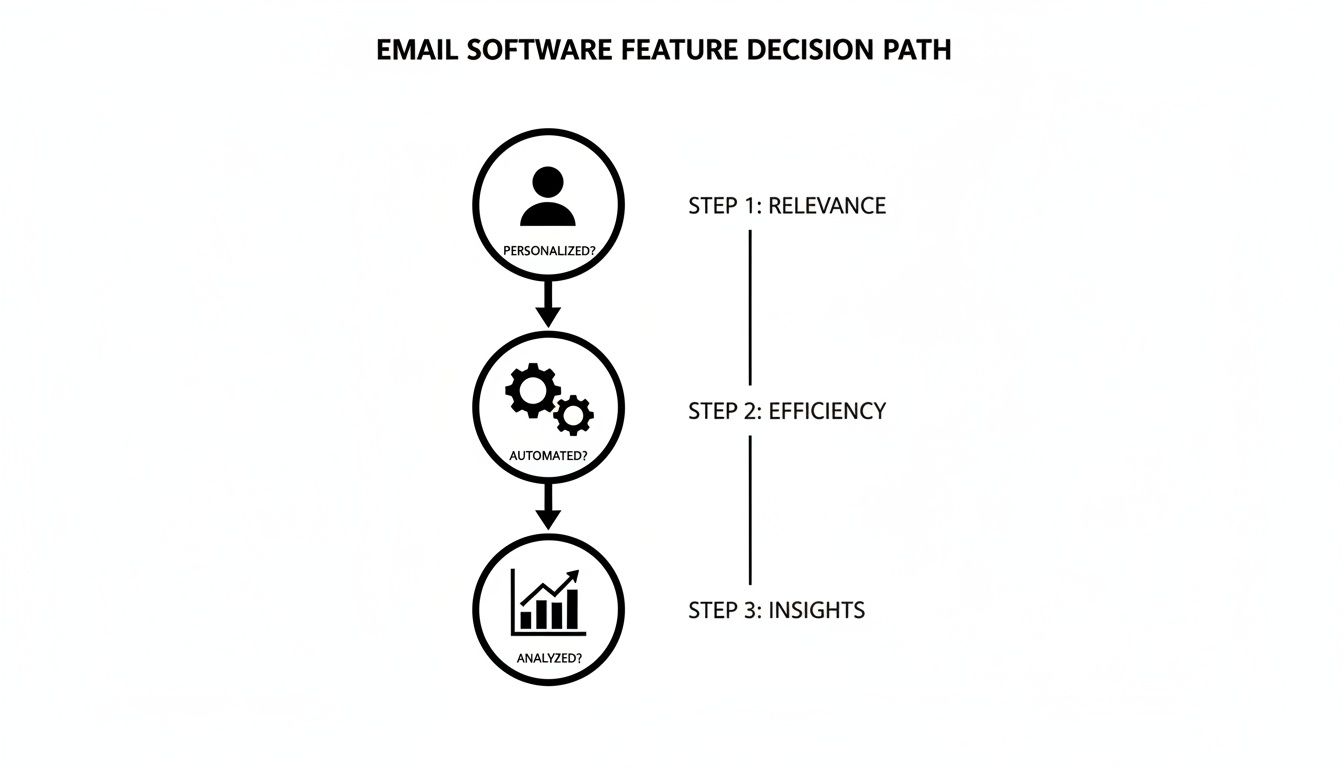
A good tool has to nail all three. Great personalization is useless if you can’t automate the follow-ups, and automation without good data is just guessing at scale.
Scoring Your Top Contenders
Now that you have your criteria, narrow your list down to three to five promising platforms. It’s time to put them to the test. Create your matrix and score each platform from 1 (Poor) to 5 (Excellent) for every single one of your criteria.
A decision matrix forces you to look at the whole picture, not just the one shiny feature a salesperson showed you. A tool might have amazing AI-powered writing, but if it doesn’t sync properly with your CRM, its low score there will rightly drag its total down.
This is where you need to be brutally honest. Did you do a free trial and find the interface a complete nightmare? Give it a low score for “Ease of Use,” even if the feature list looks impressive on paper. I highly recommend adding a “Comments” column to jot down notes, gut feelings, and any absolute dealbreakers you uncover.
Your Cold Email Software Decision Matrix Template
Here’s a simple template to get you started. The best way to use this is to copy it into a spreadsheet where you and your team can collaborate. Don’t be afraid to add, remove, or change the criteria to fit your specific workflow.
| Criteria | Vendor A Score (1-5) | Vendor B Score (1-5) | Vendor C Score (1-5) | Comments and Dealbreakers |
|---|---|---|---|---|
| A/B Testing | Notes on flexibility | |||
| Email Warm-Up | Is it included or an add-on? | |||
| CRM Integration | Native vs. Zapier only | |||
| Ease of Use (UI/UX) | Gut feeling from the free trial | |||
| Pricing Predictability | Per-seat or usage-based? | |||
| Reporting & Analytics | Are the reports actionable? | |||
| Customer Support | Response time and quality | |||
| TOTAL SCORE |
Once you’ve filled it all out, tally up the scores. The platform with the highest total isn’t just a random choice—it’s the winner you’ve backed with data. This gives you the confidence you need to sign on the dotted line, knowing you’ve made a decision that truly fits your business.
A Step-by-Step Cold Outreach Workflow
Theory is great, but seeing how all the pieces snap together in the real world is where the magic really happens. Let’s walk through a complete cold outreach campaign from start to finish, showing how great software and smart strategy combine to get results.
Think of this less like a checklist and more like a single, flowing system. Each step builds on the last, creating the momentum that takes you from a simple idea to a booked meeting.
Step 1: Build a Hyper-Targeted Prospect List
Everything—and I mean everything—starts with who you’re contacting. A generic list of names is a recipe for disaster. The real goal is to build a laser-focused list of people who have a specific problem that you are uniquely positioned to solve.
This isn’t just about finding people with the right job title. You have to dig deeper into the details:
- Industry: What specific niche do they work in?
- Company Size: Are you after scrappy startups or established enterprise companies?
- Technology Used: Do they use a specific tool that integrates perfectly with yours?
- Recent Events: Did their company just land a huge funding round or hire a new executive?
These details are the raw materials for personalization. A generic email to a “Marketing Manager” is easy to ignore. But an email to a “Marketing Manager at a B2B SaaS company that just hired a new VP of Sales”? That’s much, much harder to dismiss.
Step 2: Validate Every Single Email
Once you’ve built your list, the next step is completely non-negotiable: you have to clean it. Sending emails to invalid addresses is the fastest way to absolutely destroy your sender reputation and get your domain blacklisted.
This is where a solid email validation tool earns its keep. It scrubs your list, looking for problems like:
- Invalid Emails: Addresses with typos or that just don’t exist. These are the source of hard bounces.
- Spam Traps: Fake email addresses planted by providers to catch spammers. Hitting one is a major red flag.
- Disposable Inboxes: Temporary, throwaway emails that are useless for genuine outreach.
A clean list is the foundation of deliverability. Skipping this step is like trying to drive a race car with flat tires—no matter how powerful the engine is, you’re not going anywhere.
Step 3: Craft and Automate Your Sequence
With a sparkling clean list in hand, it’s time to jump into your cold email software and build out your outreach sequence. This is just a series of automated emails designed to follow up with a prospect over a set period. To get the most out of your software, it’s crucial to get a handle on the principles of mastering marketing automation workflows.
Your first email should be highly personalized, pulling in the research you did back in Step 1. Use custom fields (or “merge tags”) to insert their name, company, and a specific observation that shows you did your homework.
The follow-up emails should be short, continue to add value, and gently nudge them toward a response. A typical sequence might look like this:
- Day 1: The initial, highly personalized email.
- Day 3: A brief follow-up, re-stating your core value in a different way.
- Day 7: Share a relevant case study, blog post, or helpful resource.
- Day 12: A final, polite “break-up” email to close the loop respectfully.
Step 4: Launch, Test, and Monitor
Hold on—don’t hit “send all” just yet. Before launching the full campaign, use your software’s A/B testing feature. This lets you send different versions of your subject lines or calls-to-action to a small segment of your list to see which one performs better.
For instance, you could test:
- Subject Line A: “Idea for [Company Name]”
- Subject Line B: “Quick question about your sales process”
The software will automatically track which version gets more opens or replies. Once you have a clear winner, you can launch the full campaign with confidence. For the first few days, keep a close eye on your analytics. Pay special attention to open rates, click rates, and, most importantly, reply rates.
Step 5: Analyze and Optimize for Success
A campaign isn’t something you can “set and forget.” After a week or two, it’s time to dive into the analytics and see what the data is telling you. Is there a big drop-off in engagement after your second email? Maybe the messaging in that follow-up needs a tweak.
Look for patterns. Are prospects from one particular industry replying more than others? That’s a huge insight that can help you refine your targeting for the very next campaign. The best cold email software provides clear, easy-to-read reports that make spotting these trends simple, allowing you to continually improve your process and turn your outreach into a predictable engine for growth.
Answering Your Top Questions About Cold Email Software
Diving into the world of cold email tools can feel a bit overwhelming. Even with a solid plan, you’re bound to have questions. This section cuts through the noise and gives you straight answers to the most common queries we hear from sales and marketing teams.
Think of this as your personal FAQ for making a smart, confident decision. We’ll clear up the confusing bits so you can choose the right software for your business.
What Is the Difference Between Cold Email and Email Marketing Software?
This is probably the most common mix-up we see. The easiest way to think about it is like a personal, handwritten letter versus a glossy flyer you get in the mail.
Cold email software is built for one-to-one outreach. It’s all about starting a genuine conversation with someone you don’t know yet. These platforms are packed with features designed to make that happen, like deep personalization, automated follow-up sequences, and crucial deliverability tools like email warm-up. The entire goal is to act like a human, land in the main inbox, and get a reply.
On the other hand, email marketing software (think Mailchimp or ConvertKit) is for one-to-many communication. It’s for sending newsletters and promotions to people who have already given you permission to email them.
Using an email marketing tool for cold outreach is a huge mistake. Not only does it almost always violate their terms of service, but it’s a fast track to getting your domain blacklisted. Once that happens, your sending reputation is shot, and even your legitimate emails won’t get through.
How Important Is an Email Warm-Up Feature?
It’s not just important; it’s absolutely essential. This is especially true if you’re using a brand-new email account or one that hasn’t been active for a while.
Think of it this way: you wouldn’t walk into a room of strangers and immediately start shouting your sales pitch. You’d introduce yourself first and build some trust. An email warm-up does exactly that for your email account.
The feature works by automatically sending and receiving emails with a network of other real inboxes, slowly building a positive sending history. It gradually ramps up the volume, showing email providers like Google and Microsoft that you’re a legitimate sender, not a spammer who just appeared out of nowhere.
Without a proper warm-up, your emails are almost guaranteed to land in the spam folder. Your entire campaign becomes invisible before it even has a chance. That’s why the best cold email software will always have this built-in.
Can Sending Cold Emails Get My Domain Blacklisted?
Yes, it’s a very real risk with serious consequences. Your domain can get blacklisted for two main reasons: sending to too many invalid emails (which causes high bounce rates) or getting flagged as spam by too many recipients.
This is precisely why you can’t skip email validation. Cleaning your list with a reliable service before you hit “send” removes the bad addresses that lead to damaging hard bounces. It also helps you avoid spam traps—email addresses set up specifically to catch and block spammers.
By keeping your bounce rate under 2% and sending messages that are genuinely relevant, you’re actively protecting your domain’s reputation. Your domain is your single most valuable asset in outreach; you have to treat it that way.
How Much Should I Expect to Pay for Good Software?
For a quality cold email platform, you can expect to pay somewhere between $30 and $150 per user, per month. The lower end of that spectrum typically gets you all the core features you need to run effective campaigns, like automation and personalization.
As you move up in price, you’ll find plans that offer more advanced tools like AI writing assistants, sophisticated A/B testing, and deeper CRM integrations. The key is to map the price to what your team will actually use. Don’t get upsold on bells and whistles you’ll never touch.
And don’t forget to budget for email validation. This is a separate, but critical, expense. Some services charge per email with a credit system, which can make costs unpredictable. Others offer a simpler, more manageable model that helps you keep your total outreach budget in check.
Stop validating once and hoping for the best. Truelist’s recurring validation automatically re-checks your lists on a schedule — catching new bounces, dead mailboxes, and risky addresses before they damage your sender reputation. Pay-as-you-go credits that never expire, plus unlimited plans for high-volume senders.