 Claude
  Perplexity
Email Domain Validation: Secure Your Business Now
Learn how email domain validation can protect your business identity. Discover tips to implement effective email verification today.
TL;DR: Learn how email domain validation can protect your business identity. Discover tips to implement effective email verification today.
Understanding Email Domain Validation in Plain English
Think of every email you send as a package delivered with your company’s official seal. Email domain validation is the process that checks if this seal is authentic. It proves to the recipient’s mail carrier (their email provider) that the package genuinely came from you and not an imposter. Without this check, your messages are like unmarked packages on a doorstep—viewed with suspicion and probably thrown away without a second thought.
This goes much deeper than just checking if an email address looks right; it inspects the domain itself (the part after the ”@” symbol). The main question it answers is: “Is the sender of this email actually allowed to send messages on behalf of this domain?” This isn’t just a technical detail; it’s a core signal of trust. When validation succeeds, your emails get an invisible stamp of approval. When it fails, they are often sent straight to the spam folder or, even worse, rejected completely in what’s known as a hard bounce. For a complete picture of the process, you can explore more about the fundamentals of email validation on Truelist.
Why This Isn’t Just an IT Problem
Many business owners mistakenly see this as a technical task for the IT department. However, the effects of poor domain validation strike at the heart of your business operations. A failed validation can cause serious issues:
- Damaged Sender Reputation: Internet Service Providers (ISPs) like Google and Microsoft keep an eye on domains. Repeated validation failures suggest your domain might be sending spam, which hurts your ability to reach anyone’s inbox.
- Reduced Marketing ROI: What’s the point of a great email campaign if up to 20% of it never even makes it to the intended audience because of deliverability problems?
- Customer Service Failures: Important transactional emails, such as password resets or purchase receipts, might not arrive. This leads to frustrated customers and an increase in support tickets.
Comparing Security Approaches
Not all email security tactics are the same. While basic spam filters on the recipient’s side help, real security begins with the sender’s own authentication. The table below outlines how proactive domain validation stacks up against more traditional, reactive security measures.
Email Domain Validation vs Traditional Email Security
Comparison of different email security approaches and their effectiveness
| Security Method | Protection Level | Implementation Complexity | Business Impact |
|---|---|---|---|
| Email Domain Validation | Proactive & High: Authenticates the sender before the email is accepted, stopping impersonation at the source. | Moderate: Requires initial setup of specific DNS records to establish authentication policies. | High: Prevents brand impersonation, protects against fraud, and significantly boosts email deliverability and marketing ROI. |
| Recipient Spam Filters | Reactive & Medium: Scans incoming emails for suspicious content or patterns after they’ve been sent. | None for sender: This is entirely managed by the recipient’s email service provider. | Indirect: Helps protect recipients but doesn’t improve the sender’s reputation or guarantee delivery. Relies on the recipient’s technology. |
| Antivirus Software | Reactive & Low: Scans for malicious attachments or links within an email but does not verify the sender’s identity. | Low: Typically easy for end-users to install and manage on their own devices. | Limited: Protects individual devices from malware but offers no defense against business email compromise or phishing through impersonation. |
As the table shows, email domain validation is a foundational, proactive measure that directly protects your brand and ensures your messages are seen. While spam filters and antivirus software have their place, they are reactive defenses that don’t address the core problem of sender identity.
How Email Scammers Exploit Weak Domain Validation
 The email security we rely on today wasn’t created overnight; it’s the product of a long-standing struggle between businesses and cybercriminals. To really appreciate why modern validation is so essential, we need to look at how scammers take advantage of weak defenses. In the early days of the internet, email largely operated on an honor system. There was very little in place to prevent someone from sending an email that appeared to come from a major bank or a popular online retailer.
This environment was a breeding ground for fraud. Scammers quickly realized they could easily impersonate trusted brands to trick people into giving up sensitive information. This tactic, known as phishing, spread rapidly because there was no reliable email domain validation to counter it. An email could claim to be from “yourbank.com,” but the receiving server had no method to confirm that claim. It was like getting a letter with a convincing but counterfeit company letterhead—simple to produce and dangerously effective.
The Rise of Authentication Standards
The industry was forced to respond. This digital cat-and-mouse game led to the development of formal authentication protocols. Email authentication technologies were created to address the global increase in email fraud. A key moment came in 2004 with the introduction of DomainKeys Identified Mail (DKIM), which combined efforts from Yahoo and Cisco. DKIM works like a tamper-proof seal on an envelope, using a cryptographic signature to verify that an email truly came from the claimed domain and wasn’t altered in transit. You can explore its origins further by reading more about the history of DKIM on Wikipedia.
This innovation was a direct answer to the growing threats of phishing and brand impersonation. Without these standards, scammers can carry out several damaging attacks:
- Business Email Compromise (BEC): An attacker poses as a company executive to authorize fraudulent wire transfers, costing businesses billions of dollars annually.
- Credential Harvesting: Phishing emails send users to fake login pages designed to steal usernames and passwords for legitimate services.
- Malware Distribution: Emails from seemingly trustworthy sources fool recipients into opening malicious attachments or clicking on dangerous links.
Weak domain validation leaves the digital door wide open for these threats, making strong authentication an indispensable component of modern business security.
The Three-Layer Email Authentication System Explained
To really understand how email domain validation works, picture it as a three-part security checkpoint at an airport. Each layer—SPF, DKIM, and DMARC—works together to confirm your email’s identity, much like how airport security verifies a traveler’s ID, checks their bags for tampering, and confirms their flight authorization. When set up correctly, these protocols create a strong defense that proves your emails are the real deal.
This infographic shows the initial technical handshake that occurs between email servers.
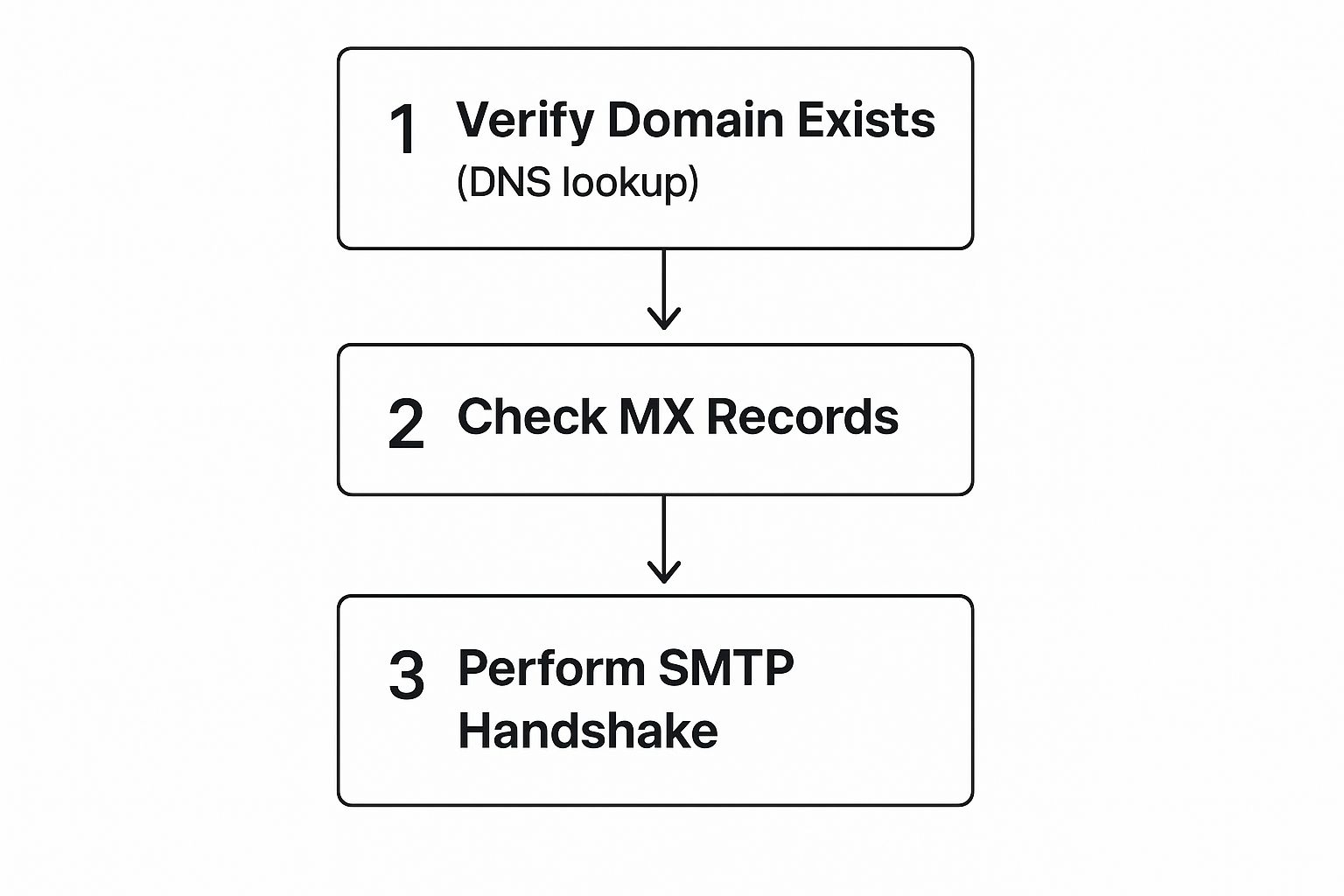
Before a server even looks at an email’s content, this process confirms the sender’s domain is genuine and set up to handle mail.
Layer 1: Sender Policy Framework (SPF)
The first checkpoint is the Sender Policy Framework (SPF). Think of SPF as a public guest list for a party you’re hosting. This list tells the bouncer (the receiving mail server) exactly who is allowed to attend on your behalf. In email terms, it’s a public record listing all the IP addresses authorized to send emails for your domain.
When an email arrives, the receiving server compares the sender’s IP address to your domain’s published SPF record.
- If the IP is on the list: The email passes the first check and moves to the next station.
- If the IP is not on the list: The server flags the email as suspicious, making it more likely to be identified as fraudulent.
Without an SPF record, anyone could pretend to send an email from your domain, and the recipient’s server would have no easy way to call their bluff.
Layer 2: DomainKeys Identified Mail (DKIM)
Next up is DomainKeys Identified Mail (DKIM). This layer acts like a tamper-proof, digital wax seal on a physical letter. DKIM attaches a unique digital signature to every outgoing email, created with a private key that only your server can access.
The screenshot below gives a glimpse into DKIM’s origins, a standard designed to provide cryptographic proof that an email hasn’t been meddled with.
This standard was a major step toward proving that a message remains unchanged from sender to recipient. The receiving server uses a matching public key to check the signature, confirming the email’s contents are exactly as they were when they left your server.
Layer 3: Domain-based Message Authentication, Reporting, and Conformance (DMARC)
The final layer, DMARC, is the security supervisor that directs the entire operation. It provides clear instructions to receiving servers on what to do if an email fails either the SPF or DKIM checks. It’s important to know that DMARC is not an authentication method itself; rather, it’s a policy that tells servers how to enforce the other two.
With DMARC, you can instruct servers to:
- Monitor: Take no action, but send you reports on any failures.
- Quarantine: Move suspicious emails to the spam or junk folder.
- Reject: Block the email from being delivered completely.
DMARC also sends back valuable reports, giving you visibility into who is sending email from your domain and whether those messages are passing authentication. This complete, three-layer system forms the backbone of modern email security.
Why Major Email Providers Are Tightening Security Standards
The world of email has arrived at a major crossroad. Big names like Google and Yahoo are no longer just suggesting better security; they are now requiring it. This push for stronger enforcement is a direct answer to the massive volume and cleverness of modern email-based attacks. For a long time, businesses could manage with basic authentication, but the financial and reputational harm from phishing and brand impersonation has forced a change.
This shift isn’t coming out of nowhere. It’s a deliberate defense against threats that have become too significant to overlook. Cybercriminals are better than ever at finding and using weak defenses, making even basic email domain validation an essential part of operating online. Providers are now making senders responsible for their domain’s security to shield their own users and protect the credibility of their platforms.
The Forces Driving Stricter Enforcement
A few key factors are pushing this security upgrade forward, setting a new baseline for everyone who sends email. The main reasons include:
- Escalating Cyber Threats: Attacks such as Business Email Compromise (BEC) and ransomware often start with a fake email. By tightening authentication, it becomes much harder for scammers to pretend to be a trusted domain.
- Regulatory Pressure: As data privacy laws increase globally, email providers are under more pressure to show they are taking real steps to protect user data from scams and fraud.
- Protecting User Trust: When users find spam or phishing emails in their main inbox, it damages their trust in the email service itself. By enforcing strong sender authentication, providers can create a safer and more reliable experience for everyone.
The End of Outdated Verification Methods
This security evolution isn’t just about sending emails; it also changes how domain ownership is proven. For example, a significant change is affecting how domains are validated for SSL/TLS certificates. The CA/Browser Forum has mandated the slow removal of WHOIS-based Domain Control Validation (DCV) methods, with the process starting on January 8, 2025. This old method is being retired because of security vulnerabilities like domain hijacking.
The result is a move across the industry toward more secure, cryptographically sound validation techniques. You can read more about this important industry shift to understand the future of domain verification.
For businesses, this means that old security habits are no longer good enough. Not adopting modern authentication protocols like SPF, DKIM, and DMARC is like sending a letter with a broken seal—it will be viewed with suspicion and most likely be rejected.
Your Email Domain Validation Implementation Roadmap

Moving from understanding SPF, DKIM, and DMARC to actually using them requires a clear, step-by-step plan. This roadmap breaks the process into manageable phases, helping you secure your email without disrupting your daily communications. Think of this not as a difficult technical task, but as a strategic upgrade for your business. The idea is to build up your email defenses layer by layer, starting with observation and moving toward full protection.
This process is vital for maintaining trust and ensuring your emails reach their destination. As businesses rely more on tools to manage their customer interactions, the reliability of your email is directly tied to your domain’s health. For instance, many companies find that proper authentication is a key part of building efficient lead management systems. Without it, important messages to new leads could end up in spam folders, wasting your acquisition efforts.
Phase 1: Assessment and Initial Setup
The first step is to get a complete picture of your email environment. You need to identify every single service that sends emails on your behalf. This includes your main email provider, like Google Workspace or Microsoft 365, along with third-party marketing platforms, CRM systems like HubSpot, and even the contact form on your website.
- Action: Make a detailed list of all your sending services.
- Timeline: Allow 1-2 weeks for this step. This discovery phase is important and shouldn’t be rushed.
- Goal: Set up basic SPF and DKIM records for your primary email services first. Most providers have guides to help you add an email sending domain, which adds a layer of authentication.
Phase 2: Monitoring and Gradual Rollout
With your core services authenticated, it’s time to activate DMARC in monitoring mode. This is a safe yet informative step.
- Action: Publish a DMARC record with a “p=none” policy. This setting instructs receiving servers to report unauthenticated emails to you without blocking them.
- Timeline: Plan for 4-8 weeks of monitoring. This gives you enough time to collect data on who is sending mail from your domain.
- Goal: Use the DMARC reports to spot legitimate senders you might have missed in Phase 1. You can then add them to your SPF and DKIM configurations. This phase is about listening and learning before you enforce stricter policies.
For those wanting a deeper dive into the verification process, you can read this helpful guide to verify an email address from Truelist.
To help you stay organized, here’s a checklist that outlines the entire process.
Email Domain Validation Implementation Checklist
Essential steps and timeline for implementing comprehensive email domain validation
| Implementation Phase | Key Actions | Timeline | Success Metrics |
|---|---|---|---|
| 1. Discovery & Audit | Identify all services sending email on your domain’s behalf. | 1-2 Weeks | A complete inventory of sending sources is created. |
| 2. SPF & DKIM Setup | Create and publish SPF and DKIM records for primary senders. | 1 Week | Primary email services pass SPF and DKIM checks. |
| 3. DMARC Monitoring | Publish DMARC record with p=none to start collecting data. | 4-8 Weeks | DMARC reports are consistently received and analyzed. |
| 4. Analysis & Refinement | Analyze DMARC reports to identify all legitimate senders. | 2-4 Weeks | All legitimate sending sources are correctly authenticated. |
| 5. Gradual Enforcement | Update DMARC policy to p=quarantine (sends to spam). | 4-6 Weeks | A low percentage of legitimate emails are quarantined. |
| 6. Full Enforcement | Change DMARC policy to p=reject to block unauthenticated mail. | Ongoing | >99% of unauthenticated emails are blocked; no impact on legitimate mail. |
Following this checklist ensures you methodically secure your domain. This structured approach to email domain validation helps you protect your brand’s reputation without accidentally blocking important business emails.
Monitoring Your Email Security Like a Professional
Setting up your email domain validation protocols is a major step forward, but it’s not a “set it and forget it” task. True email security demands ongoing vigilance. Think of it like installing a high-tech alarm system at your office; you wouldn’t just switch it on and never look at it again. You’d need to monitor the alerts, check the logs, and make sure it’s working effectively against new threats. The same principle applies to your email domain’s health.
To keep everything running smoothly, you must actively track key metrics and use the right tools to spot issues before they impact your business. This is what separates a basic setup from a professional-grade email security strategy. It’s about knowing which performance indicators reflect your validation success and having systems that warn you of trouble before your customers do.
Tracking the Metrics That Matter
Effective monitoring isn’t about drowning in data; it’s about focusing on the right information. Your most valuable insights will come from DMARC reports, which offer a detailed look at your email traffic. Key metrics to watch include:
- Authentication Pass/Fail Rates: Keep an eye on the percentage of your emails passing or failing SPF and DKIM checks. A sudden jump in failures could point to a configuration error or a new spoofing attack.
- Source Alignment: Monitor which IP addresses and third-party services are sending mail on your behalf. This helps you identify unauthorized senders that could be harming your reputation.
- DMARC Policy Conformance: Observe how many emails are following your DMARC policy. The objective is to reach a point where nearly 100% of your legitimate mail is fully authenticated and aligned.
Using Advanced Monitoring Tools
While DMARC reports are essential, dedicated tools can make monitoring much more efficient. Tracking and securing domain email configurations are central to improving both deliverability and overall cybersecurity. In response, specialized platforms have introduced features like DNS Timelines and Security Score Histories, allowing organizations to monitor record changes and their security impact over time. These tools are crucial for businesses to proactively manage their email authentication. You can learn more about how modern tools are changing the game by exploring advancements in domain security monitoring.
By building a process around consistent monitoring, you ensure your email domain validation defenses don’t weaken over time. This proactive approach allows you to make informed adjustments, maintain high deliverability, and protect your brand’s reputation with confidence.
Key Takeaways for Email Domain Validation Success
Bringing the concepts of SPF, DKIM, and DMARC together into a clear, actionable strategy is the final piece of the puzzle in protecting your brand. Achieving success with email domain validation isn’t about one single, complicated maneuver. Instead, it’s about a series of well-planned steps that build a strong defense for your reputation and make sure your messages are seen as trustworthy.
Your Prioritized Action Plan
To put this knowledge into practice, you need a structured approach that delivers quick security improvements while building long-term protection. This roadmap ensures you create a solid foundation before moving to full enforcement.
- Audit and Authenticate: Your first move is to map out every single platform that sends emails for your company. This includes your main email providers like Google Workspace or Microsoft 365, but also your marketing automation tools and CRMs. Once you have this list, set up the correct SPF and DKIM records for each one. This creates your fundamental layer of defense.
- Monitor with DMARC: Ease into DMARC by starting with a
p=nonepolicy. Think of this as “monitoring mode.” It’s a completely safe way to gather information about who is sending email using your domain, without any risk of blocking your legitimate messages. This gives you a clear picture of your entire email landscape. - Enforce and Protect: After several weeks of reviewing DMARC reports and confirming all your legitimate senders are properly authenticated, you can confidently upgrade your policy. First, move to
p=quarantineand, eventually, top=reject. This final step tells email servers to actively block unauthorized emails, effectively turning your domain into a secure fortress.
Key Performance Indicators (KPIs) to Watch
How do you know if your efforts are paying off? Keep a close eye on these two critical metrics, which you’ll find in your DMARC reports:
- DMARC Alignment Rate: This is the percentage of your emails that pass both SPF/DKIM checks and align with your domain. For your legitimate email traffic, your goal should be to get this as close to 100% as possible.
- Threat Volume: This metric tracks the number of emails that fail authentication. A high or steady volume here is actually good news—it confirms that your DMARC policy is working hard to block fraudulent senders.
For more advice on building a clean and effective email strategy, you can find valuable tips in our guide on email verification best practices.
Ready to secure your domain and boost your email’s impact? Start validating for free with Truelist and ensure every email you send builds trust and drives results.