 Claude
  Perplexity
Protect Your Emails: is this email address real and legitimate?
Learn proven methods to verify is this email address real and reduce bounces with quick checks, reliable tools, and practical steps.
TL;DR: Learn proven methods to verify is this email address real and reduce bounces with quick checks, reliable tools, and practical steps.
Figuring out if an email address is real goes way beyond just trying to avoid a bounce-back message. It’s actually a crucial piece of protecting your sender reputation and making sure your outreach campaigns even have a chance to succeed. When you send emails to addresses that don’t exist, you’re waving a huge red flag at providers like Gmail and Outlook, which can wreck your ability to reach anyone’s inbox.
Why You Need To Verify Every Email Address

It’s best to think of email verification not as an annoying task, but as a core part of a smart outreach strategy. Every single email you send is a data point that contributes to your sender reputation—an invisible score that Internet Service Providers (ISPs) use to decide if you’re a legitimate sender or a spammer. Blasting messages to addresses that don’t exist is one of the quickest ways to get on their bad side.
When your bounce rate starts to climb, ISPs make a simple assumption: you’re either sending spam or you’re working from a shoddy, purchased list. This directly tanks your reputation. The immediate result? Your future emails, even the ones sent to real people who want to hear from you, are far more likely to end up in the spam folder or get blocked completely.
The Real-World Consequences of Bad Data
Skipping verification has very real, very immediate consequences. Let’s say you launch a perfectly crafted cold email campaign to 10,000 prospects. If you haven’t verified that list, you could easily see 30% of them bounce right back. It’s not uncommon for unverified lists to have 20-30% invalid addresses, and those bounces can trigger ISP blacklists and destroy your open rates, which are already hovering around just 24% on average.
This isn’t just a numbers game. For anyone in sales or marketing, a high bounce rate creates a cascade of problems:
- Wasted Resources: All the time you spent personalizing emails and setting up the campaign? Gone.
- Damaged Sender Reputation: Every hard bounce is another ding against your domain’s credibility.
- Skewed Campaign Metrics: Your open and click-through rates become meaningless, making it impossible to know what’s actually working.
- Getting Blacklisted: In the worst-case scenario, your entire domain or IP address can be blacklisted, bringing all your email communications to a dead stop.
A single bad email list can undo months of hard work building a solid sender reputation. Verification is your insurance policy against deliverability disasters, ensuring your carefully crafted messages actually reach their intended audience.
Protecting Your Most Valuable Asset
At the end of the day, your sender reputation is one of your most valuable digital assets. It’s what gets you into the inbox. A strong reputation leads to higher deliverability, which means better engagement and more successful campaigns. A poor one means you’re constantly fighting an uphill battle just to be seen.
By taking a moment to confirm an email address is real before you hit send, you’re doing more than just cleaning a list. You’re making an investment in the long-term health of your entire email program. This proactive habit is essential for getting the most out of your efforts and is the foundation for everything we’ll cover next, from quick manual checks to using powerful automated tools. You can learn more about these core principles by reading up on why you should verify a list.
Simple Manual Checks You Can Do In Seconds
Before you jump into sophisticated tools, a few quick manual checks can be a surprisingly effective first line of defense. These methods aren’t foolproof, but they’re a great, free way to get an initial read on an address. Think of it as a quick sanity check before you invest more time or resources.
The easiest trick in the book is a simple Google search. Just wrap the email address in double quotes—like "jane.doe@examplecorp.com"—and see what pops up. This forces Google to look for that exact match. If the address is linked to a public LinkedIn profile, a company bio, a personal blog, or even a conference speaker list, you’ll likely find it right away. No results doesn’t automatically mean the email is fake, but finding a match is a very strong signal that it’s legitimate.
The Simple Ping Test
Another great trick is what I call the “ping test,” which takes advantage of the auto-populate feature in major email clients. Just start a new draft in Gmail or Outlook and paste the email address into the “To” field. Now, hover your cursor over it for a second.
If that email is tied to a Google or Microsoft account, a little contact card often appears, sometimes with a name and even a profile picture. This is a fantastic sign that you’re dealing with a real, active person. Like the Google search, a lack of a result isn’t a deal-breaker, but getting a hit is a solid green light.
Look for Obvious Syntax Errors
Never underestimate a quick visual scan. Automated tools are great, but sometimes the human eye catches common data entry mistakes that slip through. Be on the lookout for these classic blunders:
- Domain Typos: This is a big one. Keep an eye out for misspellings of major providers, like
gnail.cominstead ofgmail.comoryaho.cominstead ofyahoo.com. - Wrong Characters: An email address can’t have spaces. Period. Also, watch for illegal special characters that aren’t periods, hyphens, or underscores used correctly.
- The Missing ”@” Symbol: It sounds basic, but you’d be surprised how often this happens. An address without the ”@” symbol is just fundamentally invalid.
These manual checks are like triage in an emergency room. They help you quickly weed out the obviously broken addresses so you can focus your deeper verification efforts where they’ll have the most impact.
While these tips are perfect for one-off checks, they don’t tell the whole story. For a much deeper look into the technical journey of an email, check out our guide on how to read email headers to see what’s really happening behind the scenes.
Decoding Email Verification Results
Once you’ve run a list through an email verification tool, you’ll get back more than just a simple “good” or “bad” verdict. The real magic is in the details—the nuanced results that reveal not only if an email address is real but also how you should handle it. Knowing how to interpret these statuses is what separates a high-performing campaign from one that tanks your sender reputation.
Some of the trickiest results aren’t technically invalid, but they still carry a lot of risk. These are the ones that demand a bit of strategic thinking before you hit “send.”
Understanding High-Risk Email Statuses
The most common gray area you’ll encounter is the catch-all (or accept-all) address. This is a server configuration where the domain accepts any email sent to it, whether the specific mailbox (john.doe@) actually exists or not. While it won’t trigger an immediate hard bounce, the server might quietly delete your message or send a bounce notification hours or days later. Both outcomes are bad for your reputation.
My advice? If you’re doing cold outreach, it’s almost always better to just skip the catch-alls.
Then you have role-based emails. These are addresses tied to a function, not a person—think info@, sales@, or support@. They’re usually real, but engagement rates are notoriously low, and they’re far more likely to get your messages flagged as spam.
This decision tree gives you a great visual for a manual check, starting with simple syntax and moving all the way to server checks.
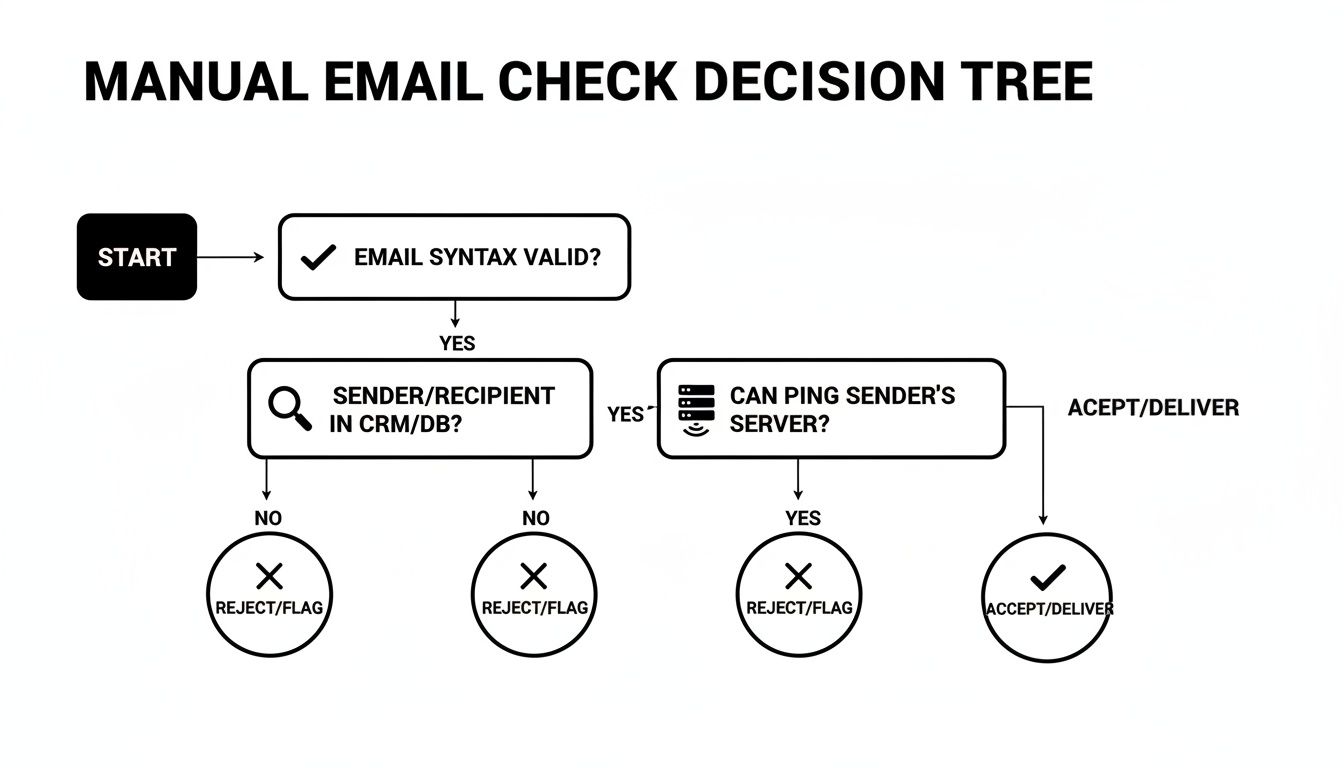
You can see how each step builds on the last, giving you more and more confidence that you’re dealing with a legitimate address before you ever send a thing.
The Most Dangerous Verification Results
Beyond the merely “risky” are the addresses you need to scrub from your lists immediately. No second chances. These are the ones that can get your domain blacklisted in a heartbeat.
- Disposable Emails: These are temporary, self-destructing addresses from services like Mailinator. They’re completely useless for building relationships and are a dead giveaway of a low-quality lead.
- Spam Traps: These are the landmines of the email world. ISPs and anti-spam services use these email addresses to catch and block spammers. Sending even one email to a spam trap can wreck your sender score and get you blacklisted.
Interpreting verification results is a critical skill. Knowing the difference between a risky ‘catch-all’ and a dangerous ‘spam trap’ allows you to clean your list intelligently, preserving good leads while eliminating threats to your deliverability.
To make things simpler, here’s a quick reference guide to the most common statuses you’ll see and what to do with them.
Email Verification Statuses And Recommended Actions
This table breaks down what each status means for your campaigns and the best course of action to take.
| Status | What It Means | Risk Level | Recommended Action |
|---|---|---|---|
| Valid | The mailbox is confirmed to exist and can receive emails. | Low | Safe to Send. |
| Invalid | The email address does not exist, resulting in a hard bounce. | Critical | Delete Immediately. |
| Catch-All | The server accepts all emails, so the specific address is unverified. | High | Avoid for Cold Outreach. |
| Role-Based | An address for a job function (e.g., contact@), not an individual. | Medium | Segment Carefully. |
| Disposable | A temporary, throwaway email address with no long-term value. | Critical | Delete Immediately. |
| Spam Trap | An address used to identify and block spammers. | Critical | Delete Immediately. |
Ultimately, a detailed verification report gives you the intel to make smarter decisions. It lets you protect your sender reputation by cutting out the junk and helps you segment your list so your messages have the best chance of landing in front of a real person who actually wants to hear from you.
Using Automated Tools For Clean Lists At Scale

Manual checks are fine when you’re just vetting a handful of high-value contacts. But let’s be realistic—they just don’t scale.
When you’re dealing with a list of hundreds, thousands, or even tens of thousands of prospects, trying to verify each one by hand is a surefire way to waste time and make mistakes. This is where automated email verification services come in. They aren’t just a nice-to-have; they’re an essential part of any serious email outreach strategy.
These platforms are built to do all the heavy lifting, processing massive lists in minutes, not days. They go way beyond a simple syntax check, running a whole series of deep diagnostics to figure out if an email is real and, more importantly, safe to send to. It’s about more than speed—it’s about accuracy and protecting your sender reputation.
How Automated Verification Works Its Magic
So, what’s happening behind the scenes? An automated verifier runs a multi-point inspection on every single address you upload. This isn’t just a quick glance. These tools perform some pretty complex, real-time checks to give you a clear verdict.
Here’s a quick rundown of what’s typically involved:
- Syntax and Format Validation: First, the tool makes sure the address looks right and follows the standard
user@domain.comformat. This catches the most obvious typos. - Domain and MX Record Check: Next, it confirms the domain actually exists and has valid Mail Exchange (MX) records. These records are what tell mail servers where to route the email.
- SMTP Handshake: This is the real meat of the process. The tool initiates a conversation with the recipient’s mail server, basically pretending to send an email to see if the server acknowledges that the specific user exists.
This comprehensive process allows services to catch everything from simple typos to toxic spam traps that could land you on a blacklist. After you’ve run a list through a verifier, knowing what to do with the results is the next step. A good guide to fixing cleaned email lists can help you turn that cleaned data into a high-performing asset.
The real power of automation isn’t just answering “is this email address real?” It’s doing it with a level of accuracy and speed that a human could never match. This turns list cleaning from a painful chore into a smart, proactive strategy for better deliverability.
Choosing The Right Service Model
Years ago, most verification services ran on a rigid credit-based system where credits expired if you didn’t use them fast enough—leaving you with confusing pricing and the constant feeling of being nickel-and-dimed.
Thankfully, the industry has evolved. Platforms like Truelist offer pay-as-you-go credits that never expire, plus unlimited plans for high-volume senders. You pick the model that fits how you work, without watching a clock tick down on credits you already paid for.
This approach makes professional-grade tools accessible to everyone, not just huge companies with massive budgets. If your team is regularly processing new data, understanding the power of bulk email verification is a game-changer. It’s a smarter, more cost-effective way to keep your data clean and your sender reputation safe.
A Practical Workflow For Verifying Your Emails
Knowing the theory is one thing, but getting results comes down to having a smart, practical workflow. The secret to a clean email list isn’t a single magic tool; it’s about being flexible and using the right method for the right situation. This approach saves you time without cutting corners on accuracy.
Got a single, high-value prospect you need to contact? The manual checks we talked about earlier are perfect for this. A quick Google search or a simple email ping can give you the confidence you need before hitting “send” on that important, personalized message. It’s fast, free, and incredibly effective for one-off checks.
But what happens when you get a fresh list of leads, maybe from a trade show or a new download on your website? Manually checking hundreds or thousands of emails is a non-starter. This is where a bulk verification service shines. You just upload your CSV file, and the system does the heavy lifting, flagging all the invalid, risky, and disposable addresses in a matter of minutes.
Integrate Verification Into Your Daily Operations
Honestly, the most effective strategy is to stop bad data from ever getting on your list in the first place. That’s where a real-time verification API becomes your best asset. By plugging an API directly into your website’s sign-up forms, your CRM, or other marketing tools, you can validate an email the moment it’s entered.
Think about it: a new user types their email into your form, and the API instantly checks if it’s real. If they made a typo, the form can ask them to fix it right away. This proactive step has a massive impact:
- Reduces List Pollution: It acts as a gatekeeper, preventing fake or misspelled emails from contaminating your database.
- Improves User Experience: It helps genuine users correct simple mistakes, ensuring they get their welcome email or password reset link without a hitch.
- Protects Sender Reputation: You’re actively defending your domain by only allowing deliverable addresses into your ecosystem.
Here’s a look at the dashboard from a service like Truelist, which shows you just how simple it is to manage both bulk uploads and ongoing API checks from one place.
This kind of interface gives you a clear bird’s-eye view of all your verification activity, making it easy to handle big list-cleaning projects and real-time checks simultaneously.
Adopt A Sustainable List Hygiene Routine
Here’s a hard truth: email verification isn’t a “one and done” task. It’s an ongoing process. Email lists are constantly changing as people switch jobs, change providers, or just abandon old accounts. Industry data shows this “email churn” can make up to 20-30% of your list unusable every single year.
To fight back against list decay, get into the habit of re-verifying your entire email database every 3 to 6 months. This simple routine will purge newly invalid addresses and keep your deliverability rates consistently high.
This kind of proactive maintenance is especially critical if you’re doing highly targeted outreach. For those who need to build incredibly specific and effective lists, a detailed process is key. There’s a fantastic guide on building and verifying a high-performing coach email list that really breaks down the steps for this kind of niche prospecting.
By weaving these methods together—using manual checks for precision, bulk cleaning for scale, and an API for prevention—you build a resilient system that sets your email campaigns up for success.
Frequently Asked Questions About Email Verification
Even with the best tools, a few questions always seem to come up once you start getting serious about email verification. I’ve heard them all over the years. Getting these nuances right is what separates a healthy sender reputation from a one-way ticket to the spam folder.
Let’s break down some of the most common things people ask.
How Often Should I Clean My Email List?
This is probably the number one question I get. The answer has two parts.
For a brand-new list you just acquired or built? Always verify it before your first send. Don’t skip this. It sets the foundation for your entire relationship with that list and with the inbox providers.
For your existing database, re-verifying every three to six months is the sweet spot. People change jobs, abandon old Hotmail accounts, and move on. This natural list decay, or “churn,” can wipe out up to 30% of your contacts in a single year. Regular cleaning is your only defense against this.
Can Validation Guarantee 100% Deliverability?
I wish I could say yes, but the honest answer is no. And any service that promises 100% deliverability is selling you snake oil. Verification is absolutely critical, but it’s just one piece of the deliverability puzzle.
Think about it: even if an email address is perfectly valid, other things can go wrong.
- Your sender reputation: If your domain has a history of being marked as spam, some providers will reject your emails on sight, no matter how valid the address is.
- A full inbox: A perfectly good mailbox can’t accept new mail if the user has hit their storage limit. It happens more than you’d think.
- Spammy content: Your email itself could be the problem. Using spam-trigger words or shady links can get you blocked before your message even gets a chance.
A top-tier verification service gets you incredibly close to perfect delivery—often pushing you over 98%—by weeding out all the addresses that are guaranteed to bounce.
Think of email verification like a pre-flight check for an airplane. It ensures the plane is sound and the runway is clear of obstacles. It gives you the best possible chance for a successful flight, but it can’t control unexpected turbulence or bad weather at your destination.
What’s the Real Difference Between “Catch-All” and “Valid”?
This one causes a lot of confusion, so let’s clear it up.
A valid email is a straightforward confirmation. The recipient’s mail server says, “Yes, jane.doe@company.com is a real inbox here, and it’s open for business.” You get a clear green light.
A catch-all (sometimes called “accept-all”) is a maybe. The server is set up to accept mail for any address at that domain, whether it’s a real person or just random-letters@company.com. The server accepts the email first and asks questions later.
The risk? That “later” often comes in the form of a delayed bounce notification, which still dings your sender reputation. Many of these addresses are essentially black holes. While some might be legitimate, it’s a gamble that can hurt your deliverability over time.
Ready to stop guessing and start cleaning your lists with confidence? With Truelist, you get pay-as-you-go credits that never expire, plus unlimited plans for high-volume senders. Sign up for free and start validating today.