
 Claude
  Perplexity
JavaScript Email Validation Regex: Quick Guide for Developers
Learn how to use javascript email validation regex patterns to improve web form accuracy. Essential tips for developers seeking reliable validation.
TL;DR: Learn how to use javascript email validation regex patterns to improve web form accuracy. Essential tips for developers seeking reliable validation.
Mastering the Art of JavaScript Email Validation

The user experience begins the moment someone interacts with your web form. A crucial element of this experience, and of form design itself, is email validation. This seemingly straightforward task presents distinct challenges, making JavaScript regex an essential tool for developers.
Email addresses, despite a standardized format, vary considerably. This demands a flexible yet robust validation approach.
Historically, developers employed various validation techniques. However, JavaScript regex emerged as the preferred solution due to its ability to concisely describe complex patterns. Early validation methods, like checking for the ”@” symbol, proved inadequate, easily bypassed by malformed entries. The increasing complexity of internationalized email addresses further highlighted the need for a more powerful approach.
Balancing Simplicity and Comprehensiveness
Finding the right balance between simplicity and comprehensiveness in a validation pattern is essential. A basic regex pattern may suffice for less critical, low-traffic forms. However, sensitive, high-volume applications require a robust JavaScript email validation regex. This necessitates considering factors like expected user base, security risks, and the overall user experience. For additional information, see How to master list verification.
Choosing the Right Regex
Choosing the right regex hinges on specific project needs. If you anticipate common email formats from your users, a simple pattern might be adequate. However, a diverse user base with a wider range of email structures necessitates a more advanced pattern. The chosen regex complexity directly impacts the balance between strictness and the potential for false positives—valid emails incorrectly rejected. This is particularly relevant for international users, as stricter patterns might inadvertently exclude legitimate addresses. A commonly used regex pattern is ^[^\s@]+@[^\s@]+\.[^\s@]+$, which checks for the presence of an ”@” symbol and a domain, while excluding whitespace. Discover more insights about email validation.
Implementing Your Regex
Effective implementation is crucial after selecting the appropriate regex. This involves more than simply inserting the pattern into your JavaScript code. A well-designed system provides clear feedback to users, guiding correct input without inducing frustration. This user-centric approach enhances the form experience and minimizes abandoned submissions due to confusing or overly strict validation.
Integrating client-side validation with server-side checks further strengthens security and data integrity, fortifying your application’s handling of complex email validation scenarios.
Powerful Regex Patterns That Actually Work
Not all JavaScript email validation regex patterns are created equal. Some provide lightweight validation, suitable for less critical applications. Others offer more comprehensive checks, vital for robust email verification. This section explores several effective patterns used by developers today, ranging from simple to complex.
Simple Validation Regex
The most basic JavaScript email validation regex often looks like this: ^[^\s@]+@[^\s@]+\.[^\s@]+$. This pattern simply checks for the presence of an ”@” symbol, with at least one character before and after it, followed by a period and more characters. While straightforward, it can be surprisingly effective for basic validation.
Moderate Validation Regex
For stronger validation, a moderate approach might use specific character sets and length limitations. A pattern like /^[a-zA-Z0-9._%+-]+@[a-zA-Z0-9.-]+\.[a-zA-Z]{2,}$/ restricts characters to alphanumeric, periods, underscores, percentage signs, plus and minus signs. It also requires a minimum two-character top-level domain (TLD). This helps filter out many common invalid email formats.
Understanding Email Structure Limitations
The infographic below illustrates the character length restrictions for different parts of an email address: local part, domain part, and TLD.
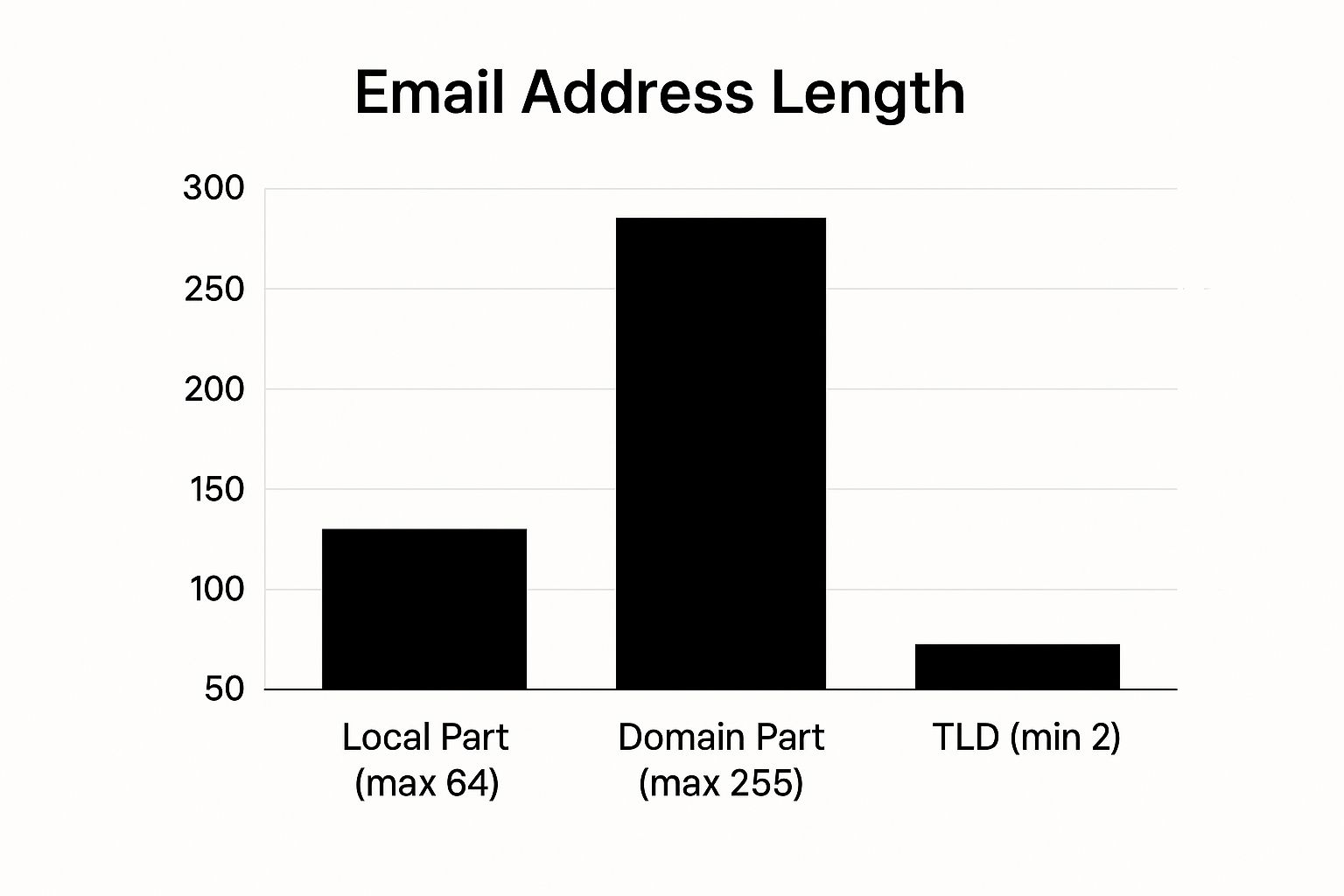
This visual highlights the 64-character limit for the local part, the 255-character limit for the domain part, and the 2-character minimum length for TLDs. Keeping these limitations in mind is crucial when designing your JavaScript email validation regex, especially if you anticipate users with longer or more complex email addresses.
Choosing The Right Regex For Your Needs
The best regex pattern depends on your application’s specific needs. A simple regex is usually sufficient for low-risk forms with few international users. However, critical applications handling sensitive data need a complex regex to minimize the risk of accepting invalid or malicious email addresses. For increased robustness, combining a JavaScript email validation regex with server-side validation using a service like Truelist enhances data integrity and blocks invalid emails.
The following table summarizes the different JavaScript regex patterns discussed, highlighting their complexity, validation capabilities, limitations, and ideal use cases.
Battle-Tested Email Validation Regex Patterns
| Regex Pattern | Complexity | Validates | Limitations | Best Use Case |
|---|---|---|---|---|
^[^\s@]+@[^\s@]+\.[^\s@]+$ | Simple | Basic email structure | Doesn’t validate character sets or length | Low-risk forms |
/^[a-zA-Z0-9._%+-]+@[a-zA-Z0-9.-]+\.[a-zA-Z]{2,}$/ | Moderate | Character sets and minimum TLD length | Doesn’t handle international domains or quoted local parts | General purpose forms |
| Complex RFC-compliant regex pattern | Complex | International domains, quoted local parts, and a wide range of characters | More computationally intensive | High-security applications |
As this table demonstrates, each regex pattern offers a different trade-off between simplicity and validation strength. Choosing the correct pattern involves considering the specific security and usability needs of your application.
Testing Your JavaScript Email Validation Regex
Thorough testing is essential, no matter which pattern you choose. Build a comprehensive test suite that covers various valid and invalid email formats, international domains, and edge cases. This process will help you identify any vulnerabilities in your regex and ensure reliable validation across a wide range of user input. Finding the right balance between catching invalid emails and avoiding false positives is key to a good user experience. By understanding these regex patterns and their limitations, you can choose the best solution for your project.
Transforming User Experience Through Smart Validation
Building a high-converting web form takes more than just an attractive design. It requires a carefully crafted user experience, with smart validation playing a crucial role. This involves using JavaScript email validation regex not as a barrier, but as a helpful guide for users.
Imagine a user completing a lengthy registration form, only to be bombarded with error messages upon submission. This aggressive approach is frustrating and often leads to form abandonment. A more user-friendly method is reactive validation, providing feedback as the user interacts with each field. This allows for immediate correction, preventing errors from piling up and making the process less overwhelming.
Timing Is Everything: Reactive Validation
Reactive validation, powered by JavaScript email validation regex, creates a dynamic and responsive experience. Validation happens in real-time, not just at form submission. As the user types, the system instantly checks the format. This immediacy allows for quick error identification and correction, preventing users from proceeding with incorrect data.
Guiding With Visual Cues and Helpful Messages
Effective validation goes beyond simply pointing out errors. It offers clear, helpful messages that guide the user towards the correct input. For instance, instead of a generic “Invalid email,” a more specific message like “Missing ’@’ symbol” is far more useful. Visual cues, such as color changes or icons, can further reinforce the feedback and clarify the validation status.
The Psychology of Validation: Guiding vs. Blocking
The psychological impact of validation approaches is significant. Aggressive validation can feel punitive, creating friction and frustration. Reactive validation, on the other hand, feels helpful and supportive, guiding users towards the desired outcome. This subtle difference can significantly improve the user experience and boost form completion rates. Using email validation regex in JavaScript can dramatically reduce the number of invalid email addresses collected. Studies show that roughly 20% of email addresses gathered through web forms are invalid, a problem mitigated by robust validation. Find more detailed statistics here.
Accessibility Matters
Smart validation must be accessible to all users, including those using assistive technologies. This means ensuring error messages are programmatically linked to the corresponding input fields, and that visual cues are reinforced with appropriate ARIA attributes. This inclusivity is essential for a truly positive and user-friendly experience for everyone. You might also be interested in: Why verify a list?. By focusing on these elements, developers can create validation systems that not only check for errors, but actively contribute to a smoother, more engaging experience.
Beyond Basic Patterns: Advanced Validation Techniques

While a well-crafted JavaScript email validation regex is crucial, basic patterns alone may not be enough for applications requiring stricter security. This is particularly true for high-traffic platforms and those handling sensitive data. This section explores more sophisticated strategies used by security-conscious developers to ensure robust email verification without impacting user experience.
Validating Domain Existence
One common vulnerability is accepting emails with non-existent domains. A simple regex pattern might verify the format, but it won’t catch a typo in the domain name. For instance, user@goggle.com would pass a basic regex check even though it’s invalid.
To solve this, incorporate domain validation. This involves checking the DNS records of the domain to confirm its existence.
Identifying Disposable Email Services
Another challenge is presented by disposable email services, also known as temporary email addresses. These services allow users to create short-lived accounts, often used to bypass registrations or avoid spam.
While a JavaScript email validation regex can’t directly identify these, you can integrate with third-party APIs or maintain a blacklist of known disposable domains. Services like Truelist offer pre-built solutions to detect these, significantly improving the quality of your collected data.
Multi-Stage Validation: Balancing Security and Usability
A multi-stage validation process is key to balancing security with a smooth user experience. Initial client-side validation, powered by a lightweight JavaScript email validation regex, offers immediate feedback. This catches common formatting errors, guiding the user toward correct input.
Server-side validation then performs a more thorough check, including domain validation and disposable email detection. This approach ensures data integrity without slowing down the user experience with potentially time-consuming checks on the client-side.
Advanced Techniques and Performance Considerations
Even more advanced techniques involve syntax checks, ensuring compliance with RFC standards, or even using machine learning models to identify suspicious patterns. These are typically handled server-side to minimize performance impact. This layered approach optimizes performance while maximizing security and accuracy.
The following table summarizes various advanced email validation methods, their implementation difficulty, and effectiveness.
Next-Level Email Validation Approaches
| Validation Method | Implementation Complexity | Accuracy | Performance Impact | Code Example |
|---|---|---|---|---|
| Regex (Client-Side) | Low | Moderate | Low | /^[\w-\.]+@([\w-]+\.)+[\w-]{2,4}$/g |
| Domain Validation (Server-Side) | Moderate | High | Moderate | See DNS lookup libraries for your chosen language |
| Disposable Email Check (Server-Side) | Moderate | High | Low to Moderate | Consult API documentation for services like Truelist |
| Syntax Validation (Server-Side) | High | High | High | Refer to RFC specifications and validation libraries |
This table highlights the importance of balancing accuracy, performance, and complexity when selecting validation methods. Combining these methods strategically allows you to create a robust validation system. This system not only protects your application but also creates a positive user experience. A well-designed multi-stage system ensures that validation is both thorough and efficient, keeping up with evolving email standards.
Building a Bulletproof Testing Strategy
Even seasoned developers can run into unexpected JavaScript email validation regex failures. This highlights the need for a solid testing strategy that catches these problems before they affect users. This involves systematically testing your regex against a wide range of situations, including common email formats, international email addresses, and those tricky edge cases that often lead to validation issues.
Comprehensive Test Suites: Covering All the Bases
A comprehensive test suite is the foundation of effective regex validation. This suite should encompass tests for several key areas:
Standard Email Formats: Ensure common formats like
user@example.comanduser.name@subdomain.example.compass validation.International Variations: Test email addresses containing accented characters, non-Latin scripts, and internationalized domain names.
Edge Cases: Include tests for maximum length limits of local and domain parts, as well as unusual characters. Test emails with quoted local parts like
"user+alias"@example.com.
This broad testing strategy ensures your regex is flexible enough to accept valid emails while being strict enough to reject invalid ones. For more information on maintaining good deliverability with verified email lists, see our guide on Good Deliverability Practices.
Specialized Testing Tools: Simplifying the Process
Several tools can simplify regex testing and improve the validation workflow. These tools offer a range of helpful features:
Real-time Feedback: See the results of your regex as you type, allowing for quick iteration and refinement.
Pre-built Test Cases: Many tools offer libraries of common email formats and edge cases, allowing you to build comprehensive test suites quickly.
Debugging Assistance: Tools can help identify errors in your regex and understand why specific email addresses fail validation.
Using these specialized tools can drastically reduce the time and effort required for thorough regex testing.
Automating Testing: Catching Errors Early
Integrating automated testing into your development workflow ensures that any changes to your JavaScript email validation regex are thoroughly checked. This early identification of potential problems prevents them from reaching production and impacting users. Automated testing also provides a safety net when refactoring code, ensuring changes haven’t broken your validation logic.
Performance Benchmarking: Keeping Validation Fast
While accuracy is crucial, performance is also important. Slow validation can negatively impact the user experience, increasing Time to Interactive and slowing down form submissions. Leading development teams use regular performance benchmarking to ensure their JavaScript email validation regex doesn’t create performance bottlenecks. This involves testing validation speed against a large dataset of email addresses to identify and fix performance issues. By balancing accuracy and speed, you can build a robust validation strategy that protects your application and provides a seamless user experience. This thorough testing approach ensures your validation logic works flawlessly across the diverse range of email formats found online.
Implementing Validation in Modern JavaScript Frameworks
Implementing JavaScript email validation regex effectively within a modern JavaScript framework requires careful consideration. Simply using a regex isn’t enough for a robust solution. This section explores how experienced developers integrate email validation within popular JavaScript ecosystems like React, Vue, and Angular, as well as with form libraries such as Formik and Yup.
Framework-Specific Best Practices
Modern JavaScript frameworks offer built-in validation features. Combining these features with custom JavaScript email validation regex patterns creates more maintainable and efficient code.
React: Developers often combine a regex with controlled components and state management for immediate user feedback. Formik streamlines this with declarative validation, allowing concise definition of your JavaScript email validation regex and error handling.
Vue: Similar to React, Vue uses directives and computed properties for dynamic validation. For complex validation scenarios, consider using Vuelidate or VeeValidate.
Angular: Angular’s robust form handling supports both template-driven and reactive forms. This allows direct integration of JavaScript email validation regex within your components.
Formik and Yup: These libraries, frequently paired with React, offer a structured validation approach. Yup’s schema validation integrates with Formik, letting you define complex validation, including JavaScript email validation regex, in a readable and maintainable manner.
Declarative vs. Imperative Validation
Frameworks often support both declarative and imperative validation. Declarative validation, as seen with Formik and Yup, describes validation rules (including your JavaScript email validation regex) separately from component logic, improving readability and maintainability. Imperative validation, conversely, involves manually implementing validation within component methods, offering more control but potentially increasing complexity. The best approach depends on project needs and team preferences.
Practical Examples and Pitfalls
Consider a simplified React example using Formik and Yup:
import { useFormik } from 'formik';
import * as yup from 'yup';

const validationSchema = yup.object().shape({
  email: yup.string().email('Invalid email format').required('Required'),
});

const MyForm = () => {
  const formik = useFormik({
    initialValues: { email: '' },
    validationSchema,
    onSubmit: (values) => { /* handle submission */ },
  });

  return (
    // ... form JSX using formik.values, formik.handleChange, and formik.errors
  );
};
This example shows how to integrate a JavaScript email validation regex into a Yup schema. A common mistake, however, is relying solely on client-side validation. Always implement server-side validation for data integrity and security. For more robust email validation, explore Truelist’s comprehensive email validation platform. This platform provides tools to enhance your JavaScript email validation regex with server-side checks, protecting your applications from invalid or malicious data.
Avoiding Common Pitfalls: From Theory to Practice

Even seasoned developers can run into issues when working with JavaScript email validation regex. This section offers practical advice to help you sidestep common mistakes that can negatively impact both security and the user experience.
Overly Restrictive Patterns
A common error is crafting a JavaScript email validation regex that’s too rigid. While precision is important, overly strict patterns can reject perfectly valid email addresses. This can lead to user frustration and lost registrations. For instance, a pattern that doesn’t allow for internationalized domain names or unusual, yet valid, characters can inadvertently block legitimate users.
Performance Bottlenecks
Complex regex patterns, though seemingly comprehensive, can sometimes cause performance issues. This is particularly relevant for high-traffic websites or applications with frequent validation checks. A computationally intensive JavaScript email validation regex can slow down form submissions and affect overall application responsiveness. This can be easily missed if performance testing isn’t part of the development process.
Client-Side vs. Server-Side Validation
It’s important to understand the difference between client-side and server-side validation. Client-side JavaScript email validation regex offers immediate user feedback, but it should never be the only validation method. Malicious users can easily bypass client-side checks. Always implement server-side validation to ensure data integrity and security.
Security Vulnerabilities
Relying solely on client-side validation introduces security risks. A determined attacker can easily circumvent client-side JavaScript email validation regex and submit invalid or malicious data. Server-side validation is essential for protecting your application and verifying that all submitted email addresses are legitimate.
Future-Proofing Your Validation
Email standards are always evolving, with new top-level domains and formats regularly appearing. This means you need to future-proof your JavaScript email validation regex. Regularly review and update your validation logic to stay current with these changes. Services like Truelist provide solutions that adapt to the latest email standards, simplifying this ongoing maintenance.
Striking the Right Balance
Effective JavaScript email validation regex hinges on finding the right balance. Your pattern needs to be robust enough to catch invalid emails without being so restrictive that it rejects legitimate ones. This requires careful consideration of your specific needs and user base, combined with thorough testing and performance benchmarking. By understanding and addressing these common pitfalls, you can create a validation system that enhances security and user experience.
Ready to improve your email validation? Start validating for free with Truelist and experience the benefits of a robust and reliable email validation platform.