
 Claude
  Perplexity
Validate Email in Python A Practical Developer Guide
A developer's guide to validate email in Python. Learn to use regex, libraries, and APIs with practical code examples for robust data validation.
TL;DR: A developer's guide to validate email in Python. Learn to use regex, libraries, and APIs with practical code examples for robust data validation.
When you need to validate an email in Python, you’ve got a few paths you can take. You could start with a simple regular expression (regex) for a basic syntax check, or you can bring in more powerful tools like dedicated libraries and APIs for real-time verification. While regex is great for a quick first pass, a library like email-validator gives you much more reliable checks, including DNS validation, making it my go-to for most applications.
Why Accurate Email Validation in Python Actually Matters
Let’s be clear: poor email validation isn’t just a small technical hiccup. It’s a direct threat to your application’s health and your company’s bottom line. If you don’t take the time to properly validate emails in Python, you’re essentially welcoming corrupted data, frustrating your users, and creating deliverability problems that can completely shut down your email channels.
Think about a new user signing up. A tiny typo—user@gmial.com instead of user@gmail.com—seems innocent enough. But without solid validation, that user will never get their welcome email, can’t reset their password, and won’t see any important updates. Just like that, you’ve lost a customer before you even had them, all due to a mistake that was entirely preventable.
The Hidden Costs of Bad Data
This problem snowballs when you’re working with larger lists, like for a marketing campaign. An email list riddled with typos and dead addresses will cause your bounce rate to skyrocket. Internet Service Providers (ISPs) like Gmail and Outlook see high bounce rates as a massive red flag. It tells them you’re likely sending spammy, low-quality mail, which can absolutely tank your sender reputation.
Once your reputation is damaged, things get ugly fast:
- Blacklisting: Your domain or IP could land on a spam blacklist, meaning your emails stop getting delivered altogether.
- Lower Engagement: Even if you avoid blacklisting, your emails will start getting dumped into the spam folder, crushing your open and click-through rates.
- Wasted Resources: You’re burning through money and server resources sending emails into the void, which torpedoes your marketing ROI.
A study revealed that approximately 22.5% of all contact data is outdated or inaccurate each year. This means that nearly a quarter of your email list could become useless without ongoing validation, directly impacting campaign performance and deliverability.
Proper validation goes far beyond just catching badly formatted addresses. It’s about making sure your messages actually have a chance to land in the right inbox, which is a critical part of improving email deliverability. It’s the bedrock of any healthy email strategy, shielding your business from the real financial and reputational harm caused by bad data.
Python Email Validation Methods at a Glance
Choosing the right validation technique depends on what you’re trying to achieve. Are you just cleaning up a user input form, or are you verifying a massive marketing list? To help you decide, here’s a quick breakdown of the common Python methods.
| Method | Best For | Accuracy | Complexity |
|---|---|---|---|
| Regex | Quick syntax checks on user input forms. | Low | Low to Medium |
| Standard Library | Basic parsing without external dependencies. | Low | Low |
| Third-Party Libraries | Robust, multi-layered validation in applications. | Medium to High | Low to Medium |
| Real-Time APIs | Maximum accuracy for critical systems and marketing lists. | High | Medium |
Each approach has its place. Regex is a simple gatekeeper, while a full-blown API is your best bet for ensuring an email address is not only valid but also active and ready to receive mail.
Your First Line of Defense: Simple Regex Checks

When you first dip your toes into email validation with Python, your mind probably jumps straight to regular expressions—and for good reason. Regex is a powerful tool baked right into Python’s re module. No external libraries to install, no complicated setup. It’s right there, ready to go.
This approach is incredibly fast and shines at one particular job: syntax validation. Think of it as a bouncer at a club. It’s not checking IDs for authenticity; it’s just making sure everyone has one. Regex quickly scans an email string to see if it looks right. Does it have an ”@” symbol? Is there something that resembles a domain name? This makes it perfect for things like user input forms, where you can give instant feedback on obvious typos.
A Practical Regex Example
So, what does this look like in practice? The idea is to build a pattern that checks for the basic anatomy of an email address: a local part, the ”@” symbol, and a domain.
Here’s a solid, practical regex pattern you can start with:
import re

def is_syntactically_valid(email: str) -> bool:
    """Checks if an email has a basic valid format using regex."""
    # A practical regex for email syntax validation
    pattern = r"^[a-zA-Z0-9_.+-]+@[a-zA-Z0-9-]+.[a-zA-Z0-9-.]+$"
    if re.match(pattern, email):
        return True
    return False

# --- Test Cases ---
print(f"'test@example.com' is valid: {is_syntactically_valid('test@example.com')}")
print(f"'test.name@domain.co.uk' is valid: {is_syntactically_valid('test.name@domain.co.uk')}")
print(f"'test@domain' is valid: {is_syntactically_valid('test@domain')}") # Fails (missing top-level domain)
This snippet does a decent job of weeding out clearly malformed addresses, like those missing a .com or containing illegal characters. You could spend hours crafting a more complex regex to cover every obscure edge case, but that’s precisely where you start running into problems.
The Inescapable Limits of Regex
Here’s the hard truth about regex: it has absolutely no concept of reality. It’s a pattern-matcher, not a fact-checker. It can confirm an email looks valid, but it can’t tell you if the domain actually exists or if the mailbox is set up to receive mail.
An email address can be 100% syntactically correct and still be 100% undeliverable. Regex alone cannot distinguish between a real address and a fake one that just happens to fit the pattern.
Take an address like user@fake-domain-that-does-not-exist.com.
Our regex function from above would give this a confident thumbs-up. It has a local part, an ”@” sign, and a domain with a top-level domain. It passes the syntax check flawlessly. But send an email to it, and you’ll get an immediate hard bounce. The domain simply isn’t real.
This is the fundamental limitation you have to accept when you validate an email in Python. If you want to get into the weeds on more advanced patterns and structures, our guide to validate email format is a great place to start.
Ultimately, you should treat regex as a quick, low-cost filter. It’s a great first step for catching typos at the source, but for any serious application, you need to go deeper to confirm an email is not just well-formed, but actually deliverable.
While regular expressions are a good starting point, they can only take you so far. Frankly, they leave a pretty big hole in your validation process. To really be sure an email address is valid, you need a tool that looks at more than just the syntax.
This is exactly where the email-validator library shines. It strikes the perfect balance between powerful, multi-layered validation and being incredibly easy to implement. It’s a huge leap forward from basic regex checks without adding a ton of complexity to your project.

Getting it set up is a breeze. If you’ve got pip (Python’s package installer), all it takes is one simple command in your terminal.
pip install email-validator
With that single line, you’re ready to start running validation checks that are far more intelligent than any regex pattern could ever be.
Smarter Validation with Practical Code
The true power of email-validator is its ability to peek behind the curtain. It doesn’t just check for an ”@” symbol; it actually performs a DNS lookup to see if the domain exists and is set up to receive mail. This step alone filters out a massive number of invalid emails that regex would have happily let through.
Let’s look at a real-world example. Say you have a list of emails to check—a mix of good and bad ones. The library makes it simple to iterate through them and handle any failures gracefully.
from email_validator import validate_email, EmailNotValidError

emails_to_check = [
    "real.user@gmail.com",
    "user@fake-domain-that-does-not-exist.com", # This will fail
    "missing-at-symbol.com", # This will also fail
    "another-valid.email@yahoo.com"
]

for email in emails_to_check:
    try:
        # Validate the email and get a normalized version
        valid = validate_email(email)
        print(f"✔️ {valid.normalized} is a valid email.")
    except EmailNotValidError as e:
        # The email failed validation
        print(f"❌ Invalid email: {email}. Reason: {e}")
Did you notice how validate_email works? It doesn’t just give you a simple True or False. Instead, it raises a specific EmailNotValidError when something is wrong, telling you exactly why the address failed. This is incredibly useful for debugging and giving clear feedback to users.
Key Takeaway: The
email-validatorlibrary moves your validation from guesswork to genuine verification. By checking for a real, live domain, it confirms an email has a plausible destination—something regex is completely blind to.
Handling Errors and Gaining Insights
This ability to catch specific exceptions is a game-changer. It lets you build more robust applications that don’t crash when they encounter bad data. You can log the bad entries, report them, or even suggest corrections to users in real-time.
For most small to medium-scale projects, this library is a fantastic choice. It’s popular for a reason: the simple pip install and its power to handle syntax checks and domain verification make it a go-to tool for developers who need both accuracy and ease of use.
Of course, this is just one piece of the puzzle. For those managing massive lists or needing the deepest level of verification, it’s worth exploring the entire spectrum of techniques. You can learn more in our complete guide on email validation. Still, for everyday development needs, the email-validator library is a wonderful middle-ground solution that gets the job done perfectly.
How Modern Python Validation Evolved
To really get a handle on how to validate an email in Python, it’s helpful to understand the backstory. We didn’t just wake up one day with dozens of tools for the job. The path from basic checks to sophisticated, real-time verification mirrors the broader tech industry’s push for better data quality. It’s a story of needs getting more complex and developers building cleverer tools to keep up.
In the early days, a developer’s validation toolkit was pretty bare. The go-to method was almost always a regular expression. Regex was fast, built-in, and easy enough for a quick syntax check. But its shortcomings became obvious pretty quickly.
Email validation in Python has come a long way from relying solely on simplistic methods like regex. We’ve moved toward layered strategies that deliver far more accuracy. While regex was great for a first pass, it often struggles to catch subtle but critical errors, like typos in a domain name. Its accuracy can frequently dip below 60%.
As the Python ecosystem grew, a tiered approach began to take shape, combining basic syntax checks with domain verification and, eventually, API integrations for full-on SMTP validation. You can find a great breakdown of these modern Python email validation techniques on Mailfloss.com.
This evolution wasn’t just for fun; it was born out of necessity. A simple regex check can’t stop a user from entering perfectly.valid@fakedomain.io. The format is correct, but the email is useless. This leads to bounces, skewed engagement metrics, and messy databases. We needed a better gatekeeper.
From Syntax to Substance
The first real breakthrough was moving past just looking at the pattern of an email address to verifying the substance behind it. This meant asking a simple but powerful question: does the domain in the email actually exist and accept mail?
This is where libraries like email-validator started to shine by building in DNS lookups. For the first time, a Python script could easily check for MX (Mail Exchange) records. This was a huge step forward. It immediately filtered out a ton of bad data from typos and non-existent domains.
But even that wasn’t a silver bullet. A domain might be real, but what if the specific mailbox (jane.doe) doesn’t exist? Or what if the server is set up as a “catch-all,” accepting email for any address at that domain? These lingering questions pushed developers toward the final frontier of validation.
The Rise of Real-Time Verification
Today, the most robust validation stacks are topped off with real-time verification, usually through a specialized API. This method essentially mimics the first step of sending an email by initiating an SMTP handshake with the recipient’s mail server. It’s the only way to get a definitive “yes” or “no” on whether a mailbox is active without actually sending a message.
This multi-layered approach—syntax, domain, and mailbox verification—is now the gold standard for anyone serious about data quality.
The infographic below shows a simplified workflow, visualizing how these server-side checks fit into the process of capturing and saving user data in a typical web application.
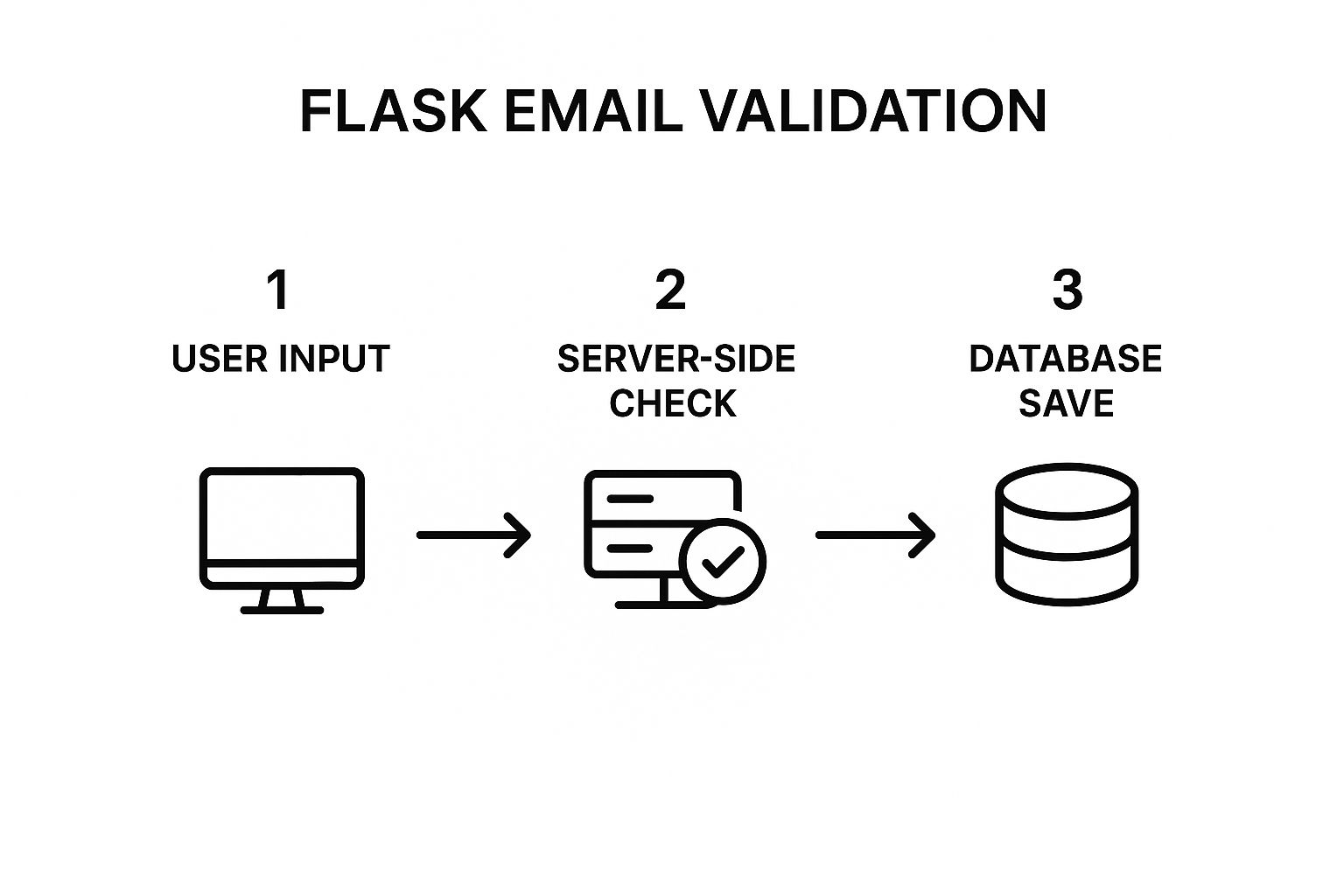
As you can see, validation isn’t an afterthought. It’s a critical step that sits between receiving user input and saving it to your database, acting as a crucial line of defense against bad data.
Validating Large Email Lists with APIs

When you need to validate an email in Python, a quick local script or library works just fine for a handful of checks. But what happens when your small task turns into a massive one? Suddenly, you’re staring down a list of 50,000, 100,000, or even a million emails.
At that kind of scale, the game completely changes.
Trying to run that volume of validation locally will bring your Python script to its knees. Every single check eats up memory, CPU cycles, and network bandwidth. It’s a recipe for unresponsive loops, maxed-out resources, and scripts that either crash outright or take days to finish. For any serious data cleaning job, it’s just not a practical approach.
This is exactly where third-party validation APIs come into play. They are the enterprise-grade solution built to handle this exact challenge.
The Power of Offloading Validation
Instead of wrestling with performance on your own machine, an API lets you hand off all the heavy lifting to a specialized service. These platforms are engineered from the ground up for high-volume processing, instantly solving your performance bottleneck.
The advantages are pretty clear:
- Unmatched Scalability: They’re built on powerful infrastructure designed to process millions of requests without even blinking.
- Superior Speed: These services can churn through enormous lists far faster than any local script could ever hope to.
- Advanced Accuracy: They use sophisticated, multi-layered checks that go way beyond what a simple library can do.
By delegating the workload, you free up your own resources and gain access to a validation engine that’s faster, more reliable, and infinitely more scalable than a DIY solution.
Let’s be real—when you’re dealing with massive datasets, a dedicated API isn’t just a nice-to-have; it’s a necessity. In my experience, trying to validate an email in Python locally on a large scale often ends in failure. I’ve seen processes grind to a halt because of resource drain time and time again.
In stark contrast, a specialized validation API can verify around 100,000 addresses in just 45 minutes. That’s a game-changing improvement in both speed and accuracy for any bulk job.
Navigating Complex Validation Scenarios
It’s not just about the sheer volume, either. APIs are also much better at handling the tricky roadblocks that pop up during validation.
For instance, many email servers use defensive measures like greylisting, which temporarily rejects emails from unrecognized senders. A simple local script would probably mark that address as invalid. A smart API, however, knows to retry the connection after a short interval to get an accurate result.
On top of that, firing off thousands of DNS and SMTP requests from your server’s IP address is a great way to get flagged for suspicious activity. APIs are designed to distribute these checks across a vast network, which protects your sender reputation from being tarnished by your own validation efforts.
If you want to dig deeper into the technical side of confirming an address, our guide on how to check if an email exists offers some great context.
Ultimately, for bulk validation, APIs aren’t just another option. They’re the only viable path forward.
Frequently Asked Questions About Python Email Validation
As you start working with Python to validate an email, you’ll quickly run into a few common questions. Deciding between a simple regex pattern, a dedicated library, or a full-blown API isn’t always straightforward. Let’s break down some of the most frequent sticking points I’ve seen developers encounter.
Can Regex Alone Reliably Validate an Email Address?
Honestly, no. A regular expression is a great first line of defense for checking basic syntax—it can quickly tell you if there’s an ”@” symbol and something that looks like a domain. But that’s where its usefulness ends.
Regex has absolutely no concept of the real world. It can’t tell you if a domain actually exists or if the corresponding server has a mailbox ready to accept messages.
An email like hello@this-is-not-a-real-domain.io will pass most regex patterns with flying colors, but it’s completely undeliverable. It’s best to think of regex as a quick, initial sanity check, not a true validation tool.
What Is the Difference Between Validation and Verification?
People often use these terms as if they mean the same thing, but in the world of email, they refer to two very different processes.
- Validation is all about the format. It asks, “Does this string look like a correctly structured email address?” This is the job of regex and basic syntax checkers.
- Verification goes much, much deeper. It asks, “Does this email address actually exist and can it receive mail?” This involves checking DNS and MX records and, in many cases, communicating with the mail server to confirm the mailbox is active.
While a library like email-validator starts to dip its toes into verification, a dedicated API is where true, comprehensive verification happens.
When Should I Use a Validation API Instead of a Python Library?
Moving from a local Python library to an API is a strategic decision that usually comes down to scale, accuracy, and protecting your own infrastructure. I generally recommend making the switch in these situations:
- You’re dealing with large volumes. If you’re processing thousands, or even millions, of email addresses, a local script can become a huge performance bottleneck. APIs are built to handle that scale without breaking a sweat.
- You need the highest possible accuracy. For mission-critical tasks like cleaning a marketing list or ensuring user signups are valid, you can’t afford mistakes. APIs provide real-time checks that a local library simply can’t perform.
- You want to avoid getting blacklisted. Sending a massive number of validation checks from your own server IP is a surefire way to get flagged for suspicious activity. APIs handle this from a distributed network, protecting your sender reputation.
An API takes all the heavy lifting off your plate and gives you detailed insights into things a library might miss, like identifying tricky “catch-all” domains.
As your project grows, your validation logic will become more complex. To ensure your email validation logic remains clear and maintainable for your team, understanding how to go about documenting Python code effectively is crucial. Well-documented code is easier to debug, update, and hand off to other developers.
Ultimately, picking the right tool depends on the job. A library might be perfectly fine for a simple contact form. But for cleaning a massive database or powering a core feature of your app, an API is the only reliable path to ensuring the quality and deliverability of your email data.
Ready for validation that just works? Truelist offers pay-as-you-go credits that never expire, plus unlimited plans for high-volume senders — with no surprise fees. Clean your lists, protect your sender reputation, and boost your deliverability with our powerful, easy-to-use platform. Start validating for free today at Truelist.