 Claude
  Perplexity
Validate List of Email Addresses The Right Way
Learn how to validate list of email addresses to protect your sender score and boost ROI. Get actionable steps for cleaning your list and automating hygiene.
TL;DR: Learn how to validate list of email addresses to protect your sender score and boost ROI. Get actionable steps for cleaning your list and automating hygiene.
If you want to properly validate a list of email addresses, you can’t just skim the surface. It’s a methodical process that digs deep, checking everything from basic typos to whether the specific inbox is actually live and ready to receive mail. This is the only way to genuinely clean your list, slash your bounce rates, and safeguard your sender reputation.
Why You Can’t Afford to Skip Email Validation
Cutting corners on email validation is one of the costliest mistakes you can make in marketing. This isn’t just about tweaking your deliverability by a few percentage points; it’s about protecting the very core of your email program. A “dirty” list quietly sabotages your work, causing real, measurable damage that goes far beyond a few bounces.
Every single undeliverable email you send is a waste of money. Plain and simple. You’re paying to send campaigns to ghosts, and that throws all your important metrics out of whack. How can you trust your open and click-through rates if you don’t even know how many people had a chance to see your email? You’re left guessing whether it’s your content or your contact quality that’s the problem.
The Hidden Costs of a Dirty List
The fallout from a messy list gets worse. Internet Service Providers (ISPs)—think giants like Gmail and Outlook—are watching your every move. When they see high bounce rates from your sends, they see a massive red flag. It makes you look like a spammer, and that absolutely tanks your sender reputation.
Your sender reputation is the score that decides if your emails hit the inbox or get buried in the spam folder. Once it’s damaged, it’s incredibly difficult to repair, potentially crippling your campaigns for months.
A huge perk of taking the time to validate your list is the immediate boost it gives to your deliverability and engagement, which is a key part of learning how to improve email open rates for your business.
To understand what a robust validation process looks like, it helps to break it down into its core components. These are the essential checks that a professional-grade service will run to ensure an email address is not just valid, but also safe to send to.
The Core Pillars of Email Address Validation
| Validation Check | What It Does | Why It Matters |
|---|---|---|
| Syntax Check | Verifies the email address format (e.g., name@domain.com). | Catches obvious typos and formatting errors instantly. |
| Domain/MX Check | Confirms the domain exists and has mail servers ready to accept email. | Ensures the destination server is real and operational. |
| SMTP Verification | Pings the mail server to see if a specific mailbox (user) exists. | The deepest check to confirm the individual inbox is active. |
| Spam Trap Detection | Identifies known spam trap addresses used by ISPs to catch spammers. | Protects your sender reputation from immediate blacklisting. |
| Role-Based & Disposable | Flags generic addresses (e.g., info@, support@) and temporary emails. | Helps you target individuals and avoid low-engagement contacts. |
These checks work together to give you a complete picture of your list’s health, moving far beyond a simple “valid” or “invalid” status.
The Real-World Impact on Deliverability
The industry numbers tell a pretty sobering story. With an average email deliverability rate hovering around 83.1%, nearly 17% of all marketing emails never even make it to the primary inbox. A shocking 10.5% are routed to spam, and another 6.4% just disappear into the void.
These statistics, highlighted in reporting by EmailToolTester.com, make it crystal clear why you have to validate your list of email addresses. It’s not just a best practice anymore; it’s a fundamental requirement for giving your campaigns a fighting chance to succeed.
A Practical Breakdown of the Validation Process
To really clean an email list, you have to think in layers. Each check peels back another level of uncertainty, starting with simple typos and moving all the way up to sophisticated threats that can tank your sender score. This multi-step process is the only way to be sure that the emails you have are not just formatted correctly, but are active, safe, and ready for your next campaign.
Think of it as moving from broad checks to highly specific ones, as this diagram shows. You first confirm the basic structure, then the domain, and finally, the specific mailbox itself.
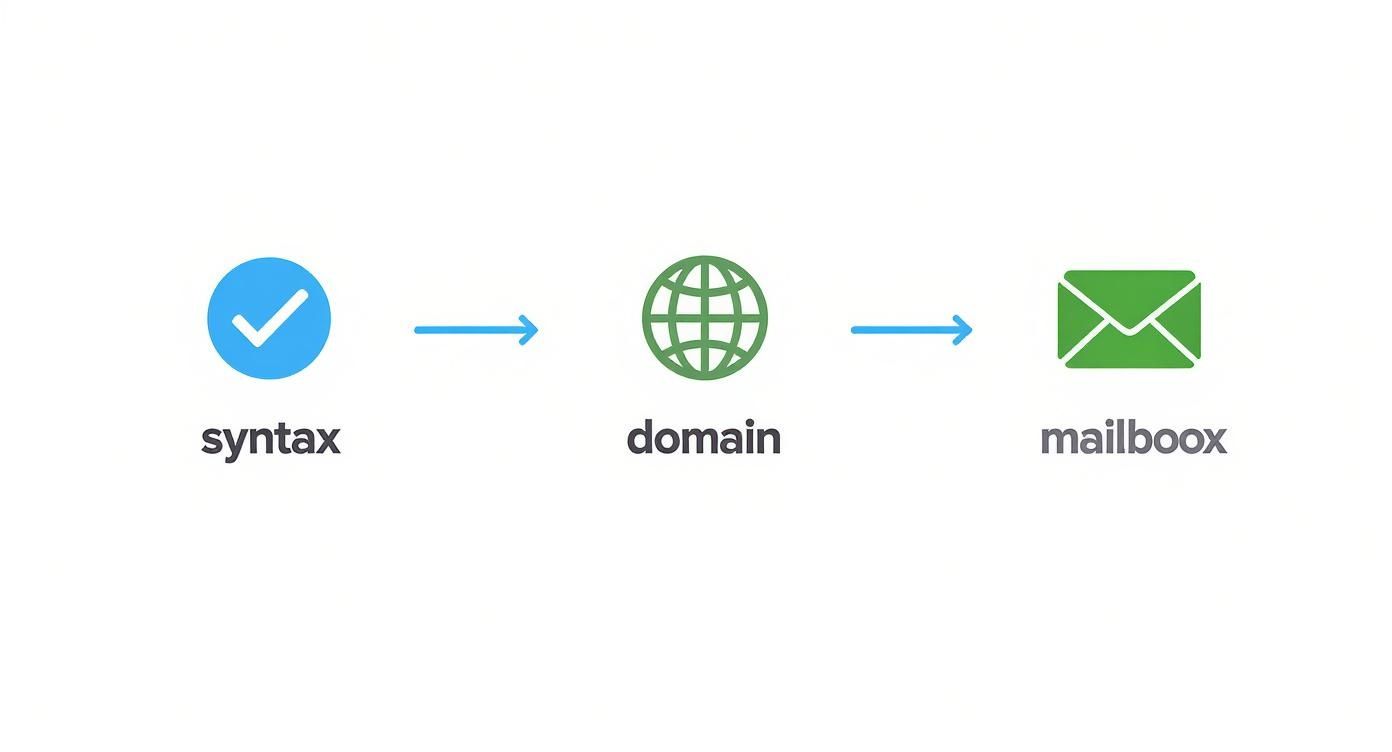
Let’s break down what’s happening at each stage.
First, Nail the Syntax and Formatting
This is your first line of defense, the quick and easy win. A syntax check is basically a digital proofread, scanning for structural mistakes and obvious data entry errors. It’s amazing how many problems you can catch right here.
This initial pass just makes sure every email follows the standard user@domain.com format. It’ll instantly flag common slip-ups like:
- Missing ”@” symbols (e.g.,
johndoe.example.com) - Illegal characters or spaces (e.g.,
john doe@example.com) - Typos in the domain extension (e.g.,
jane@example,cominstead of.com)
It might seem basic, but this step clears out a surprising amount of junk, giving you a much cleaner list to work with for the more advanced checks. A tool like Truelist does this for your entire list in an instant.
Next, Verify the Domain and Mail Server
Okay, so the email looks right. But does its domain actually exist and is it set up to receive email? This is where MX (Mail Exchange) record verification comes into play. It’s not enough for a website like example.com to be live; it needs a specific mail server designated to handle incoming messages.
This check answers two key questions:
- Is the domain (
example.com) a real, active domain? - Does it have a valid MX record that points to a functioning mail server?
An address like contact@randomnonexistentdomain123.com has perfect syntax, but it’s a guaranteed hard bounce because the domain is a dead end. This check stops you from sending emails straight into a digital black hole.
A valid domain doesn’t mean the specific mailbox exists. It just confirms that an address at that domain could exist. This is a crucial difference that separates a basic check from a truly thorough one.
Then, Perform the SMTP Handshake
Now we get to the most definitive part of the process. The SMTP (Simple Mail Transfer Protocol) handshake is a live test where the validation server communicates directly with the recipient’s mail server. I like to think of it as calling ahead to see if someone’s home before you drive all the way over.
The validator simulates the beginning of an email delivery without actually sending anything. It connects to the recipient’s mail server and essentially asks, “Hey, do you have a user named john.doe here?” The server’s response tells us if the mailbox is active and can accept mail.
This direct “ping” is the only way to know for sure if a specific inbox is real. It’s what distinguishes a valid john.doe@company.com from a nonexistent jon.doe@company.com, even when both have perfect syntax and a valid domain.
Finally, Filter Out the Risky Addresses
The last layer is all about protecting your sender reputation. An email address can pass all the technical checks and still be bad for your business. This is where advanced filtering flags problematic emails that can get your domain blacklisted.
Here’s what to look for:
- Role-Based Accounts: These are generic inboxes like
info@,sales@, orsupport@. They often have very low engagement and a higher likelihood of being marked as spam. - Disposable Domains: These are temporary, throwaway emails from services like Mailinator. People use them to get through a sign-up form and then abandon them, making them useless for any real communication.
- Spam Traps: These are the big one. They’re email addresses used by ISPs and anti-spam organizations specifically to catch senders who aren’t cleaning their lists. Hitting even one can do serious damage to your ability to land in the inbox.
By running your list through these four layers, you graduate from just fixing errors to actively managing your sender reputation. The end result is a high-quality list of contacts who are actually ready to hear from you.
Turning Validation Results Into a High-Performing List
So, you’ve run your list through a validation tool. What you get back is a treasure trove of data, but it’s not just a simple “good” or “bad” stamp on each email. This raw report is your blueprint for building a genuinely healthy and high-performing contact list. The real magic happens when you know how to read the results and act decisively.
With a staggering 347 billion emails expected to fly across the internet daily in 2025, getting your message to the right inbox is harder than ever. At that scale, even small delivery issues can snowball into major problems. This is exactly why top-tier validation goes way beyond just checking for an ”@” symbol; it digs deep to verify the domain is real and the mailbox is active.
This is what we’re aiming for: a clean, organized list where you know the status of every single contact, setting you up for smarter, more effective campaigns.
Decoding Your Validation Report
Your validation results will likely break down your emails into a few core categories. Think of these as your action plan. What you do with each group is different, from giving them a green light to removing them for good.
Here’s the typical breakdown:
- Valid: These are your gold-star contacts. They’ve passed every test—syntax, domain, and the SMTP handshake. These emails are safe to send to and should be the backbone of your main campaign lists.
- Invalid: These are dead ends, plain and simple. The address might have a typo, the domain doesn’t exist anymore, or the server confirmed the mailbox is gone. Remove these immediately. Don’t think twice.
- Spam Trap: This is the most dangerous category. Hitting a spam trap is a direct hit to your sender reputation. Get these off your list instantly to avoid getting blacklisted by providers like Gmail and Outlook.
Getting these basic categories sorted is the first, most crucial step in any serious email list cleaning process. It’s the foundation for preventing bounces and protecting your sender reputation.
Handling the Gray Areas: Catch-All and Unknown
Now for the tricky part. Not every email gives you a clear “yes” or “no” answer. This is where a bit of strategy comes in, especially with addresses marked “catch-all” or “unknown.”
A catch-all server is set up to accept mail for any address at its domain, which means a standard SMTP check can’t confirm if your specific contact actually exists. It’s a maybe.
A “catch-all” status isn’t a death sentence for an email address, but it absolutely carries a higher risk. Send to too many, and you’ll see your bounce rates creep up, hurting your sender score over time.
So, what do you do? Don’t just delete them. A smart move is to segment these “catch-all” addresses into their own list. Send them a low-risk, high-value re-engagement campaign. Their response—or lack of one—will tell you everything you need to know. As for “unknown” statuses, these often happen when a mail server is temporarily offline. I usually just set them aside and re-validate them in a day or two.
Using an Email Quality Score
Modern tools like Truelist often provide an email quality score, which I’ve found incredibly useful. This score takes all the different data points—syntax, domain health, mailbox status, and other risk factors—and boils them down into a single number, usually on a 0-100 scale.
This simple score makes your life so much easier. You can create your own rules of engagement based on this metric. Here’s a system I often recommend to clients:
- Score 90-100: These are your A-listers. Add them straight to your primary mailing list.
- Score 60-89 (Often Catch-alls): Put these into a separate segment. Send to them carefully and less frequently.
- Score 0-59 (Invalid/Risky): Suppress or delete them on the spot. No exceptions.
By setting up rules like these, you graduate from just one-off list cleaning to a proactive, long-term strategy for managing your list’s health and performance.
Putting Your Email Validation on Autopilot
https://www.youtube.com/embed/pprodMnNmB0
Uploading a CSV file for a one-time scrub is a decent first step, but it’s a reactive strategy. Real list hygiene isn’t a single event; it’s an ongoing commitment. To truly protect your sender reputation and keep your list healthy, you have to move beyond manual uploads and build an automated, always-on validation system.
This means catching bad emails the moment they try to enter your ecosystem—not weeks or months down the line.
A proactive approach completely changes how you manage data quality. Instead of doing periodic cleanups, you’re building a defensive perimeter that keeps your list pristine 24/7. There are two core ways to get this done: batch automation for the data you already have, and real-time API validation for all your new signups.
Batch Automation for Your Existing Database
Think of batch automation as your scheduled maintenance check-up. It’s the perfect method for regularly cleaning the large contact list you’ve already built. Instead of the tedious process of manually exporting and uploading contacts from your CRM or email platform, you can just set up a recurring task.
Most platforms let you schedule an export of your entire list or just certain segments. By connecting this to a validation service, you can automatically validate your list of email addresses every week or month. This simple step ensures that natural data decay—from people changing jobs or abandoning old accounts—doesn’t slowly poison your database.
The goal of automation isn’t just about saving time. It’s about enforcing consistency. A recurring, automated batch process makes sure list cleaning happens reliably, without depending on someone remembering to do it.
This approach keeps your established contacts fresh. But to really secure your list, you need to stop bad addresses from ever getting on it in the first place. That’s where a real-time API shines.
Real-Time API Validation at the Point of Entry
This is your front-door security guard. A real-time API integrates directly into your signup forms, landing pages, and app registration flows. The instant a user types in their email and hits “submit,” the API pings a service like Truelist to verify that single address.
The whole process is incredibly fast, often taking less than a second, and happens before the address ever touches your database. If the email is invalid, you can show an immediate message asking the user to fix a potential typo. Just like that, you’ve stopped a data entry error at the source.
For a more technical look at how this works, our guide on API email validation provides detailed examples and use cases. The end result is a self-cleaning acquisition channel that only feeds high-quality, deliverable emails into your marketing funnels.
Batch vs. Real-Time API Validation
So, which one is right for you? It’s not really an either/or situation—the best strategies use both. This table breaks down the key differences to help you decide how to implement them.
| Feature | Batch Validation | Real-Time API Validation |
|---|---|---|
| Best For | Regularly cleaning existing, large lists. | Preventing bad emails at signup forms. |
| Timing | Scheduled (e.g., weekly, monthly). | Instant, at the moment of submission. |
| Use Case | Maintaining the health of your CRM data. | Protecting lead capture forms and apps. |
| Impact | Cleans data already in your system. | Stops bad data from ever entering. |
Ultimately, a strong validation strategy combines the scheduled maintenance of batch processing with the always-on protection of a real-time API.
A simple API call can be made using a tool like cURL. Here is a basic example of what that request looks like when sending an email to Truelist for verification:
curl -X POST "https://api.truelist.io/v1/validate" -H "Authorization: Bearer YOUR_API_KEY" -H "Content-Type: application/json" -d '{"email": "test@example.com"}'This command sends the email ”test@example.com” to the Truelist API and gets a detailed validation status back in milliseconds. By implementing both batch and real-time automation, you create a comprehensive system that not only cleans your existing data but also builds a more resilient and effective list for the future.
Connecting Validation With Your Marketing Tools
This is where you can really start to see the magic happen. By weaving email validation directly into your everyday marketing tools, you create a self-cleaning system that works tirelessly in the background. It shifts data hygiene from a one-off project you dread into an always-on, proactive part of your workflow.
The whole point is to catch bad emails right at the front door. Think about it: a new lead signs up for your newsletter on a Mailchimp form. Instead of just adding them to your list, an integration can instantly validate that email before it ever pollutes your main audience.

This kind of seamless process guarantees that only clean, verified data makes it into your ecosystem. Right from the start, you’re protecting your sender reputation and campaign metrics. For businesses that rely on professional business email hosting solutions, this step is crucial for making sure their messages actually land in the inbox and deliver a return on investment.
Building Your Automated Workflow with Zapier
If you’re not a developer, don’t worry. Tools like Zapier are the perfect bridge, allowing you to connect different apps and build powerful automations without touching a single line of code. You can create what Zapier calls “Zaps”—simple workflows that trigger an action in one app based on an event in another.
Let’s walk through a classic example that I’ve seen work wonders for countless businesses:
- The Trigger: It all starts when someone new subscribes to your list in a tool like Mailchimp or ConvertKit. This is the event that kicks everything off.
- The Action: Zapier grabs that new email address and automatically sends it over to Truelist for a real-time check.
- The Filter: Next, the Zap pauses and waits for the validation result. You simply tell it to “Only continue if the Truelist status is ‘valid’.”
- The Final Step: If the email checks out, Zapier can add a “Verified” tag to the contact in your ESP or move them to your main marketing list. If it’s invalid? It can automatically add them to a suppression list so you never accidentally email them.
This simple automation acts as a bouncer for your email list. It vets every single new contact the moment they sign up, which means you’ll never again waste a send on a fake address or a simple typo.
Setting up a workflow like this is a total game-changer. It puts the entire process to validate a list of email addresses on complete autopilot. If you’re ready to get this up and running, we have detailed instructions in our official guide for the Truelist and Zapier integration.
By connecting your tools, you’re doing more than just cleaning a list—you’re building a smarter, more resilient marketing machine. This automated system works 24/7 to protect your most valuable asset, freeing you up to focus on creating great campaigns instead of worrying about data rot.
Common Questions About Email Validation
Even with the best guides, you’re bound to have questions. It’s a complex topic. Over the years, I’ve heard just about every question there is when it comes to validating a list of email addresses. Here are a few of the most common ones, with some straight-up answers.
Can I Really Validate a List for Free?
Yes, but there’s a catch. Many services will give you a handful of free credits to test out their platform. This is great for a tiny, one-off list clean.
However, for any real, ongoing list maintenance, you’ll need a paid plan. The free tools just don’t have the heavy-duty features like spam trap detection or API integrations, which are what really protect your sender reputation in the long run.
How Often Should I Be Cleaning My Email List?
A good rule of thumb for most businesses is to run your entire list through a validation service quarterly. You’d be surprised how quickly data goes stale—people switch jobs, abandon old email accounts, or their company domain just disappears.
Beyond that, you absolutely should be using a real-time API to check every single new email right at the point of sign-up. This stops bad data from ever getting onto your list in the first place.
Don’t think of email validation as a one-and-done task. It’s more like routine maintenance for one of your most important business assets. Consistent cleaning keeps small data issues from turning into massive deliverability headaches.
What’s a “Safe” Bounce Rate to Aim For?
Most email service providers (ESPs) consider a bounce rate under 2% to be in the healthy range.
If you’re consistently creeping above that number, it’s a big red flag that your list hygiene needs serious help. High bounce rates are a fast-track ticket to a damaged sender score, which means your emails are far more likely to end up in the spam folder.
Does Validation Guarantee 100% Deliverability?
Nope, and you should be skeptical of any service that claims it does.
Validation dramatically increases the odds of your email hitting the inbox by weeding out all the invalid, risky, and junk addresses. But final deliverability still depends on other critical factors like your sender reputation, the content of your email, and even the recipient’s own server-side filters.
Ready to stop guessing and start sending with confidence? Truelist offers straightforward email validation to keep your lists clean and your campaigns effective. Get started for free today and see the difference a truly clean list makes.