 Claude
  Perplexity
How to Verify an Email and Protect Your Sender Reputation
Learn how to verify an email to reduce bounce rates and protect your sender reputation. Our guide offers practical steps to improve your email deliverability.
TL;DR: Learn how to verify an email to reduce bounce rates and protect your sender reputation. Our guide offers practical steps to improve your email deliverability.
Sending an email to a list you haven’t verified is a lot like flying blind. You’re burning through resources, hitting dead ends, and ultimately damaging your credibility with every “send.” Taking a moment to verify an email first changes the entire game. It turns a hopeful guess into a strategic, high-impact play.
Honestly, it’s the single best thing you can do to protect your sender reputation and make sure your messages actually land where they’re supposed to.
Why You Absolutely Must Verify Emails Before Hitting Send

It’s easy to assume the email addresses you’ve collected are good to go. But I’ve learned from experience that’s almost never the case. Email data just goes stale. People switch jobs, abandon old Hotmail accounts, or use temporary addresses to grab a freebie.
When you send campaigns to a list cluttered with these digital ghosts, you’re not just being inefficient—you’re actively hurting your own efforts. Every hard bounce, which is a permanent delivery failure, flags you as a potential problem to Internet Service Providers (ISPs) like Gmail and Outlook.
The Hidden Costs of a Dirty Email List
Think of it this way: when an ISP sees a high bounce rate coming from your domain, they start treating you with suspicion. This tanks your sender reputation, an invisible score that dictates whether you land in the inbox, the promotions tab, or the dreaded spam folder. A bad enough reputation can even get your domain blacklisted, making it nearly impossible for any of your emails to get through.
And this isn’t a small problem. The data backs it up.
A deep-dive 2025 report from SafetyMails that analyzed millions of emails found that only 80.94% are actually valid and safe to send to. That means nearly one out of every five emails in a typical list (19.6%) is a risk to your campaigns. You can see the full breakdown in their email list quality report.
This goes way beyond just bounces. You’re also dealing with disposable emails people use for one-time sign-ups and, even worse, spam traps. These are email addresses specifically designed to catch and block senders who don’t clean their lists. Hitting just one of them can cause serious, long-term damage to your deliverability.
For anyone in sales or marketing, this translates directly to lost money. Every undelivered email is a missed opportunity—a lead that never got your follow-up, a sale you never made. It’s wasted ad spend and a lower ROI across the board. By taking the time to verify an email address, you’re not just tidying up a spreadsheet; you’re protecting your investment. Our guide on why you should verify a list gets into even more detail on this.
Common Threats Lurking in Your Email List
An unverified list is a minefield. Knowing what kind of “bad” emails are in there really drives home why verification is non-negotiable for anyone serious about email outreach.
| Common Threats Lurking in Your Email List | ||
|---|---|---|
| Email Issue Type | Percentage in an Average List | Primary Risk |
| Invalid/Non-Existent | 10-12% | Causes hard bounces, which directly harms your sender reputation. |
| Spam Traps | 1-2% | Hitting even one can get you immediately blacklisted by major ISPs. |
| Disposable Addresses | 3-5% | Inflates your list size with contacts that offer zero long-term value. |
| Role-Based Accounts | 2-4% | Prone to low engagement and high spam complaints (e.g., info@, admin@). |
| Catch-All Domains | Varies | These accept all mail, so it’s impossible to know if a real person is on the other end. |
Each of these issues chips away at your sender score and drags down your campaign performance. Cleaning them out isn’t just good practice; it’s essential for survival in the inbox.
So, How Does Email Verification Actually Work?
You might assume that to check if an email address is real, you just send an email to it. Nope. Instead, verification services act like digital detectives, running a series of background checks that all happen in a matter of seconds.
Imagine you’re trying to deliver a package. First, you check if the address format is correct (street, city, zip). Then, you confirm the city actually exists and has a post office. Finally, you ask the local postmaster if the specific recipient lives at that address. It’s a cascading process—if any step fails, the delivery is a no-go.
Email verification works the same way. It’s a methodical, multi-layered check that weeds out bad emails without ever clogging up an inbox.
The First Filter: Does It Look Right? (Syntax Validation)
The most basic check is all about the format. It’s a simple, instant pass/fail test on the structure of the email address itself: local-part@domain.
An address like sarah.jones@company.com is perfect. But sarah jones@company.com (with a space) or sarah.jones.company.com (missing the crucial ”@”) will get flagged and tossed out immediately. You’d be surprised how many bad emails are just simple typos caught at this stage. In fact, syntax errors alone account for nearly 8% of all invalid emails.
The Next Step: Is the Destination Real? (Domain and Mail Server Checks)
Okay, so the address is formatted correctly. Now, does the destination—the part after the ”@“—actually exist and, more importantly, can it receive mail? This isn’t just about checking if company.com is a real website; it’s about confirming it has a functioning mailbox system.
This involves a two-part investigation:
- Domain Name System (DNS) Check: First, the tool verifies that the domain name is registered and active. An email like
info@madeupbusiness12345.comwould fail right here because the domain itself is a ghost. - Mail Exchanger (MX) Record Check: If the domain is real, the next stop is its MX records. Think of these as the specific mailing address for a domain’s email server. A domain without MX records is like a town without a post office—it simply can’t receive mail.
So, the DNS check confirms the town is on the map, and the MX record check confirms there’s a place to deliver mail. You need both.
Why this matters: A business can have a website but no email service set up for that domain. This step catches a ton of those undeliverable addresses before they can cause a bounce.
The Final Handshake: Is Anyone Home? (SMTP Verification)
This is where the real deep-dive happens. After confirming the domain and mail server are legitimate, the verification tool initiates a direct—but temporary—conversation with that server. It uses the Simple Mail Transfer Protocol (SMTP), which is the universal language all email servers use to communicate.
The process mimics the first few steps of sending an email without actually sending anything. It’s like calling a building’s front desk and asking, “Is Sarah Jones here?” before you make the trip to visit.
The brief digital conversation looks something like this:
- The verification tool connects to the recipient’s mail server.
- It says hello (HELO).
- It provides a return address (MAIL FROM).
- Then, it pops the critical question: “Will you accept mail for this specific person?” (RCPT TO:
sarah.jones@company.com).
The server’s answer to that final question is the moment of truth. An “OK” means the mailbox exists and the email is valid. A rejection like “user unknown” or “mailbox not found” means it’s a dead end. This final handshake is what separates a basic check from a truly accurate one, as it confirms the individual mailbox is ready and waiting.
Choosing and Using an Email Verification Tool
Knowing the theory behind email verification is one thing, but the real magic happens when you put it into practice. Thankfully, modern tools make this whole process incredibly easy, whether you’re scrubbing a massive contact list or just checking a single address on the fly.
This practical need is exactly why the market for these services is exploding. Valued at USD 0.8 billion in 2023, it’s projected to climb to a whopping USD 2.1 billion by 2032. As businesses everywhere are realizing, clean data isn’t a luxury—it’s the bedrock of effective communication. Superagi’s market analysis digs deeper into this trend if you’re curious.
Let’s get into the two main ways you’ll use a verification service: cleaning your lists in bulk and checking individual emails in real-time.
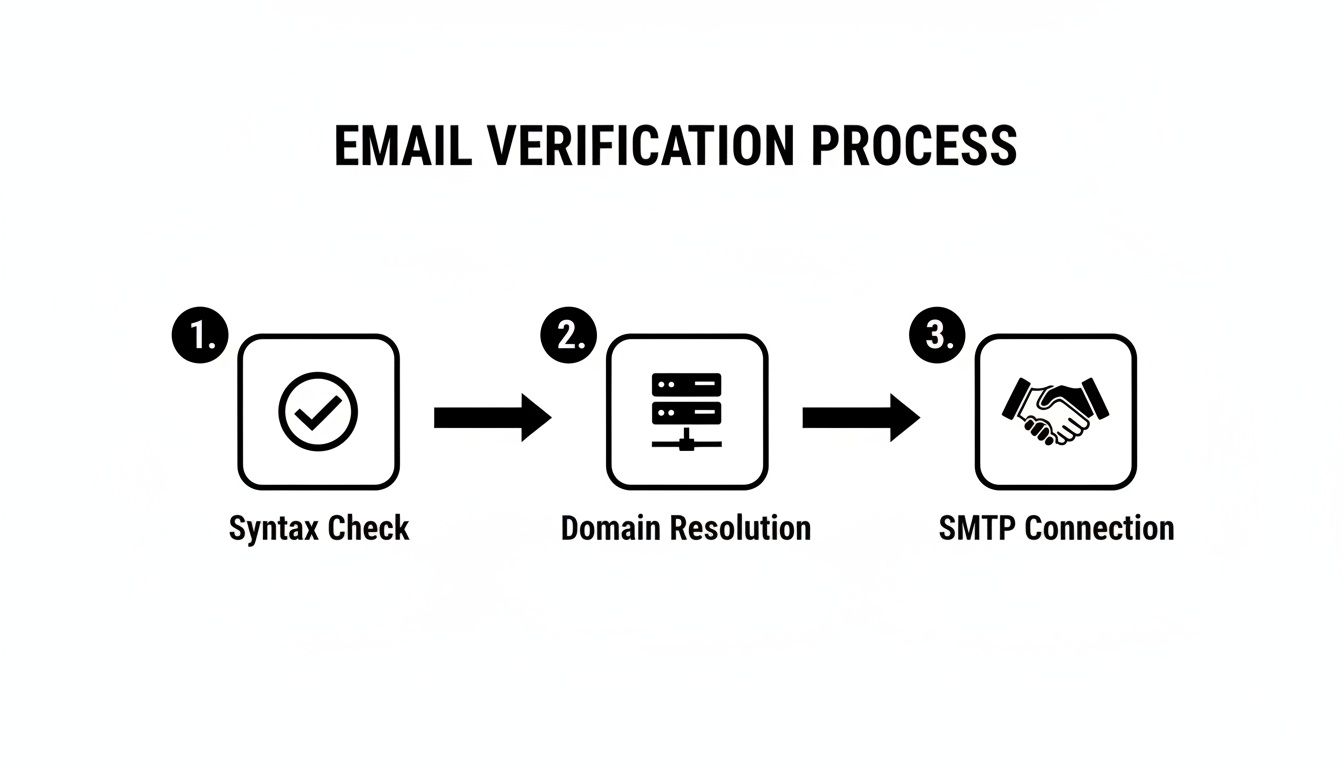
Think of verification as a multi-stage filter. Each step, from a simple syntax check to a direct SMTP handshake, weeds out bad addresses, making sure only the good stuff gets through.
Cleaning Your Entire List with Bulk Verification
This is the bread and butter for anyone with an existing list of leads, subscribers, or customers. Maybe you just got back from a trade show with a fresh list of contacts, or you’re gearing up for a big campaign to your entire database. Before you even think about hitting ‘send,’ a bulk cleanup is a must.
The process itself is straightforward:
- First, you’ll export your contacts from whatever system they live in—your CRM, email platform, or even just a spreadsheet. A simple CSV file is usually all you need.
- Next, you upload that file directly into your verification tool.
- Then, just kick off the verification. The service will churn through your list, running every single email through its multi-point validation gauntlet.
Once it’s done, you get a detailed report that breaks down your list into helpful categories. This report is your roadmap to a healthier, higher-performing email list.
Interpreting Your Bulk Verification Results
After the tool works its magic, you’ll be able to download your original file, now enriched with a status for each email. Knowing what these labels mean is key to taking the right next steps.
| Result Status | What It Means | Recommended Action |
|---|---|---|
| Valid | The email address exists and is safe to send to. | Keep them! These are the solid contacts you build your campaigns on. |
| Invalid | The address is fake, has a typo, or the domain doesn’t exist. | Delete immediately. Sending to these causes a hard bounce, hurting your reputation. |
| Risky | This bucket includes catch-all, disposable, or role-based addresses. | Handle with care. It’s often best to segment these out and monitor their engagement. |
| Unknown | The server didn’t respond or gave an unclear answer. | Set these aside for now. You can try to re-verify them in a few days. |
The single most important thing you can do is immediately remove every “invalid” email from your mailing list. This one move alone will dramatically reduce your bounce rate and protect your sender score.
Using a Real-Time API to Verify an Email Instantly
For anyone who wants to stop bad data from getting into their systems in the first place, a real-time API is the perfect solution. This is ideal for developers integrating verification directly into a website signup form, an app registration process, or a CRM lead capture field.
Here’s how it works: a user types in their email and hits submit. In the background, your system fires off a quick request to the verification API. In less than a second, the API sends back a response indicating if the email is good to go.
This lets you give users instant feedback, like a friendly nudge: “Oops, looks like there might be a typo in your email!” This proactive approach is a game-changer because it keeps your lists clean from day one.
There are many great services out there, and taking a look at the best email verification tools can help you find one with a solid API that fits your technical needs. Finding a service that offers both bulk and API options gives you a complete toolkit for managing your email data quality.
Automating Verification in Your Daily Workflows
Manually cleaning a list is a decent start, but the real game-changer is automation. When you build a “set it and forget it” system, you’re essentially creating a permanent shield against bad data. This keeps your lists clean around the clock without you having to lift a finger.
The idea is to stop bad emails right at the door. Instead of running big, periodic cleanups, you weave verification directly into the tools you already use every single day. This creates a simple, automated checkpoint where every new lead or subscriber gets a quick check-up the moment they enter your system.
This proactive approach isn’t just a nice-to-have anymore; it’s becoming standard practice. The global market for this kind of software is projected to hit USD 1,968.4 million by 2033. That’s a massive signal that businesses are getting serious about automated data hygiene to protect their bottom line.
Real-World Automation for Marketers
For anyone in marketing, list hygiene is the foundation of everything. An automated workflow can be the one thing that separates a wildly successful campaign from one that tanks your sender reputation. A classic, effective setup is connecting your verification tool with your email platform, like Mailchimp or ConvertKit.
Here’s how that plays out:
- Someone signs up for your newsletter on your website.
- Instead of being dumped straight into your main list, their email first gets pinged to your verification service.
- Only after the email is confirmed as valid does it get added to your active campaign list.
This simple sequence stops invalid, disposable, or typo-ridden emails from ever polluting your audience data. It’s a low-effort, high-impact move that keeps your list healthy and boosts engagement with every email you send.
Powering Sales Teams with Clean Lead Data
Sales reps live inside their CRMs, whether that’s Salesforce, HubSpot, or something else. Manually checking every new lead is a colossal waste of time that pulls them away from actually selling. This is where a tool like Zapier becomes your best friend.
By connecting your lead sources, CRM, and verification tool, you can build a seamless pipeline that qualifies contact data automatically. This ensures your sales team is only working with high-quality, deliverable email addresses.
Here’s a practical workflow you could build in just a few minutes with Zapier:
- Trigger: A new lead pops up in your CRM.
- Action: That lead’s email is instantly sent to your verification tool.
- Filter: The workflow waits for the result.
- Action: If the email is valid, a custom field in the CRM gets updated to “Verified,” and the lead gets assigned. If it’s invalid, the lead is flagged for review or even disqualified on the spot.
This kind of setup stops your reps from chasing dead-end leads and protects your domain from the bounces that kill cold outreach campaigns. As you grow, it’s worth thinking about how this fits into your larger strategy for automating lead generation processes.
The engine behind all this magic is usually a powerful email verification API, which lets your different software tools talk to each other instantly. To get a better sense of how this works under the hood, check out our guide on the fundamentals of an email verification API. This is the technology that makes modern, efficient, and clean data workflows possible.
Building Long-Term Habits for Excellent List Hygiene
Cleaning your list once is a great start, but the real secret to keeping your deliverability high isn’t a one-time event—it’s about building smart, ongoing habits. The best email marketers I know have shifted from a reactive “clean it when it breaks” mindset to a proactive one. It’s all about creating a durable system that protects your sender reputation for the long haul.
Think of it this way: true list hygiene means putting processes in place that work for you in the background, so the health of your list never really gets a chance to decay. This is a commitment to quality over quantity, and it’s a strategy that pays off big time with higher open rates, better engagement, and a stronger bottom line.
Make Double Opt-In Your Standard Practice
If there’s one habit you should adopt right now, it’s making double opt-in your standard for every new subscriber. It’s a simple process: when someone signs up, they get an email asking them to click a link to confirm their subscription. Yes, it adds a tiny bit of friction, but the benefits are massive.
For starters, it guarantees you’ve captured a real, typo-free email address from someone who genuinely wants to hear from you. It also acts as a rock-solid defense against bots and spam sign-ups that can pollute your list and tank your reputation.
When a subscriber confirms their intent, they’re far more likely to engage with your future emails. That sends a powerful signal to ISPs like Gmail and Outlook that your content is valuable and wanted. It’s a simple step that proactively verifies an email right from the get-go.
Schedule Regular List Maintenance
Email lists are living things, and they decay over time. People change jobs, abandon old email accounts, or just stop using an address. In fact, some experts estimate that email lists decay by about 22.5% every year. That means nearly a quarter of your contacts could become useless within twelve months.
To get ahead of this, you absolutely need to schedule regular cleanings.
- Quarterly Reviews: At a bare minimum, plan to run your entire list through a bulk verification service once a quarter. This helps you catch those decaying addresses before they become hard bounces.
- Pre-Campaign Scrubs: Always, always run a final verification check before launching a major campaign, especially if you’re emailing a segment you haven’t touched in a while. Think of it as your last-minute quality control.
This is no different than routine maintenance on a car. You don’t wait for the engine to seize up to get an oil change, right? Regular check-ups keep your email program running smoothly and help you avoid a total breakdown.
Segment Your Audience by Engagement
Here’s something a lot of people miss: not all valid emails are created equal. An address might be perfectly deliverable, but if the person behind it hasn’t opened one of your emails in six months, they’re actually hurting you by dragging down your engagement metrics. Low engagement is a huge red flag for ISPs and can seriously damage your sender score.
Get into the habit of segmenting your audience based on how they interact with your emails.
- Engaged Subscribers: These are your champions—people who have opened or clicked an email in the last 90 days. Keep sending them your best stuff.
- Less-Engaged Subscribers: This group hasn’t interacted in 90-180 days. It’s worth trying to win them back with a targeted re-engagement campaign.
- Inactive Subscribers: Anyone who has been silent for over 180 days? It’s probably time to move them off your primary sending list.
This whole process is often called a “sunset policy,” and it’s a disciplined way to keep your active list filled with people who actually want to be there. It sharpens your focus, directs your efforts where they’ll have the most impact, and dramatically improves your overall campaign performance.
Got Questions? We’ve Got Answers.
Knowing the ‘how’ of email verification is one thing, but putting it into practice in your daily work often brings up a whole new set of questions. It’s totally normal. Let’s walk through some of the most common things people ask when they start getting serious about data quality.
Getting these details right is the difference between a one-off list cleaning and building a sustainable habit of great email hygiene.
How Often Should I Actually Be Verifying My Email List?
There’s no single right answer here—it really comes down to how quickly your list is growing.
If you have a large, relatively static list that you’ve built over time, running a bulk verification check every three months is a solid rule of thumb. This is enough to catch the natural decay that happens when people switch jobs, close accounts, or just move on.
But what if you’re actively generating leads and new subscribers every day? In that case, you need to be more proactive. A monthly verification run is a much safer bet. For those who want the absolute best protection, verifying emails in real-time with an API right at the point of sign-up is the gold standard. It stops bad data from ever making it onto your list in the first place.
My Personal Rule: Never, ever email a segment that’s been dormant for over 90 days without running a fresh verification first. An address that was perfectly fine three months ago could be a hard bounce waiting to happen today, and it’s just not worth the hit to your sender reputation.
Does Email Verification Mean 100% Deliverability?
This is a really important one to get straight: no, no tool on the planet can guarantee 100% deliverability. What email verification does do, and does incredibly well, is remove the biggest roadblock to good deliverability—invalid addresses that cause hard bounces.
Think of it this way: verification ensures your mail is addressed correctly and is heading to a real, existing mailbox. But getting it delivered involves more than just a valid address. Other factors are always at play:
- Your Sender Reputation: Are you known for sending engaging emails that people actually open and click?
- Your Email Content: Does your message look clean, or is it full of spam trigger words and broken links?
- The Recipient’s Server: The server on the other end can still reject your email for its own reasons, like a full inbox or an overly aggressive spam filter.
Verification is the critical foundation, but deliverability is the whole house you build on top of it.
What’s The Real Difference Between a Hard Bounce and a Soft Bounce?
Knowing the difference here is fundamental to good list management. They signal completely different problems and you need to handle them differently.
A hard bounce is a permanent dead end. It means the email failed because the address is misspelled, completely fake, or the domain simply doesn’t exist anymore. These addresses are useless and you need to remove them from your list immediately. No exceptions.
A soft bounce, on the other hand, is a temporary problem. The email address is real and valid, but the delivery failed for a short-term reason. The most common culprits are a full mailbox, a server that’s temporarily offline, or a message that’s too large. Most email service providers will automatically try resending to soft bounces a few times.
Are Email Verification Services Safe and GDPR Compliant?
Any reputable verification provider takes security and privacy regulations like GDPR incredibly seriously. They act as data processors, which is a formal way of saying they handle your data on your behalf for one specific purpose—verification. They are legally and contractually bound not to sell, share, or use your data for anything else.
When you’re shopping for a service, look for transparency. Do they clearly explain their security measures and data handling policies? A trustworthy provider will use secure connections for all data transfers and won’t hold onto your lists for any longer than necessary. This way, you can scrub your list with peace of mind, knowing your customer data is safe and you’re staying compliant.
Ready to stop guessing and start sending with confidence? Truelist offers unlimited, real-time email verification to keep your lists clean and your sender reputation pristine. Get started for free today and see the difference clean data makes.