
 Claude
  Perplexity
Boosting Your Click To Open Rate A Practical Guide
Discover what click to open rate (CTOR) reveals about your email content. Learn proven strategies to improve your click to open rate and drive real engagement.
TL;DR: Discover what click to open rate (CTOR) reveals about your email content. Learn proven strategies to improve your click to open rate and drive real engagement.
Let’s get straight to it. Think of your email subject line as the storefront window. A great one gets people to walk through the door—that’s your open rate. But the click-to-open rate (CTOR) tells you how many of those people actually picked something up and headed for the checkout.
It’s one of the most honest metrics you have for judging if your email content is actually any good.
Understanding Your Click To Open Rate

Sure, metrics like open rate and the standard click-through rate (CTR) have their place. But on their own, they don’t give you the full picture. CTOR is different because it zeroes in on the performance of your email’s body, completely separate from the subject line.
This metric answers a simple but vital question: Of the people who were intrigued enough to open your email, how many found the content compelling enough to click a link? This makes CTOR an incredibly powerful diagnostic tool for your campaigns.
Why CTOR Is a Sharper Metric for Content Quality
Ever had a killer open rate but a dismal click-through rate? That’s a classic sign of a great subject line that led to disappointing content. A high CTOR, on the other hand, is proof that your message, design, and call-to-action all clicked with the people who opened it. It’s the mark of true engagement.
Here’s exactly what CTOR tells you:
- Content Relevance: Is your message actually hitting the mark with the people reading it?
- Call-to-Action Power: Are your CTAs clear, persuasive, and easy to spot?
- Promise vs. Payoff: Did the content inside deliver on the promise your subject line made?
Your click-to-open rate is the truth serum for your email content. It cuts through the vanity of open rates and shows you precisely how well your message resonates with your most interested subscribers.
To really get a handle on CTOR, you have to see where it fits into the broader world of email marketing. Looking at it alongside other key metrics gives you a much clearer view of your campaign’s health. For a deeper dive, it’s worth exploring all the different https://truelist.io/blog/email-marketing-kpis to understand how they work together to shape a winning strategy.
Calculating And Interpreting Your CTOR

Unlike some of the more convoluted marketing metrics out there, calculating your click-to-open rate is refreshingly simple. Its power lies in its focus—it zeroes in on the subscribers who already raised their hand by opening your email.
The formula itself only needs two data points: the number of unique opens and the number of unique clicks.
(Unique Clicks ÷ Unique Opens) × 100 = Click-to-Open Rate (CTOR)
It’s absolutely critical to use unique numbers for this. Using total clicks and opens can inflate your numbers with repeat actions from the same few super-fans. Unique figures give you a much cleaner, more honest look at how many individual people took action.
Putting The Formula Into Practice
Let’s make this real with a quick example. Say you just sent out your weekly newsletter and got these results:
- Unique Opens: 2,000 subscribers opened the email.
- Unique Clicks: 300 of those people clicked a link inside.
Plugging those numbers into the formula, we get:
(300 Unique Clicks ÷ 2,000 Unique Opens) × 100 = 15% CTOR
So, your click-to-open rate for that campaign is 15%. That tells you that of every person who bothered to open your email, 15% found your content engaging enough to click through. But is that good?
What Your CTOR Is Telling You
A number on its own is just a number. The context is what matters. Think of your CTOR as a direct grade on how well your email’s content lived up to the promise of your subject line.
A high CTOR is a great sign. It means the message you crafted hit the mark, and your call-to-action was compelling enough to get that click. You made a promise, and you delivered.
On the other hand, a low CTOR points to a disconnect. Maybe your subject line was fantastic, but the content inside fell flat. Or perhaps your call-to-action was weak, confusing, or buried at the very bottom.
For a little perspective, data from 2021 showed the average global CTOR was around 10.5%. Most email marketing experts will tell you that a “good” rate is anywhere between 6% and 17%, though this can swing quite a bit depending on your industry. If you want to dive deeper, you can explore more about these email marketing benchmarks to see how you stack up. This is how you move from just collecting data to actually understanding the story it tells about your audience.
Why CTOR Matters More Than You Think
A catchy subject line might get you a great open rate, but that’s only the first step. The real magic happens after the open, and that’s where the click-to-open rate (CTOR) comes in. It cuts right to the chase, showing you how many people were actually interested enough by your email’s content to take the next step.
Think of it this way: CTOR ignores everyone who didn’t open your email and focuses exclusively on the people who did. This makes it the single best metric for judging how well your email’s body—your copy, your design, your call-to-action—actually performed.
The True Measure of Content Resonance
A high CTOR is a fantastic sign. It means the promise you made in your subject line was successfully delivered by the content inside your email. That’s how you build trust and create real relationships with your subscribers, moving beyond metrics that just look good on a report.
On the flip side, a low CTOR paired with a high open rate is a serious red flag. It’s a classic sign of a disconnect. Maybe your subject line was a bit too much like clickbait, or perhaps your offer wasn’t compelling enough. Tracking your click-to-open rate lets you spot these problems and fix them.
By focusing on CTOR, you shift your goal from simply getting attention to holding it. It’s the difference between a subscriber just browsing and one who is actively considering what you have to offer.
A strong CTOR does more than just make your campaign stats look good; it has a positive ripple effect. When Internet Service Providers (ISPs) see people consistently clicking links in your emails, they take it as a strong signal that your content is valuable. This positive engagement boosts your sender reputation, which in turn improves your inbox placement. To keep that momentum going, it’s vital to stick to key email deliverability best practices.
This bar chart gives you a look at the average click-to-open rates across different industries.
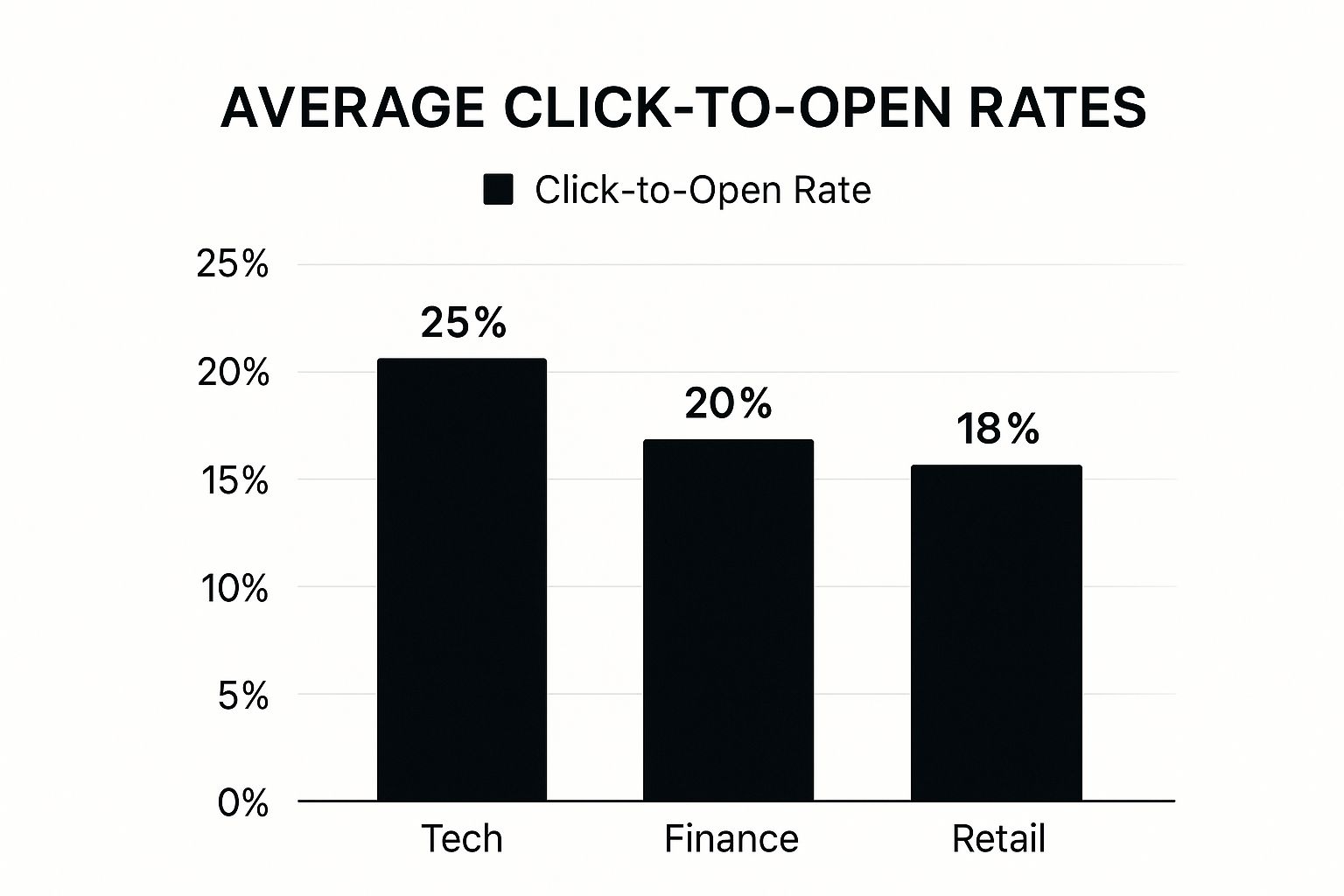
As you can see, engagement levels are all over the map. Industries that are more technical or involve bigger decisions often see higher CTORs because their audience is already highly invested.
Email Engagement Metrics Compared
It’s easy to get these metrics mixed up, but they each tell a very different part of the story. Here’s a quick breakdown to clear things up.
| Metric | What It Measures | What It Tells You |
|---|---|---|
| Open Rate | The percentage of recipients who opened your email. | How effective your subject line and preheader text were at grabbing attention. |
| Click-Through Rate (CTR) | The percentage of total recipients who clicked a link. | The overall performance of your campaign, from subject line to CTA, across your entire list. |
| Click-to-Open Rate (CTOR) | The percentage of openers who clicked a link. | How compelling your email’s content, offer, and CTA were to an already interested audience. |
In the end, making CTOR a priority fundamentally changes your email marketing for the better. You stop chasing opens and start creating content that genuinely connects with people and encourages them to act—and that’s what truly drives results.
Proven Strategies To Increase Your Click To Open Rate

Getting someone to open your email is half the battle. Getting them to click is where the real magic happens. A high click to open rate doesn’t just happen by luck; it’s the payoff for creating content that’s genuinely interesting, well-designed, and perfectly aligned with what your audience wants.
Your goal is to make that click feel like the most natural next step for your subscriber. It all starts by making sure the inside of your email delivers on the promise of your subject line. If you teased a huge discount, that offer better be the first thing they see. Any bait-and-switch, and you’ve lost their trust—and their click—for good.
Craft Compelling and Actionable Copy
Think of your email copy as a direct path leading your reader straight from the opening line to your call-to-action (CTA). To get them there, your writing needs to be crisp, valuable, and laser-focused on one main goal. Don’t muddy the waters by asking them to do five different things at once.
Every word should build excitement for the click. Here’s how to do it:
- Have a Singular Goal: Decide on the one, single action you want the reader to take. Everything in the email—the headline, the images, the copy—should push them toward that goal.
- Focus on the Benefit: Don’t just list features. Frame everything in terms of what your reader gets out of it. “Save 3 hours a week” packs a much bigger punch than “New automated feature.”
- Make it Scannable: Let’s be honest, people don’t read emails; they scan them. Use short paragraphs, bullet points, and bold text to make your key points jump off the page.
A great email doesn’t just share information. It creates a feeling of opportunity or urgency, making the click feel like the obvious solution to a problem or the perfect answer to a desire.
Remember, none of this matters if your subject line doesn’t get the email opened in the first place. Brushing up on email subject line best practices is non-negotiable for improving your overall campaign performance, which absolutely includes your CTOR.
Design for the Click
How your email looks is just as crucial as what it says. A clean, mobile-friendly design isn’t just a nice-to-have anymore; it’s a must. With over 50% of all emails being opened on a phone, a clunky, hard-to-read layout is a surefire way to get your message deleted instantly.
Your CTA button should be the star of the show. Make it pop with a high-contrast color that stands out from the rest of the email. And please, ditch the generic “Click Here.” Use clear, action-oriented text like “Get Your Free Guide” or “Claim My Discount.”
Test and Personalize Everything
If you really want to move the needle on your click-to-open rate, you have to stop guessing and start testing. A/B testing is your best friend for figuring out what your audience actually responds to.
Not sure where to start? Try testing these elements:
- CTA Button Copy: Is “Shop Now” better than “Explore the Collection”?
- Button Color and Placement: Test a bright orange button at the top against a blue one at the bottom.
- Email Layout: Does a simple single-column design outperform one with multiple columns?
- Personalization: See what happens when you use the subscriber’s first name or mention a product they recently viewed.
Personalization and segmentation are game-changers here. Sending a generic email about running shoes to someone who just bought hiking boots is a huge missed opportunity. When you segment your list based on past purchases, browsing history, or demographics, you can send hyper-relevant content. It feels less like a marketing blast and more like a personal recommendation, making that click almost a reflex.
What’s a Good Click-to-Open Rate? A Look at Industry Benchmarks
So, you’ve calculated your click-to-open rate. The very next thought that pops into your head is probably, “Is this number any good?”
The honest answer? It completely depends on your industry. A CTOR that would have one marketing team high-fiving would be considered just okay for another.
Trying to compare your results against a generic, one-size-fits-all average is just setting yourself up for confusion. The real magic happens when you use industry-specific benchmarks. This gives you the context you need to set achievable goals and understand how well you’re really connecting with your audience.
Why Do Benchmarks Vary So Much?
It all comes down to the mindset of your audience and the type of content they expect from you.
Think about it. Someone subscribed to their favorite author or blogger is there for the content. They want to read, engage, and click through to the latest article or story. Their whole reason for being on the list is to discover something new.
Now, contrast that with someone on an e-commerce or real estate mailing list. Their intent is often much more transactional. They might open an email to see if a price dropped or if a new house hit the market, but they’re not going to click unless an offer perfectly aligns with what they need right now. This fundamental difference in user intent is what drives the huge swings in CTORs across industries.
Understanding your industry’s benchmark isn’t about hitting some magic number. It’s about knowing what’s typical for your specific audience so you can spot real opportunities to improve, instead of chasing a standard that doesn’t apply to you.
For a wider view of how CTOR fits into the bigger picture, you can check out general Email Marketing Benchmarks to see the full landscape of performance metrics.
Let’s Talk Numbers
Recent 2024 data, pulled from an analysis of over 3.3 million email campaigns, really shines a light on these differences. While the average email open rate was a healthy 42.35%, the click-to-open rate painted a much more interesting picture.
The real estate industry, for example, posted a CTOR of just 3.47%. On the other hand, industries built around content and community, like bloggers (8.43%) and authors (7.69%), saw much stronger results. This just confirms what we know intuitively: audiences who sign up expecting great content are far more likely to click. You can dig into the full research on email performance metrics to learn more.
Here’s a quick look at how a few other industries tend to perform:
- Creative Services: These folks often see higher engagement because their emails are a visual portfolio, practically begging to be clicked on.
- Publishing Companies: Much like bloggers, their subscribers are actively on the hunt for new things to read, watch, or listen to.
- Education Institutions: This sector has a built-in advantage—an audience that is actively looking for information, which naturally leads to more clicks.
By rooting your strategy in these industry-specific numbers, you can be much smarter about your email marketing. You’ll know when a campaign genuinely missed the mark and, just as importantly, when you’ve scored a real win for your audience.
Got Questions About Click-to-Open Rate? We’ve Got Answers
Even when you’ve got a handle on the basics, some of the finer points of click-to-open rate can still be a bit fuzzy. Let’s clear up some of the most common questions marketers have so you can use this metric like a pro.
Is CTOR The Same As Click-Through Rate?
Nope, they’re two different beasts, and they tell you very different stories about your email’s performance.
Your click-through rate (CTR) looks at the bigger picture. It’s calculated based on the total number of emails you delivered. On the other hand, your click-to-open rate (CTOR) zooms in on the people who actually opened your email.
Here’s an easy way to think about it: CTR tells you how many people clicked out of everyone you sent the email to. But CTOR gets much more specific. It isolates the performance of your email’s content—the copy, the images, the offer—on an audience that was already interested enough to open it.
CTOR answers a crucial question: “Of the people who cared enough to open this email, how many did we actually persuade to click?” It’s a pure test of your content’s power.
How Does Apple’s Mail Privacy Protection Mess With CTOR?
It definitely does, but in a slightly sneaky way. Apple’s Mail Privacy Protection (MPP) can pre-fetch email content, which often triggers the tracking pixel and registers an “open” even if your subscriber never actually laid eyes on it.
This leads to artificially inflated open rates. So, while your number of real, human clicks stays the same, the number of “opens” in your formula shoots up. The result? Your click-to-open rate can look artificially low. It’s a classic case of the denominator getting bigger while the numerator stays the same, which skews the whole equation.
What Should I Try to Improve First?
This is a great question, and the answer depends on where your funnel is leaking.
If your open rates are in the gutter, start there. Period. You could have the most persuasive email in the world, but it doesn’t matter one bit if nobody opens it. Your first job is to get people in the door by focusing on your subject lines, sender name, and that all-important preheader text.
But what if your open rates are solid, yet your click-to-open rate is disappointingly low? That’s a clear signal that the problem isn’t getting them to open—it’s what they find inside. In this situation, your energy is best spent on:
- Your Copy: Is it engaging? Does it clearly spell out the benefits for the reader?
- Your Design: Is the layout clean and easy to scan? Does it look great on a phone?
- Your Call-to-Action (CTA): Is your button big, bold, and impossible to miss? Does the text tell people exactly what to do?
Knowing which metric to focus on is the key to making smart, efficient improvements instead of just spinning your wheels.
A low click-to-open rate often points to a bigger problem hiding in plain sight: an unhealthy email list. Truelist helps you make sure your emails are landing in front of real, engaged people. It cleans your lists by weeding out the invalid, risky, and inactive addresses that are dragging your metrics down. Start validating for free and see what a difference a clean list makes.