 Claude
  Perplexity
Email Subject Line Best Practices for 2026 (With Examples)
Discover top email subject line best practices to boost opens. Learn how to craft compelling subject lines with our expert tips and real-world examples.
TL;DR: Discover top email subject line best practices to boost opens. Learn how to craft compelling subject lines with our expert tips and real-world examples.
The average professional gets 121 emails a day and decides what to open in roughly 2-3 seconds per message. In that window, the subject line and preheader are the only things competing for attention. That’s the whole reason this guide exists: the subject line isn’t a factor in open rate — for most senders it’s the only factor that matters before the message gets clicked or ignored.
The nine practices below are the ones that move the needle in 2026, with specific examples and the data behind why they work. We’ll cover length and pairing with preheader text, urgency without spam triggers, personalization that goes beyond merge tags, and how Apple Mail Privacy Protection has changed what “open rate” even means. Each section includes concrete subject-line examples you can adapt for your next campaign.
1. Keep Subject Lines Under 50 Characters
In the modern digital landscape, attention is a scarce resource, and the inbox is a battlefield. One of the most critical email subject line best practices is to prioritize brevity. With over 60% of emails now opened on mobile devices, long subject lines are often truncated, meaning your core message gets lost before the email is even opened. Adhering to a limit of around 50 characters ensures your entire message is visible, scannable, and impactful across all platforms, from a wide desktop monitor to a small smartphone screen.
This practice isn’t just about avoiding truncation; it’s about forcing clarity and discipline in your messaging. A shorter subject line demands you get straight to the point, which respects the recipient’s time and increases the likelihood they will engage. Think of it as an elevator pitch for your email: you have mere seconds to capture interest.
Why This Practice Is Essential
A concise subject line directly boosts open rates. Recipients can quickly grasp the email’s purpose and value proposition, reducing friction and hesitation. This is especially vital for Sales Development Representatives (SDRs) sending cold emails or e-commerce brands announcing a flash sale. The primary benefit is improved visibility and scannability on mobile devices, where screen real estate is at a premium.
Actionable Tips for Implementation
- Front-Load the Value: Place the most compelling words or your main call to action at the very beginning of the subject line. This ensures the key information is seen first, even if it gets cut off.
- Count Characters, Not Words: Use an online character counter to stay within the 50-character guideline. “Your weekly report is ready” (27 characters) is much more effective than “This is your weekly performance report for the period ending Friday” (72 characters).
- Use Contractions and Symbols: Shorten phrases where possible. Use “You’re” instead of “You are” or a ”→” symbol instead of the word “to” to save precious space.
- Test Across Devices: Before sending a campaign, use tools like Litmus or Email on Acid to preview how your subject line appears on various popular email clients and mobile devices.
2. Pair Your Subject Line With the Preheader
The preheader is the snippet of text that appears next to (on desktop) or under (on mobile) the subject line in the inbox preview. On Gmail mobile it’s roughly 40-90 characters depending on screen size; on Apple Mail mobile it’s about 2 lines of preview text. Most senders ignore it. That’s a mistake — the preheader is the second thing every recipient sees, and it doubles your real estate for hooking the open.
When a preheader isn’t explicitly set, email clients pull whatever text appears first in the email body. That’s often “Click here to view in browser,” a tracking pixel artifact, or the start of your boilerplate. None of those help your open rate.
Why this practice is essential
A strong subject + preheader pairing functions as a two-line headline, not one. Use the subject to grab attention and the preheader to deepen the hook with context the subject line couldn’t fit. This is especially powerful for mobile, where the two lines together account for nearly all the visible information.
Actionable tips for implementation
- Always set a preheader explicitly. Every modern ESP (Mailchimp, Klaviyo, HubSpot, ConvertKit, Brevo) exposes a “preheader” or “preview text” field. Fill it. Don’t rely on defaults.
- Make the preheader complement the subject, not duplicate it. Subject: “Your Q4 report is ready” → Preheader: “Open rates jumped 18% — the breakdown is inside.” Together they form a complete pitch.
- Avoid letting tracking-pixel text leak in. If you see the words “View in browser” or alt-text from a header image appearing in your preview text, your preheader isn’t set or is too short. Most clients fall back to body text after the preheader runs out — write at least 75 characters to be safe.
- Front-load the preheader too. Mobile clients often cut the preheader at 35-40 characters. Put the most compelling phrase first, just like the subject line.
A typical mobile preview shows three lines: sender name, subject, preheader. Optimizing only the middle line is leaving a third of your inbox real estate on the table.
3. Create Urgency Without Being Spammy
Leveraging urgency is a powerful psychological tool in email marketing, but it walks a fine line between compelling and cringeworthy. This practice involves using time-sensitive language and genuine scarcity to prompt immediate action from your audience. When executed correctly, urgency creates a legitimate Fear Of Missing Out (FOMO), encouraging recipients to open your email and act now, rather than later. The goal is to motivate without resorting to deceptive tactics that harm your brand’s reputation and trigger spam filters.

This approach is highly effective because it directly addresses procrastination. By framing an offer with a clear deadline or limited availability, you give the recipient a concrete reason to prioritize your message over the dozens of others in their inbox. It transforms a “maybe later” consideration into a “must-see now” opportunity, a technique mastered by e-commerce giants like Amazon with its “Lightning Deals” and Booking.com with its real-time scarcity alerts.
Why This Practice Is Essential
Strategic urgency dramatically increases conversion rates by shortening the consideration-to-action timeline. It’s particularly effective for driving sales, event registrations, and webinar sign-ups. The primary benefit is spurring immediate engagement by making the cost of inaction clear and tangible. However, using this technique requires a careful touch to maintain trust and avoid deliverability issues. For those concerned about their sending reputation, you can learn more about how to navigate these challenges with the right email deliverability best practices.
Actionable Tips for Implementation
- Use Genuine Deadlines and Scarcity: Authenticity is key. If you say a sale ends at midnight, ensure it does. Subject lines like “Last chance: 20% off ends tonight” are effective because the urgency is real and verifiable.
- Combine Urgency with Value: Clearly state what the recipient stands to gain or lose. “Your cart expires soon - complete your order for free shipping” combines urgency (cart expiration) with a clear benefit (free shipping).
- Avoid Spam Triggers: Steer clear of ALL CAPS, excessive exclamation points, and pushy words like “ACT NOW!!!“. These are red flags for spam filters and human recipients alike. A clean “Final hours for our summer sale” is far more professional.
- A/B Test Your Phrases: Experiment with different urgency-driven subject lines to see what resonates with your audience. Test phrases like “Ends soon,” “Last day,” “24-hour offer,” or “Limited spots available” to find your optimal performer.
4. Personalize with Recipient Data
Moving beyond generic, one-size-fits-all communication is a cornerstone of modern email marketing. Personalization involves leveraging subscriber data to craft subject lines that speak directly to an individual, creating a sense of recognition and relevance that mass messaging simply cannot match. While using a recipient’s first name is a common starting point, true personalization goes deeper, incorporating behavioral data like purchase history, location, or past interactions to create a hyper-relevant experience.
This approach transforms your email from an advertisement into a personal recommendation. Instead of feeling like just another number on a list, the recipient feels seen and understood. For example, a subject line like “Recommended for you based on The Midnight Library” from Amazon is far more compelling than a generic “New book recommendations” because it’s tailored to a specific interest.
Why This Practice Is Essential
Personalized subject lines have been consistently shown to significantly increase open and click-through rates. By demonstrating that you know and understand your audience’s needs or interests, you build trust and foster a stronger customer relationship. The primary benefit is enhanced relevance and engagement, which cuts through inbox noise and makes your message stand out. This is a crucial tactic for e-commerce brands aiming to drive repeat purchases and for service providers looking to nurture leads.
Actionable Tips for Implementation
- Go Beyond the First Name: Use other data points for more impactful personalization. Incorporate a city name (“Big savings in Boston this weekend”), a recently viewed product (“Still thinking about the Suede Loafers?”), or a loyalty status (“A special offer for our Gold members”).
- Implement Fallback Content: Always have a plan for missing data. If you don’t have a first name for every contact, set up a rule to use a generic but friendly alternative like “A special offer for you” to avoid awkward “Hi [FNAME],” errors.
- Ensure Data Accuracy: Stale or incorrect data can make your personalization efforts backfire and damage brand credibility. Regularly clean and update your contact lists to ensure the information you’re using is accurate and relevant.
- Test and Segment: A/B test personalized subject lines against non-personalized versions to measure the direct impact on your open rates. Further segment your audience to deliver even more targeted messages based on behavior or demographics. For those in sales, understanding how to apply these concepts is key; you can explore advanced techniques on how to write cold emails on truelist.io.
5. Use Action-Oriented Language
The most effective subject lines don’t just describe what’s inside an email; they inspire the recipient to act. Using action-oriented language involves starting your subject line with a strong verb that clearly communicates what the reader can do or achieve by opening your message. This creates a sense of momentum and sets a clear expectation, transforming a passive suggestion into an active invitation. It’s a fundamental email subject line best practice for driving engagement.
This direct approach works because it taps into our natural inclination to respond to commands and opportunities. A subject line like “Start learning Python today” from Coursera is far more compelling than “Python course information.” It doesn’t just inform; it empowers the user, framing the email’s content as an immediate, accessible opportunity. This sense of urgency and clarity is proven to boost open rates and subsequent conversions.
Why This Practice Is Essential
Action-oriented language directly increases engagement by telling the recipient exactly what to do next. This clarity removes cognitive load and makes the decision to open the email much simpler. The primary benefit is a higher click-through rate because the subject line primes the user for the call-to-action inside the email. For e-commerce brands, this means more sales, and for SaaS companies, it means more feature adoption or trial sign-ups.
Actionable Tips for Implementation
- Start with a Strong Verb: Begin your subject line with a powerful action word. Instead of “New features are here,” try “Discover our new features.” Words like Join, Save, Download, Reserve, and Transform are excellent choices.
- Match the Action to the Content: Ensure the verb you choose accurately reflects the action the recipient can take within the email. If the goal is to get sign-ups for a webinar, a subject line like “Reserve your seat now” is perfectly aligned.
- Combine Verbs with Benefits: Pair your action word with a clear benefit to make the proposition even more attractive. For example, Peloton’s “Join your first live class” combines the action (Join) with the exciting benefit of a first-time experience.
- Test Different Action Words: Not all verbs resonate equally with every audience. A/B test different action-oriented subject lines to see which ones drive the best performance for your specific subscribers. For instance, test “Get your free guide” against “Download your free guide.”
6. A/B Testing for Optimization
Relying on intuition alone is a risky strategy in email marketing. One of the most powerful email subject line best practices is to adopt a data-driven approach through A/B testing. This systematic method involves creating two or more variations of your subject line (Variation A and Variation B) and sending each to a small, random segment of your email list. By measuring which version yields a higher open rate, you can confidently send the winning subject line to the remainder of your audience, maximizing your campaign’s impact.
This process removes guesswork and provides concrete evidence of what truly captures your audience’s attention. Famously, Barack Obama’s 2012 presidential campaign raised millions by A/B testing subject lines, discovering that simple, direct messages like “Hey” outperformed more formal appeals. This practice allows you to continuously learn and refine your messaging based on real-world user behavior, not assumptions.
Why This Practice Is Essential
A/B testing is the key to incremental, long-term improvement. Instead of one-off successes, you build a repository of knowledge about what works for your specific audience, leading to consistently higher engagement. The primary benefit is data-driven decision-making, which replaces speculation with empirical proof and drives predictable growth. It’s an essential tool for any marketer, from e-commerce brands testing promotional language to B2B companies refining their outreach. Furthermore, a successful A/B test is a prerequisite for a healthy campaign, much like ensuring your email list is clean and valid. For more insights on this foundational step, see our guide on how to see if an email address is valid.
A 2026 warning: Apple Mail Privacy Protection breaks naive open-rate tests
Since iOS 15, Apple Mail Privacy Protection (MPP) automatically pre-fetches tracking pixels for any email opened in Apple Mail — whether or not the recipient actually opened it. That inflates the reported “open rate” for the Apple Mail share of your audience to nearly 100%, regardless of subject-line quality. Apple Mail typically accounts for 40-55% of consumer email opens in 2026.
If you A/B test only on open rate, you’re effectively comparing two variants over the non-Apple-Mail half of your audience while the Apple half reports false positives for both. Either variant will look like it performs similarly because the noise floor is huge.
Three workarounds that work in 2026:
- Test on click-through rate, not opens. Clicks are still a real signal. Define a clear in-email CTA and measure click rate per variant.
- Test on conversion, not opens. For revenue-driving campaigns, route both variants through a UTM parameter and measure conversion downstream.
- Filter Apple Mail opens out of your open-rate metric. Most modern ESPs (Klaviyo, HubSpot, Customer.io) now offer an “Apple Mail Privacy Protection adjusted” open rate. Use that, not the raw number.
Don’t trust an A/B test result that says “Variant B won by 1.5% on open rate.” With MPP, that’s noise, not signal.
Actionable Tips for Implementation
- Test One Variable at a Time: To get clear results, only change one element. For subject lines, this could be personalization (e.g., “Your Weekly Report” vs. ”[First Name], Your Weekly Report”), length, or tone (e.g., a statement vs. a question).
- Ensure Statistical Significance: Your test segments must be large enough to produce reliable results. A common rule of thumb is to have at least 1,000 recipients per variation to ensure the outcome isn’t due to random chance.
- Allow Sufficient Time: Let the test run long enough to gather meaningful data. Most email service providers recommend at least 4 hours before declaring a winner and sending the final version to the rest of your list.
- Document Everything: Keep a log of your tests, including the variations, results, and key takeaways. This creates an invaluable internal knowledge base to inform all future email campaigns.
The infographic below illustrates the straightforward process flow for conducting an effective subject line A/B test.
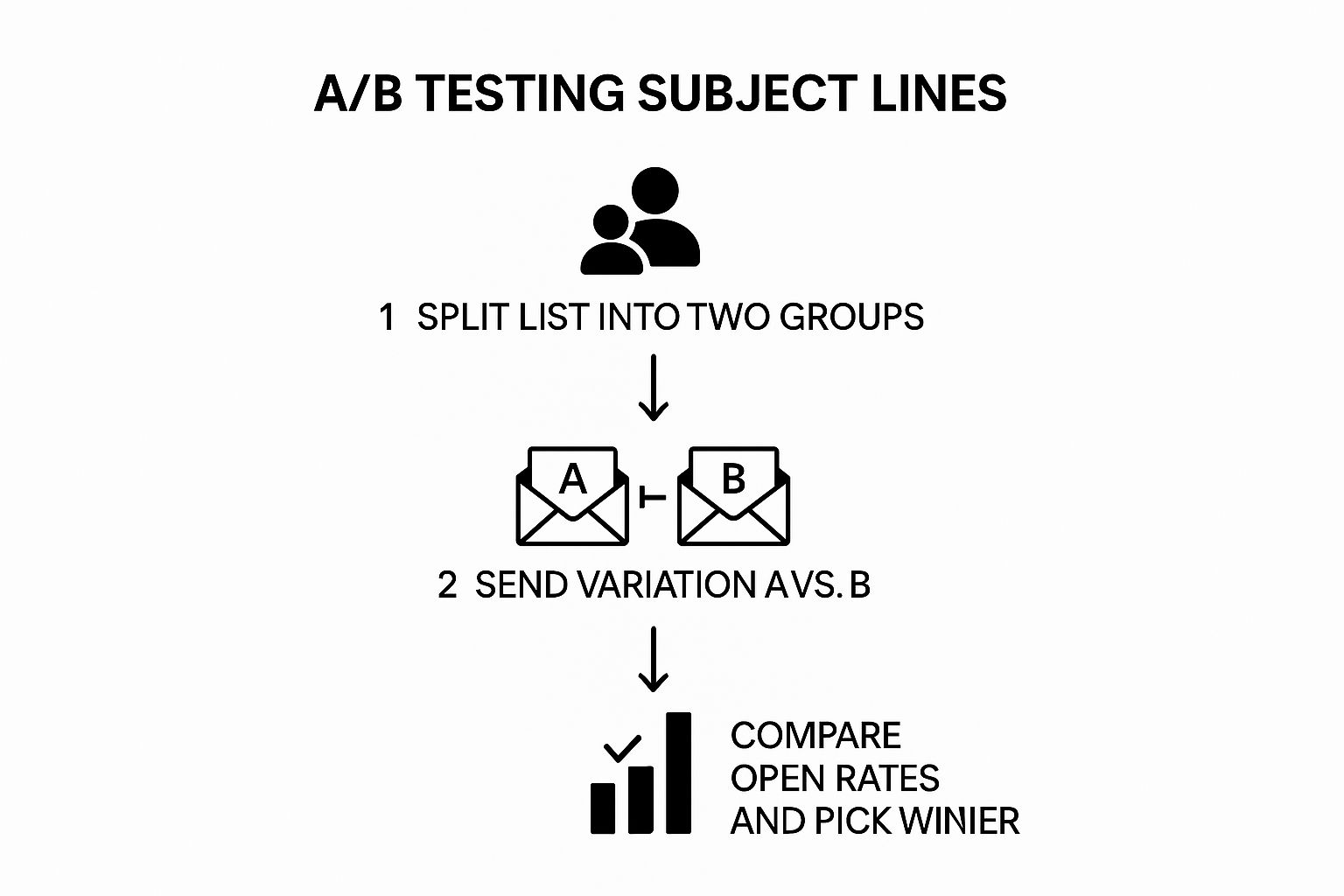
This simple, three-step workflow ensures you can systematically identify the more effective subject line before committing to a full campaign send.
7. Ask Compelling Questions
One of the most effective email subject line best practices is to harness the power of human curiosity. Crafting your subject line as a compelling question creates a psychological “information gap,” an itch that the recipient feels compelled to scratch by opening your email to find the answer. This technique shifts the dynamic from a simple announcement to an engaging conversation starter, immediately involving the recipient in your message.
This method moves beyond just stating a benefit; it frames that benefit as a solution to a problem the reader may be actively considering. A question like “Ready to ditch your bank fees?” from Mint is far more engaging than a statement like “Ditch your bank fees with Mint.” It directly addresses a common pain point and prompts the user to reflect on their own situation, significantly boosting the impulse to open the email and learn more.
Why This Practice Is Essential
Question-based subject lines are highly effective because they tap into a natural cognitive bias. When we see a question, our brains are hardwired to start formulating an answer. This creates instant engagement before the email is even opened. For SDRs, this can be the key to breaking through the noise of a crowded inbox. The primary benefit is increased curiosity and engagement, which directly translates to higher open rates. It feels personal and less like a mass-market broadcast.
Actionable Tips for Implementation
- Make it Relevant: The question must connect directly to the recipient’s known needs, goals, or pain points. A question like “Tired of manual data entry?” is powerful for a CRM contact but irrelevant to a retail customer.
- Avoid Simple Yes/No Answers: Steer clear of questions that can be answered without opening the email. “Do you like saving money?” is less effective than “What if you could save an extra 15%?” The latter requires opening the email to understand the “how.”
- Use the Second Person: Address the recipient directly using “you” or “your” to make the question feel personal and urgent. “Who’s viewed your profile?” is a classic, effective example from LinkedIn.
- Deliver on the Promise: The email body must provide a clear and satisfying answer to the question posed in the subject line. Failing to do so breaks trust and can lead to unsubscribes.
- Test Against Statements: A/B test your question-based subject lines against more traditional, statement-based versions to see what resonates best with your specific audience.
8. Avoid Spam Trigger Words
Navigating the complex world of email deliverability requires more than just a clever hook; it demands an understanding of what gets you flagged. One of the most fundamental email subject line best practices is to meticulously avoid spam trigger words. These are specific terms, phrases, and formatting choices that email service providers like Gmail and Outlook automatically associate with unsolicited, low-quality, or malicious content. Using them is like waving a red flag at an inbox guard, dramatically increasing the chances your message will be diverted straight to the spam folder, never to be seen.
This practice is about safeguarding your sender reputation and ensuring your carefully crafted email has a fair chance to be read. It’s not about censoring your message but about communicating it in a way that builds trust from the very first impression. Steering clear of spammy language signals to both algorithms and humans that your email is legitimate and valuable, a crucial step in building a healthy relationship with your audience.
Why This Practice Is Essential
The primary benefit of avoiding spam triggers is improved email deliverability. An email that never reaches the primary inbox has a 0% open rate, no matter how compelling its content is. By avoiding these problematic words and formatting, you protect your sender score, which directly impacts whether email clients trust you enough to deliver your messages. This is especially critical for SDRs and marketers whose success depends on consistent inbox placement.
Actionable Tips for Implementation
- Rethink Urgency and Value: Frame your offers without using classic spam triggers. Instead of “FREE MONEY NOW!”, try “Your exclusive savings inside.” Instead of “ACT NOW!!!”, use a more professional “A limited-time offer for you.”
- Avoid Excessive Punctuation and Caps: Using multiple exclamation points (!!!), question marks (???), or writing in ALL CAPS is a major red flag for spam filters. It reads as shouting and unprofessional, so use standard capitalization and punctuation.
- Use a Spam Checker Tool: Before launching a campaign, run your subject line and email body through a spam checker tool. These services maintain updated lists of trigger words and can score your email’s likelihood of being flagged as spam.
- Be Wary of “Miracle” Claims: Words that promise unbelievable results or quick fixes, such as “guarantee,” “risk-free,” or “lose weight fast,” are heavily scrutinized. Focus on clear, tangible benefits instead of making grandiose claims.
Trigger words to avoid in 2026
The list below isn’t exhaustive — filter heuristics evolve constantly — but these are the categories that reliably hurt deliverability. For each, a reframe that keeps the meaning without the flag.
| Category | Watch out for | Reframe |
|---|---|---|
| Money / pricing | free, cash, $$$, 100% free, cheap, discount, lowest price, refund | complimentary, included, at no cost, you save |
| Urgency / pressure | act now, urgent, hurry, limited time, expires today, don't miss out | closing soon, final week, last chance for…, ending Friday |
| Risk-free claims | guarantee, risk-free, no risk, no obligation, no catch, you've been selected | (skip the claim; lead with the benefit instead) |
| Income / outcomes | make money, earn extra cash, work from home, additional income, lose weight fast, miracle, breakthrough | (be specific about the actual outcome and method) |
| CTA pressure | click here, click below, apply now, subscribe, order now | read the full guide, see the details, view the report |
| Formatting flags | ALL CAPS, !!!, ???, >>>, **STARS**, mixed colors in HTML | sentence case, single punctuation |
The categorical pattern matters more than any individual word — filters score holistically. A subject line with one “free” is usually fine. A subject line with “free” + ”!!!” + ALL CAPS will tank. For the broader deliverability picture beyond subject lines, see how to prevent emails from going to spam and email sender reputation score.
9. Strategic Emoji Usage
In a text-heavy inbox, a splash of color and personality can make all the difference. One of the most visually effective email subject line best practices is the strategic use of emojis. These small icons add visual flair, convey emotion, and help your message pop in a crowded environment. When used thoughtfully, emojis can break through the noise, increase brand recall, and significantly boost open rates by drawing the recipient’s eye.
This practice was popularized by mobile-first brands like Uber and modern retailers who understand the power of visual communication. An emoji can replace a word, saving precious character space while adding context and tone. For example, a simple “✈️” instantly communicates travel, making a subject line like “✈️ Sale fares as low as $59” immediately scannable and compelling for someone interested in a getaway.
Why This Practice Is Essential
Strategic emoji usage is about more than just decoration; it’s a psychological tool. Emojis can create a quick emotional connection and humanize your brand, making your communication feel less corporate and more personal. The primary benefit is enhanced visibility and emotional resonance, which leads to higher engagement. In A/B tests, subject lines with a relevant emoji frequently outperform their text-only counterparts, proving their power to capture attention.
Actionable Tips for Implementation
- Ensure Relevance: Only use emojis that directly relate to your email’s content or your brand’s product. A pizza slice emoji for a food delivery confirmation (Domino’s: 🍕 Your pizza is ready!) makes sense; a random animal does not.
- Practice Moderation: Overloading your subject line with emojis can look spammy and unprofessional. A good rule of thumb is to stick to one or two emojis per subject line to maintain a clean, impactful look.
- Know Your Audience: Consider your brand voice and audience demographics. While emojis work well for B2C retail and lifestyle brands, they may be inappropriate for highly formal B2B communications or conservative industries.
- Test for Rendering: Emojis can appear differently or not at all across various email clients and operating systems. Always test how your subject line displays on major platforms like Gmail, Outlook, and Apple Mail before sending a campaign.
Email Subject Line Best Practices Comparison
| Strategy | Implementation Complexity 🔄 | Resource Requirements ⚡ | Expected Outcomes 📊 | Ideal Use Cases 💡 | Key Advantages ⭐ |
|---|---|---|---|---|---|
| Keep Subject Lines Under 50 Characters | Low 🔄 | Minimal ⚡ | Higher open rates; mobile-friendly 📊 | Mobile-first email campaigns | Complete visibility; clarity; concise messaging ⭐ |
| Pair Subject With Preheader | Low 🔄 | Minimal ⚡ | Doubles inbox real estate; adds context 📊 | Every send, especially mobile | Two-line headline; complete pitch ⭐ |
| Create Urgency Without Being Spammy | Medium 🔄 | Moderate ⚡ | Increases open rates; drives quick action 📊 | Time-sensitive promotions | FOMO creation; improved ROI ⭐ |
| Personalize with Recipient Data | High 🔄 | High ⚡ | 50% higher open rates; better engagement 📊 | Targeted, personalized marketing | Enhanced relevance; higher conversions ⭐ |
| Use Action-Oriented Language | Low-Medium 🔄 | Low ⚡ | Increases click-through; motivates action 📊 | Call-to-action focused emails | Clear expectations; engagement booster ⭐ |
| A/B Testing for Optimization | High 🔄 | High ⚡ | Data-driven improvements; reduced guesswork 📊 | Campaign optimization across audiences | Continuous performance improvement ⭐ |
| Ask Compelling Questions | Low 🔄 | Low ⚡ | Increases curiosity and open rates 📊 | Engagement-driven content | Creates mental engagement; personal connection ⭐ |
| Avoid Spam Trigger Words | Medium 🔄 | Moderate ⚡ | Better deliverability; higher inbox placement 📊 | Any email to improve deliverability | Maintains sender reputation; trust ⭐ |
| Strategic Emoji Usage | Low-Medium 🔄 | Low ⚡ | 56% higher open rates in B2C 📊 | B2C, mobile-friendly campaigns | Visual appeal; emotional connection ⭐ |
From Theory to Inbox Mastery: Your Next Steps
We have navigated the critical landscape of what makes an email subject line not just seen, but clicked. From the tactical precision of keeping subject lines under 50 characters to the psychological pull of well-crafted urgency, each practice serves a distinct purpose. The strategies we’ve detailed are not isolated tricks; they form a comprehensive framework for communication.
Mastering these email subject line best practices involves a continuous cycle of creation, testing, and refinement. Think of the core pillars we discussed:
- Clarity and Brevity: Capturing attention instantly in a crowded inbox with subject lines under 50 characters.
- Inbox Real Estate: Pairing the subject line with an explicitly-set preheader so the preview shows a complete two-line pitch.
- Personalization and Connection: Using recipient data and compelling questions to make your message feel like a one-to-one conversation.
- Motivation and Action: Employing action-oriented verbs and strategic urgency to prompt an immediate response.
- Optimization with MPP-aware metrics: Leveraging A/B testing on clicks and conversion (not just opens) because Apple Mail Privacy Protection has made raw open rates unreliable.
- Deliverability: Avoiding spam-trigger language to ensure your message even reaches the inbox.
The journey from a good subject line to a great one is paved with data. A/B testing is not just a best practice; it is the engine of improvement that transforms assumptions into certainties. It allows you to replace guesswork with concrete evidence, ensuring your efforts consistently lead to higher engagement and better results.
Putting Best Practices into Action
The true value of this knowledge lies in its application. Don’t feel overwhelmed by the need to implement all nine strategies at once. The most effective approach is incremental. For your next campaign, select just one or two of these techniques to focus on.
For example, you could start by A/B testing a question-based subject line against a statement-based one. Or, you could focus on personalizing the subject line with the recipient’s company name. The key is to start small, measure the impact on your open rates, and gradually integrate more of these powerful techniques into your standard workflow. This methodical approach is the secret to achieving sustainable inbox mastery.
Ultimately, a truly effective email strategy recognizes that a brilliant subject line is only half the battle. Your message, no matter how perfectly crafted, is worthless if it lands in the spam folder or is sent to an invalid address. This is why the foundation of all successful email marketing is impeccable list hygiene — see our guide to email list cleaning services for the operational side of this. Protecting your sender reputation by ensuring your emails reach real, engaged recipients is non-negotiable. It creates a virtuous cycle where great subject lines lead to high open rates, which in turn boosts your reputation and improves future deliverability. Your journey to mastering email begins not just with a great subject line, but with a clean list.
Ready to ensure your perfectly crafted subject lines actually reach the inbox? Start with a foundation of clean data. Truelist provides real-time email verification to remove invalid addresses, reduce bounce rates, and protect your sender reputation. Try Truelist today and maximize the impact of every email you send.