 Claude
  Perplexity
Why Was My Email Not Received A Complete Troubleshooting Guide
Struggling with 'email not received' errors? This guide breaks down exactly how to diagnose and fix deliverability issues from sender to recipient.
TL;DR: Struggling with 'email not received' errors? This guide breaks down exactly how to diagnose and fix deliverability issues from sender to recipient.
It’s a familiar, frustrating moment: you send an important email, only to hear the dreaded words, “I never got it.” Before you spiral into a technical deep-dive, take a breath. The fix is often surprisingly simple.
When an email goes missing, the usual suspects are a typo in the address, an overzealous spam folder, or an inbox that’s completely full. I always start by checking these three things first—it solves the problem more often than you’d think.
The Quick Fix Checklist For Missing Emails
So, where do you begin? Let’s walk through the most common culprits, starting with the easiest checks on the recipient’s side before looking at what might be happening on your end.
Initial Troubleshooting Table: A Quick Glance
To get started, here’s a simple table that breaks down the most common issues from both the recipient’s and the sender’s perspective. It’s a handy reference for quickly diagnosing the problem.
| Check Area | What to Look For (Recipient) | What to Look For (Sender) |
|---|---|---|
| Email Address | Is the sender’s address accidentally blocked or filtered? | Are there any typos in the recipient’s address? (e.g., gmil.com) |
| Email Folders | Did the email land in Spam, Junk, Promotions, or another folder? | Did you receive an automated “undeliverable” or bounce-back email? |
| Inbox Status | Is the inbox full? No new mail can arrive if storage is maxed out. | Are other recipients receiving your emails without issue? |
This table covers the basics, but let’s explore these points in more detail.
Start With the Recipient
The investigation should always start on the receiving end. With nearly 45% of all emails being classified as spam, aggressive filters are often the number one reason a legitimate message gets lost.
Ask the recipient to do a quick check of these three spots:
- The Spam or Junk Folder: This is ground zero for missing emails. It’s the first place anyone should look.
- All Mail and Other Folders: Gmail has “Promotions” and “Social” tabs, and Outlook has “Other.” Emails can easily get sorted away from the primary inbox. A quick search across all folders usually turns up the missing message.
- Inbox Storage Space: If their inbox is full, their server will simply reject any new emails. Have them confirm they have enough free space to receive new mail.
My go-to tip: Tell them to search for your specific email address or the exact subject line. This is much faster than endlessly scrolling and gives a definitive “yes” or “no” on whether the email is anywhere in their account.
Now, Check Your Own Work
If the recipient has searched high and low with no luck, it’s time to look in the mirror. A simple typo can send your carefully crafted message into the digital ether.
First, triple-check the recipient’s email address. I’ve seen it a hundred times—a simple mistake like gmil.com instead of gmail.com will cause the email to bounce back immediately because the domain doesn’t exist.
Next, look for a bounce-back message in your own inbox. If an email can’t be delivered, the server almost always sends an automated reply explaining why. These messages are your best clue for what went wrong.
If you notice multiple people aren’t getting your emails, the problem might be bigger. Often, this points to issues with your domain’s configuration. If you suspect that’s the case, this guide on troubleshooting DNS issues is a great resource. For more widespread deliverability problems, check out our in-depth article on what to do when https://truelist.io/blog/no-emails-coming-through.
Understanding Sender-Side Deliverability Issues

So, the recipient has checked their spam folder, and there’s no sign of your email. The issue probably isn’t on their end. Now it’s time to look in the mirror and figure out if the problem is coming from your side.
When an email doesn’t get delivered, it often means the recipient’s email service—think giants like Gmail or Outlook—stopped it at the gate. These providers are incredibly protective of their users’ inboxes, and they’re constantly on the lookout for anything that seems even slightly suspicious.
Are You Who You Say You Are? A Look at Email Authentication
Think of it like this: sending an email is like knocking on a door. Before that door opens, the person on the other side wants to know who you are. This is exactly what email authentication does for your messages.
Email authentication is your digital passport. It’s a series of technical checks that prove your emails are really from you and not from a phisher trying to impersonate your brand. Without it, you look like a stranger, and your emails are far more likely to get blocked or sent straight to spam.
The three main pillars of authentication you need to have in place are:
- SPF (Sender Policy Framework): This is basically a guest list for your domain. It’s a public record that tells the world which servers are officially allowed to send emails on your behalf.
- DKIM (DomainKeys Identified Mail): This adds a tamper-proof digital signature to your emails. When the email arrives, the recipient’s server checks this signature to make sure nothing was altered along the way.
- DMARC (Domain-based Message Authentication, Reporting & Conformance): This is the enforcer. DMARC instructs receiving servers on what to do if an email fails the SPF or DKIM checks—whether to quarantine it (send to spam) or reject it entirely.
Getting these three set up correctly isn’t just a suggestion; it’s essential for anyone who takes email seriously. To get a better handle on how they all work together, you can read more about what is email authentication in our guide.
A common pitfall is assuming your email marketing platform automatically sets this up for you. Most provide instructions, but it’s almost always on you to actually add these records to your domain’s DNS settings.
Your Reputation Is Everything
Beyond authentication, your domain has what’s called a sender reputation. It’s a score that email providers calculate based on your sending history. A great score tells them you’re a trustworthy sender whose emails are wanted. A poor score is a one-way ticket to the spam folder, or worse, getting blocked completely.
Several things can tank your reputation:
- Sending Volume: Abruptly sending a massive number of emails from a new or quiet domain looks very spammy.
- Complaint Rates: This is the percentage of people who hit the “spam” button on your emails. If this number creeps above 0.1%, you’re in the danger zone.
- Bounce Rates: A high number of undeliverable emails signals that your list is outdated or full of bad addresses.
- User Engagement: Are people opening and clicking your emails? High engagement is a powerful positive signal that tells providers your content is valued.
I once worked with a client whose big product launch emails were simply disappearing. The culprit? They were sending from a brand-new domain with no sending history—it had zero reputation. We had to pump the brakes and start a “domain warm-up” process, sending small batches of emails to their most engaged subscribers first. It took a few weeks, but by slowly building a history of positive engagement, we built up their reputation and got their deliverability back on track.
Why Your Email List’s Health is Sabotaging Your Deliverability
Okay, let’s talk about one of the biggest, and most overlooked, reasons your emails go missing: the health of your contact list. Think of it this way—sending emails to a messy list full of dead-end addresses is like a mail carrier trying to deliver letters to vacant lots. It’s a complete waste of effort, and it makes the post office (in this case, Internet Service Providers or ISPs) think you don’t know what you’re doing.
Every single time you send an email to an address that doesn’t exist, you get a hard bounce. Rack up too many of those, and ISPs start seeing you as a major risk. A high hard bounce rate is a huge red flag that screams “spammer,” because spammers are notorious for using scraped or purchased lists packed with junk addresses.
What’s Really Lurking in Your Unverified List?
An unhealthy list isn’t just a few typos here and there. It’s a minefield of issues that actively work against you, often ensuring your email is never received before you even hit “send.”
You need to get these troublemakers off your list, and fast:
- Invalid Addresses: These are the obvious ones—typos like
jane@gnail.comor addresses that are just plain fake. They cause instant hard bounces that tank your sender score. - Inactive or Abandoned Mailboxes: The email address is technically correct, but the owner hasn’t checked it in ages. Continuously sending to these “graymail” accounts tells ISPs that your audience isn’t engaged, which hurts your reputation.
- Disposable Domains: Think of services like 10MinuteMail. People use these temporary, self-destructing email addresses to grab a freebie and disappear. They’re worthless for building relationships and often lead to bounces.
- Spam Traps: This is the big one. Spam traps are pristine-looking email addresses set up by ISPs specifically to catch irresponsible senders. Hitting even a single one can get your entire domain blacklisted.
I always tell my clients to treat their email list like a garden. If you don’t regularly pull the weeds—the bad contacts—they will eventually choke out the healthy plants and prevent anything new from growing.
The Bottom-Line Cost of a Dirty List
The damage from a poorly maintained list isn’t just a hypothetical problem; it has real, painful consequences. For a sales team trying to connect with hundreds of prospects, it’s a disaster. You could spend a week crafting the perfect outreach campaign, only to have a huge chunk of it vanish into thin air.
The data doesn’t lie. After analyzing deliverability across 15 major email service providers, researchers found that the average delivery rate for marketing emails is a mere 83.1%. That means 10.5% of emails end up in the spam folder, and a staggering 6.4% are never delivered at all. You can dive into the full research on Email Tool Tester to see just how common this problem is.
This is exactly why email validation isn’t optional—it’s essential. Running your list through a verification service cleans out all those harmful addresses before you send. It’s a simple, proactive step that protects your reputation, slashes your bounce rate, and gives your important messages a fighting chance of actually being seen. For a closer look at this process, we’ve put together a guide on effective email list cleaning strategies.
Navigating Platform and Regional Delivery Roadblocks
Sometimes, you can do everything right—your sender reputation is solid, your list is squeaky clean—and your emails still go missing. When that happens, the problem often isn’t how you’re sending, but where your emails are headed.
It’s a frustrating truth of email marketing: an email campaign that lands perfectly in one country can completely tank in another. Digital borders are very real, and different regions and email providers play by their own unique set of rules. Understanding these nuances is often the final key to solving the “email not received” mystery, especially for a global audience.
The Geographic Divide in Email Deliverability
Think of the world as having different email microclimates. What works in one doesn’t guarantee success elsewhere. The data paints a clear picture of this reality.
Consider the average inbox placement rates across the globe. Europe leads the pack with an impressive 89.1%, while North America follows closely at 85-87.9%. The Asia-Pacific region, however, often sees rates as low as 78.2%. You can dig deeper into these global benchmarks in Validity’s comprehensive report.
Why the big difference? A lot of it comes down to privacy laws. Strict regulations like GDPR in Europe have pushed marketers there to build and maintain incredibly clean, consent-based lists. Higher quality lists mean fewer spam complaints and more trust from inbox providers, which directly translates to better delivery.
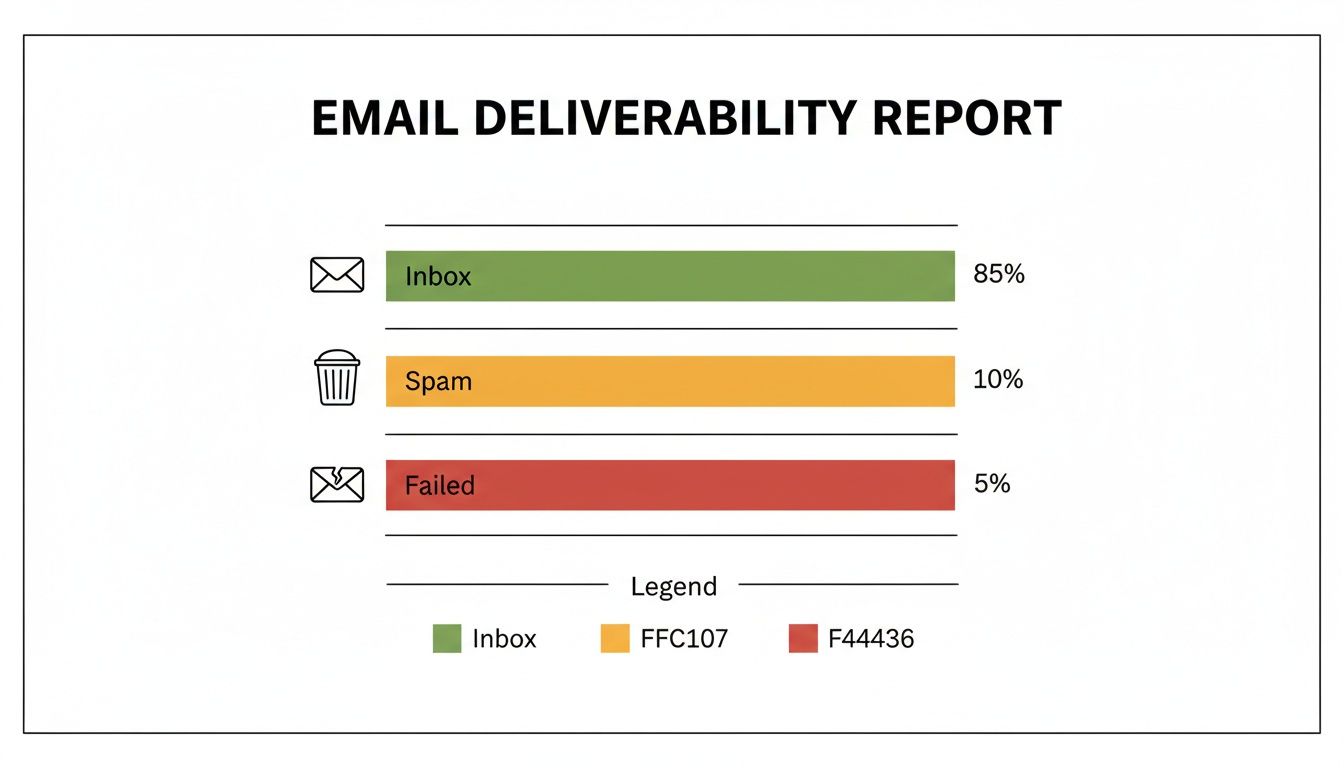
Even a small percentage of failed emails, like the 5% shown here, can represent a huge number of lost opportunities. It’s a stark reminder that optimizing for every single recipient is crucial.
When Email Giants Set Different Rules
On top of geography, the specific inbox provider you’re trying to reach is a huge piece of the puzzle. The internet’s biggest gatekeepers—Gmail, Outlook, and Yahoo—all have their own secret sauce for filtering mail. They look at the technical signals, sure, but they also analyze user engagement patterns unique to their platforms.
Here’s how they tend to differ:
- Gmail is all about user engagement. If your recipients consistently open, reply to, or star your emails, Gmail’s algorithm learns that your messages are valuable and rewards you with a spot in the primary inbox. Ignore engagement, and you’re destined for the Promotions tab, or worse, spam.
- Outlook has a reputation for being more conservative. It’s often wary of messages from new or low-volume senders, frequently pushing them to the “Other” tab or straight to junk until you’ve built up a positive sending history with its users.
- Yahoo and AOL Mail operate on their own historical data and user behavior, which means they can have entirely different filtering triggers and deliverability outcomes compared to their bigger competitors.
Here’s the key takeaway: your deliverability isn’t one static number. It can swing wildly depending on which providers make up the bulk of your email list. Always, always segment your campaign reports by provider to see if you have a problem with Gmail specifically, or if Outlook is giving you trouble.
To get past these roadblocks, you have to adapt your strategy. If you’re running a campaign in Europe, put extra effort into consent and data transparency. Targeting a list that’s 80% Gmail users? Your number one priority should be creating content that begs for interaction. And for an Outlook-heavy audience, a slow, methodical domain warm-up is non-negotiable. By tailoring your approach, you give your emails the best possible chance of being seen, no matter where in the world they’re going.
How to Stop Emails From Failing in the First Place

Running around fixing “email not received” errors is exhausting. It’s a purely reactive game. The best way to win is to stop playing defense and start building a strategy that keeps these failures from ever happening.
It’s all about shifting your mindset from one-off fixes to creating a resilient email program from the ground up. The goal is to build a rock-solid foundation of trust with inbox providers like Gmail and Outlook, so they see your emails as welcome guests, not suspicious intruders. This proactive approach turns your email channel from a constant headache into your most reliable asset.
Build Your Sending Reputation on Trust and Engagement
A healthy email strategy really boils down to two things: keeping your list squeaky clean and sending emails people actually want to open. If you neglect one, the other will eventually fall apart, taking your deliverability down with it.
First, automate your list hygiene. Forget about a big spring cleaning every few months. Use real-time validation tools to check an email address for issues the very second it’s submitted on a form. This stops bad data from ever polluting your list.
Next, you have to be methodical with your sending volume, especially if you’re working with a new domain or IP address. You can’t just flip a switch and send 10,000 emails. You need a proper “warm-up” plan:
- Start small and focused. Your first sends should go to a tiny, hand-picked segment of your most engaged subscribers—the people you know love your emails.
- Grow your volume slowly. From there, gradually increase how many emails you send each day or week. Slow and steady wins the race.
- Watch your metrics like a hawk. Keep a close eye on your open rates, click-through rates, and bounce rates. These numbers tell you if your warm-up is working.
This process carefully builds a positive sending history and proves to the big Internet Service Providers (ISPs) that you’re a legitimate sender, not a spammer.
A consistent warm-up isn’t just for brand-new domains. It’s just as critical if you’ve been inactive for a while. Suddenly blasting thousands of emails after months of silence is a massive red flag for spam filters and a surefire way to get blocked.
Make Your Content Personal and Keep an Eye on Performance
At the end of the day, engagement is one of the most powerful signals for deliverability. ISPs are watching. They see when people open, click, and reply to your emails. High engagement tells them your content is valuable and wanted.
On the flip side, low engagement or, even worse, a high number of spam complaints will absolutely tank your sending reputation. Go beyond just using a {first_name} tag. Tailor your content to what you know about your subscribers—their behavior, stated interests, and past purchases.
Finally, consistent monitoring is completely non-negotiable. If you see a sudden, sharp drop in your open rates or a spike in bounces, treat it as an early warning sign that something is wrong.
By combining automated list hygiene, a smart sending schedule, and genuinely engaging content, you create an email program that doesn’t just avoid problems—it consistently lands in the inbox. For a deeper dive into mastering your outreach, check out these 8 Email Deliverability Best Practices.
Answering Your Lingering Email Delivery Questions
After you’ve worked through the standard troubleshooting checklists, a few key questions almost always remain. Let’s dig into the common, real-world concerns that pop up when you’re trying to figure out why an email never arrived.
How Often Should I Actually Be Cleaning My Email List?
This is one of the most important questions, and the honest answer is: it depends on how you use email. But there are some solid rules of thumb I’ve learned over the years.
For any big, one-off campaign—especially if it’s a cold outreach sequence—you absolutely must validate the list right before you hit send. Email addresses go bad surprisingly fast. Industry studies show that more than 20% of contact data gets stale every single year. An address that worked last quarter might be a hard bounce today.
For your regular lists, like a company newsletter you send monthly, aim to re-validate the entire database every three to six months. Think of it as routine maintenance. This simple habit clears out the deadwood (inactive or now-invalid addresses) and is one of the best ways to protect your sending reputation.
The best-in-class approach, though, is to stop bad emails from ever getting on your list. A real-time validation API integrated directly into your signup forms is the way to do this. It checks the email address the moment someone types it in, catching typos and fakes at the source. It’s the single most powerful proactive step you can take.
Could the Content of My Email Be the Reason It’s Not Getting Delivered?
Absolutely. We often get so focused on the technical side of things, like authentication, that we forget how much the email’s content matters. Internet Service Providers (ISPs) and email clients use incredibly smart content filters, and they are always on the lookout for red flags.
Here’s what often gets people into trouble:
- Spammy Language: Going overboard with words like “free,” “winner,” or “act now” is a classic mistake. Using a bunch of dollar signs or ALL CAPS is just asking for trouble.
- Weird Formatting: Using bright red fonts, way too many exclamation points, or writing your entire subject line in capital letters looks amateurish and, to a filter, very spammy.
- Sketchy Links: Including links that are broken or, even worse, that point to domains with a poor reputation is a major red flag. Always double-check your URLs.
- The “All-Image” Email: An email that’s just one big image with almost no text is a technique spammers use to hide their keywords from filters. As a result, filters are highly suspicious of this format.
The goal should always be to create clean, professional-looking emails that offer real value. A well-written message with a good balance of text and images, plus links to reputable sites, will almost always have a better shot at hitting the inbox.
My Emails Are Going to Spam, Not Bouncing. What’s the Difference?
This is a fantastic question because it gets right to the heart of deliverability. While both are frustrating, they are two very different problems with different root causes.
When an email is not received at all, it usually means the recipient’s mail server flat-out rejected it. The email was stopped at the door. This is often a hard, technical failure—the email address doesn’t exist (a hard bounce), or your email failed an authentication check and your DMARC policy told the server to reject it.
An email landing in the spam folder is a different story. It means the server accepted your email but immediately made a judgment call, deciding it was low-quality or unwanted. This is almost always a sender reputation problem. The server looked at your sending history, saw low engagement, or flagged your content and decided your message didn’t earn a spot in the primary inbox.
Fixing spam placement comes down to the same core best practices: clean your list to get rid of complaint risks, nail your SPF, DKIM, and DMARC setup, and, above all, send content that people actually want to open and click.
Ready to stop worrying about bounces and blacklists? Truelist offers pay-as-you-go credits that never expire, plus unlimited plans for high-volume senders, to keep your lists clean and your sender reputation pristine. Start validating for free today at Truelist and ensure your emails always get delivered.