 Claude
  Perplexity
A Practical Guide to Free Bulk Email Validation
Discover how free bulk email validation can clean your lists, boost deliverability, and improve outreach. Get actionable tips and tool insights.
TL;DR: Discover how free bulk email validation can clean your lists, boost deliverability, and improve outreach. Get actionable tips and tool insights.
Ever tried sending an email campaign and felt like you were just shouting into the void? That’s what happens with an unverified email list. It’s a total waste of time, effort, and money. Free bulk email validation is your first line of defense—a simple but critical step to weed out the bad email addresses before you hit “send.” Think of it as essential maintenance that protects your sender reputation and gives your message a real shot at landing in the inbox.
Why Clean Email Lists Are a Game Changer
Let’s be real: high bounce rates are a killer. They don’t just feel frustrating; they actively harm your sender reputation, eat up your marketing budget, and ensure your message never gets seen. A clean email list isn’t just a “nice-to-have” item on a checklist. It’s the absolute foundation of any effective email marketing or sales outreach you do.
Picture this: you launch a campaign to 10,000 subscribers, but 2,000 emails bounce right back. That’s not just a 20% loss of reach. Internet Service Providers (ISPs) see that spike in bounces and immediately flag you as a potential spammer. Keep that up, and they’ll start routing all your emails—even the ones to good addresses—straight to the junk folder. Or worse, they might just block you entirely.

The Hidden Costs of Dirty Data
The consequences of ignoring email list hygiene go way beyond poor deliverability. The business costs are real and they add up quickly. Consider the wasted resources—the hours your sales team spends chasing dead-end leads, the marketing dollars burned on ads that attract fake sign-ups, and the skewed analytics that lead to flawed business strategies.
This problem is so significant that the bulk email verification service market hit an estimated USD 1.2 billion and is expected to climb to USD 4.06 billion. That explosive growth tells you one thing: businesses are waking up to the fact that clean data is directly tied to revenue.
“A bad email address isn’t just a bounce—it’s a missed opportunity. Every invalid contact in your database represents a potential relationship you can’t build and revenue you can’t generate.”
Protecting Your Most Valuable Asset
Your email list is one of your most powerful marketing assets. It’s a direct line to your customers and prospects, and protecting its integrity is non-negotiable. This is where solid subscriber data management comes into play—it’s the ongoing practice of making sure your contact info stays accurate and up-to-date.
The table below breaks down exactly what’s at stake.
Risks of Unvalidated Email Lists vs Benefits of Clean Lists
| Metric/Outcome | Risk with Unvalidated List | Benefit with Clean List |
|---|---|---|
| Deliverability Rate | High bounce rates (over 2%) lead to blacklisting. | Consistently high inbox placement (98%+). |
| Sender Reputation | Damaged reputation with ISPs, leading to spam folder placement. | Strong, trusted sender score that ISPs favor. |
| Campaign ROI | Wasted ad spend on fake leads, lower conversion rates. | Higher engagement, better conversions, and maximized ROI. |
| Customer Data Quality | Skewed analytics and unreliable business insights. | Accurate data for personalization and strategic decisions. |
| Engagement Metrics | Low open and click-through rates. | Increased open rates, clicks, and genuine interaction. |
| Team Productivity | Sales and marketing teams waste time on dead contacts. | Teams focus on qualified, reachable leads. |
By integrating a validation process, you’re not just cleaning a list; you’re adopting a proactive strategy. Instead of dealing with the fallout from a disastrous campaign, you ensure your list is healthy from the get-go. This simple act of hygiene creates a powerful ripple effect, improving everything from open rates to your bottom line. A validated list isn’t just cleaner—it’s far more profitable.
Getting Your List Ready for a Flawless Validation
Dumping a messy list straight into a validation tool is asking for trouble. Think of it this way: your email list is the foundation of your campaign. If that foundation is a mess, everything you build on it is going to be shaky. That’s why this pre-validation cleanup isn’t just a suggestion—it’s the essential first step.
This is where you turn a chaotic spreadsheet into a clean, standardized dataset that a validation tool can actually work with. Honestly, a few minutes of prep now will save you hours of headaches later and prevent skewed results that give you a false sense of security. It’s all about getting rid of the data gremlins before they wreak havoc.
Taming Your CSV File
Most free bulk email validation tools will ask for your list in a CSV (Comma-Separated Values) file. The first order of business is getting that format right. You need a single column dedicated only to email addresses, with a clear header like “Email” at the top.
It’s amazing how easily other data can sneak in. You might have names, phone numbers, or notes mixed into the email column from a sloppy export. Before you do anything else, just scan that column and get rid of anything that isn’t an actual email address.
The old data quality mantra, “garbage in, garbage out,” has never been more true. A validation service is only as good as the data you give it. Feed it a messy, poorly formatted list, and you’ll get unreliable results and waste your time.
Getting Rid of Formatting Gremlins
Once your email column is isolated, it’s time to hunt down the common formatting errors that can trip up even the best software. These tiny mistakes are often invisible to the naked eye but can instantly make an address invalid.
Pesky Extra Spaces: Leading or trailing spaces are the most frequent offenders. An address like
" john.doe@example.com "(with a space at the end) will often fail. A quick fix is to use your spreadsheet’s TRIM function (e.g.,=TRIM(A1)) to automatically strip these from every cell.Unwanted Special Characters: Characters like commas, quotation marks, or parentheses don’t belong in a clean email list. Run a “Find and Replace” to search for and remove these from your email column. It takes seconds.
Inconsistent Casing: While email addresses aren’t case-sensitive, standardizing them to lowercase (
=LOWER(A1)) just makes the list cleaner and much easier to manage. It’s also a huge help in spotting true duplicates.
Standardizing for Success
With the obvious errors out of the way, you can focus on standardization. This is about correcting common but incorrect email formats that people sometimes use to mask their addresses online.
For instance, you might see emails written as jane.doe(at)example.com or john.doe [at] example [dot] com. These need to be converted to the standard @ and . format. Again, a simple “Find and Replace” is your best friend here. Just replace (at) with @ and [dot] with ..
This is also the perfect moment to check for duplicates. A list with hundreds of repeated entries not only inflates your contact count but will also mess with your final validation metrics. Every spreadsheet program has a built-in “Remove Duplicates” tool that can handle this in a single click. For a deeper dive into keeping your database in top shape, our guide on the fundamentals of email list cleaning covers more advanced strategies.
Taking these steps ensures that every single email you submit for validation has the best possible chance of being processed correctly. This prep work is truly the difference between a vague, unreliable report and a clear, actionable set of results that will genuinely improve your deliverability.
How to Actually Use Free Email Validation Tools and Methods
Alright, you’ve got your list prepped and ready to go. Now for the real work: validating all those emails without spending a dime. Let’s be clear—there isn’t a magical “one-click” free tool that will clean a massive list for you. The secret is to build a smart, repeatable process using the free resources that are available.
The whole strategy hinges on working with the limitations of free services, not against them. Most online tools have a free tier, but they’ll cap how many emails you can check at once or per day. A little organization turns this from a dealbreaker into a totally manageable workflow.
It all starts with a clean, properly organized CSV file. This is non-negotiable if you want accurate results from any tool.
This simple workflow shows how to get your data in shape before you start validating.
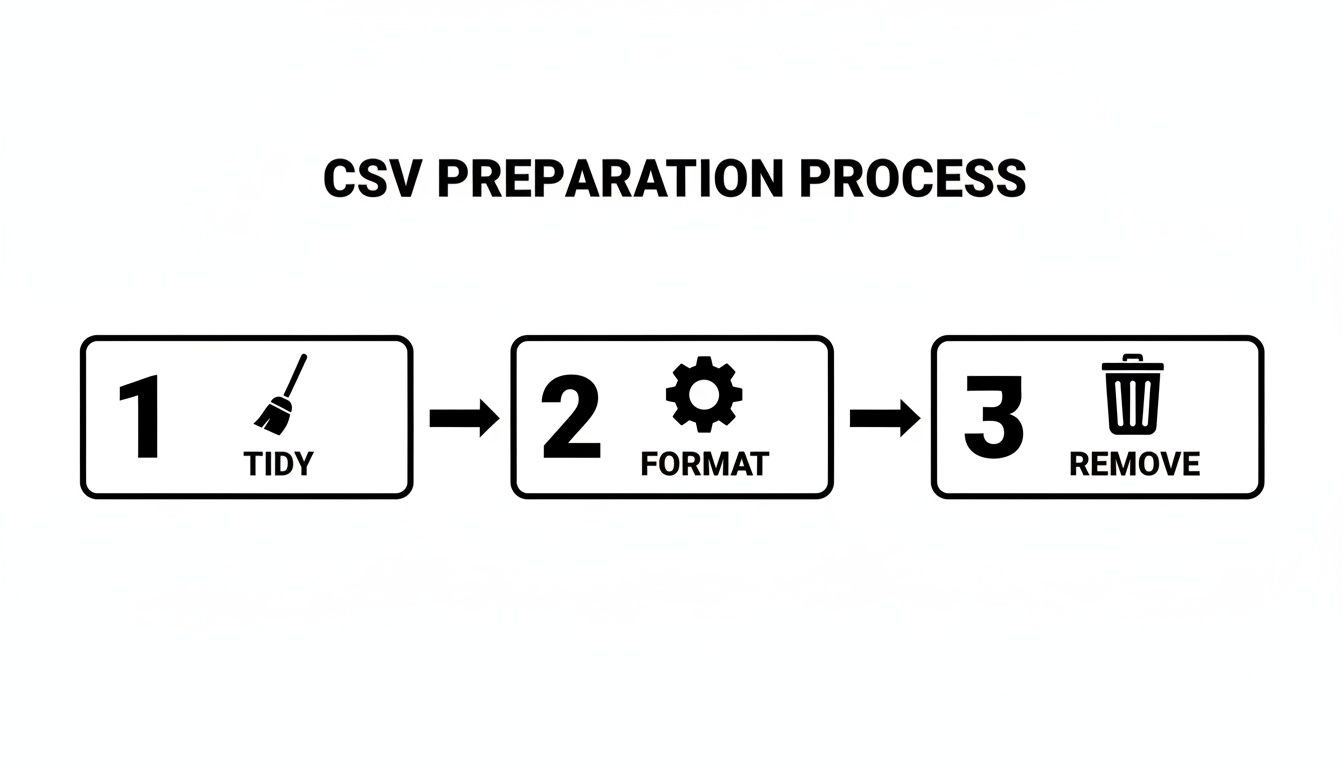
Tidying up, formatting correctly, and ditching duplicates upfront will save you a world of headaches later on.
The Batching Method: Your Best Friend for Large Lists
The most reliable approach for a big list is what I call batching. Imagine you have a list of 5,000 emails and you’ve found a free tool that gives you 100 free checks a day. Don’t see that as a roadblock; see it as a simple daily task.
Here’s how you’d tackle it:
- Chop your main CSV file into 50 smaller files, each with just 100 emails.
- Set up a routine to validate one small batch every day.
- As you get the results back, merge the cleaned data into a new “master validated” spreadsheet.
Yes, it takes patience. In this scenario, you’d have a completely clean list in just under two months, all for free. For a startup, a small business, or anyone on a shoestring budget, this method is a lifesaver. It breaks a massive project down into small, easy-to-complete steps.
Speed Things Up by Juggling Free Tiers
You don’t have to stick to just one service. You can seriously speed up the process by creating a circuit of different free tiers.
One service might offer 100 daily credits. Another might give you 500 monthly credits, while a third could offer a one-time signup bonus of 1,000 credits. By rotating between a few different providers, you can process several batches a day instead of just one. When looking for options, you might want to try a dedicated email verification tool to see how its free tier compares.
My Pro Tip: Use a simple spreadsheet to track which batches you sent to which service and when. This little bit of organization keeps you from getting confused or accidentally re-validating the same batch, ensuring you squeeze every last drop of value from your free credits.
Why go through all this trouble? Because email deliverability is a tough game. The average deliverability rate hovers around 83.1%, meaning nearly 17% of emails never even make it to the inbox. They either hit the spam folder or vanish into the ether. That stat alone shows why keeping your lists clean isn’t optional.
For the Tech-Savvy: Open-Source Scripts
If you’re comfortable with a bit of code, open-source email validation scripts are a powerful alternative. These are typically written in languages like Python or PHP and run on your own server. Since you’re the one running the software, there are no artificial limits on how many emails you can check.
But this freedom comes with a few strings attached:
- You’re the IT Department: You have to handle the installation, configuration, and ongoing maintenance. This means getting comfortable with a command line and basic server management.
- Accuracy Can Be Hit-or-Miss: These scripts are great at basic checks (like syntax), but they often lack the sophisticated, multi-layered validation systems of a commercial service.
- No Support Hotline: When things break, you’re on your own. You’ll be digging through community forums or relying on your own troubleshooting skills.
This path is really for developers or marketers with a technical background who need to validate huge lists and don’t mind a DIY project. Want to dig deeper into the mechanics? We have a guide that explains how free online email verification tools work.
Choosing Your Free Validation Path
To help you decide which route to take, here’s a quick breakdown of the methods we’ve covered.
Comparison of Free Validation Methods
| Method | Pros | Cons | Best For |
|---|---|---|---|
| Single Tool Batching | Simple, no technical skill needed. | Slow for very large lists. | Small businesses or individuals with lists under 10,000 contacts and a flexible timeline. |
| Multi-Tool Juggling | Faster than using a single tool. | Requires more organization to track credits and batches. | Startups and marketers who need to clean a medium-sized list (10k-50k) reasonably quickly. |
| Open-Source Scripts | No limits on volume, completely free. | Requires technical expertise, setup, and maintenance. Accuracy may vary. | Developers or tech-savvy teams with massive email lists and the resources to manage the script. |
Ultimately, there’s no single best answer for free bulk email validation. It’s about picking the right combination of tactics for your situation. For most people, the batching method using the free tiers from a few trusted online tools offers the best balance. It’s methodical, accessible, and it flat-out works.
Translating Validation Results into Action
Once your free bulk email validation tool spits out a report, the real work begins. Getting a file full of labels like “Valid,” “Invalid,” and “Catch-All” is one thing; knowing what to do with each category is what really cleans up your list and protects your sender reputation.
Making the right calls here separates a high-performing email list from one that’s just dead weight. This isn’t just about deleting the bad emails—it’s about understanding what each result actually means for your strategy.

Decoding the Core Validation Statuses
Your results will generally fall into a few key buckets. The exact terminology might change a bit from tool to tool, but the concepts are the same everywhere. For a deep dive into all the possible classifications, you can explore the various email validation result codes that professional services like Truelist use.
Here’s a breakdown of what you’ll see and what to do about it.
Valid or Deliverable This is the gold standard. The tool confirmed the email address format is correct and an active mailbox exists. These are your keepers. Add them to your primary mailing list and send with confidence.
Invalid or Undeliverable This one’s a hard no. It means the address is misspelled, the domain is fake, or the mailbox simply doesn’t exist. There’s a zero percent chance an email will land here, and trying to send one will trigger a hard bounce. Action: Delete these immediately. Don’t even think twice.
Every “Invalid” email you scrub from your list is a direct investment in your sender reputation. Keeping them is like intentionally sending mail to a non-existent house—it’s a guaranteed failure that makes email providers trust you less.
While the email marketing industry is projected to hit USD 17.9 billion, a shocking 16.9% of emails never even get delivered. Invalid addresses are a huge part of that problem, tanking sender reputations and campaign ROI. You can find more of these eye-opening email marketing trends and benchmarks on verified.email.
Handling the Ambiguous Gray Area
Okay, this is where things get interesting. “Valid” and “Invalid” are black and white, but what about the maybes? Results like “Catch-All” and “Unknown” require a bit more finesse. Deleting them all could mean losing good leads, but keeping them is a gamble.
The “Catch-All” Dilemma
A catch-all server is designed to accept any email sent to its domain, regardless of whether a specific mailbox exists. This setup makes it impossible for validation tools to definitively confirm if jane.doe@corporate-domain.com is a real inbox.
You’ll see a lot of these if you’re in B2B marketing, as many companies use catch-alls to prevent spam. Here’s how to handle them:
- The Safe Bet: Move all catch-all addresses into their own segment. Keep them out of your main campaigns to protect your deliverability metrics.
- The Calculated Risk: Send a small, highly personalized test campaign just to your catch-all segment. Watch the bounce rate like a hawk. If it stays below 2-3%, you can cautiously start including them in your regular sends.
The “Unknown” or “Risky” Status This result pops up when a tool couldn’t get a clear yes or no from the email server. Maybe the server was temporarily down or timed out. Or, it could be configured to block these kinds of checks.
| Status | Recommended Action | Why It Matters |
|---|---|---|
| Catch-All | Segment and test with caution. | Keeps your main list pristine while salvaging potential leads. |
| Unknown | Treat like Catch-Alls or quarantine for re-validation later. | Avoids unnecessary risk to your sender score. |
| Spam Trap | Delete immediately. No exceptions. | Hitting a spam trap can get your domain instantly blacklisted. |
| Disposable | Remove from your list. | These are temporary addresses used for sign-ups and offer no long-term value. |
Ultimately, turning your validation results into action is all about smart risk management. By acting decisively on the clear-cut cases and using a careful, segmented approach for the ambiguous ones, you ensure your efforts lead directly to better deliverability and a much healthier email program.
Knowing When to Upgrade from Free Tools
Free tools are a fantastic starting point for cleaning up an email list on a budget. The manual batching methods we’ve covered absolutely work, but there’s a tipping point where the time and effort you’re spending start to cost more than the money you’re saving. The real skill is recognizing that moment before it starts hurting your business.
This shift isn’t usually a sudden event. It’s more of a slow burn. You find yourself dreading the daily chore of uploading yet another small CSV. You miss a day, and suddenly your whole validation schedule is thrown off. A time-sensitive campaign gets put on hold because your list just isn’t ready. When the friction of the free process starts costing you opportunities, it’s time for a change.
The Tell-Tale Signs Your Workflow Is Broken
Let’s be honest, free bulk email validation is a trade-off. You’re swapping your time and attention for a zero-dollar price tag, and in the beginning, that’s a great deal. But as your lists grow and your campaigns become more ambitious, that trade starts to feel less and less fair. You’ll start noticing some clear red flags that you’ve outgrown your current setup.
Here are the signals that it’s time to look for a better way:
- Your List Size Is Exploding: That list of 5,000 emails that seemed so manageable a few months ago is now pushing 50,000. The batching method that would have taken a couple of weeks now looks like a year-long project.
- Speed Becomes a Necessity: You just got a hot new lead list and need to act on it now, not next quarter. In fast-paced sales and marketing, waiting weeks to validate contacts means you’re leaving money on the table for competitors.
- Manual Work Is Causing Errors: Juggling multiple spreadsheets, keeping track of daily credits, and manually merging data is a recipe for disaster. One simple copy-paste mistake can corrupt your results or, worse, lead you to email a list you thought you had cleaned.
If any of this sounds painfully familiar, you’re likely spending more in lost productivity and missed opportunities than a proper tool would cost.
The point of email validation isn’t just to have a clean list; it’s to enable faster, more effective communication. If your cleaning process is the bottleneck holding you back, it has stopped serving its purpose.
Moving from Manual Hassle to Automated Power
The biggest win you get from a paid solution is automation. It’s about buying your time back so you can focus on writing great campaigns and talking to real prospects instead of wrestling with spreadsheets. This is where a service built for professionals, like Truelist, completely changes the game.
Instead of juggling free accounts and daily caps, Truelist offers pay-as-you-go credits that never expire, plus unlimited plans for high-volume senders. This simple shift removes all the mental gymnastics of rationing checks or hopping between different free tools. You can validate a list of 100,000 emails with the same ease as a list of 100.
This screenshot of the Truelist platform shows just how simple it can be to upload and manage lists for validation.
The entire interface is built for speed, letting you process lists quickly and get the results back into your workflow without the clunky, multi-step dance required by free methods.
The Strategic Value of a Premium Service
Upgrading isn’t just about making your own life easier; it’s a strategic move that lifts up your entire team. For different roles, the value is immediate and obvious.
- For Sales Development Reps (SDRs): Time is money, literally. A paid tool means an SDR can take a fresh list of 1,000 prospects, clean it in minutes, and start their outreach that same day. Predictable, pay-as-you-go pricing means there’s zero hesitation to clean every single list, every single time.
- For Email Marketers: Predictability is everything. With credits that never expire — or an unlimited plan when your volume is high — costs become a stable line item in your marketing budget instead of a moving target. It empowers you to run regular, full-database hygiene checks with confidence.
- For Developers: It’s all about seamless integration. A robust API lets developers build email validation right into your sign-up forms, CRM, or other internal tools. This is a game-changer because it stops bad data from ever getting into your system, creating a proactive defense against list decay.
Once you reach the stage where your email program is a serious engine for growth, relying on a patchwork of free tools and manual processes becomes a liability. Investing in a dedicated validation platform isn’t just another expense—it’s an investment in efficiency, accuracy, and the long-term health of your most valuable communication channel.
Got Questions About Bulk Email Validation? We’ve Got Answers.
Even after walking through the steps, you probably have a few specific questions bouncing around. That’s perfectly normal. Getting these details right is what separates a clean list from a deliverability headache.
Let’s tackle some of the most common questions people ask before they start verifying their lists. Think of this as the final check-in to make sure you’re confident and ready to go.
How Often Should I Actually Validate My Email List?
Treating your email list like a garden is the best analogy I can give. It needs regular weeding, not just a one-time cleanup. Email data decays surprisingly fast—industry stats suggest lists lose about 22% of their accuracy every single year. People change jobs, abandon old Hotmail accounts, or switch providers. The list that was pristine last spring could be full of duds today.
So, what’s a good schedule?
- For most businesses, running a full validation every three months is a great baseline.
- If you’re in a high-turnover industry or running constant outreach (think e-commerce or aggressive sales), you’ll want to bump that up to monthly. This is all about preventing problems before they start.
My personal rule of thumb: Never, ever send to a brand-new list without validating it first. For your existing lists, a full re-check every 3-6 months is non-negotiable for keeping your sender reputation in good standing.
Will Validating My Emails Hurt My Sender Reputation?
Not at all. In fact, it’s one of the best things you can do to protect it. This is a common myth, but here’s how it really works: a good validation service performs all its checks from its own infrastructure, not yours. It runs technical checks on syntax and domains without ever sending an actual email from your IP address.
Because the process is invisible to Internet Service Providers (ISPs), it has zero negative impact on your reputation. The real magic happens after you validate. By sending to a squeaky-clean list, you dramatically lower your bounce rate. Since a low bounce rate is a huge green flag for ISPs, proper validation actively strengthens your sender score over time.
What’s the Deal with “Catch-All” Email Addresses?
You’ll definitely run into these. A “catch-all” is a server setting that essentially says, “I’ll accept any email sent to this domain, whether the specific mailbox exists or not.” This setup makes it impossible for any tool to know for sure if jane.doe@examplecorp.com is a real inbox.
Sending to catch-alls is a bit of a gamble. Some are valid inboxes monitored by a real person, especially at smaller companies. Others are just black holes where your emails go to die, which silently kills your engagement rates.
Don’t just delete them or send to them blindly. The smart move is to segment them.
- Isolate: Create a separate list of all your “catch-all” results.
- Test: Send a small, high-value, personalized campaign only to this segment.
- Analyze: Watch the metrics closely. If you get decent engagement with few bounces, you can cautiously fold them back into your main campaigns. If not, you know to leave them out.
Can I Reliably Validate Gmail or Yahoo Addresses?
Yes, but you need to set your expectations. Huge providers like Gmail, Yahoo, and Outlook have fortress-like defenses against spam. A side effect of this is that they often make it difficult for verification tools to get a clear yes/no answer, precisely to stop spammers from harvesting valid addresses.
This means you’ll likely see more “Unknown” or “Risky” results for these consumer domains, even with the best tools. Professional services have ways to get a more accurate picture, but no one can guarantee 100% accuracy on these domains. It’s simply an industry-wide challenge to be aware of when you see your results.
Tired of the manual effort and guesswork that comes with free tools? Truelist offers pay-as-you-go credits that never expire, plus unlimited plans for high-volume senders. Clean your lists in minutes, automate your hygiene with our API, and keep predictable pricing. Start validating for free today at Truelist and see what a difference professional-grade cleaning makes.