
 Claude
  Perplexity
how to check domain reputation: Quick tips
how to check domain reputation: Discover practical checks, tools, and best practices to improve email deliverability and protect your sender reputation.
TL;DR: how to check domain reputation: Discover practical checks, tools, and best practices to improve email deliverability and protect your sender reputation.
When you need to check your domain reputation, the process boils down to a few key actions: auditing your email authentication (SPF, DKIM, DMARC), digging into third-party tools like Google Postmaster or Cisco Talos for a score, and scanning for any blacklist entries. These steps give you a clear picture of how mailbox providers and security filters see your domain.
Why Your Domain Reputation Is a Critical Business Asset

Your domain’s reputation isn’t just some techy metric; it’s the bedrock of your digital trust. This single, powerful signal directly determines whether your emails, and by extension your business communications, actually succeed. It’s the invisible gatekeeper deciding if your messages land in the primary inbox or get exiled to the spam folder.
Think about the real-world impact for a moment. A huge product launch can fall flat simply because the promotional emails never made it to your audience. Customer trust gets chipped away every time a password reset or order receipt is flagged as suspicious. That’s why keeping a close eye on your reputation isn’t just a good idea—it’s essential for any business operating today.
The Financial and Brand Impact of a Poor Reputation
A bad domain reputation creates real, often severe, problems that spread throughout the company. It’s not just an IT headache; it’s a business crisis that hits revenue, customer loyalty, and how people see your brand.
Here’s what’s really on the line:
- Lost Sales Opportunities: When your marketing emails land in spam, your campaigns might as well be invisible. That translates directly to lower engagement and lost sales.
- Customer Service Failures: If crucial messages like order confirmations or support replies get blocked, customer frustration boils over fast.
- Wasted Marketing Spend: Every dollar you put into an email campaign is thrown away if the messages never even get seen.
Think of your domain reputation as your digital credit score. A high score opens doors to your customers’ inboxes. A low score gets you shut out, no matter how valuable your message is.
Understanding the Metrics That Matter
Over the last ten years, domain reputation has become a make-or-break factor for email deliverability and overall web security. With so many new domains popping up constantly, providers have to rely on these reputation signals to sort the good from the bad. For instance, in the period from April to September 2025 alone, over 43.5 million new domains were registered globally.
Industry tools like Sender Score give you a straightforward benchmark: a score above 85 is considered good, but anything below 70 signals that you have serious problems to fix.
Since your domain’s health is a key part of your overall digital footprint, it’s smart to also look into broader online brand reputation management strategies. This holistic approach ensures all your digital efforts are working together to build and protect trust.
Double-Checking Your Email Authentication Setup

Before you even think about reputation scores or blacklists, you have to get your technical house in order. This starts with a solid foundation built on three core email authentication protocols. Think of them as your domain’s digital passport, proving to inbox providers like Gmail and Outlook that your emails are legit.
Without these protocols in place, you’re essentially leaving your front door unlocked. It makes it incredibly easy for spammers and phishers to spoof your domain, sending malicious emails that look like they came from you. This is the fastest way to get your domain’s reputation trashed.
The Big Three: SPF, DKIM, and DMARC
These three protocols—Sender Policy Framework (SPF), DomainKeys Identified Mail (DKIM), and Domain-based Message Authentication, Reporting, and Conformance (DMARC)—work together to protect your brand. They’re not just technical jargon; they are the bedrock of modern email deliverability.
Nailing your authentication is non-negotiable. If these checks fail, mailbox providers see a huge red flag. It’s a strong signal that an email might be fraudulent, which can land your domain on blacklists and your legitimate messages in the spam folder.
Let’s quickly break down what each one does and why it matters so much.
Core Email Authentication Protocols Explained
This table gives you a quick-reference guide to what each protocol does and its impact on your sender reputation.
| Protocol | What It Does | Why It’s Critical for Reputation |
|---|---|---|
| SPF | Publishes a list of servers (IP addresses) authorized to send email on behalf of your domain. | It’s your domain’s approved sender list. It prevents others from sending emails using your domain from unauthorized servers. |
| DKIM | Adds a unique, tamper-proof digital signature to every email you send. | This signature proves the email hasn’t been altered in transit, confirming its integrity and authenticity. |
| DMARC | Tells receiving email servers what to do if an email fails SPF or DKIM checks (e.g., quarantine or reject it). | DMARC is the policy enforcer. It gives you control and visibility, stopping fraudulent emails in their tracks. |
Having all three correctly configured is the industry standard and a fundamental requirement for building and maintaining a positive domain reputation.
A domain without proper DMARC enforcement is like a high-security building where the alarms are turned off. You might detect a problem, but you have no power to stop it, leaving your brand reputation exposed to impersonation.
How to Quickly Check Your Records
The good news is you don’t need to be a DNS wizard to see if everything is set up correctly. There are plenty of free online tools that can run a quick diagnostic for you.
I always recommend starting with a trusted lookup tool like the one from MXToolbox. Just pop in your domain name, and it will instantly check your DNS for SPF, DKIM, and DMARC records. It gives you a clear pass/fail report and flags any syntax errors or common misconfigurations that might be tanking your deliverability. If you’re looking for a deeper dive, our guide on what is email authentication breaks down the entire process.
If the tool flags any issues—like a missing record or a “fail” status—that’s your number one priority. You’ll need to work with your IT team, developer, or domain registrar to add or fix the necessary TXT records in your DNS settings. Getting these foundational elements right is one of the most powerful things you can do to protect your domain reputation.
Using Free Tools to Get Your Reputation Score
Once you’ve got your authentication protocols buttoned up, it’s time to find out what the rest of the internet actually thinks about your domain. This is where objective, third-party tools come in. They give you an unbiased look at your reputation and provide the raw data you need to see your sending habits through the eyes of major inbox providers like Gmail.
These services don’t just spit out a score; they open a window into the specific signals that are either helping or hurting your deliverability. By checking them regularly, you can stop guessing why your open rates are tanking and start fixing the real problems.
Google Postmaster Tools for Gmail Insights
Let’s face it, for most of us, Gmail makes up a massive slice of our email list. That makes understanding how Google perceives you non-negotiable. Google Postmaster Tools (GPT) is their free service that gives you direct, unfiltered feedback on how your domain is performing with their users.
Getting started is simple: just add and verify your domain in the GPT dashboard. Once you’re in, it tracks a handful of key metrics, but the one you need to live and breathe is Domain Reputation. Google grades this on a straightforward scale:
- High: You have a great track record of sending email people want, with almost no spam complaints. Keep it up.
- Medium: You’re sending legitimate email, but you’ve racked up enough spam complaints to get noticed. This is a critical warning sign.
- Low: This means you have a history of sending a significant volume of spam.
- Bad: The worst of the worst. You’ve sent a massive amount of spam, and your deliverability is likely in the gutter.
A “Medium” reputation is where many well-intentioned senders find themselves, and it’s a huge red flag. It’s your signal that emails are already getting filtered to spam, especially for subscribers who aren’t opening every message. If you see this, it’s time to immediately audit your list hygiene and content.
Checking Your Status with Cisco Talos and Barracuda
Google is the big one, but you need a wider perspective. Other security and intelligence platforms offer powerful, free lookups that give you a more complete picture of your domain’s health. Two of the most respected names in the game are Cisco Talos Intelligence and BarracudaCentral.
Cisco Talos runs one of the largest commercial threat intelligence teams on the planet. Their reputation lookup gives you a simple verdict: Good, Neutral, or Poor. A “Neutral” rating here is a lot like Google’s “Medium”—it’s not a death sentence, but it clearly shows you haven’t built up a strong, positive sending history yet.
Here’s what a reputation check looks like for a trusted domain, like Cisco’s own, inside their tool.
That “Good” web reputation is exactly what you’re aiming for. It tells the world you’re a trustworthy source.
BarracudaCentral operates a similar reputation system. While their data most directly impacts delivery to organizations using Barracuda’s security products, it’s another valuable piece of the puzzle. A bad reputation here often points to underlying problems that other providers are seeing, too. To get a quick, comprehensive overview, an email health check tool can pull all these checks together and save you a ton of time.
Think of these tools as your digital report card. Google Postmaster is the grade from your most important teacher. Talos and Barracuda are the opinions of the principal and the guidance counselor. You really need all of them to be positive if you want to succeed.
Running a Thorough Blacklist Check
Landing on an email blacklist is one of the fastest ways to tank your domain reputation and, with it, your deliverability. Think of these lists as the internet’s “most wanted” posters for domains and IPs known for sketchy sending behavior. If your domain ends up on one, mailbox providers will treat your emails with immediate suspicion, and many will just block them outright.
Imagine this: your marketing team just launched a huge campaign. Hours later, the bounce rates are through the roof. That sinking feeling in your stomach? It’s often the first sign your domain has been blacklisted. Suddenly, every email you send is hitting a brick wall, and you’ve got a serious problem to solve—fast.
Where to Look and What to Look For
Let’s be clear: not all blacklists are created equal. Getting flagged on some small, obscure list might not even make a dent in your metrics. But a listing on a major player like Spamhaus, Spamcop, or Barracuda can be absolutely devastating. These are the lists that the big mailbox providers really pay attention to.
Thankfully, you don’t have to hunt these down one by one. Aggregator tools are your best friend for this. They’ll scan dozens of important blacklists all at once, giving you a complete picture in just a few seconds. This is your go-to first step for understanding where you stand.
A blacklist entry is a symptom, not the disease. Before you even think about requesting removal, you must find and fix the underlying issue that got you listed in the first place. Rushing to delist without fixing the root cause will only land you back on the list—and often with a more permanent stain on your reputation.
The Problem of Malicious Domains
New threats pop up every single day, and the sheer volume of new domains makes it tough for security systems to keep up. Just to give you an idea, one recent report showed a 7.39% jump in new domain registrations. Out of those, a staggering 2.9 million domains were flagged as malicious within just six months. With a constant barrage of spam and phishing, blacklist operators have to be aggressive, and sometimes, legitimate senders get caught in the crossfire. You can dig into the data in this Spamhaus domain reputation update.
What to Do If You’re Blacklisted
Finding your domain on a blacklist is stressful, but don’t panic. Just follow a calm, methodical process to get things sorted out and protect your reputation for the long haul.
Stop All Campaigns Immediately. First thing’s first: halt all email sends from the affected domain. Pushing more emails out the door will only dig the hole deeper and make delisting much harder.
Investigate the Root Cause. You need to play detective. Why did this happen? Common culprits include a compromised account spewing spam, a sudden spike in sending volume that looked suspicious, poor list hygiene that led to high complaint rates, or hitting a spam trap.
Fix the Underlying Issue. This is non-negotiable. Secure any compromised accounts, scrub your email lists to remove invalid or unengaged contacts, and take a hard look at your sending practices. Our detailed guide on the blacklist email check process can walk you through how to pinpoint these issues.
Request Delisting. Only after you’ve fixed the problem should you follow the specific delisting procedure for the blacklist you’re on. When you reach out, be honest and transparent about the steps you took to resolve the issue.
By focusing on the cause instead of just the symptom, you won’t just get your name off a list. You’ll build healthier, more sustainable sending habits that protect your domain reputation for good.
Building a Proactive Monitoring and Recovery Plan
A good domain reputation isn’t a one-and-done task; it’s something that needs constant attention. You have to shift from a reactive mindset—only checking when things go wrong—to proactively keeping your domain’s health in check. This is what separates the pros from the amateurs and keeps you out of the deliverability doghouse.
Think of it like tending a garden. You don’t just plant the seeds and walk away. You have to water, weed, and watch for pests. The same goes for your domain.
Key Metrics for Weekly Monitoring
I recommend setting aside a little time each week to pull up your email service provider’s dashboard and review a few key health metrics. These numbers are the pulse of your email program, telling you exactly how mailbox providers and your subscribers see you.
Here’s what I always look at:
- Spam Complaint Rate: This is the big one. It’s the percentage of people hitting the spam button on your emails. You need to keep this number tiny—well below 0.1%. If it starts creeping up, mailbox providers take that as a direct signal that your messages aren’t wanted.
- Hard Bounce Rate: This tracks emails that couldn’t be delivered because the address was flat-out invalid. A high bounce rate screams “messy email list,” which is a massive red flag for ISPs.
- Engagement Data: Keep an eye on your open and click-through rates. These will naturally fluctuate, but a sudden, steep drop can be an early warning that your emails are landing in the spam folder instead of the inbox.
A huge part of keeping these numbers healthy is regular list hygiene. It’s absolutely essential to verify emails to protect your sender score, because every invalid address you send to chips away at your reputation.
Creating a Strategic Recovery Blueprint
Okay, so what happens if you check your reputation and find it’s already taken a hit? First, don’t panic. Second, stop sending emails. The absolute worst thing you can do is carry on as if nothing happened. You have to pause, figure out what went wrong, and rebuild trust.
A damaged reputation is a clear signal that something is broken in your process. Simply asking to be removed from a blacklist without fixing the root cause is like patching a leaky pipe with tape—it’s a temporary fix for a permanent problem.
When you find your domain has landed on a blacklist, this is the basic workflow you need to follow.
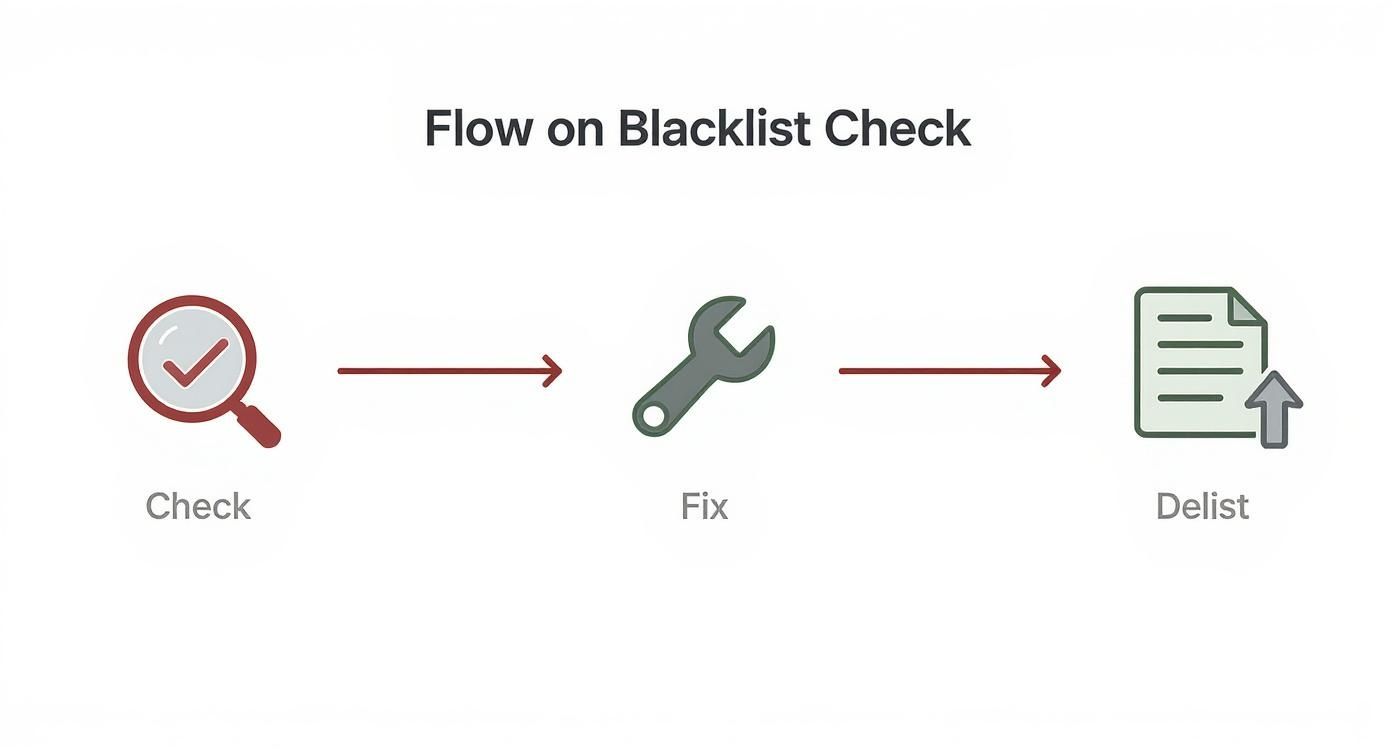
As you can see, fixing the problem comes before you ask to be delisted. It has to.
To kick off your recovery, pause all active email campaigns immediately. Then, put on your detective hat. Investigate the root cause. Was it a compromised account? A purchased list you shouldn’t have used? Spammy-sounding content? Once you’ve found and fixed the problem and double-checked all your authentication is solid, you can slowly begin to warm up your domain again. Start with very small sends to your most engaged subscribers first. This will help you rebuild positive sending signals with the mailbox providers one email at a time.
Common Questions About Domain Reputation
As you start digging into how to check domain reputation, you’ll inevitably run into a few common questions. These are the nuances that can trip up even seasoned email marketers, so let’s clear up some of the most frequent points of confusion.
Getting these right will make a huge difference in how effectively you manage your sending presence.
What’s the Difference: Domain Reputation vs. IP Reputation?
It’s easy to think of these as the same thing, but they’re two very different signals that mailbox providers are watching. They’re definitely related, but knowing how they differ is key to playing the long game with your deliverability.
IP reputation is all about the specific server IP address that sends your email. If that IP gets caught sending spam—even if it’s not from you—its reputation tanks.
Domain reputation, however, is tied directly to your sending domain (like yourcompany.com). Think of it as a more permanent measure of your brand’s trustworthiness, built up over time through good sending practices.
You could switch from Mailchimp to Klaviyo tomorrow and your sending IP would change completely. But your domain reputation? That follows you wherever you go. This is a big reason why providers like Gmail are leaning more heavily on domain reputation; it’s a much more stable and reliable signal of who you are as a sender.
How Long Does It Take to Fix a Bad Reputation?
I wish I could give you a simple answer, but there’s no magic number. How long it takes to recover really depends on two things: how bad the damage is and how consistently you work to fix it.
If you had a minor slip-up, like a temporary spike in spam complaints from one campaign, you might see things turn around in a few weeks with careful sending. But if you’ve landed on a major blacklist like Spamhaus, you could be looking at several months of very focused, diligent effort to dig yourself out of that hole.
The secret to a faster recovery is simple: stop the bleeding first. Find the root cause—whether it’s a compromised form, a stale list, or a security breach—and fix it completely. Only then can you start the process of rebuilding trust by sending great content to your most engaged contacts.
Can a Brand-New Domain Have a Bad Reputation?
A new domain doesn’t start out with a bad reputation, but it starts with no reputation at all. In the eyes of a mailbox provider, that can be just as risky. Spammers burn through new domains all the time, so inbox providers are naturally suspicious of email coming from a domain they’ve never seen before.
This is exactly why a proper domain warm-up isn’t optional—it’s essential. You have to build a positive sending history from scratch.
The process involves:
- Starting with very low sending volumes.
- Sending only to your most engaged, active subscribers who are least likely to complain.
- Gradually increasing your volume over several weeks.
This slow-and-steady approach proves to providers like Gmail and Outlook that you’re a legitimate sender who belongs in the inbox.
Ready to protect your domain and improve deliverability? Truelist offers pay-as-you-go credits that never expire, plus unlimited plans for high-volume senders, to keep your lists clean and your reputation pristine. Start validating for free today and see the difference.