 Claude
  Perplexity
Email Blacklist Removal: Your Complete Recovery Guide
Stuck on an email blacklist? Follow our proven email blacklist removal steps to restore deliverability fast. Get expert strategies that work.
TL;DR: Stuck on an email blacklist? Follow our proven email blacklist removal steps to restore deliverability fast. Get expert strategies that work.
Understanding What Email Blacklists Really Do To Your Business
Imagine your emails suddenly stopped reaching your customers. For businesses that land on an email blacklist, this isn’t a hypothetical situation. It’s a serious problem that can significantly disrupt communication and impact revenue.
How Blacklists Impact Your Business
Email blacklists are used by Internet Service Providers (ISPs) like gatekeepers, preventing emails from senders known for spam or harmful practices. This means that even legitimate business emails might be blocked, never reaching your intended audience.
A blocked marketing email for a new product launch, for example, means lost sales and brand awareness. Crucially, if transactional emails like order confirmations or password resets are blacklisted, it leads to customer frustration and potentially lost revenue. Email blacklisting essentially disrupts your connection with your audience, impacting any business operation that relies on email. This issue has become increasingly sophisticated in recent years, with ISPs and spam filters using real-time databases to block potentially harmful senders. Learn more about email blacklists here.
The Mechanics of Blacklisting
Blacklisting is often an automated process. ISPs use complex systems that monitor several factors, including sender reputation, email content, and user complaints. By analyzing email traffic, these systems flag suspicious activity, potentially adding an IP address or domain to a blacklist.
There are also different types of blacklists. Public blacklists are accessible to anyone, while private blacklists are maintained by individual organizations. Understanding these differences is essential for effective blacklist removal.
Recognizing the Warning Signs
Early detection is key to mitigating the impact of blacklists. Several warning signs indicate potential email deliverability problems. A sudden drop in email deliverability, a spike in bounce rates, or an increase in spam complaints are all red flags. These indicators suggest your email practices might be triggering blacklist filters.
Monitoring your email metrics isn’t just a good idea; it’s a necessity. Regularly tracking key indicators allows you to identify and address potential issues before your emails are completely blocked. Early intervention can prevent a minor issue from becoming a major crisis. Services like Truelist can help validate your email lists and prevent issues that lead to blacklisting.
Finding Out If You’re Actually Blacklisted (And Where)
Before trying to get off an email blacklist, you first need to know if you’re actually on one, and which one it is. This isn’t always easy. Some blacklist databases are public, making them simple to search. Others are private, requiring a bit more detective work.
Using Blacklist Checker Tools
Many online tools provide blacklist checks. These services query multiple blacklist databases using your IP address or domain. The results will show if you’re listed on any of the blacklists they checked. The sheer number of these lists, however, can feel overwhelming.
Not all blacklists have the same impact. Some hold considerably more weight than others.
Being listed on a major blacklist like Spamhaus can severely affect your email deliverability. Being on a lesser-known list, however, might have little effect. It’s important to understand the difference between a real blacklist and a temporary block.
Understanding Blacklist Severity
Some blacklists are really just temporary blocks, based on recent sending activity. Others are hard blacklists requiring formal removal requests. This distinction is crucial for determining your next steps.
A temporary block may clear up on its own after some time, if you improve your sending practices. A hard blacklist listing requires direct contact with the blacklist provider.
Your sender score also plays a vital role. A low sender score, though not a blacklist itself, can create similar problems. It signals a tarnished sender reputation, which can lead ISPs to route your emails directly to spam folders. Check out our guide on email bounce checks for more information on how bounce rates affect your sender reputation.
Monitoring For Early Warning Signs
Beyond active blacklist checks, regularly monitoring your email metrics is key for early problem detection. A sudden drop in open rates, along with a surge in bounce rates, can warn of impending blacklist issues.
Proactive monitoring is your best initial defense. Using an email validation service like Truelist, for example, can help avoid bounces and build a better sender reputation, lowering your blacklist risk.
To help you choose a suitable checker, we’ve compiled a table of comparison below.
Major Email Blacklist Checking Tools Comparison
Comparison of popular blacklist checking tools, their coverage, and key features.
| Tool Name | Blacklists Checked | Free/Paid | Key Features | Best For |
|---|---|---|---|---|
| MXToolbox | 100+ | Free & Paid | Comprehensive blacklist checking, DNS diagnostics, and email delivery monitoring | Businesses of all sizes |
| UltraTools | 100+ | Free & Paid | Bulk IP and domain checking, detailed reporting, and API access | Large senders and email marketers |
| Email Blacklist Checker | 100+ | Free | Quick blacklist lookup, simple interface | Individuals and small businesses |
| MultiRBL | Multiple | Free | Checks against various real-time blackhole lists | Identifying spam sources |
| Spamhaus Blocklist Removal Center | Spamhaus Lists | Free | Specifically for requesting delisting from Spamhaus | Senders listed on Spamhaus |
This table highlights some of the most commonly used blacklist checking tools. The specific tool you choose will depend on your needs and budget. However, using any of these can help you quickly identify and address blacklisting problems.
Pinpointing the Problem Blacklist
After identifying a blacklist listing, the next step is understanding why you’re on it. Blacklists have different listing criteria. Some prioritize spam complaints, others track sending volume or email content.
This information helps tailor your removal strategy. Knowing the reason allows you to address the root cause and prove to the blacklist provider you’ve taken corrective actions. This is critical for a successful delisting request.
The Major Blocklists That Actually Matter In 2026
A handful of operators drive almost every inbox-versus-spam decision across Gmail, Outlook, Yahoo, Apple Mail, and enterprise filters.
Spamhaus is the most consequential, running several distinct lists: SBL (verified spam sources), XBL (exploited hosts, open proxies, malware), PBL (residential and dynamic IPs that shouldn’t speak SMTP to MX directly), DBL (spam, phishing, and malware domains), and CSS (snowshoe patterns). Removals via spamhaus.org/lookup. Listings often auto-expire after a quiet period; repeat offenders trigger manual reviews.
Barracuda’s BRBL protects much of the mid-market and enterprise. Submit at barracudacentral.org/rbl/removal-request; 1 to 3 business days.
SpamCop (Cisco Talos) is complaint-driven and auto-expires 24 hours after the last reported message. Lookup at spamcop.net/bl.shtml.
SURBL and URIBL scan message bodies for links to known spam, phishing, or malware domains. A hit usually means your shortener, tracking domain, or a partner domain is compromised. Remove at surbl.org and uribl.com.
Cloudmark Sender Intelligence powers filtering for many large telecoms. Support requests at support.cloudmark.com; 3 to 10 business days.
Cisco Talos scores senders as Good, Neutral, Poor, or Untrusted. A Poor rating behaves like a blocklist for IronPort and Cisco gateways. Check at talosintelligence.com/reputation — no removal form, just behavior change.
Microsoft SmartScreen and SNDS govern Outlook, Hotmail, Live, and Microsoft 365. A red SNDS status effectively blocks the entire ecosystem. Mitigation at sendersupport.olc.protection.outlook.com; 3 to 14 business days.
How To Check Whether You’re Actually Listed
Start with a multi-list scanner: MXToolbox Blacklist Check queries about 100 lists, and MultiRBL.valli.org covers roughly 250. Confirm any hit directly at the source — check.spamhaus.org, barracudacentral.org/lookups, Microsoft SNDS, and Google Postmaster Tools. Postmaster Tools and SNDS aren’t blocklists but they’re the only official windows into how Gmail and Microsoft score you. If reputation there is Low or Bad, public-blocklist work alone won’t fix delivery — see email sender reputation score.
A common mistake is checking only the sending IP. Run lookups for every domain in the campaign — From domain, tracking domain, unsubscribe domain, any shortener. Domain-level listings on Spamhaus DBL or SURBL are increasingly the cause of “we look clean on every IP list but mail still goes to spam.” The companion domain spam rating guide covers this in detail.
The Real Reasons You End Up On Blacklists

Understanding why your emails are flagged is crucial for both blacklist removal and prevention. This means recognizing the difference between minor deliverability issues and serious blacklist offenses. Surprisingly, seemingly harmless actions can land you on a blacklist.
Common Email Practices That Trigger Blacklists
One common culprit is outdated contact lists. Importing old lists without validation can lead to high bounce rates, a major red flag for blacklist providers. Sending campaigns too quickly, especially with a new IP address, also mimics spammer behavior. This sudden increase in volume can trigger automatic blacklisting.
Even your email content matters. Overly promotional language, excessive use of “spammy” keywords, or misleading subject lines can activate spam filters. This can land your emails in the spam folder, or worse, on a blacklist. For tips on maintaining a clean list, read more about how to validate email format.
The Connection Between Email Security Threats and Blacklists
The increase in email security threats has made blacklist providers more vigilant. Phishing attacks, malware distribution, and AI-driven scams are constantly evolving, forcing Internet Service Providers (ISPs) to bolster their defenses.
This means legitimate senders can get caught in the crossfire if their email practices resemble those of malicious actors. In 2025, phishing attacks increased by 28%, and AI-driven scams by 67.4%, resulting in significant fraud losses. More detailed statistics can be found here.
Simply avoiding bad practices isn’t enough. You need to actively demonstrate good email hygiene to stay off blacklists.
Evolving Standards of ISPs and Email Providers
The rules of email deliverability are constantly changing. Practices that worked a few years ago might now be considered risky. ISPs are scrutinizing sender behavior, analyzing everything from sending frequency and volume to engagement metrics like open and click-through rates.
Staying ahead of these changes requires ongoing monitoring and adaptation. Understanding the evolving criteria used by ISPs to evaluate sender reputation is essential. This includes implementing best practices like email authentication (SPF, DKIM, DMARC) and maintaining clean, engaged subscriber lists.
By understanding these evolving standards, you can differentiate between minor deliverability issues and genuine blacklist threats, allowing you to prioritize your efforts effectively.
The Specific Behaviors That Get You Listed
The same handful of behaviors trigger nearly every listing.
- High bounce rates from dirty lists. Anything above 2 percent hard bounces is dangerous; above 5 percent will almost certainly trigger a listing. Pre-send validation with Truelist or any bulk email verifier is the cheapest insurance. See email bounce checker and why do emails bounce back for the mechanics.
- Spam complaints above 0.1 percent. Gmail, Yahoo, and Microsoft share complaint data with major blocklist operators. Above 0.3 percent and expect a listing.
- Sudden volume changes. Going from 5,000 emails one week to 500,000 the next is the textbook spammer profile. Warm IPs and domains slowly.
- Spam trap hits. Pristine traps (never opted in) prove non-permission acquisition. Recycled traps are formerly real addresses repurposed by providers. Either triggers an immediate listing, particularly on Spamhaus. Regular list cleaning and engagement-based segmentation are the only defenses.
- Compromised credentials. A compromised SMTP account or API key will spam through your infrastructure in minutes and blocklists react within hours. Use MFA and rotate keys.
- Missing authentication. Mail without valid SPF, DKIM, and DMARC alignment is treated as suspect. See what is SMTP authentication and configure reverse DNS.
- Linking to bad neighborhoods. Even with a clean IP, linking to dirty domains trips SURBL, URIBL, and Spamhaus DBL. Audit shorteners, partner links, and redirects.
Your Step-By-Step Email Blacklist Removal Action Plan
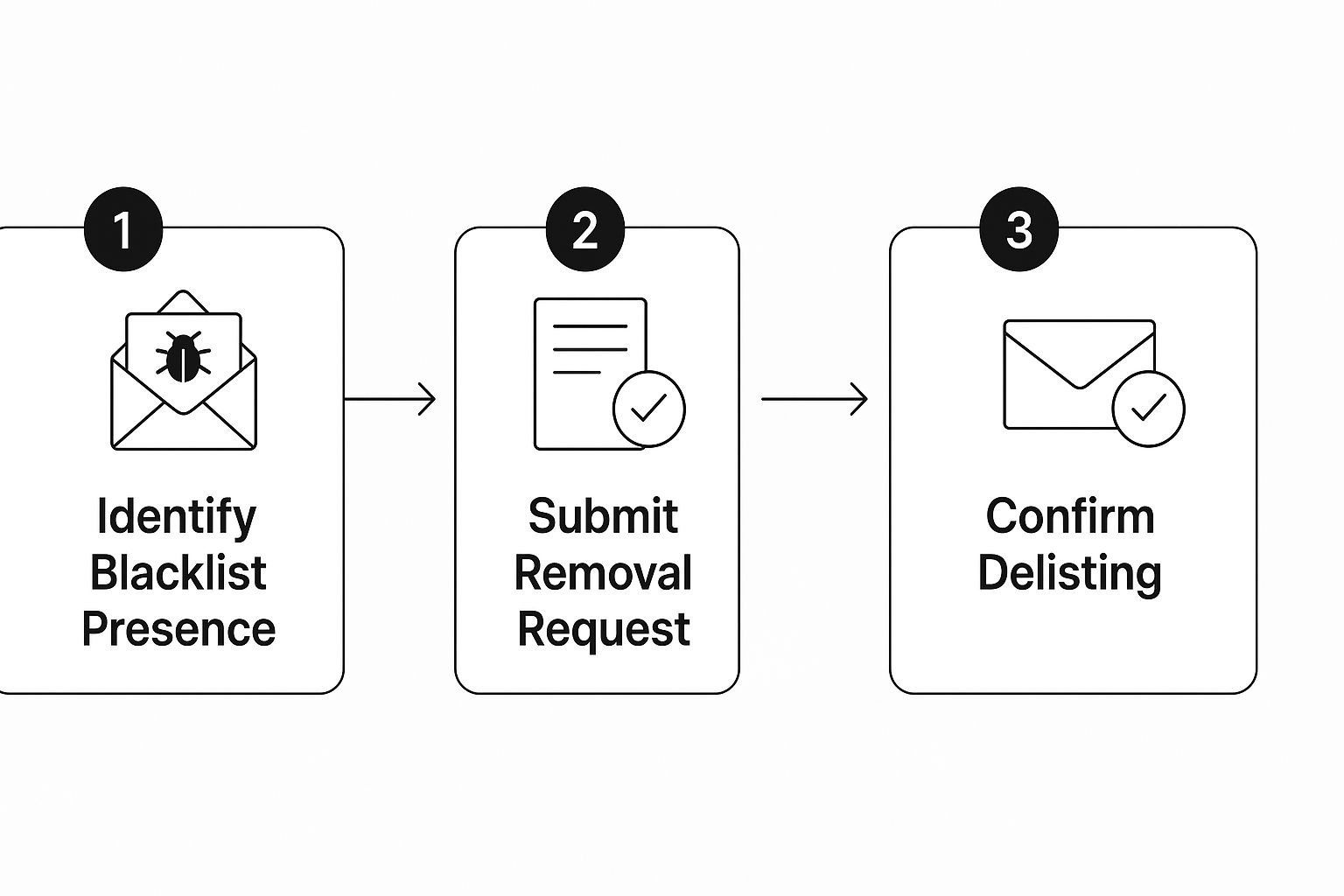
This infographic illustrates the three main steps involved in getting your emails off a blacklist. It’s a sequential process: identify the blacklist, submit a removal request, and then confirm the delisting. Each stage requires careful attention. By diligently following these steps, you’ll significantly improve your chances of a swift and successful removal.
Identify Blacklist Presence
The first step is to pinpoint which blacklist is impacting your email deliverability. Use blacklist lookup tools like MXToolbox or MultiRBL to scan your IP address or domain against numerous blacklists. Keep in mind that not all blacklists are created equal. Some, such as Spamhaus, can severely hinder your email campaigns, while others have a negligible effect. Focus on getting delisted from those directly affecting your email reach.
Submit Removal Request
After identifying the specific blacklist, visit the provider’s website and find their removal procedure. Most require a formal delisting request, explaining the steps you’ve taken to fix any underlying problems. This could include cleaning your email list with a service like Truelist, updating your email authentication protocols, or adjusting your sending practices. Getting off a blacklist involves several key actions, including understanding the root cause, contacting the blacklist operator, and implementing corrective measures. Some blacklists automatically remove entries after a period of inactivity, ranging from a few days to several months. Learn more about this process here.
Confirm Delisting and Monitor
Once you’ve submitted your request, keep a close eye on your email deliverability. Some blacklists have automated removal processes, while others conduct manual reviews. These manual reviews can take several days or even weeks. Follow up with the blacklist provider if you don’t receive confirmation within a reasonable time. Even after removal, continue to monitor your email metrics to ensure consistent inbox placement.
Accelerating The Removal Process
Blacklist removal can be a lengthy process, but there are ways to speed things up. In your removal request, provide clear and concise information, emphasizing the corrective actions you’ve taken. Maintaining open communication with the blacklist provider demonstrates your commitment to resolving the issue. In some cases, existing relationships with email service providers or industry contacts can also help expedite the delisting process.
Maintaining Communication During Recovery
Maintaining contact with your audience is essential, even during a blacklist issue. While working on the removal, consider alternative communication channels like social media or SMS messages for important updates. Keep your subscribers informed, assuring them you’re actively addressing the problem. Transparency and proactive communication can minimize potential frustration and preserve trust while you work towards recovery.
Building Defenses Against Future Blacklist Problems
Getting off an email blacklist is a significant win, but the real work begins with staying off. It’s similar to recovering from an illness – you’re feeling better, but without building up your immunity, you’re still vulnerable. For your email program, this means establishing robust email authentication and practicing meticulous list hygiene.
Authentication: Proving Your Email’s Identity
Email authentication acts like a digital signature for your messages, verifying their origin and legitimacy. This drastically lowers the risk of your emails being marked as spam or phishing attempts. The primary methods are SPF, DKIM, and DMARC.
- SPF (Sender Policy Framework): SPF designates which mail servers are authorized to send emails on behalf of your domain. It’s like giving a trusted neighbor permission to collect your mail.
- DKIM (DomainKeys Identified Mail): DKIM applies a cryptographic signature to your emails, confirming their authenticity and protecting them from tampering. Think of it as a secure seal for your messages.
- DMARC (Domain-based Message Authentication, Reporting & Conformance): DMARC connects SPF and DKIM, instructing email providers on how to handle emails that fail authentication checks. It’s your personalized set of instructions for managing suspicious emails.
Properly implementing these protocols greatly reduces the chances of future blacklisting. This builds trust with email providers, increasing the likelihood of your messages reaching the inbox.
To help illustrate the impact of these protocols, let’s look at the following table:
Email Authentication Protocols Impact On Deliverability
Data showing how different authentication methods affect blacklist risk and delivery rates
| Authentication Method | Blacklist Risk Reduction | Delivery Rate Improvement | Implementation Difficulty |
|---|---|---|---|
| SPF | Moderate | Moderate | Easy |
| DKIM | Significant | Significant | Moderate |
| DMARC (with SPF & DKIM) | High | High | Moderate to Complex |
As the table shows, combining SPF, DKIM, and DMARC provides the strongest defense against blacklisting and boosts deliverability the most, although it does require more effort to set up correctly.
List Hygiene: Keeping Your Email List Healthy
A clean email list is crucial for avoiding blacklists. Regular maintenance removes invalid, inactive, or temporary email addresses, preventing high bounce rates that can trigger spam filters.
- Regular Validation: Using an email verification service like Truelist identifies and purges invalid addresses. This proactive approach focuses your sending efforts on active, engaged subscribers.
- Manage Unsubscribes: Simplifying the unsubscribe process is essential. Honoring unsubscribe requests protects your sender reputation.
- Engagement Monitoring: Tracking open and click-through rates identifies inactive subscribers. Removing unengaged users strengthens your overall engagement metrics, signaling a healthy list to email providers.
Monitoring and Maintaining a Positive Sender Reputation
Regularly monitoring your sender reputation and staying current with email best practices is crucial for long-term deliverability. Resources like How to master email deliverability monitoring offer valuable insights into this process. Think of this as routine maintenance for your email program. Consistently applying these practices builds a solid foundation for email deliverability, ensuring your messages reach their intended recipients. This proactive approach is an investment in your long-term success and a key to avoiding the headaches of future blacklisting.
Subscribe To Every Feedback Loop You Can
Major mailbox providers run feedback loop (FBL) programs — when a recipient marks a message as spam, the provider forwards that complaint to an address you control. Subscribing is one of the highest-leverage moves to stay off blocklists, because complaints almost always precede a listing. Sign up for Google Postmaster Tools, Microsoft SNDS and JMRP, Yahoo/AOL FBL, and Comcast FBL. Pipe FBL complaints into your suppression list automatically.
Set Up Continuous Blocklist Monitoring
Manual checks miss listings between scans. MXToolbox Monitoring and Hetrix Tools offer paid tiers that monitor IP and domain across 100+ lists with email and webhook alerts. Spamhaus Data Query Service (DQS) provides API-based DNSBL access. A simple dig +short cron against the major zones is a free fallback. Pair monitoring with Postmaster Tools, SNDS, and Talos dashboards to catch deteriorating signals before they become a listing.
What To Expect During Your Recovery Journey
Recovering from an email blacklist isn’t a quick fix. It takes time, consistent effort, and a realistic understanding of the process. Managing expectations is crucial for maintaining your business operations and keeping your team focused on finding solutions. This section will provide you with realistic timelines and effective communication strategies to navigate the recovery journey.
Realistic Timelines for Blacklist Removal
The time required to remove your domain or IP from an email blacklist can vary considerably. Some automated systems might delist you within 24-48 hours after the underlying problems are resolved. However, if the blacklist provider conducts manual reviews, this can take much longer – sometimes up to several weeks.
The type of blacklist also matters. Major blacklists, such as Spamhaus, often have stricter processes, which can lengthen the removal time. The complexity of the issue that caused the blacklisting will also influence how quickly you can recover.
Communicating With Clients and Team Members During Recovery
Open communication is essential throughout the recovery process. Proactively communicate with your clients, explaining the situation and the steps you’re taking to resolve it. This transparency builds trust and minimizes potential frustration. Keeping your team informed about progress and any roadblocks is also important for morale and maintaining focus.
Here are some key communication tips:
- Be upfront about the issue: Explain clearly that there’s a temporary email deliverability issue.
- Provide regular updates: Keep clients and your team informed about the progress of your blacklist removal efforts.
- Offer alternative contact methods: Provide alternative contact options, such as phone, social media, or live chat, while email deliverability is being restored.
- Focus on solutions: Highlight the actions you’re taking to fix the problem and prevent recurrence.
Alternative Email Strategies During Delisting
While you work on getting removed from the blacklist, consider alternative email strategies to maintain essential communications. A temporary solution might be using a different email service provider with a clean IP address for sending critical emails. However, make sure this doesn’t violate the terms of service of your primary email platform. Consider using email validation services like Truelist for any new email lists you use to avoid further deliverability problems.
Case Studies and Lessons Learned
Real-world examples offer valuable insights into successful blacklist removals. One company, blacklisted due to a compromised email account, took three weeks to fully restore email deliverability. Their key takeaway: the critical importance of robust security measures. Another organization, blacklisted for a high bounce rate, recovered within 48 hours after implementing strict list validation practices using a service like Truelist. This highlighted the importance of list hygiene. These varying experiences demonstrate the range of recovery timelines and the importance of adapting your strategy to your specific situation.
Switching IP Addresses or Domains: When Does It Make Sense?
In extreme cases, switching IP addresses or even domains might be necessary. If your current IP address has a severely tarnished reputation and removal attempts fail, migrating to a new IP might be a viable option. If your domain itself is blacklisted across multiple platforms, changing domains might be the only solution. However, these are drastic measures with significant consequences for your brand and technical infrastructure. Carefully evaluate the costs and benefits before considering these options. Often, persisting with the removal process using your existing setup, especially after implementing preventative measures, is the best long-term strategy. This allows you to rebuild a positive sender reputation on your existing infrastructure, leading to a more stable email program for the future.
Key Takeaways
Your journey to email blacklist removal doesn’t end with a successful delisting request. It’s about creating a resilient email program that prioritizes deliverability and prevents future blacklisting. Think of it as building a robust defense system for your email, proactively safeguarding against future threats. This section outlines practical steps for establishing a healthy email ecosystem.
Immediate Actions For Blacklist Recovery
Verify your listing: Confirm your blacklist status and pinpoint the specific blacklists impacting your deliverability using reputable blacklist lookup tools like MXToolbox or MultiRBL. This targeted approach maximizes the effectiveness of your efforts.
Submit removal requests: Adhere closely to each blacklist provider’s specific removal procedures. Present clear and concise explanations of the corrective actions implemented, such as cleaning your email list or enhancing authentication protocols.
Monitor your progress: Keep a close watch on your email deliverability metrics after submitting removal requests. Automated processes typically take 24-48 hours, while manual reviews can extend to several weeks. Consistent monitoring provides crucial insights into the progress of your removal efforts.
Understanding Realistic Recovery Timelines
Blacklist removal is not instantaneous. Expect a recovery timeframe ranging from a few days to several weeks. Factors influencing this duration include the blacklist provider’s policies, the complexity of the issue, and your responsiveness. Some providers, such as Spamhaus, employ more stringent processes, potentially extending the removal period. Understanding these potential delays allows for realistic expectations and facilitates consistent communication with your audience.
Maintaining Email Deliverability During Recovery
While awaiting delisting, consider alternative communication channels like social media or SMS messaging for time-sensitive updates. Maintain open communication with your subscribers, explaining the situation and reassuring them of your active efforts to restore email service. This proactive communication fosters trust and mitigates potential frustration during the recovery process.
Best Practices for Long-Term Blacklist Prevention
Getting removed from a blacklist is just the first step; staying off requires consistent effort. Implement these practices to protect your sender reputation and sustain high deliverability:
Email Authentication: Properly configure SPF, DKIM, and DMARC records. These protocols function as digital signatures for your emails, validating your identity and building trust with email providers.
List Hygiene: Regularly clean your email list using a reputable service like Truelist. Removing inactive or invalid addresses helps maintain a healthy bounce rate and prevents triggering spam filters.
Content Quality: Create engaging and relevant email content. Avoid overly promotional language, excessive use of “spammy” keywords, or misleading subject lines.
Sending Practices: Adhere to consistent sending patterns. Avoid sudden increases in email volume, which can resemble spam behavior. Gradually increase sending volume, especially with a new IP address, to build a positive sending reputation.
Monitoring: Continuously track email metrics such as open rates, bounce rates, and spam complaints. These metrics provide valuable insights into your email deliverability performance, enabling you to make proactive adjustments and prevent potential issues.
These preventative measures create a solid foundation for sustained email deliverability success, reducing the risk of future blacklisting and ensuring your messages reach their intended audience.
Success Indicators and Benchmarks
Decreased Bounce Rate: A lower bounce rate signifies a cleaner email list and improved deliverability. Strive for a bounce rate below 2%.
Improved Open and Click-Through Rates: Higher engagement demonstrates that your emails are reaching the inbox and resonating with your audience. Track these metrics to assess the effectiveness of your email campaigns.
Consistent Inbox Placement: Emails consistently landing in the inbox rather than the spam folder indicate a positive sender reputation.
Positive Feedback Loops: Cultivate positive relationships with major email providers by maintaining good sending practices. This ensures favorable treatment of your emails by their filtering systems.
No New Blacklist Listings: After removal, diligently monitor your blacklist status to promptly address any emerging issues. Proactive monitoring is essential for preventing recurring blacklisting.
The 2026 Reality: Blocklists Aren’t The Whole Story
For most of email’s history, public blocklists were the dominant filtering signal. That model is fading. The largest mailbox providers now run internal scoring systems that decide inbox-versus-spam placement before a blocklist lookup is consulted.
Gmail’s spam classifier runs TensorFlow models trained on billions of messages per day, evaluating hundreds of features — sender history, engagement, content, link reputation, authentication. You can be clean on every public blocklist and still go to Gmail spam if engagement is weak. Fixing it is rarely about delisting; it’s about rebuilding engagement over weeks of careful sending to your most active subscribers.
Microsoft’s stack across Outlook, Hotmail, and Microsoft 365 is famously opaque. SmartScreen combines IP and domain reputation, content fingerprinting, and per-tenant learned models. Senders frequently see mail filtered to Junk with no clear listing to explain it. Apple iCloud and Yahoo have moved toward similar engagement-based models, weighing recipient interaction heavily.
Staying off public blocklists remains necessary — a Spamhaus or Barracuda listing still hurts at scale — but “off all blocklists” is the floor, not the ceiling. The 2026 sender who consistently lands in the inbox is validating every list before send, authenticating with SPF/DKIM/DMARC alignment, watching Postmaster Tools and SNDS daily, subscribing to every feedback loop, segmenting away from unengaged subscribers, and treating tracking and link domains as reputation assets.
Frequently Asked Questions
How long does it take to get off Spamhaus?
SBL and XBL removals typically take 24 hours to 7 days. Recent listings with a documented fix often clear within a day. Repeat listings require manual review and remediation evidence. PBL clears in hours once the IP is properly assigned. DBL clears in hours once the offending content is removed.
Will switching to a new IP address fix a blocklist problem?
Rarely the right first move. Without behavior changes, a fresh IP just resets the clock. Switch only after you’ve corrected the root cause, and plan a 4 to 8 week warm-up. A clean reputation on a warmed IP beats a fresh IP every time.
Can I check my blocklist status for free?
Yes. MXToolbox Blacklist Check and MultiRBL.valli.org cover most lists that matter. Google Postmaster Tools and Microsoft SNDS provide the only direct visibility into Gmail and Microsoft sender reputation.
Do email validation tools really prevent blocklisting?
They prevent the most common cause: high bounce rates from dirty lists. Pre-send validation with Truelist catches invalid addresses, dead domains, full mailboxes, role accounts, and known spam traps. It can’t prevent listings from complaints or content issues, but it removes the largest single risk factor.
My emails are going to spam but I’m not on any blocklist. What’s wrong?
Increasingly common in 2026 — almost always mailbox-provider-internal reputation rather than a public blocklist. Check Postmaster Tools and SNDS. If either shows Low/Bad or Red, the problem is engagement: low opens, high deletes, low replies. The fix is to send less, to your most engaged subscribers only, over weeks. See how to prevent emails from going to spam and check email address for spam.