
 Claude
  Perplexity
How to Find Company Email Addresses A Practical Guide
Learn how to find company email addresses with proven methods. Our guide covers manual discovery, smart tools, and verification to boost your outreach.
TL;DR: Learn how to find company email addresses with proven methods. Our guide covers manual discovery, smart tools, and verification to boost your outreach.
Finding the right company email address really comes down to a simple, repeatable process: discover your target person and their company’s domain, deduce the likely email pattern they use, and then verify that the address is actually live before you hit send. Following this playbook turns a wild guess into a genuine lead, making sure your message lands in the right inbox.
Why Finding The Right Email Address Matters

Before we get into the how, let’s talk about the why. Finding a specific person’s email is more than just ticking a box on your to-do list; it’s the bedrock of any solid outreach campaign, whether you’re in sales, marketing, or just trying to build professional connections.
Blasting your message to a generic info@ or sales@ address is like shouting into a crowded room and hoping the right person overhears you. It rarely works. A direct email, on the other hand, cuts through the noise and lands right in front of the decision-maker you actually want to talk to. This simple difference can dramatically boost the odds of your message being seen, read, and acted upon.
The High Cost of Getting It Wrong
Guessing emails and hoping for the best doesn’t just waste your time—it actively hurts your reputation. High bounce rates are a massive red flag for email providers like Gmail and Outlook. When too many of your messages fail to deliver, your domain’s sender reputation takes a nosedive.
Once your reputation is damaged, even your legitimate emails—the ones sent to perfectly good addresses—are far more likely to end up in the spam folder. This can cripple your outreach, making it nearly impossible to connect with new prospects or even your existing contacts.
The goal isn’t just to get an email delivered. It’s to make a direct, personal connection. An accurate email address is your digital handshake; it shows you’ve done your homework and respect the other person’s time.
The scale of this problem is huge. With over 376 billion emails sent every single day, just getting noticed is a challenge. And while 81% of B2B marketers consider email their most important channel, unverified outreach often leads to bounce rates of 10-15% or more. For sales reps doing manual searches, the accuracy can be as low as 20-30% without proper validation tools.
Building a Foundation for Success
Ultimately, mastering how to find company email addresses is about creating a scalable process that consistently delivers results. A clean, verified list is your most valuable asset in this game. It ensures your energy is spent engaging interested people, not chasing down dead ends. Integrating this with effective sales prospecting best practices is what separates a frustrating campaign from a successful one.
Understanding why you should always verify an email list is the first, most critical step toward building a more effective and sustainable outreach strategy.
Put on Your Detective Hat: Manual Email Discovery Techniques
Before you even think about automated tools, it’s crucial to get your hands dirty with a bit of old-fashioned digital sleuthing. Mastering these manual techniques is the foundation of any good outreach strategy. They train you to spot the clues, understand where companies hide contact details, and, best of all, they cost nothing but your time.
The most logical place to start is the company’s website, but don’t just skim the homepage. Most people give up way too easily. You need to dig into the corners of the site where the real contact gold is often buried.
Start with the obvious pages: ‘About Us,’ ‘Our Team,’ or ‘Contact Us.’ These are designed to introduce the people behind the curtain, and you’ll frequently find names, job titles, and sometimes—if you’re lucky—a direct email address right there in plain sight.
Dig Deeper Than the ‘About Us’ Page
Once you’ve checked the usual suspects, it’s time to explore the less-traveled paths on the company website. These pages are often overlooked but can be surprisingly fruitful.
- Press Releases & Media Kits: When a company puts out a press release for a new product or hire, they almost always include a media contact. That’s a real person’s email, and it reveals the exact email format the company uses. Bingo.
- Blog Posts by Staff: Many company blogs feature articles written by different employees. Always check the author bio at the top or bottom of the post. You might find a direct email or, at the very least, their full name and title to use later.
- Career Pages: This one is a long shot, but I’ve seen it work. Job postings for senior roles sometimes list a hiring manager’s contact info for follow-up questions.
This patient, methodical scan of a website is the first real step in learning how to find company email addresses. It’s all about piecing together the puzzle one clue at a time.
Master the Art of Google Dorking
When the website itself comes up dry, your next move is to bring out the big guns: advanced Google search operators, also known as “Google dorking.” This technique lets you give Google hyper-specific commands to unearth information that a simple search would never find.
For example, you can tell Google to only search within a specific company’s domain for mentions of an email address. The trick is to combine the person’s name, the company domain, and a few key operators.
My Favorite Pro Tip: Google dorking isn’t just for emails. Use it to find publicly available PDFs, spreadsheets, or presentations. I’ve found entire contact lists from conference attendee sheets this way.
Here are a few of my go-to search strings you can copy and adapt:
site:company.com "Jane Doe": Narrows your search exclusively to the company’s website for any mention of your contact."Jane Doe" email site:company.com: Scans their site for the person’s name alongside the word “email.”"Jane Doe" filetype:pdf site:company.com: This is great for finding reports, white papers, or internal documents that mention your contact.
Playing around with these operators can quickly surface pages you missed during your initial website exploration.
Leverage Social and Professional Networks
Professional networks are absolutely essential here, with LinkedIn being the king. While LinkedIn usually hides direct emails, it’s the single best place to confirm someone’s full name, current job title, and the exact spelling of their name. This information is non-negotiable for the next phase: guessing email patterns.
Don’t forget about other platforms like X (formerly Twitter). Many professionals put their company or a contact email directly in their bio. A quick search for their name and company can sometimes lead you straight to the source.
Finally, there’s a slightly more technical but often effective trick: a WHOIS lookup. For smaller companies or startups, the person who registered the website’s domain is often a founder or a key decision-maker. A quick search on a site like WHOIS.com can reveal the administrative contact’s email tied to the domain.
The data you get back often includes the registrant’s name and email. This is especially useful for businesses where the owner is still hands-on with the technical side of things.
Using Email Patterns and Permutators
So, you’ve done your homework, but you’ve hit a wall. You have a person’s name and their company’s domain, but the actual email address is nowhere to be found. This is a super common scenario, and it’s where we shift from searching to smart, educated guesswork.
This is all about cracking the code of corporate email patterns. Most companies don’t just pull email addresses out of a hat; they use a consistent format for the entire team. Your job is to figure out what that format is.
Decoding Common Email Structures
Once you start looking, you’ll see the same formulas again and again. Companies almost always stick to a simple combination of an employee’s first and last name. Identifying this structure is the key to guessing an email address that actually lands in someone’s inbox.
Here are some of the most common patterns I see out in the wild:
- First Initial + Last Name:
jdoe@company.com(for Jane Doe) - First Name + Last Initial:
janed@company.com - Full First Name:
jane@company.com - Full First Name + Full Last Name:
janedoe@company.com - First Name . Last Name:
jane.doe@company.com
This list isn’t exhaustive, but it probably covers 80% of the formats you’ll ever run into. For a much deeper dive, we put together a guide on the most common formats of email addresses businesses use.
The easiest way to find a company’s pattern? Find one existing email. A single address from a press release, a blog post author bio, or a contact page is all the confirmation you need to figure out the structure for everyone else.
Let Permutators Do the Heavy Lifting
Manually typing out every possible email combo for a list of prospects is a tedious, error-prone nightmare. Don’t do it. Instead, use an email permutator tool. These tools are lifesavers.
You just give them a first name, last name, and a domain, and they instantly spit out a list of every likely email address. Instead of guessing one by one, you get a whole menu of possibilities in seconds. A quick Google search for “email permutator” will give you plenty of free options.
Here’s what that looks like in practice:
- Plug in the details: Enter your contact’s info—Jane, Doe, and company.com.
- Get the list: The tool instantly generates dozens of potential emails, like
jane.doe@,jdoe@,janed@, and more. - Get ready to verify: Now you have a solid list of potential addresses, which leads us to the most important step: confirming which one is real.
This process turns blind guessing into a systematic strategy. It gives you a targeted list of emails to check, which dramatically boosts your chances of finding the right one without wasting hours on trial-and-error.
A huge mistake people make is generating a list and immediately blasting emails to all of them. This is a surefire way to get a sky-high bounce rate, which tanks your sender reputation and sends your future messages straight to the spam folder.
From Educated Guesses to Confirmed Contacts
Using patterns and permutators is a fantastic way to build a list of potential email addresses, but it’s critical to remember that list is still unconfirmed. It’s a collection of strong possibilities, not a verified directory.
The real power here is generating a comprehensive set of options quickly. But those options are useless—and even damaging—if you don’t follow up with a solid verification process. The next step is to take that list and run it through a validation tool like Truelist to find the single, correct address.
This final check is non-negotiable. It protects your sender score and makes sure your message actually gets delivered.
You’ve put in the hard work and found a list of potential company emails. That feels like a win, right? Well, not so fast. Finding the emails is only half the battle—the real work starts with figuring out which ones actually work.
Sending a blast of messages to an unverified list is more than just a waste of time. It’s one of the quickest ways to torpedo your sender reputation.
Every single email that bounces back is a red flag for providers like Gmail and Outlook. A high bounce rate—the percentage of your emails that just don’t make it—signals that you’re not paying attention to who you’re contacting. Before you know it, their algorithms start treating you like a spammer, and your messages get shoved into the junk folder or blocked completely.
Why You Can’t Afford to Skip Verification
Crafting the perfect outreach message is pointless if it never lands in an inbox. Ignoring email verification is like building a house on a foundation of sand; it’s just not going to hold up. A clean, verified list is what separates a successful campaign from one that actively hurts your brand.
Think of it this way: each bounced email chips away at your sender reputation. A few chips are no big deal, but they add up. Soon enough, the whole structure is weak, and even your legitimate emails to paying customers might start landing in spam.
“I see it all the time—people think a bigger list is automatically a better list. The truth is, a highly deliverable list of 100 verified contacts will crush a list of 1,000 unverified ones, every single time.”
The Snowball Effect of a High Bounce Rate
A poor sender reputation isn’t a one-and-done problem. It’s a snowball effect that makes every future email campaign harder and less effective.
- Your Deliverability Plummets: Internet Service Providers (ISPs) start limiting how many emails you can send or just start blocking your domain altogether.
- You Get Blacklisted: Your domain or IP address can end up on a public blacklist, which is basically a “do not trust” list for email providers.
- You Waste Time and Money: Your team pours resources into crafting messages for contacts who will never see them, killing your ROI.
This isn’t a small issue. In the B2B world, companies are scrambling to source reliable data. European marketers, for example, see an inbox placement rate of 89.1%, largely because GDPR forces them to keep their lists clean. In the SaaS and startup scene, unverified outreach often results in a disastrous 19-22% bounce rate. But with proper validation, you can get that down to under 2% and boost click-through rates by 27%. The scale of this challenge is massive, as you can see in the data validation market reports.
How Real-Time Verification Actually Works
So, what’s happening behind the scenes during a proper email verification? It’s a lot more than just checking for an ”@” symbol. A robust tool like Truelist runs a series of critical, real-time tests to confirm an email is good to go before you hit send.
This sophisticated process boils down to three core checks:
- Syntax and Format Check: This is the basic first pass. Does the email follow the standard
local-part@domain.comstructure? Are there any weird, illegal characters? - Domain and Server Check: Next, the tool checks if the domain (
company.com) is real and active. It also looks for valid mail exchange (MX) records, which tell the internet where to deliver email for that domain. - Mailbox Existence Check: This is the real magic. The tool communicates directly with the recipient’s mail server and essentially asks, “Hey, do you have a mailbox for this user?” without actually sending an email. The server’s response tells us if the address is deliverable or a dead end.
By running these checks in sequence, a good verification service gives you a crystal-clear picture of your list’s quality.
Decoding Your Verification Results
When you get your results back, it’s not just a simple “yes” or “no.” You’ll get more nuanced feedback that helps you manage your list effectively.
| Status Category | What It Means | Recommended Action |
|---|---|---|
| Deliverable | The email address is valid and the mailbox exists. | Safe to send. This is your green-light list. |
| Undeliverable/Invalid | The email address doesn’t exist, has a typo, or the domain is fake. | Remove immediately. Sending to these causes a hard bounce. |
| Risky/Unknown | The server is a “catch-all” that accepts mail for any address, so it’s impossible to confirm if the specific user exists. | Use with caution. Some might work, many won’t. Segment these for a separate, low-priority campaign. |
| Disposable | The email is from a temporary, throwaway service. | Remove. These are not real contacts and are often used to abuse sign-up forms. |
Understanding these statuses is key to maintaining pristine list hygiene and protecting your sender score. For a deeper dive into the technicals, our complete guide on email address verification breaks down the entire process.
Weaving Verification into Your Everyday Workflow
The real secret to long-term success is to stop thinking of verification as a one-off cleanup task. It needs to be an automatic, built-in step in your process.
If you’re just dealing with a few emails, you can easily upload a CSV to the Truelist dashboard and get your results in minutes.
But if you’re looking to scale, the API is your best friend. By connecting a verification API directly to your CRM or outreach platform, you can check emails the moment you collect them. This ensures that only clean, deliverable contacts ever make it into your system, turning a raw list of prospects into a high-value asset right from the start.
Automating Email Discovery to Scale Your Outreach
Finding emails one by one is a great starting point, but let’s be honest—it doesn’t scale. If you’re serious about building a sales or marketing pipeline, manual prospecting quickly becomes a massive bottleneck. To go from a handful of contacts to a sustainable lead generation engine, you need to bring in automation.
This isn’t about blasting out generic, soulless messages to thousands of people. It’s about letting technology handle the grunt work—the scraping, the data entry, the verification—so you can pour your energy into what actually matters: crafting personalized outreach that connects with the right people. By linking a few smart tools together, you can build a powerful system that finds leads, enriches their data, and validates their emails in bulk.
Building Your Automated Workflow
The endgame here is a seamless flow of data from one tool to the next with as little manual meddling as possible. A typical automated stack usually involves a lead source, a data enricher, and a verification service. It might sound a bit technical, but modern tools make setting this up surprisingly simple.
For instance, you could use a sales intelligence platform to pull a list of target companies and job titles. Then, an automation platform like Clay.com can take that list and hunt down contact names and company domains. The last, and most critical, piece of the puzzle is plugging in an email verification API—like the one from Truelist—to confirm the emails are legit in real-time.
This simple, three-part process is the heart of an effective automated email workflow.
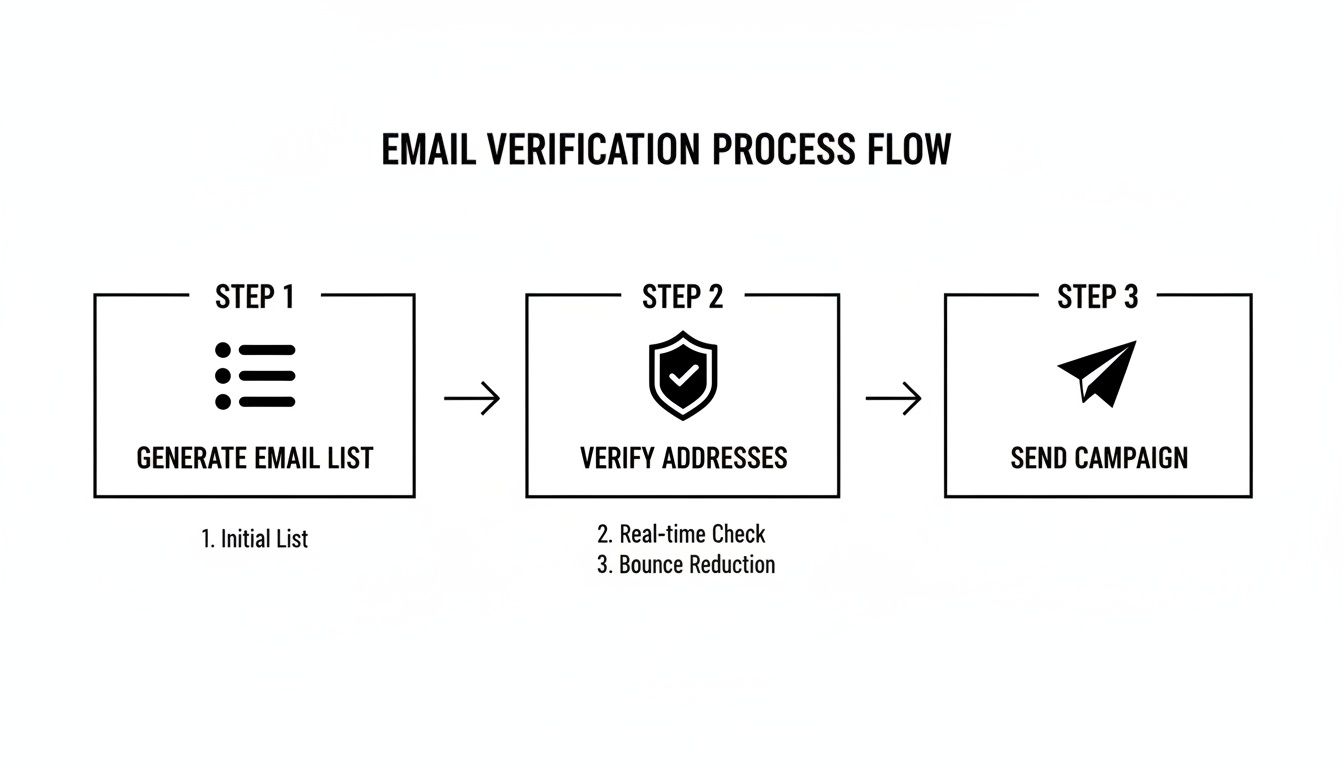
Running your data through a workflow like this ensures only clean, deliverable addresses make it into your outreach sequences, protecting your sender reputation from day one.
The Power of API Integration
This is where the real magic happens for scaling your email discovery. An API (Application Programming Interface) is basically a bridge that lets different software programs talk to each other automatically. Instead of manually exporting a CSV from your lead source and uploading it to a verifier, an API does it all for you, instantly.
When you integrate a verification API into your process, every single email gets checked the moment it’s found. This real-time validation is the key to maintaining a high-quality list and guaranteeing your campaigns actually land in the inbox.
A common mistake I see is “batch” verification—running a cleanup just once a month. By then, the damage from sending to bad emails is already done. Think of real-time API verification as a proactive shield for your sender reputation, not a reactive cleanup tool.
With a projected 4.83 billion email users by 2025, only the cleanest, most verified lists will cut through the noise. Campaigns sent to unvalidated lists often see inbox placement rates slump to 84%. We’ve seen that for developers and small businesses, nearly one in five pattern-guessed emails is invalid without a proper check. Tools like Truelist.io integrate directly with platforms like Clay, using real-time scans to fix this and ultimately boost conversions by 54-67%. You can dig deeper into this trend in recent email marketing research reports.
Staying Compliant at Scale
As your outreach grows, so does your responsibility to play by the rules. Automating your email discovery doesn’t give you a free pass on legal and ethical compliance—in fact, it makes it more important than ever. You absolutely need to understand regulations like GDPR in Europe and the CAN-SPAM Act in the United States.
Here are the non-negotiables for keeping your outreach on the right side of the law:
- Be Transparent: Always state clearly who you are and why you’re reaching out. Don’t even think about using deceptive subject lines or sender names.
- Provide a Clear Opt-Out: Every single email you send must include a simple, obvious way for the recipient to unsubscribe from future messages.
- Honor Opt-Outs Promptly: When someone unsubscribes, they need to be removed from your list immediately. No exceptions.
- Have a Legitimate Interest: Under GDPR, B2B outreach requires a legitimate business reason for contact. Your product or service must be genuinely relevant to their professional role.
Baking compliance directly into your automated workflow isn’t just a good idea; it’s essential. It protects your brand and ensures your outreach is both effective and respectful.
Frequently Asked Questions
When you’re digging for company email addresses, a few key questions always seem to pop up. Let’s tackle the ones I hear most often, from legal gray areas to the most efficient ways to build your contact lists.
Getting these fundamentals right is what separates a successful outreach campaign from one that falls flat.
Is It Legal to Find and Email Someone at Their Company Address?
Yes, for B2B outreach, you’re generally in the clear, but you have to play by the rules. Regulations like CAN-SPAM in the United States and GDPR in Europe are the big ones to watch. They’re not trying to stop business communication, but they do demand transparency.
What does that mean for you? Be upfront about who you are, don’t use misleading subject lines, and always provide a simple way for people to opt out. A critical part of staying compliant is using a verified list. It shows you’re making a good-faith effort to contact legitimate business addresses, which is not only good for compliance but also protects your all-important sender reputation.
What Is the Most Accurate Way to Find Emails?
Honestly, there’s no single magic bullet. The most reliable method is actually a simple, multi-step workflow that combines a bit of detective work with smart tools.
Here’s the process that works time and time again:
- Discover: Start with the obvious places. Find your target on LinkedIn and identify their company’s domain from their profile or the company website.
- Deduce: Once you have the name and domain, use an email permutator tool to generate a list of the most common email patterns. This gives you a handful of solid guesses.
- Verify: This is the non-negotiable final step. Run your list of guesses through a real-time email verification service like Truelist. It will instantly tell you which one is the correct, deliverable address.
Relying on just one of these steps is a recipe for failure. You have to combine them to get consistent, accurate results.
A common mistake is stopping after the “deduce” step. Sending emails to a list of unverified guesses is a fast track to a high bounce rate, which can get your domain flagged as spam. Verification is the essential final step.
How Can I Find Emails for an Entire Department?
Hunting for emails one by one is a huge time sink. When you need to reach a whole team, you have to think bigger.
First, head over to LinkedIn. Use the search filters to find people at your target company with specific job titles, like “Account Executive” or “Software Engineer.” This will give you a list of names.
Next, your goal is to find just one verified email for anyone at that company. That single email address is your key—it reveals the company’s email pattern (like first.last@company.com). Now you can apply that same pattern to your entire list of names to create their probable email addresses.
Finally, you need to validate that whole list. A bulk email verification tool, like the one Truelist offers, is perfect for this. Just upload your list, and it will confirm which addresses are good to go. This builds your campaign on a solid foundation of clean data and dramatically boosts your chances of success.
Ready to stop guessing and start connecting? Truelist.io offers unlimited real-time email verification to ensure every message you send lands in the right inbox. Protect your sender reputation, reduce bounce rates, and supercharge your outreach by signing up for free.