 Claude
  Perplexity
How to Increase Email Open Rates with 7 Proven Tactics
Learn how to increase email open rates with our guide. We cover proven tactics from subject line optimization to list hygiene that boost engagement.
TL;DR: Learn how to increase email open rates with our guide. We cover proven tactics from subject line optimization to list hygiene that boost engagement.
Want to boost your email open rates? It all starts with two things: a squeaky-clean, validated list and subject lines that are impossible to ignore. But let’s be real—the health of your email list is the foundation of everything. If your emails aren’t even making it to the inbox, nothing else matters.
Build Your Foundation with a Healthy Email List
Before you even think about crafting that perfect subject line, take a hard look at your email list. This is ground zero for most open rate problems. Sending emails to a list filled with invalid, old, or risky addresses is like trying to build a house on quicksand. It’s just not going to work.
Every time you send a campaign, email providers like Gmail, Outlook, and Yahoo are watching. They’re looking for signals to figure out if you’re a legitimate sender or just another spammer. One of the biggest red flags they look for is your bounce rate—the percentage of your emails that fail to deliver.
A high bounce rate screams that you’re not maintaining your list, which is exactly what spammers do.
Why Bounce Rates Are an Open Rate Killer
Once your bounce rate starts creeping over the 2% mark, those email providers start to notice. This is when they can hit your sender reputation, which means your future emails get throttled or, worse, sent straight to the spam folder. And nobody opens emails they never see.
Think of it like this: if the mail carrier keeps trying to deliver letters to abandoned houses, they’ll eventually stop trusting anything from that sender. Email providers work the same way. A pattern of high bounces tanks your credibility, making it tougher for your emails to reach even your most loyal subscribers.
This is why list hygiene isn’t just a “nice-to-have.” It’s an ongoing part of your strategy. You have to be constantly on the lookout for bad addresses.
These troublemakers usually fall into a few key categories:
- Invalid Emails: Simple typos or syntax errors (like
jane.doe@gmal.com). - Inactive Mailboxes: Accounts that people just don’t use anymore.
- Spam Traps: Hidden email addresses used by providers to catch and block spammers.
- Disposable Emails: Temporary addresses that vanish after a few minutes.
Sending emails to these addresses is the quickest way to wreck your sender reputation and, by extension, your open rates. For a deeper look at building a solid email strategy from the ground up, check out A Modern Guide to High-Performing Email Marketing Campaigns.
The Power of Email Validation
So, how do you keep your list clean? The most effective method is using an email validation service. These tools scan your list and flag all the problematic addresses before you hit send.
A clean email list is the bedrock of high open rates. It ensures your messages are delivered to real, engaged people, which builds trust with both your subscribers and the internet service providers that control inbox placement.
By plugging a validation tool into your workflow, you can automate this whole cleaning process. The flowchart below nails it—showing how you go from a messy, unreliable list to a high-performing asset.
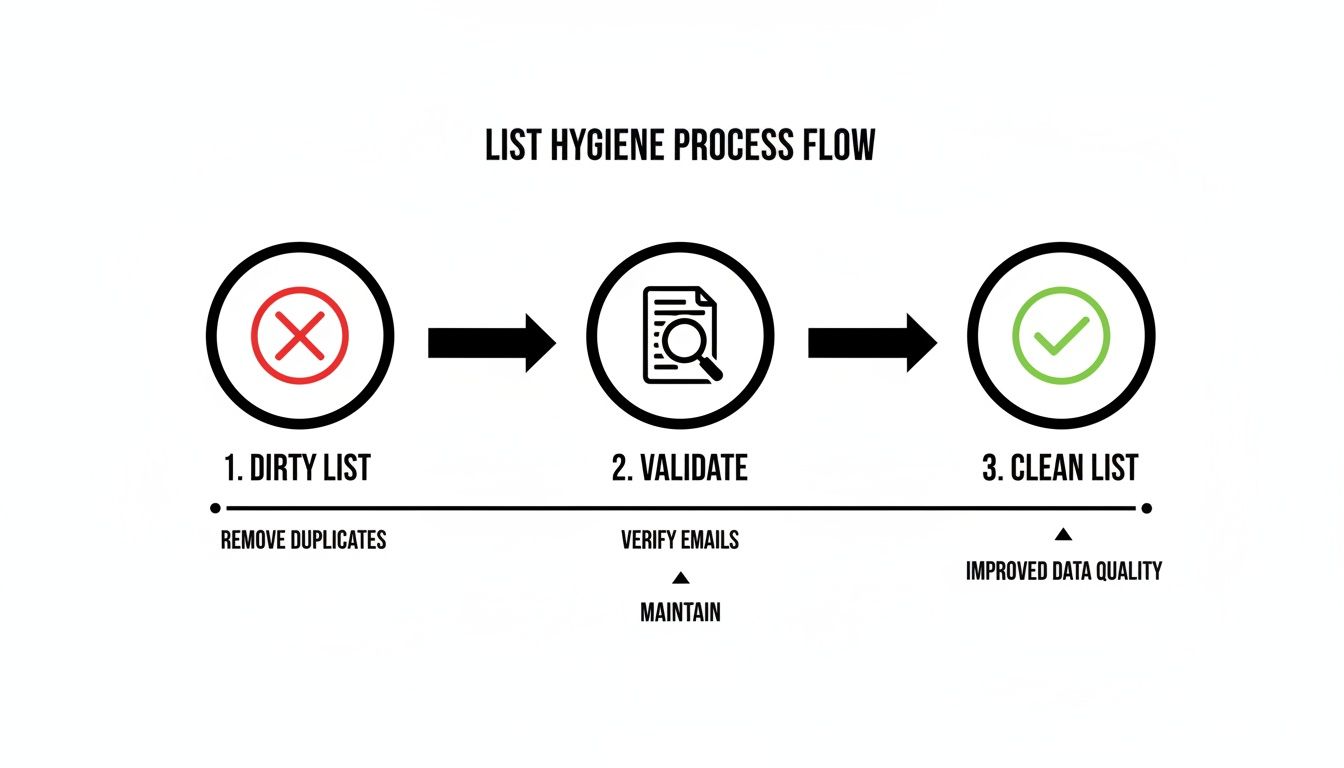
It’s a simple but powerful process: take your raw list, run it through a validation service to weed out the bad stuff, and you’re left with a clean list that’s ready to go.
A service like Truelist is built for exactly this. You can see how this works in practice by checking out their guide on effective email list cleaning.
The difference this makes is staggering. The table below breaks down the before-and-after of implementing good list hygiene.
How List Hygiene Directly Impacts Email Performance
| Metric | Unvalidated List (Poor Hygiene) | Validated List (Good Hygiene) |
|---|---|---|
| Hard Bounces | High (2-5%+) | Very Low |
| Sender Reputation | Damaged, at risk of blacklisting | Strong and trusted |
| Deliverability | Poor, emails land in spam | High, emails reach the inbox |
| Open Rates | Low and declining | Significantly higher |
| Campaign ROI | Wasted budget on undelivered emails | Maximized, reaching real customers |
As you can see, the contrast is night and day. Taking the time to validate your list pays off across the board.
In fact, cleaning your email list can slash your bounce rates and push your open rates up by 10-20% or more. I’ve seen it happen time and again. Campaigns with bounce rates under 0.5% often see open rates climb to 30% or higher in industries like retail and SaaS.
When you consistently keep your bounce rate below 1%, you’re sending a clear signal to email providers that you’re a responsible sender. That positive reputation leads to better inbox placement and, ultimately, much higher open rates for every campaign you send.
Craft Subject Lines That Demand to Be Opened
Once you’ve done the hard work to ensure your emails actually land in the inbox, your next battle is for attention. And your subject line is the tip of the spear. It’s your one shot—your first impression—to convince someone that your message is more important than the dozen others clamoring for their focus.
A weak subject line renders even the most brilliantly crafted email invisible. Think about it: your subscribers’ inboxes are noisy, crowded places. To get that click, you have to cut through the clutter and give them a reason to care. This isn’t about clickbait; it’s about making a genuine connection from the very first word.
Spark Curiosity and Convey Urgency
Human curiosity is a powerful force. A subject line that hints at a valuable piece of information, asks a provocative question, or teases a surprising result can be nearly impossible to ignore. You’re creating a small “information gap” that the reader instinctively wants to close by opening your email.
For instance, instead of the flat and forgettable “Our New Feature Is Here,” try reframing it around the user: “The one feature you’ve been asking for…” See the difference? One is an announcement; the other is a conversation starter.
Urgency and scarcity are just as potent. We’re wired to act when we think we might miss out. Phrases that signal a deadline or limited availability tap directly into that impulse.
- Urgency in action: “Last chance: 40% off ends at midnight”
- Scarcity in action: “Only 12 spots left for our workshop”
A word of caution: use these tactics authentically. If every email screams “URGENT,” you’ll quickly train your audience to tune you out. Save these for when they genuinely apply, and you’ll protect your credibility and effectiveness.
Personalize Way Beyond the First Name
Let’s be honest, just dropping in a {{first_name}} token isn’t really personalization anymore—it’s the bare minimum. True personalization runs much deeper and is based on a subscriber’s actual behavior and demonstrated interests. This is how you show you’re paying attention.
Think about these more sophisticated approaches:
- Follow up on past behavior: “Your thoughts on the [Product Name] you bought?”
- Connect with a known interest: “New arrivals for hikers like you, Sarah”
- Acknowledge their loyalty: “A special offer just for our VIP members”
This level of detail transforms a mass broadcast into what feels like a one-on-one conversation. It instantly signals relevance, which is a massive driver for getting that open. For a deep dive, we’ve put together a complete guide on https://truelist.io/blog/email-subject-line-best-practices.
Use Emojis and Preview Text as Your Secret Weapons
In a wall of black and white text, a single, well-chosen emoji can make your subject line jump off the screen. This is especially true on mobile, where the majority of emails are first seen. But it’s not just about looking different; the data backs it up.
One analysis of 30 billion emails discovered that adding an emoji to a subject line can boost open rates by a staggering 56%. With over 370 billion emails flying around the globe daily, that little icon might be the edge you need.
And don’t forget the preview text! It’s that snippet of copy right next to the subject line, and it’s some of the most valuable real estate in the inbox. Never let it default to “View this email in your browser.” Use it to expand on your subject line and add a compelling hook.
Let’s look at the difference it can make for a webinar invite:
| Element | The Weak Approach | The Strong Approach |
|---|---|---|
| Subject Line | Webinar Invitation | Are you making this SEO mistake? |
| Preview Text | Join us for our upcoming webinar… | Find out how to fix it in 30 mins. We’ll show you the exact steps… |
The strong approach tells a complete story. The subject line piques curiosity with a touch of FOMO, and the preview text immediately promises a fast, actionable solution. This synergy is key. While a great subject line is vital, it’s just one piece of the puzzle. To see how it fits into the bigger picture of email engagement, explore this guide on how to write business emails that get read.
Nail Your Send Times and Cadence
You can have the most compelling subject line and a perfectly clean email list, but if your message lands when your subscriber is offline, asleep, or just drowning in their morning inbox flood, it’s going to get buried. A great email sent at the wrong time is, for all intents and purposes, an invisible email.
Mastering your sending schedule isn’t just a “nice-to-have”—it’s a critical lever for boosting open rates. It’s all about meeting your audience where they are, in their own time. Think of it less like a broadcast and more like a scheduled appointment. You wouldn’t show up for a meeting at 3 AM, so why send your most important campaign when your subscribers are least likely to see it?
Finding That Peak Engagement Window
While there’s no single “magic” hour that works for every business, years of data reveal clear patterns in user behavior. Most professionals have a routine: they check emails in the morning, often during their commute or as they settle in at their desk. This creates a prime window of opportunity for your message to be seen right at the top of their inbox.
Timing really is everything. Data shows that sending between 10-11 AM local time can boost opens by up to 20-30% over off-peak hours. With 99% of users checking their inboxes daily, hitting that morning peak is a huge advantage. This is especially true when you consider HubSpot’s data flagging 65% of opens happening on mobile, where those morning habits really dominate.
For B2B audiences, the sweet spot is typically mid-morning on weekdays—think Tuesday, Wednesday, and Thursday between 9 AM and 11 AM. By this time, people have cleared out the initial overnight clutter and are focused on their workday. I’ve found that sending on Mondays can be risky as inboxes are often overflowing, while Fridays can see a dip in engagement as people start winding down for the weekend.
In contrast, B2C audiences often show different patterns. While weekday mornings are still strong, you might see engagement spike during lunch breaks (12 PM - 2 PM) and in the evenings (after 7 PM) when people are browsing on their personal devices. For retail, entertainment, and hobby-focused brands, don’t be afraid to test weekend sends—they can be surprisingly effective.
The goal isn’t to find the one perfect time for everyone, but the best starting point for your audience. Use industry benchmarks as your hypothesis, then test relentlessly to find what truly works.
Master Your Sending Frequency
Just as important as when you send is how often you send. This is your sending cadence, and believe me, finding the right balance is a delicate art.
Send too frequently, and you’ll trigger subscriber fatigue, annoyance, and a spike in unsubscribes. But if you send too infrequently, your audience might forget who you are, making them far less likely to open your emails when they finally do arrive. It’s all about consistency and value.
The key is to set clear expectations right from the signup and then deliver on that promise. Ask yourself:
- What did you promise? If your signup form said “weekly tips,” stick to that schedule. Building trust starts with keeping your word.
- What’s the value of each send? Every single email should provide genuine value. If you don’t have something useful to say, it’s better to skip a send than to “mail it in.”
- How are your subscribers responding? Keep a close eye on your open, click, and unsubscribe rates. A rising unsubscribe rate is a blaring alarm that you might be sending too often.
A Practical Plan for Testing Send Times
The only way to know for sure what works for your specific audience is to test. An A/B test for send times is simple to set up in most email platforms and provides incredibly valuable data.
Here’s a straightforward test plan I’ve used countless times. It’s designed to isolate one variable at a time so you get clean, actionable results.
A/B Test Plan for Finding Your Best Send Time
| Test Element | Group A (Control) | Group B (Variant) | Success Metric |
|---|---|---|---|
| Send Day | Tuesday | Thursday | Highest Unique Open Rate |
| Send Time | 10:00 AM | 2:00 PM | Highest Unique Open Rate |
| Subject Line | Identical | Identical | N/A (Keep consistent) |
| Email Content | Identical | Identical | N/A (Keep consistent) |
Make sure you run this test over several campaigns to get a large enough sample size to trust the results. Once you identify a winning time or day, make that your new “control” and continue testing other variables.
And a pro tip for global campaigns: use an email service provider that offers a “send by time zone” feature. It’s a game-changer. It ensures your 10 AM email actually arrives at 10 AM in New York, London, and Tokyo, maximizing your relevance for every single subscriber on your list.
Go Deeper with Personalization and Segmentation
If you’re still sending the same email to your entire list, you’re leaving money on the table. The “email blast” is dead. Sending a generic message is the fastest way to get your emails ignored, flagged as spam, or worse, trigger a wave of unsubscribes.
The key to getting more opens is proving to your subscribers that your emails are consistently relevant to them. This is where smart personalization and segmentation come into play. It’s about so much more than just dropping a {{first_name}} tag in the subject line. True personalization means you understand your audience deeply and use that insight to craft messages that resonate.
When people realize your emails speak directly to their needs, they start looking for them in their inbox. That’s when your open rates really take off.

Segment Your Audience by Their Behavior
One of the most effective ways to group your subscribers is by what they do. Behavioral segmentation gives you incredible context, allowing you to tailor your message based on how someone has interacted with your brand.
Think of it as breaking down one massive list into smaller, more intelligent groups.
- Purchase History: Group customers based on what they’ve bought. Someone who just bought hiking boots will be interested in different content than someone who bought a yoga mat. You can send them follow-up tips, accessories, or related product suggestions.
- Website Activity: Keep an eye on the pages people visit. A user who keeps returning to your pricing page is signaling strong intent. They need a different message than someone who casually reads your blog.
- Email Engagement: Not everyone interacts with your emails the same way. Create a segment for your super-fans (e.g., opened the last five emails) and another for those who are slipping away (e.g., haven’t opened in 90 days). Reward your VIPs with exclusive offers and try to win back the inactive crowd with a re-engagement campaign.
This approach makes every email feel like a helpful next step in the conversation, not a random interruption.
How Smart Segmentation Looks in the Real World
Let’s make this practical. The whole point is to make the subscriber feel like you get them, not that you’re just another company shouting into the void.
Imagine a SaaS company with different types of users. Sending the same newsletter to a new trial user and a long-time paying customer is a massive missed opportunity.
| Audience Segment | The Generic (and Ineffective) Message | The Segmented (and Effective) Message |
|---|---|---|
| New Trial Users | “Check out our latest feature updates!” | “Getting Started Tip #1: Your first 5 minutes” |
| Paying Customers | “Our monthly company newsletter is here.” | “Advanced Tip: How to automate [feature] and save 3 hours” |
| Inactive Users | “Here’s what you missed this month.” | “We noticed you haven’t logged in. Is this one feature holding you back?” |
It works just as well for e-commerce. Don’t just blast out a generic “20% Off Everything” sale. Get specific.
A shopper who abandoned a cart with a specific pair of running shoes should get an email with a subject line like, “Still thinking about those running shoes?” That targeted, behavioral trigger is infinitely more powerful than a generic discount.
Personalize the Content, Not Just the Name
Once you have your segments defined, you can take things a step further by personalizing the actual content inside the email.
This is where dynamic content blocks are a game-changer. These are sections of your email that automatically change based on the segment viewing them. For instance, a clothing retailer could send a single email campaign where the main hero image shows menswear to its male segment and womenswear to its female segment. The product recommendations below could also be tailored to categories they’ve browsed before.
This level of detail shows you’re paying attention. You’re not just another brand trying to make a sale; you’re a helpful resource. When you achieve that, opening your emails becomes a welcome habit for your subscribers, not a chore.
Shore Up Your Sender Reputation with Technical SEO
Even with a pristine list and a killer subject line, there’s a crucial, often-overlooked layer to email marketing that can sink your open rates before you even start. This is the technical bedrock of your sending setup, known as email authentication.
Think of it like a digital passport for your domain. It’s how you prove to mailbox providers like Gmail and Outlook that the emails coming from your domain are, in fact, legitimately from you.
Without this “passport,” your carefully crafted campaigns look suspicious. Internet Service Providers (ISPs) are in a constant battle against phishing and spoofing, where spammers impersonate trusted brands. Proper authentication is your first and best line of defense, telling ISPs you’re one of the good guys.
This technical foundation directly feeds into your sender reputation—an invisible score that mailbox providers use to decide if you land in the inbox or get banished to the spam folder. A strong reputation, built on authentication and good list hygiene, is non-negotiable for consistent inbox placement.
The Three Pillars of Authentication
When people talk about email authentication, they’re really referring to three core protocols working in concert. You don’t need to be a developer to get the gist, but knowing they’re set up correctly is absolutely essential for anyone serious about getting their emails opened.
These protocols are simply records you add to your domain’s DNS settings. Let’s break them down.
SPF (Sender Policy Framework): This is the most basic check. It’s a public list of all the servers and services authorized to send email on behalf of your domain. You’re essentially telling the world, “Only emails from these specific places are officially from us.”
DKIM (DomainKeys Identified Mail): This adds a tamper-proof seal to your messages. DKIM attaches a unique, encrypted digital signature to your emails. When the receiving server gets it, it can check the signature to confirm the message hasn’t been messed with along the way.
DMARC (Domain-based Message Authentication, Reporting & Conformance): Think of DMARC as the bouncer. It tells receiving servers what to do if an email fails the SPF or DKIM checks. You can set a policy to just monitor, quarantine (send to spam), or flat-out reject unauthorized emails, which is a huge step in protecting your brand from being impersonated.
Together, these three create a powerful shield around your sender reputation.
Why Authentication Is Your Secret Weapon for Deliverability
Getting SPF, DKIM, and DMARC set up sends a massive trust signal to all major mailbox providers. It shows you take email security and best practices seriously, which is exactly what they want to see.
When your emails are properly authenticated, ISPs are far more likely to place them in the primary inbox. This one-time technical fix can have a bigger impact on your open rates than any single subject line you’ll ever write.
This isn’t just a “nice-to-have” anymore. In early 2024, Gmail and Yahoo made these authentication methods mandatory for bulk senders. If you haven’t configured them, a huge chunk of your emails might not be getting delivered at all.
For a deeper dive into the mechanics (without the confusing jargon), you can learn more about how email authentication works to protect your brand and why it’s so critical today.
How to Check Your Authentication Status
Thankfully, you don’t have to fly blind. There are tons of free online tools that can instantly check your authentication records. Just search for a “DMARC checker” or “SPF record checker,” pop in your domain name, and it will tell you if your records are valid and configured correctly.
What if you find something missing or broken? Don’t panic. Your email service provider (like Mailchimp or ConvertKit) or domain host (like GoDaddy or Namecheap) almost certainly has step-by-step guides to help you add the necessary DNS records. It’s usually a simple copy-and-paste job that takes a few minutes but pays off in deliverability for years to come.
Got Questions About Email Open Rates? We’ve Got Answers.
Even with the best playbook in hand, you’re bound to run into some specific head-scratchers when you’re trying to boost your email open rates. This is where we tackle the most common questions and sticky situations that pop up in the real world. Think of this as your go-to reference for troubleshooting on the fly.
Getting these details right is often what separates a campaign that flies from one that flops. Let’s dig into some of the most common questions I hear from marketers.
How Often Should I Be Cleaning My Email List?
Treating list hygiene as a one-and-done task is a huge mistake. It’s an ongoing process. For anyone managing a high-volume list or pulling in leads from various sources, a quarterly cleaning is a solid rule of thumb. This keeps your list healthy, protects your sender reputation, and weeds out contacts that inevitably go stale.
But there’s a big exception: for new contacts, you need to be much more proactive. Whether it’s a cold outreach list or sign-ups from a new lead magnet, you absolutely have to validate those contacts before you hit send for the first time. This single step prevents you from immediately damaging your reputation with a wave of bounces. Using a service like Truelist — with pay-as-you-go credits that never expire, plus unlimited plans for high-volume senders — lets you build this right into your sign-up workflow, so you’re always working with a clean, high-potential list from the get-go.
Can I Really Hurt My Deliverability by Using Too Many Emojis?
You bet. Emojis can be fantastic for grabbing attention and boosting opens, but it’s easy to overdo it. When you do, you risk looking spammy, and your deliverability will take a hit. The key is to be tasteful and relevant.
My advice? Stick to one or two well-placed emojis that genuinely add something to your message. Spam filters are notorious for flagging subject lines that are stuffed with symbols or use them in a way that feels like clickbait.
The emoji should be the garnish, not the main course. Your subject line needs to stand on its own and clearly communicate value. When in doubt, A/B test a version with an emoji against one without to see how your audience actually responds.
What’s a Good Email Open Rate to Aim For, Anyway?
This is the million-dollar question, and the honest answer is: it depends entirely on your industry. The global average sits somewhere around 20-24%, but that figure is almost meaningless without context. For instance, government-related emails can soar past 30%, while a typical retail campaign might land closer to 20%.
Instead of getting hung up on a universal benchmark, you should focus on improving your own numbers.
- Know Your Baseline: First, figure out your average open rate over the last three to six months. That’s your starting point.
- Set a Realistic Goal: Aim to lift that average by a steady 5-10% after putting the strategies from this guide into practice.
- Track Your Own Progress: Consistent, incremental growth is the true sign of a winning strategy.
Competing against yourself is far more productive than chasing a vague industry average.
Help! My Open Rates Suddenly Tanked. What Should I Check First?
A sudden nosedive in your open rates is an all-hands-on-deck situation. It almost always points to a deliverability or reputation problem. Before you panic, run through this quick diagnostic checklist.
- Check Your Bounce Rate: This is your prime suspect. Jump into your email service provider and check the bounce rate on your last send. A sudden spike is a massive red flag that you may have hit a spam trap or an old segment of your list has soured.
- Review Your Subject Line: Was the subject line on your last campaign a little… off? Did you use any classic spam trigger words (“free,” “act now,” ”$$$”) or go overboard with punctuation?
- Scan Public Blacklists: Use a free online tool to see if your sending domain has landed on a major blacklist. Getting listed is a fast track to the junk folder and can crush your delivery rates overnight.
- Confirm Your Authentication: Pop the hood and double-check that your SPF, DKIM, and DMARC records are all properly set up and passing. It’s surprisingly common for a small DNS change to accidentally break these essential configurations.
Working through these four areas will help you pinpoint the root cause quickly so you can fix it and get your open rates climbing again.
Ready to stop worrying about bounces and start focusing on opens? With Truelist, you get pay-as-you-go credits that never expire, plus unlimited plans for high-volume senders. Clean your lists as often as you need, integrate validation into your workflows, and ensure every campaign has the best possible chance of landing in the inbox. Start validating for free today at https://truelist.io and see the difference a clean list makes.