 Claude
  Perplexity
Is This a Real Email Address and How to Check It
Struggling with email bounces? Find out how to check 'is this a real email address' with our guide on manual techniques, automation, and API verification.
TL;DR: Struggling with email bounces? Find out how to check 'is this a real email address' with our guide on manual techniques, automation, and API verification.
You know that sinking feeling when your latest email campaign report lands, and the bounce rate is through the roof? We’ve all been there. Asking, “is this a real email address?” is the first, most crucial step to protecting your sender score, sharpening your metrics, and frankly, stop wasting money.
But this goes way beyond a simple yes or no answer.
Why Verifying Email Addresses Is So Damn Important
Just having an email address isn’t enough. The quality of that email determines whether your outreach efforts fly or flop. A list packed with bad addresses is a direct threat to your business. It cranks up your bounce rate, which is a major red flag for email providers like Gmail and Outlook. They use that metric to decide if you’re a trustworthy sender.
Too many bounces can land your domain on a blacklist. When that happens, even your legitimate emails—the ones meant for real, interested prospects—get dumped straight into the spam folder or blocked entirely. It’s a fast way to tarnish your brand and nullify all the hard work your team poured into that campaign.

The Problem Is Bigger Than You Think
The sheer scale of email makes this a non-negotiable task. By 2025, we’re looking at nearly 4.8 billion email users firing off hundreds of billions of messages every single day. At that volume, even a tiny fraction of invalid addresses adds up to millions of undelivered emails.
A healthy, well-maintained list might have a bounce rate around 2–5%. But I’ve seen unverified lists, often built through things like email scraping, easily top 20%. That kind of number absolutely kills your deliverability. Every one of those bad contacts is a missed opportunity and a direct risk to your reputation.
Stop Guessing and Start Strategizing
When you get proactive about email verification, you unlock some serious advantages.
- You protect your sender reputation. Fewer bounces signal to ISPs that you’re a legitimate sender, which helps you land in the inbox.
- You get a better ROI. Your marketing budget is spent reaching actual people who might buy from you, not dead ends.
- You get real, actionable insights. Clean data gives you an honest look at your campaign performance, from open rates to actual conversions.
For anyone in sales or marketing, this isn’t just about housekeeping. It’s about making every single outreach count. A verified list is the foundation of any communication strategy that’s built to last. Take a moment to understand the “why” behind it all, and you’ll start seeing your entire approach differently. Find out more at: https://truelist.io/docs/fundamentals/why-verify-a-list
Getting Your Hands Dirty: Simple Manual Checks
Sometimes, you don’t need a high-tech tool, especially when you’re just looking at a handful of important email addresses. If you’re an SDR about to reach out to a key prospect or a marketer wanting to be sure before adding someone to a nurture sequence, a few quick manual checks can give you a solid gut check.
Think of these as the first line of defense. They’re fast, free, and can often spot the most obvious fakes.

The most basic thing you can do is just look at the address itself. Does it look right? Every email has to follow the local-part@domain structure. Any deviation from that is an instant red flag.
For example, jane.smith@acmecorp.com looks perfectly normal. But something like jane smith@acmecorp.com (with a space) or jane.smith@acmecorp (missing the .com) is a dead giveaway that it’s either fake or was typed in wrong. Getting familiar with the proper format of an email address is a surprisingly powerful skill. You can learn more about the specific rules here: https://truelist.io/blog/format-of-email-address.
The Five-Second Domain Check
After a quick syntax scan, the domain itself can tell you a lot. The domain is everything after the @ symbol, and a quick visit can be incredibly revealing.
Just copy that part of the email address and paste it into your browser’s address bar. If the email is j.doe@techsolutionsgroup.com, you’d pop techsolutionsgroup.com into your browser.
What you’re looking for is simple:
- Is there a real website? A legitimate business will almost always have a professional-looking site.
- What if it’s a blank page or just a bunch of ads? That’s a huge warning sign. The domain might just be a shell for sending spam.
- Does the site look like it was built in 1998 and never updated? An abandoned or broken website could mean the company is out of business, and their email accounts are probably inactive.
This little trick gives you immediate context. A polished, active website makes it far more likely that the email address associated with it is also active and monitored.
Pro Tip: Keep an eye out for tricky misspellings of well-known domains, like
s.jones@gmai1.com(with a ‘1’ instead of an ‘l’). These are classic phishing tactics and are almost never connected to a real person you want to do business with.
The “Ping Test” Email
If you’re still on the fence, one of the most direct ways to check is to send a “ping” email. This is just a simple, harmless test message sent from a secondary email account—never your primary business domain—to see if it bounces back.
Your goal here is to be as neutral as possible. Don’t send a sales pitch. A simple message like, “Hi, just confirming this email is active. Thanks!” is all you need.
If you get an immediate “hard bounce” notification saying the user doesn’t exist, you’ve got your answer. The address is bad.
But this method has its limits. If you don’t get a bounce, it doesn’t automatically mean the email is good. Some servers are set up as “accept-all,” meaning they won’t report an invalid mailbox. So, while a bounce is a definitive “no,” the absence of one is more of a “maybe.”
Understanding the Different Types of Bad Emails
To really answer the question “is this a real email address?”, you need to know that not all bad emails are the same. Some are just dead ends, but others are active threats to your sender reputation. Moving beyond a simple “valid” or “invalid” check helps you protect your outreach far more effectively.
First up, you have disposable emails. You’ve probably used one yourself to grab a free e-book or start a trial without getting spammed. These are temporary addresses designed to self-destruct, sometimes in just 10 minutes. Sending to them is a total waste of time and just messes with your engagement metrics.
Dealing with Role-Based Addresses
Another tricky category is role-based emails. These are the generic inboxes tied to a job function, not a person—think info@, sales@, or contact@company.com. These addresses are almost always real and deliverable, but that doesn’t mean you should use them.
For sales or marketing, blasting these inboxes is usually a bad move. Here’s why:
- Low Engagement: Your message lands in a shared inbox, often managed by an admin or filtered automatically. The chances of it reaching an actual decision-maker are slim to none.
- Higher Complaint Risk: Since no specific person opted in, your carefully crafted email is far more likely to get flagged as spam.
While they’re fine for general inquiries, your outreach will be much more successful when you’re emailing a specific person.
The real danger, however, comes from a much more harmful type of address: the spam trap. These are the landmines of email marketing that can cause severe, long-lasting damage to your ability to reach the inbox.
The Threat of Spam Traps
A spam trap, sometimes called a honeypot, is an email address used by Internet Service Providers (ISPs) and anti-spam organizations to catch and block spammers. No real person ever uses these addresses for legitimate communication. They’re often old, deactivated emails that have been secretly brought back online just to see who’s still sending to them.
Hitting even a single spam trap is a huge red flag to ISPs. It signals that your email list is outdated and poorly managed, and your sender reputation will take an immediate and serious hit. This can get your domain universally blocked or have all your future emails sent straight to the junk folder.
Understanding these distinctions is critical. Good email verification can slash hard bounce rates from an industry average of 5-10% down to under 2%, directly preserving your deliverability. If you’re interested in the latest email trends, CloudHQ has some great insights.
Automating Email Checks with Truelist: The Only Way to Scale
Look, manual checks are great for one or two crucial contacts. But let’s be real—they’re completely impractical when you’re dealing with hundreds, or even thousands, of emails. The time sink is one problem, but the real killer is the bad data that always sneaks through.
If you want to protect your sender reputation and make sure your outreach actually reaches people, automation isn’t a luxury; it’s a necessity.
This is where a tool like Truelist comes into play. It takes the guesswork out of email validation and turns it into a scalable process that saves you from future deliverability nightmares.
For Your Existing Lists: The Bulk Clean-Up
The most common starting point? You have a list—maybe from a trade show, a webinar, or just years of accumulation—and you have no idea how healthy it is.
The process is refreshingly simple. You just upload your list as a CSV file, and Truelist handles the rest. In the background, it’s running all those complex checks we talked about, but it does it across your entire list in minutes, not days.
What you get back is a crystal-clear breakdown of your list’s quality. It segments every contact into categories like Deliverable, Risky, and Undeliverable. This isn’t just data; it’s a roadmap for what to do next.
Once the scan is done, you download the results. The first, most obvious step is to immediately remove all the Undeliverable emails—those are the ones that will cause hard bounces and tank your sender score. From there, you can decide how to handle the risky ones.
For a complete step-by-step tutorial, you can explore the full guide on how to verify a list here: https://truelist.io/docs/usage/verify-list.
For New Leads: Stop Bad Emails at the Source with an API
Cleaning old lists is reactive. The truly smart move is to be proactive and stop bad email addresses from ever getting into your system. That’s what an API (Application Programming Interface) is for.
By integrating an API into your signup forms or CRM, you can check an email address in real time, the moment someone types it in. Before that contact is even saved to your database, Truelist has already given it a thumbs-up or thumbs-down.
This real-time check is a total game-changer. Here’s why:
- Catch Typos Instantly: Someone types
john@gmal.com? The form can immediately ask, “Did you meangmail.com?” You just saved a lead you would have otherwise lost. - Block Bad Actors: Disposable emails and other junk formats are stopped at the door. Your list stays clean from day one.
- Protect Your Reputation: By preventing bad emails from ever getting on your list, you drastically lower your bounce rate, which is a huge factor in your sender reputation.
Integrating an API might sound like a job for a developer, but it’s often much simpler than you think. It’s the difference between cleaning your house every weekend and just not letting mud get tracked inside in the first place.
This proactive approach means your data is always as clean as possible. Your marketing campaigns run better, your sales team connects with more prospects, and your metrics actually mean something because they aren’t skewed by bad data.
Okay, You Have Verification Results. Now What?
Running a list through an email verification tool is the easy part. You get a report packed with data, but that data is just noise until you know exactly what to do with it. The real magic happens when you turn those results into a smart, repeatable process that actually protects your sender score and boosts your campaign performance.
A solid verification service like Truelist won’t just give you a simple “valid” or “invalid” tag. You’ll get a much more detailed breakdown, which is exactly what you need to manage your outreach risk effectively. Let’s dig into what these statuses mean and build a clear action plan for each.
Understanding the Different Verification Statuses
Not all results are black and white. Some addresses are a clear green light, while others are a hard stop. But many fall into a gray area, and knowing how to handle those is what separates the pros from the amateurs.
Here’s a look at the common categories you’ll encounter:
Deliverable: This is your green light. The tool has confirmed the mailbox exists and is ready to receive mail. These are the contacts you can confidently add to your primary campaigns. They’re good to go.
Undeliverable: A definitive dead end. The address is invalid, the domain is fake, or the server has flat-out said the mailbox doesn’t exist. These are your future hard bounces, just waiting to happen.
Risky: Welcome to the gray zone. This category often includes “accept-all” (or “catch-all”) domains. These servers are set up to accept email for any address, so it’s impossible to know if a specific inbox is real without actually sending something. This bucket can also contain addresses with temporary server problems.
Choosing how to act on this data often comes down to a choice: do you validate emails in real-time as they come in, or do you clean your existing lists in bulk? This flowchart lays out that decision-making process perfectly.
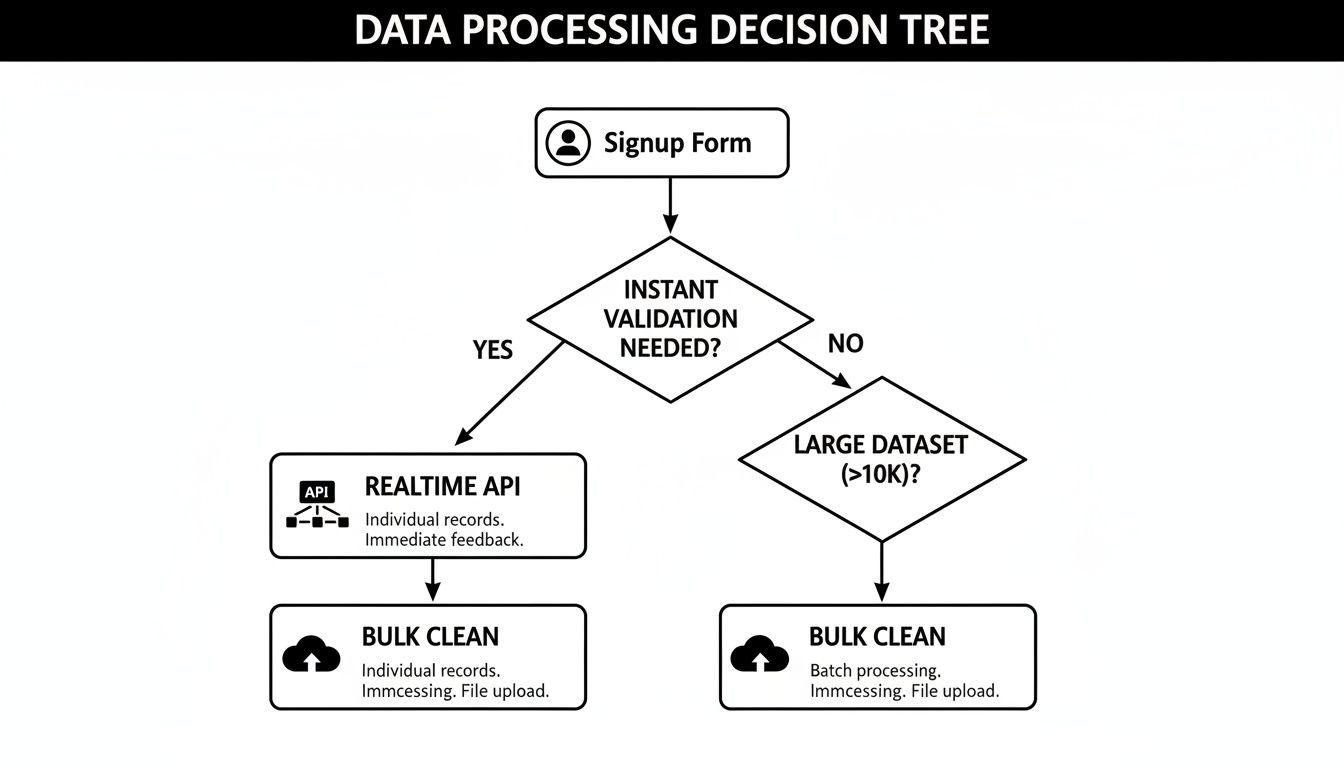
The big takeaway here? An API is your best friend for catching bad emails at the signup form. For the database you already have, regular bulk cleaning is absolutely essential hygiene.
Your Step-by-Step Action Plan
So, how do we turn these statuses into a concrete strategy? Your goal should always be to minimize risk while maximizing every opportunity.
Key Insight: Immediately deleting every “Risky” email feels safe, but you’re likely throwing away perfectly good leads from companies that use accept-all domains. A smarter, segmented approach is the way to go.
Here’s a simple, battle-tested framework you can follow.
First, get rid of all “Undeliverable” contacts. Do it now. Don’t hesitate. Sending to these addresses guarantees hard bounces, and nothing tanks a sender reputation faster. There’s zero upside to keeping them.
Next, isolate your “Risky” and “Accept-All” contacts. Don’t delete them, but don’t dump them into your main mailing list, either. The right move is to create a separate segment just for this group.
Finally, launch a cautious re-engagement campaign. Send a low-stakes welcome email to your “Risky” segment. If you have a secondary, “warm-up” domain, now is the time to use it. The whole point is to see who opens or clicks. Anyone who engages is likely a real person and can be safely moved to your primary list. Those who bounce or show no activity can be removed.
This strategy turns a risky guess into a smart, data-driven decision.
Action Plan for Email Verification Results
To make it even clearer, here’s a table that breaks down precisely what to do for each status. This is your go-to guide for handling contacts based on their verification results, ensuring you protect your sender reputation while improving campaign effectiveness.
| Verification Status | What It Means | Recommended Action for Marketers |
|---|---|---|
| Deliverable | The email address is valid and the inbox exists. Safe to send. | Add directly to your main email lists and include in all relevant campaigns. |
| Undeliverable | The email address is invalid, fake, or defunct. Will cause a hard bounce. | Remove from all lists immediately. Do not attempt to contact again. |
| Risky (Accept-All) | The server accepts all emails, so the specific inbox can’t be confirmed. | Segment these contacts. Send a low-risk engagement campaign. Move engaged users to the main list. |
| Risky (Other) | May have temporary issues like a full mailbox or server downtime. | Isolate and attempt to send to them again after a few days. If they fail again, remove them. |
| Role-Based | An address like info@, support@, or sales@ not tied to one person. | Use with caution. Segment them for specific, non-personalized communications. Avoid in cold outreach. |
| Disposable | A temporary email address designed to self-destruct. Low value. | Remove immediately. These contacts have no long-term value and indicate low-quality signups. |
By following this structured approach, you’re not just cleaning a list—you’re building a healthier, more engaged, and more profitable audience. You’re treating email verification as the strategic tool it is.
Common Questions About Email Verification
Even with a solid plan, you’re bound to run into some practical questions once you start verifying emails. Answering the big one—“is this email address even real?”—often brings up smaller, more specific worries about timing, accuracy, and what to do with those tricky “maybe” contacts. Nailing these details is how you build an outreach process you can actually trust.
Let’s walk through some of the questions I hear most often.
How Often Should I Verify My Email List?
This depends on where the emails are coming from.
For any web form where you’re capturing new leads, the answer is easy: verify them in real-time with an API. This is the single most effective way to stop bad data from poisoning your CRM in the first place. You catch typos, fake sign-ups, and junk emails right at the door.
For the list you already have, a quarterly check-up is a great baseline. Email lists decay naturally—people switch jobs, companies get acquired, and old inboxes get abandoned. Regular verification keeps this data rot from quietly tanking your sender reputation and campaign results.
Does Verification Guarantee 100% Deliverability?
Nope, and it’s critical to understand the distinction. Honestly, no tool on the planet can promise 100% deliverability.
Email verification is fantastic at one thing: eliminating hard bounces. It confirms that a mailbox exists and is set up to receive mail. But getting your email delivered and into the inbox depends on a whole other set of factors:
- Your sender reputation: Do inbox providers like Gmail and Outlook see you as a trusted sender?
- Email content: Is your message genuinely valuable, or does it trigger spam filters?
- Recipient engagement: Are people actually opening, clicking, and replying to your emails?
Think of it this way: a verified email gets you to the front door, but it can’t stop the homeowner (or their security system) from sending you straight to the junk pile.
What Is the Difference Between a Hard and Soft Bounce?
It all comes down to a permanent vs. a temporary problem.
A hard bounce is a full stop. It’s a definitive “no.” This means the email address is invalid, the domain doesn’t exist, or the recipient’s server has permanently blocked you. These need to be scrubbed from your list immediately because they directly damage your sender score.
A soft bounce, on the other hand, is a temporary hiccup. The mailbox might be full, the server could be down for maintenance, or maybe your email file was just too large. Most email marketing platforms will try sending again a few times. But if an address keeps soft bouncing over several campaigns, it’s time to treat it like a hard bounce and say goodbye.
Is It Safe to Email Addresses Marked Risky or Accept-All?
Tread carefully here. This is where a bit of strategy goes a long way. Sending to these requires a smart, segmented approach. “Accept-all” (or catch-all) domains are set up to receive email for any address at that domain, which makes it impossible to know if a specific inbox exists without actually sending something.
The safest play is to quarantine these contacts. Move them to a separate, isolated list and send them a low-risk engagement campaign. Even better, send it from a secondary domain to protect your main one. Then, watch the results like a hawk. If they open or click, great—they’re probably real, and you can merge them into your primary list. If they bounce or ignore you, cut them loose. This turns a risky gamble into a calculated test.
Ready to stop guessing and start knowing? Truelist offers unlimited, real-time email verification to keep your lists clean and your sender reputation pristine. Protect your outreach and ensure your messages land where they belong. Start verifying for free today.