 Claude
  Perplexity
Validate Email List: The Ultimate How-To Guide
Learn how to validate your email list effectively. Boost deliverability and protect reputation with our expert tips on validating email lists.
TL;DR: Learn how to validate your email list effectively. Boost deliverability and protect reputation with our expert tips on validating email lists.
Validating an email list is the process of using a specialized service to scrub your contacts. It weeds out the bad addresses, which in turn boosts your deliverability and protects your all-important sender reputation. Think of it as essential maintenance for your marketing engine. It’s a non-negotiable step to make sure your messages land in front of real people, maximizing your campaign ROI and keeping your domain off ISP blacklists.
Why You Absolutely Cannot Skip Email Validation

Before we jump into the “how,” let’s get crystal clear on the “why.” A clean email list is the bedrock of any solid email marketing strategy. Trying to run campaigns without one is like building a house on a shaky foundation—it’s just a matter of time before it all comes crashing down.
The whole game revolves around your sender reputation. This is the score that providers like Google and Microsoft use to decide if you’re a trustworthy sender. Every single email you send, whether it lands in the inbox or bounces, affects this score.
When your list is full of typos, old addresses, and other junk, your bounce rate inevitably skyrockets. A high bounce rate is a huge red flag for ISPs. It tells them you’re not practicing good list hygiene, and they’ll start funneling your emails straight to the spam folder. That’s right—even for the subscribers who actually want to hear from you.
The Unseen Threats Lurking in a Dirty List
The fallout from a messy list is about more than just a few bounced emails. There are some serious hidden dangers, like spam traps. These are email addresses created by blocklist providers and ISPs for one purpose: to catch spammers.
Hit even one of these traps, and the consequences can be immediate and severe. Your domain or IP can get blacklisted overnight, bringing your entire email outreach program to a grinding halt.
Beyond spam traps, you have to watch out for other problematic emails:
- Disposable addresses: These are the temporary, “burner” emails people use to sign up for something without giving away their real address. They’re abandoned almost instantly.
- Role-based accounts: Think
info@,sales@, orsupport@. These often have low engagement, are shared by multiple people, and are more likely to generate spam complaints. - Catch-all addresses: These are configured to accept any email sent to a domain, which means you have no way of knowing if a real person will ever see your message.
A clean email list isn’t about vanity metrics; it’s about business survival. Ignoring list hygiene is a direct path to poor deliverability, wasted marketing spend, and a damaged brand reputation. It’s the one task that has an outsized impact on every other email marketing effort.
The Real-World ROI of a Clean List
Let’s talk numbers. Regularly cleaning your list doesn’t just prevent disaster; it actively drives success. Time and again, we see that clean lists get significantly better inbox placement, which naturally leads to higher open rates and more conversions. Why? Because ISPs trust the sender.
Here’s a stat that might surprise you: a bounce rate creeping above 0.7% can be enough to start tripping ISP filters, slowly but surely eroding your deliverability.
For any serious campaign, especially in competitive spaces like effective SaaS email marketing, starting with a validated list is the only way to build real engagement. At the end of the day, a smaller, highly-engaged list of verified contacts will run circles around a massive, unverified one every single time.
Your Email List Is Decaying Faster Than You Think

It’s a tough truth to swallow, but your email list has a shelf life. From the moment someone signs up, the clock starts ticking. This natural, unavoidable process is what we call email list decay, and it’s the quiet erosion of your list’s quality over time.
Think about your own life. How many times have you changed jobs, leaving an old work email behind? Or maybe you abandoned that old Hotmail account from college? People move on, and their email addresses do, too. Sometimes, it’s just a simple typo during sign-up that creates a dead address from day one.
This isn’t just a minor housekeeping issue. It’s a significant threat to your email marketing’s effectiveness. The speed of this decay can be shocking. Research shows that, on average, a staggering 28% of a B2B email list can become invalid every single year. Another report on email list decay found that of all emails submitted for validation, only about 62% were actually valid. That’s a huge chunk of your audience you could be failing to reach.
Key Takeaway: A list that was 99% accurate just six months ago could now be riddled with deliverability issues. Without a plan to manage this decay, your ability to reach the inbox will suffer, tanking your open rates and ROI.
The Rogues’ Gallery of Bad Emails
To stop the rot, you first have to understand what’s causing it. These problem emails aren’t all created equal; they come in different flavors, each posing a unique risk. If you don’t regularly validate your email list, these addresses pile up and start dragging down your sender reputation.
Before we get into cleaning them, let’s look at the main culprits. I’ve seen these pop up in lists of all sizes, from small startups to massive enterprise databases.
Types of Problematic Emails and Their Risk Levels
This table breaks down the common bad apples you’ll find in an unkempt list. Recognizing them is the first step to protecting your sender score.
| Email Type | Description | Risk to Sender |
|---|---|---|
| Hard Bounce | An email sent to an address that is invalid, fake, or simply doesn’t exist. This is a permanent failure. | High: Directly damages your sender reputation and can lead to blacklisting. |
| Disposable Domain | A temporary “burner” email created to grab a freebie or sign-up without giving a real address. They are abandoned quickly. | High: These have zero long-term value and often signal low-quality or fraudulent sign-ups. |
| Catch-All Address | A server configured to accept all mail sent to any address at a domain, making it impossible to know if it’s a real inbox. | Medium: Risks sending to unmonitored inboxes, leading to low engagement and potential spam complaints. |
| Role-Based Email | Generic addresses like info@, support@, or sales@. Often monitored by multiple people or a ticketing system. | Medium: Typically have very low engagement and a higher chance of being marked as spam. |
Knowing these categories helps you appreciate why a simple “send and see” approach is so dangerous. Each one of these lurking in your list is a potential landmine for your deliverability.
Viewing list decay as a natural, ongoing process changes your entire strategy. Instead of a one-off “spring cleaning,” you start to see list hygiene as essential, routine maintenance—just like changing the oil in your car. This proactive mindset is the foundation of any email program that actually gets results.
Your Workflow for Validating an Email List
Theory is great, but let’s get our hands dirty. Knowing why you need to clean your list is one thing; actually doing it methodically is another. Here’s a practical, step-by-step workflow I’ve honed over the years to weed out harmful addresses without accidentally deleting your most valuable subscribers.
First things first, you need to get your data out of your email service provider (ESP). Whether you’re using Mailchimp, HubSpot, or another platform, find the option to export your contacts. I always recommend exporting the entire list, not just a segment, to get a complete picture of its health. This usually comes out as a CSV or Excel file.
Getting Your List Ready for Validation
Once you have that file, take a quick peek before you upload it anywhere. Just make sure the column with the email addresses is clearly labeled. Most tools, including Truelist, are smart enough to find the emails automatically, but starting with clean data is always a good habit. Don’t worry about other columns like names or signup dates; the service will just ignore them.
Now, you’re ready to hand it over to a validation service. A reliable platform like Truelist keeps this part incredibly simple. You just upload your CSV file, and the system takes it from there.
This is the Truelist dashboard where the magic begins.
 As you can see, the clean layout lets you drag and drop your file or just select it from your computer. There’s no complex setup required—it just gets to work.
What Happens During Validation?
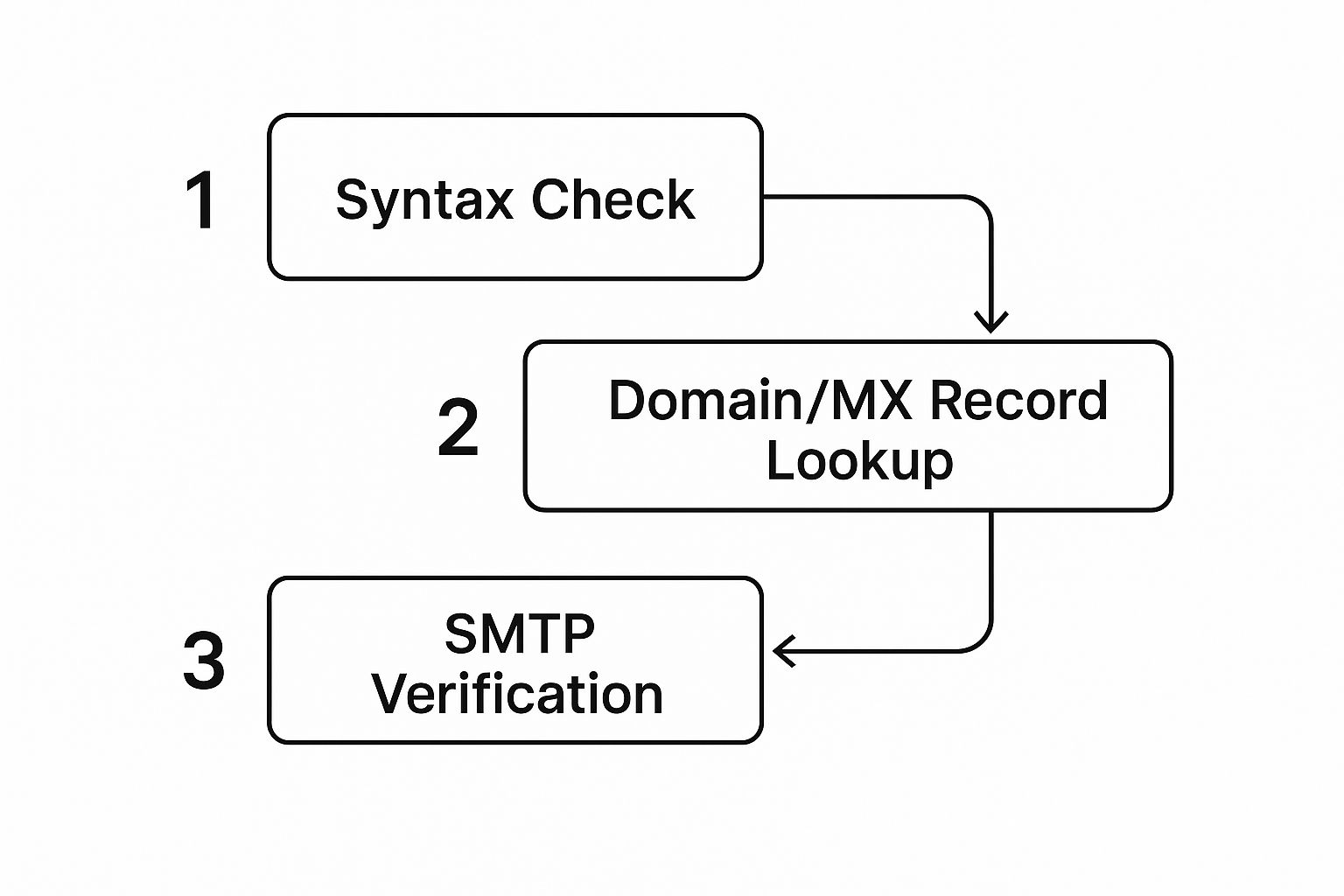
So what’s going on behind the scenes? It’s not just a quick spell-check. The service runs a comprehensive, multi-layered check on every single email in your list. It’s a pretty fascinating process.
- First, it checks for basic syntax errors (like missing the ”@” symbol).
- Then, it verifies that the domain actually exists and has a mail server configured to receive email.
- Finally, it attempts to communicate with that server to confirm the specific user account is real.
For the more technically curious, you can even see these principles in action by exploring how to build a basic email validation script in Python. It really highlights the depth of a professional-grade check.
Making Sense of the Results
After the analysis is complete, you’ll get a report that sorts your emails into different categories. This is where your decisions matter most. Typically, you’ll see a few key statuses:
- Valid: These are the keepers. They’ve been verified and are safe to send to with a very low chance of bouncing.
- Invalid: These are junk. Think typos, misspelled domains, or accounts that just don’t exist anymore. They are 100% unusable.
- Risky: This is the gray area. It often includes “catch-all” addresses, which are set up to accept any email sent to their domain, making it impossible to know if the user is real. It can also include temporary or disposable addresses.
The real goal isn’t just to find bad emails. It’s to create clean, actionable segments from your original list. Your validation results are the roadmap to get you there.
The next step is to download the cleaned-up lists. Most services, including Truelist, let you export your results based on these statuses. My go-to method is to download two separate files: one containing only the “Valid” emails and another with everything else.
Updating Your Email Platform—The Right Way
With your pristine “Valid” list in hand, it’s time to head back to your ESP. Here’s a pro tip: the safest way to update your contacts is to import the “Valid” list as a completely new, clean list or segment.
Please, do not just delete contacts from your old list based on the “Invalid” report. You’ll thank me later.
By uploading the “Valid” list as your new master list, you prevent any bad contacts from accidentally slipping back in. Once that new list is successfully imported and running, you can safely archive or delete the old, unvalidated one. This methodical approach to validating an email list ensures you shed the dead weight without losing a single valuable subscriber.
Alright, let’s get into the nitty-gritty. You’ve run your list through a validation service, and now you have a report full of data. This is where the real work begins. Getting this report back is one thing; knowing what to do with it is what separates a healthy list from a ticking time bomb.
It’s tempting to just find all the “invalid” emails and hit delete. While that’s a necessary first step, it’s only part of the story. The real opportunity for smart marketing lies in how you handle the gray areas—the “risky” and “catch-all” addresses.
https://www.youtube.com/embed/ehlzYfWib-Q
What to Do With Risky and Catch-All Emails
So, what exactly is a catch-all email? It’s an address set up to accept all mail sent to a specific domain, whether the individual mailbox exists or not. This makes it impossible for a validation tool to confirm if a real person is on the other end. Sending to a pile of these can crush your engagement rates and flag you as a potential spammer.
But just deleting them all feels like a waste, right? It is. Many of those contacts could still be valuable. Instead of a simple “keep or delete” approach, you need to think more like a strategist.
Here’s a battle-tested method I’ve used countless times:
- Isolate the Risk: First, pull all your “catch-all” and “risky” emails out of your main list and put them into a new, separate segment. This protects your primary list’s reputation.
- Launch a Test Campaign: Craft a simple, high-value re-engagement email specifically for this segment. This isn’t the time for a hard sell. Think of it as a friendly check-in—maybe an exclusive piece of content or a simple question like, “Are you still interested in hearing from us?”
- Analyze the Engagement: Now, watch the results. Anyone who opens or clicks that email has proven they’re a real, engaged subscriber. You can confidently move them back to your main “valid” list. The ones who don’t engage? They can be safely suppressed or removed without a second thought.
This process lets you rescue legitimate subscribers from the chopping block without risking your overall sender score. It transforms a simple cleanup job into a proactive strategy to validate your email list using actual user behavior. If you want to dive deeper, our guide on email list validation strategies has even more techniques for handling these tricky situations.
Shifting from Cleanup to Prevention
Your validation report is also a fantastic diagnostic tool. Are you seeing a flood of invalid emails coming from one particular signup form on your website? Bingo. You’ve just found a leak in your data collection process.
By analyzing where your bad emails originate, you can shift from constantly cleaning your list to preventing bad data from ever getting on it. This is the key to long-term list health and sustained deliverability.
This is where you can make a huge impact. Consider adding a real-time validation API from a service like Truelist directly to your forms. It works silently in the background, catching typos and fake emails the moment they’re entered. It’s a small, one-time setup that saves you an enormous amount of cleanup work later on.
Decision Guide for Email Validation Statuses
To make things even clearer, here’s a quick-reference table to help you decide what to do with each status you get back from a validation service. Think of it as your cheat sheet for taking immediate, effective action.
| Validation Status | Recommended Action | Reasoning |
|---|---|---|
| Valid | Keep and mail with confidence. | These addresses are verified and safe to send to, ensuring high deliverability. |
| Invalid | Remove immediately. | These are guaranteed to bounce and will actively damage your sender reputation. |
| Catch-All / Risky | Isolate and test with a re-engagement campaign. | This lets you safely sift through the segment to find engaged subscribers. |
| Unknown | Treat as risky. Isolate and test. | A non-responsive server is a red flag. It’s always best to err on the side of caution. |
Ultimately, list validation isn’t a one-and-done task. It’s an ongoing part of list hygiene. On average, email lists decay by about 25.7% every year, and typical bounce rates are between 1.39% and 2.48%. Staying on top of this is how you maintain the kind of 98.16% B2B delivery rates that come with a clean list. Keeping these numbers in mind really highlights the importance of regular cleanups.
Proactive Habits for Maintaining a Healthy List

To really win at email, you have to treat list hygiene as a constant discipline, not a one-and-done project. From my experience, the most successful marketers aren’t just cleaning up messes; they’re actively preventing them from happening. This forward-thinking approach is what truly separates thriving email programs from those constantly stuck fighting deliverability fires.
The whole game is shifting your mindset from reactive cleanups to proactive prevention. Instead of waiting for your list to inevitably decay, you build smart habits that keep it healthy day in and day out.
Your first line of defense is your signup form. Seriously. By plugging in a real-time validation API, you stop bad data at the source. This one move automatically rejects misspelled domains, burner addresses, and obvious typos before they ever touch your database. Think of it as a bouncer for your email list—only legitimate contacts make it past the velvet rope.
Confirming Intent and Scheduling Cleanups
Beyond catching typos, you need to confirm that a real person actually wants to hear from you. This is where the double opt-in process is your best friend. When you make someone click a confirmation link in their inbox, you accomplish two critical things: you prove the email address works, and you get explicit proof they want to be on your list.
This simple step dramatically boosts the quality of your leads and builds a strong foundation of consent right from the start.
Even with the best preventative measures, regular checkups are non-negotiable. People change jobs, switch providers, or just abandon old email accounts. It’s a natural part of the email lifecycle.
A proactive validation schedule is your insurance policy against list decay. It protects your sender reputation and ensures your messages consistently reach engaged subscribers who want to hear from you.
Get a recurring date on the calendar to validate your entire email list. For most businesses, a deep clean every quarter is a great rhythm. But if you’re dealing with a high volume of new signups or pulling leads from sources that aren’t always top-tier, you might want to bump that up to a monthly check. Following these types of email marketing best practices is what keeps your messages landing in the inbox.
Sunsetting Inactive Subscribers
Finally, every smart list hygiene program needs a graceful exit strategy for subscribers who have gone silent. This is often called a “sunset policy.” If someone hasn’t opened or clicked one of your emails in a while—let’s say six months—it’s time to either try and win them back or let them go.
Here’s a simple way to approach it:
- Spot the Inactivity: First, create a segment of everyone who hasn’t engaged in the last 180 days.
- Launch a Re-Engagement Campaign: Send a “last chance” or “is this goodbye?” email to that specific group. Be direct and compelling—ask them if they still want to stay subscribed.
- Cleanse the List: For everyone who doesn’t respond or engage, it’s time to part ways. Removing these contacts might feel counterintuitive, but it will immediately improve your deliverability and engagement rates.
As you get into the nitty-gritty of this process, exploring different methods for email list cleaning can give you a major edge. When you combine real-time validation, double opt-ins, scheduled cleanups, and a smart sunset policy, you create a powerful, self-sustaining system that keeps your list healthy, your sender score high, and your email program firing on all cylinders.
Have Questions? Let’s Clear Things Up
Even after you’re sold on the “why,” some practical questions always come up when it’s time to actually validate an email list. Getting these sorted out is key to feeling confident about the process and protecting the health of your email program.
Let’s dive into the most common questions we hear from marketers just like you.
How Often Should I Actually Clean My List?
There’s no single right answer here—the best frequency really depends on how you’re growing your list and how often you’re hitting “send.” For most businesses, running a full list validation every quarter is a great baseline. That’s frequent enough to weed out most of the bad emails before they start dragging down your deliverability.
However, some situations demand a more rigorous schedule. You should probably bump that up to a monthly validation if you’re dealing with:
- Fast-Paced List Growth: Are new contacts flooding in by the thousands each month?
- Risky Signup Sources: Do you get emails from trade shows, list buys, or lead magnets that don’t use a double opt-in?
The more entry points you have for new contacts, the more vigilant you need to be. Think of it as preventative maintenance for your most valuable marketing asset.
An occasional sender with a pretty static list can get by with a check-up every few months. But if you’re a daily sender with a list that’s constantly growing, you need to treat validation like a non-negotiable, routine task. It keeps the engine from sputtering.
Am I Going to Lose a Bunch of Subscribers?
This is probably the number one fear we see, and it comes from a totally understandable place. But let’s reframe what you’re “losing.” When you validate your list, you aren’t removing real people who want your emails. You’re removing addresses that were never going to engage anyway.
You’re cutting out the invalid, undeliverable, and outright fake addresses. These contacts couldn’t receive your emails even if they wanted to. By keeping them, you’re just paying to send emails into a black hole, which actively hurts your ability to reach the people who genuinely want to hear from you. It’s the ultimate example of quality over quantity.
Can I Just Find a Free Tool to Do This?
You’ll definitely find services offering free trials or a handful of credits to let you kick the tires. But when it comes to a full, proper list cleaning, there’s really no free lunch.
Free tools almost always have major limitations. They just don’t have the sophisticated, multi-layered technology to accurately flag the trickiest problems, like spam traps, disposable domains, or catch-all servers. Using one can give you a false sense of security, which is sometimes worse than doing nothing at all.
Think of investing in a professional validation service as an investment in your sender reputation and the ROI of your entire email program. It pays for itself by making sure your messages actually land where they’re supposed to.
Ready to see what a truly clean list can do for your results? Truelist delivers incredibly accurate email validation that protects your sender score and boosts campaign performance. Stop guessing and start validating. Get started for free at Truelist.