
 Claude
  Perplexity
What Is a Hard Bounce Email and How to Fix It
Learn what is a hard bounce email and why it damages your sender reputation. Discover expert strategies to prevent and fix hard bounces for good.
TL;DR: Learn what is a hard bounce email and why it damages your sender reputation. Discover expert strategies to prevent and fix hard bounces for good.
A hard bounce email is the digital equivalent of a “return to sender, address unknown” stamp from the post office. It’s a permanent, irreversible delivery failure.
Think of it this way: you send a letter to a house, but the house has been demolished and the lot is empty. There’s no mailbox, no front door—nothing. The postal service has no choice but to send it right back to you. That’s a hard bounce. The destination simply doesn’t exist anymore.
What Exactly Is a Hard Bounce?
When your email hard bounces, it means the recipient’s mail server has sent a firm rejection notice back to your Email Service Provider (ESP). This isn’t just a temporary hiccup; it’s a final verdict. The server is telling your ESP, “This address is no good, and it never will be.”
Your ESP logs this message and immediately knows that any future attempts to reach that address are pointless. This is the key difference between a hard bounce and other delivery problems. It points to a fundamental, permanent issue with the email address itself—not a temporary glitch like a full inbox or a server that’s down for maintenance.
Getting your head around this concept is the first real step toward keeping your email list clean and protecting your sender reputation.
The Technical Nitty-Gritty of a Permanent Failure
So, what happens behind the scenes? A hard bounce is an automated response from the recipient’s email server, triggered by strict, non-negotiable rules. When your email arrives, their server does a quick check. If it finds the address is invalid for a permanent reason, it shoots back an error code that classifies the failure as a hard bounce.
A hard bounce in email marketing refers to a permanent delivery failure where an email is returned to the sender because it cannot be delivered due to permanent reasons such as the recipient email address being invalid, non-existent, or blocked. Data shows that typical hard bounce rates are generally low, often under 2%. You can learn more about the causes of bounced emails from MailerLite’s research.
This isn’t the server being difficult—it’s essential for managing resources and protecting users from spam. By rejecting bad addresses immediately, servers maintain an efficient and secure environment for everyone.
For you, the email marketer, these rejections are gold. They’re clear, unmistakable signals that you have list quality issues that need to be fixed right away. The most common culprits behind a hard bounce are:
- Non-Existent Email Address: The classic typo (like ”jane.doe@gmil.com”) or an address that was simply made up.
- Invalid Domain: The part after the ”@” symbol is wrong, doesn’t exist, or has expired.
- Recipient Server Rejection: The receiving server has a policy to block all incoming mail from your domain or IP address, often because you’ve been blacklisted.
Quick Guide to Hard Bounce Causes
To help you diagnose issues on the fly, here’s a quick breakdown of the primary reasons an email will result in a hard bounce.
| Cause | Explanation | Example |
|---|---|---|
| Invalid Email Address | The user account (“john.doe”) doesn’t exist at that domain. This is often due to a typo or a fake address. | Sending an email to jondoe@example.com instead of johndoe@example.com. |
| Non-Existent Domain | The domain itself (“@example.com”) isn’t registered or is no longer active. | An employee leaves, and their old business domain (@oldcompany.com) is shut down. |
| Server Block | The recipient’s email server is set up to automatically refuse all emails from your sending server. | Your domain has landed on a universal blacklist because of past spam complaints. |
Understanding these root causes is the first step in cleaning up your list and ensuring your future campaigns land in the right inboxes.
Hard Bounces vs. Soft Bounces: Understanding the Difference
It’s easy to get hard and soft bounces mixed up, but telling them apart is absolutely essential for a healthy email strategy. The clearest way I’ve found to explain it is with a simple phone call analogy.
A hard bounce is like dialing a phone number that’s been permanently disconnected. You can try calling it a hundred times, but you will never, ever get through. It’s a dead end.
A soft bounce, on the other hand, is like getting a busy signal or a “voicemail box is full” message. The number is perfectly valid, but some temporary glitch is stopping your call from connecting right now. You can hang up and try again later, and there’s a good chance you’ll connect.
That core difference—permanent failure versus temporary issue—is the foundation of smart email list management.
The Temporary Nature of Soft Bounces
Think of a soft bounce as a short-term delivery hiccup. The email address you’re trying to reach is real and active, but something is temporarily getting in the way. The good news is these are often “self-healing” problems that don’t require you to do anything.
Here are the most common culprits behind a soft bounce:
- Mailbox Full: The recipient’s inbox is just stuffed to capacity and can’t accept another message.
- Server is Down: Their email server might be temporarily offline for maintenance or experiencing an outage.
- Email Size Too Large: Your message, usually because of a hefty attachment, is bigger than what the recipient’s server allows.
Because these are just temporary roadblocks, your Email Service Provider (ESP) is smart enough not to give up right away. It will usually try to redeliver the email a few more times over the next day or so.
A good benchmark for a soft bounce rate is to keep it under 2%. This tells you that your emails are generally reaching valid inboxes without too many temporary snags. Keep an eye on it, though. If the same address soft-bounces across several campaigns, most ESPs will eventually give up and treat it as a hard bounce to protect your reputation.
How Your ESP Handles Each Bounce Type
The real gut-level difference between the two is how your ESP reacts. For a soft bounce, it’s a “wait and see” approach. For a hard bounce, the action is swift and final.
When an email triggers a hard bounce, your ESP sees it for what it is: a dead end. To shield your sender reputation from damage, the platform immediately adds that email address to a suppression list. This is a critical, automated safety feature. It stops you from ever sending to that bad address again, preventing you from repeatedly hitting a brick wall and signaling to Internet Service Providers (ISPs) that you aren’t managing your lists well.
Understanding this automatic protection is key to making sense of your campaign reports and keeping your email program healthy for the long haul.
How Hard Bounces Wreck Your Sender Reputation
Think of your sender reputation as a credit score for your email program. Every time you hit “send,” mailbox providers like Gmail and Outlook are watching. They’re sizing you up, using this score to decide if your emails are trustworthy enough for the inbox or if they belong in spam—or blocked entirely.
A high hard bounce rate is one of the quickest ways to tank that score. When an email hard bounces, it screams to these providers that you’re not paying attention to your list quality. It suggests you might be using old, purchased, or scraped lists. A few bounces here and there won’t sink you, but a consistent pattern is a massive red flag that poisons your reputation with every failed send.
The Snowball Effect on Your Deliverability
The damage from hard bounces isn’t a one-and-done deal. It’s a snowball rolling downhill. Each bounce chips away at your sender score, making it harder and harder for all your emails to reach their destination, even the ones going to perfectly valid, engaged subscribers.
ISPs are always tracking your sending habits. If they notice you repeatedly trying to deliver mail to addresses that don’t exist, they’ll start to see you as a sloppy or even malicious sender.
This is where things get serious. Mail servers use your reputation to decide whether to accept, block, or junk your messages. The industry consensus is that once your hard bounce rate crosses 2%, you’re in the danger zone. According to data from providers like Campaign Monitor, this is a critical threshold that can quickly lead to major delivery problems.
Suddenly, even your most loyal customers might not see your emails. Why? Because your reputation has been dragged down by all those attempts to reach bad addresses. The fallout is huge and can absolutely cripple your email marketing ROI.
The Slippery Slope from the Spam Folder to a Blacklist
So, what happens when your sender reputation gets too low? ISPs start playing defense, protecting their users from what now looks like spam. It usually happens in a few painful stages.
- More Trips to the Spam Folder: At first, you’ll just notice more of your emails are landing in spam instead of the inbox. Your open rates will nosedive because people just aren’t seeing your messages.
- Getting Throttled: Next, ISPs might start throttling you. This means they’ll deliberately slow down or delay your emails, accepting only a few at a time. Your campaigns will grind to a halt.
- Blocked and Blacklisted: If you don’t fix the problem, the final step is getting blocked outright. The ISP will simply refuse all mail from your IP address or domain. The worst-case scenario? You land on a public blacklist, making it nearly impossible to get an email delivered to anyone.
Getting a handle on your sender reputation is absolutely crucial for long-term success. We have a complete guide on how to monitor and boost your email sender reputation score if you want to dive deeper. Keeping your lists clean isn’t just a “nice to have”—it’s a must-do for anyone who’s serious about their email strategy.
Finding the Root Causes of Your Hard Bounces
Okay, you know hard bounces are bad for business. But just knowing they’re a problem isn’t enough—you have to figure out why they’re happening to stop them. Think of yourself as a detective. Your mission is to trace each bounce back to its source.
Fortunately, most hard bounces aren’t a total mystery. They usually fall into a few common categories, making the investigation a lot more straightforward.
The Most Common Culprits: Bad and Expired Addresses
More often than not, the root cause is a simple human mistake. Someone might blast through a signup form and type jane@gmil.com instead of jane@gmail.com. Or maybe they just wanted your free guide and threw in a fake address to get it. These addresses are dead on arrival and will bounce the second you hit “send.”
Another major source is what we call email address decay. This is when a once-perfectly-good email address simply becomes obsolete. An employee leaves a company, and their corporate email (john.smith@oldcompany.com) gets shut down. The address was real, but now it’s a digital ghost town. It’s not malicious, it’s just the natural lifecycle of data.
Digging into Technical Failures
Sometimes, the problem isn’t the user—it’s the tech behind the scenes. These bounces can feel a bit more confusing because they often point to server issues that are completely out of your hands.
A classic example is a non-existent or badly configured domain. If the part of the email after the @ symbol doesn’t exist, or its technical settings are a mess, mail servers have nowhere to deliver your message. It’s a dead end. You can actually check if a domain is properly set up to receive emails by learning more about how an MX record lookup works.
Finally, the recipient’s server might just be blocking you entirely. This isn’t about one specific bad address; it’s a red flag about your sender reputation. If your domain or IP address lands on a blacklist, their server might just slam the door on all your emails, causing hard bounces for every single contact at that domain.
This decision tree shows just how much your bounce rate can influence your sender reputation, which is the foundation of getting your emails delivered.
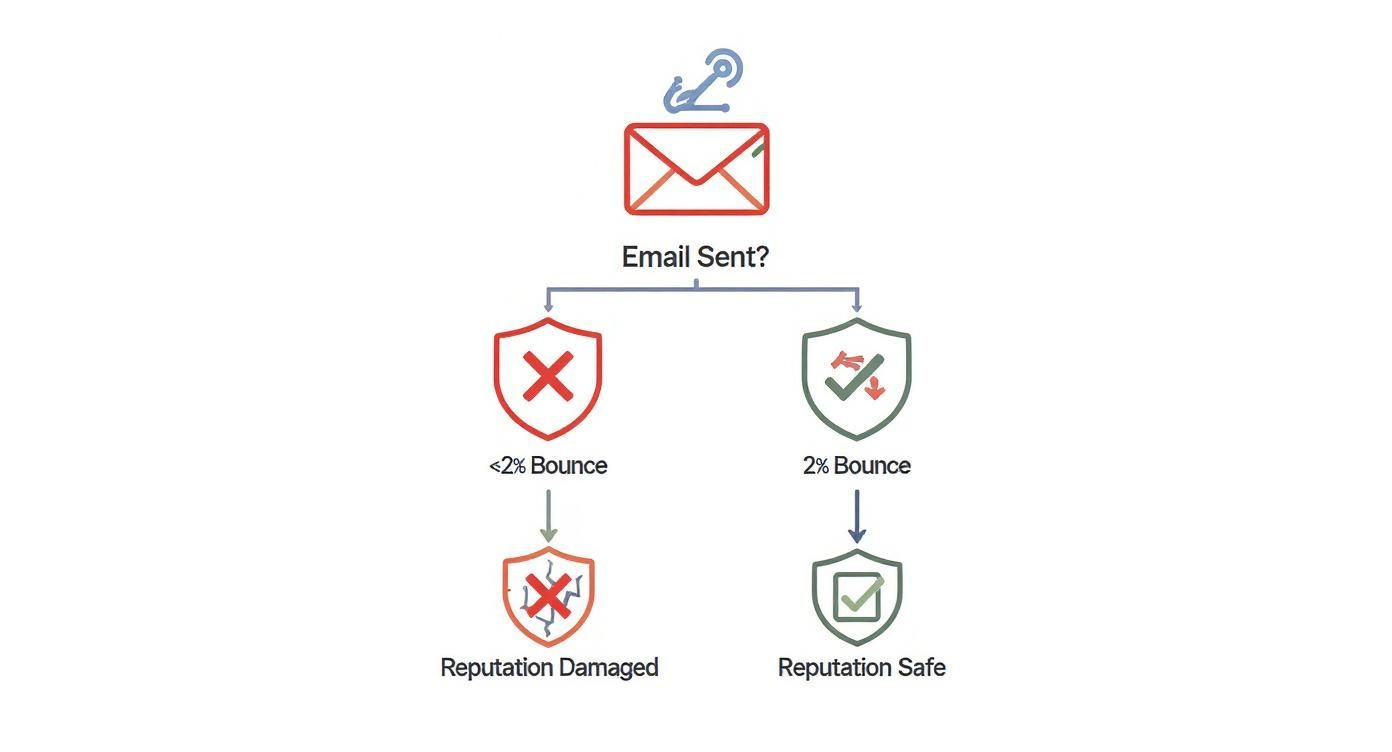
As you can see, keeping that hard bounce rate safely below the 2% line is absolutely critical for staying in the good graces of email providers.
How to Spot the Clues in Your Reports
Your best tool for this detective work is right inside your Email Service Provider (ESP). The campaign reports hold all the clues you need. When an email hard bounces, the receiving server sends back an error code and a short message explaining what went wrong.
A common hard bounce error looks something like this: “550 5.1.1 User Unknown” or “550 No Such User Here.” That “550” code is the universal signal for a permanent failure, and the message confirms the email address simply doesn’t exist.
To make sense of this, you need to get comfortable digging into your bounce logs. Start looking for patterns. Are all your bounces coming from one specific domain? Did you see a huge spike right after importing a new list? Answering these questions will point you straight to the source of the trouble.
To help you decode these messages, here’s a quick guide to the most common hard bounce reasons and how to spot them.
Identifying Hard Bounce Reasons
| Bounce Category | Common Reason | How to Spot It |
|---|---|---|
| Invalid Mailbox | The email address doesn’t exist. This could be due to a typo, a fake address, or an account that has been deleted. | Look for error codes like 550 or 551 and messages containing “User Unknown,” “Invalid Recipient,” or “Mailbox not found.” |
| Invalid Domain | The domain name itself (e.g., company.com) is misspelled, has expired, or isn’t configured to receive email. | The error message will often mention “Domain not found,” “Host unknown,” or “Unroutable address.” |
| Server Rejection | The recipient’s email server is actively blocking your emails, often because your IP or domain is on a blacklist. | You might see a 554 error code with a message like “Message rejected” or “Sender denied.” This is a major reputation issue. |
By breaking down your bounces this way, you can move from just reacting to them to proactively fixing the underlying issues. It’s the key to keeping your list healthy and your emails out of the void.
Keeping Hard Bounces at Bay with Proactive List Hygiene

The single best way to handle a hard bounce is to make sure it never happens in the first place. Instead of just reacting to delivery failures after you’ve already hit “send,” a proactive approach to list hygiene is what keeps your contacts healthy and your sender reputation intact. This isn’t a one-and-done fix; it’s about building good habits that pay off with every campaign.
Think of your email list like a garden. If you just leave it alone, the weeds—all those invalid addresses—will eventually crowd out the healthy plants you actually want to nurture. Good list hygiene is the constant weeding and pruning that helps your engaged subscribers thrive.
Start Strong with Double Opt-In
Your best defense starts right at the front door. Setting up a double opt-in process for anyone who signs up is a foundational move for preventing bad emails from ever getting on your list. This method simply asks new subscribers to confirm their email by clicking a link in a confirmation message.
It’s a simple step, but it works wonders. It instantly verifies the email address is real, spelled correctly, and can receive mail. Just as importantly, it confirms the person genuinely wants to hear from you, which is the perfect start to a strong relationship.
Catch Typos on the Fly with Real-Time Validation
While double opt-in is great, you can stop bad emails even sooner. Integrating real-time email validation right into your signup forms is a total game-changer. Think of it as an instant quality check that flags common mistakes before they can cause any trouble.
For example, when someone accidentally types jane.doe@gmil.com, a real-time validation tool catches the typo right away and prompts them to fix it. This single action prevents a guaranteed hard bounce and saves a valuable lead. It’s a clean, automated way to keep junk data out from the very beginning.
The Power of Regular List Cleaning
Email lists are living things. People switch jobs, abandon old inboxes, and make mistakes. This natural process, called list decay, means even a perfectly clean list will degrade over time. The only way to fight back is with regular, scheduled list cleaning.
Proactive list hygiene is a cornerstone of smart email marketing. To see how this fits into a larger framework, it’s worth exploring some comprehensive email marketing strategies.
Periodically scrubbing your list removes subscribers who have gone dormant and are no longer opening your emails. These accounts are often prime candidates to become hard bounces down the road. By clearing them out proactively, you keep your engagement rates high and protect your sender score. If you’re ready to dive in, our guide on the best practices for email list cleaning is a great place to start.
Always keep a close eye on your bounce rate. While every industry is different, a combined bounce rate creeping above 2% should set off alarm bells. To put that in perspective, some industries like agriculture see hard bounces as low as 0.32%, while others like construction might see rates around 0.73%. Tracking where you stand against these benchmarks is a great way to gauge the health of your list.
Frequently Asked Questions About Hard Bounces
Even after you get the basics down, real-world questions about hard bounces always pop up. Let’s tackle some of the most common ones so you can handle them like a pro and keep your sender reputation safe.
Can a Hard Bounced Email Address Ever Become Valid Again?
It’s highly, highly unlikely. Think of a hard bounce as a permanent delivery failure—the digital equivalent of a “return to sender, address unknown” stamp. An email tied to a domain that doesn’t exist isn’t going to suddenly spring into being, and a corporate email for someone who left the company is gone for good.
The only exception, and it’s a rare one, is if you can spot an obvious typo and fix it yourself (like correcting “gmil.com” to “gmail.com”). But that’s a manual fix, not a scalable strategy.
The best practice is simple: immediately and permanently remove all hard-bounced addresses from your active email lists. Hanging onto them is all risk and no reward.
Treat every hard bounce as a final verdict. This is a non-negotiable part of maintaining a healthy list and showing Internet Service Providers (ISPs) that you’re a sender who plays by the rules.
How Often Should I Clean My Email List to Prevent Bounces?
While you should do a deep clean of your entire list at least a couple of times a year, the real secret is making list hygiene a constant habit, not a rare event. Being proactive is always better than trying to repair a damaged sender score after the fact.
A solid list hygiene plan has a few moving parts:
- Immediately: The best defense is a good offense. Use a real-time email validation tool on all your sign-up forms to stop bad emails from ever getting on your list in the first place.
- Quarterly: Set up a simple automated process to remove subscribers who haven’t opened or clicked an email in over six to nine months. These disengaged accounts are often the next ones to become hard bounces.
- Bi-Annually: Run your entire list through a trusted verification service. This is your safety net, catching any invalid addresses that have decayed over time or slipped through your initial checks.
My Hard Bounce Rate Is Over 2 Percent. What Should I Do First?
A bounce rate over 2% is a massive red flag. Stop everything. Sending another campaign will only dig the hole deeper and do serious, long-term damage to your reputation with ISPs.
Here’s your emergency action plan. Follow these steps in this exact order:
- Pause All Campaigns: Hit the brakes. Stop sending to the list that triggered the high bounce rate. This puts a tourniquet on the problem and prevents ISPs from penalizing you further.
- Isolate and Remove Bounces: Go into your last campaign report and export the list of every email that hard-bounced. Delete them permanently from your database. Don’t just suppress them—get them out.
- Validate Your Entire List: Before you even think about hitting “send” again, run that entire email list through a reliable validation service. This will scrub out any other ticking time bombs and give your next campaign a clean slate.
Stop letting bad emails tank your sender score. With Truelist, you get pay-as-you-go credits that never expire, plus unlimited plans for high-volume senders, ensuring your lists are always clean and your deliverability is protected. Start validating for free today at Truelist.