 Claude
  Perplexity
What Is Email Bounce — what is email bounce and how to fix it
Discover what is email bounce, why emails get returned, and practical steps to fix it so your messages reach inboxes.
TL;DR: Discover what is email bounce, why emails get returned, and practical steps to fix it so your messages reach inboxes.
Ever had a letter returned to you stamped “address unknown”? An email bounce is the digital version of that exact same problem. It’s an automated message you get back from the recipient’s email server telling you, “Nope, couldn’t deliver this one.”
This failure notice isn’t just an FYI—it’s a critical health signal for your email list and your entire sending strategy.
What an Email Bounce Actually Is
Let’s stick with the mail carrier analogy for a moment. Imagine you’re trying to deliver a package, but when you get to the address, the building has been completely torn down. There’s nowhere to leave it, so you have no choice but to take it back. That’s precisely what happens with an email bounce. It’s not just a failed attempt; it’s an official notification that your message hit a dead end.
This automated alert is technically called a Non-Delivery Report (NDR), and it’s your first sign that something is amiss. Learning to read these signals is the first step toward improving your campaigns and protecting your reputation as a sender.
Bounces are typically triggered by one of two kinds of problems:
- Permanent Issues: These are the dead ends, like an email address that simply doesn’t exist.
- Temporary Issues: These are short-term hiccups, like a recipient’s inbox being too full to accept new mail.
Why Bounces Matter More Than You Think
Ignoring bounces is like knowingly sending mail to that vacant lot over and over again. It’s a waste of time and money, and it makes you look bad. Internet Service Providers (ISPs) like Gmail and Microsoft pay very close attention to your bounce rate—the percentage of your emails that fail to deliver. A high rate signals that you might be using old, purchased, or low-quality lists, which is a classic spammer move.
A high bounce rate is one of the quickest ways to torpedo your sender reputation. When you repeatedly send to bad addresses, you’re telling email providers that you don’t manage your lists properly. This can get your emails routed straight to the spam folder, or even blocked entirely.
To truly understand the stakes, it’s crucial to know what email bounce rate means for your business. Keeping this number low isn’t just a “best practice”; it’s fundamental for anyone who relies on email to connect with their audience.
Next, we’ll dive into the different types of bounces, what they mean, and what you need to do about them to keep your emails landing in the inbox.
Hard Bounces vs. Soft Bounces: Understanding the Key Differences
Not all email bounces are the same. While any bounce means a delivery problem, they fall into two distinct categories: one is a permanent dead end, and the other is just a temporary roadblock. Getting a handle on this difference is the first step to keeping your email list healthy and protecting your sender reputation.
Think of it like this: a hard bounce is like sending a letter to an address where the building was torn down years ago. The address is permanently invalid. No matter how many times you try, that letter is never getting delivered. It’s a definitive failure.
A soft bounce, on the other hand, is like the mail carrier arriving to find the mailbox is stuffed full. The address is perfectly valid, but a temporary issue is blocking the delivery right now. The carrier can always swing by again later and try to deliver it then.
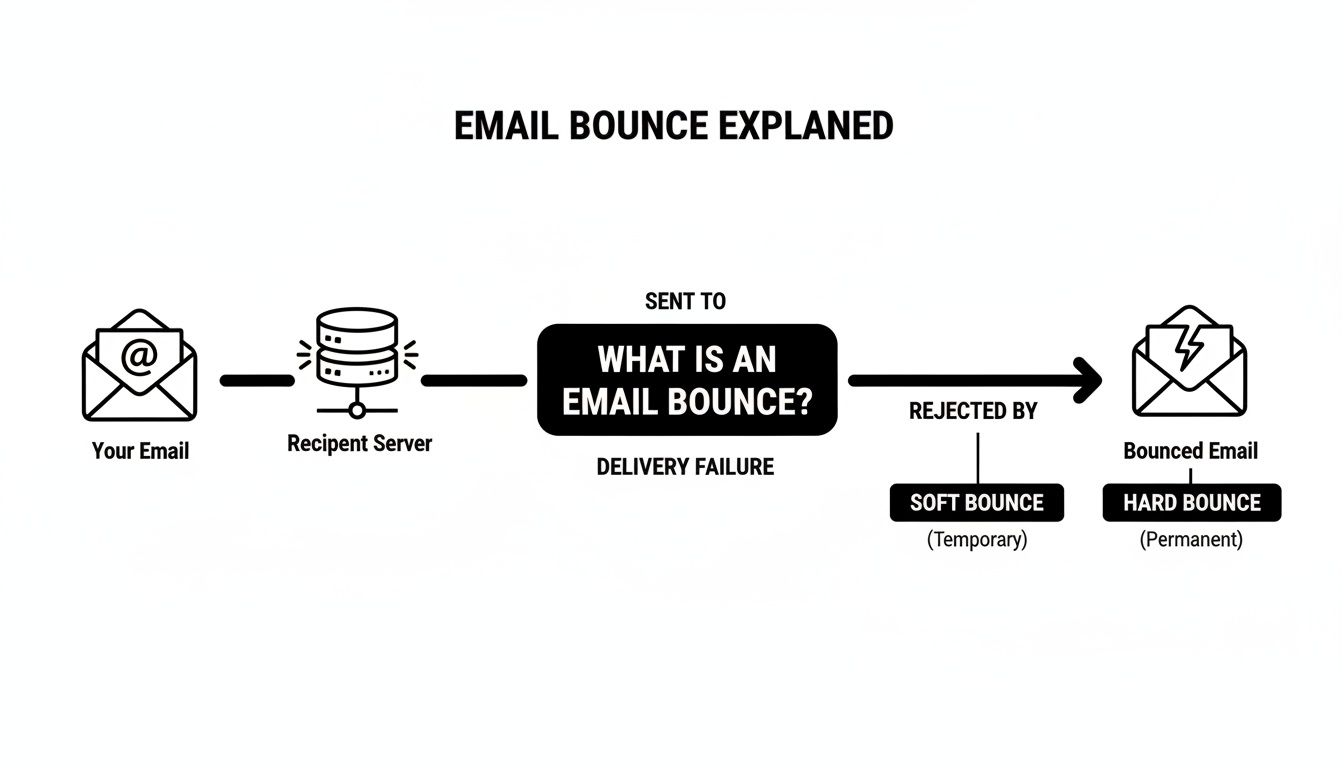
Ultimately, the recipient’s server makes the final call. It examines the incoming email and sends it back if it can’t be delivered, flagging the reason as either temporary or permanent.
Diving Deeper Into Hard Bounces
A hard bounce signals a permanent delivery failure. It’s the recipient’s mail server telling you, in no uncertain terms, that this email address is no good and you should stop trying to send to it. For Internet Service Providers (ISPs) like Gmail or Microsoft, a lot of hard bounces from a sender is a major red flag.
The most common reasons for a hard bounce are pretty straightforward:
- Invalid Email Address: The address simply doesn’t exist. It might have been deleted or never created in the first place.
- Domain Name Typos: A simple slip of the keyboard, like
user@gnail.cominstead ofuser@gmail.com. - Server Rejection: The recipient’s email server has a policy in place that completely blocks delivery from your domain.
Because hard bounces point directly to poor list quality, they can wreck your sender reputation. If your hard bounce rate climbs above 2%, you risk having your emails routed straight to the spam folder—or worse, getting your domain blacklisted entirely.
Understanding the Nuances of Soft Bounces
A soft bounce is a temporary hiccup. The email address is valid and exists, but the recipient’s server has rejected the message for a reason that might clear up on its own. Most email service providers (ESPs) are smart about this; they’ll usually try to resend the email a few more times over the next day or two.
Here are a few common causes for a soft bounce:
- Mailbox Full: The recipient has hit their storage limit and can’t accept any new messages.
- Server is Temporarily Down: The mail server on the other end is offline for maintenance or just too busy to handle the request.
- Email is Too Large: Your message, especially if it has large attachments, exceeds the size limit set by the recipient’s server.
While a few soft bounces here and there are no cause for alarm, you can’t just ignore them. If an address soft bounces over and over again across several campaigns, it’s time to treat it like a hard bounce and remove it from your active list.
Hard Bounce vs. Soft Bounce: A Quick Comparison
To make the distinction crystal clear, here’s a side-by-side look at what separates a hard bounce from a soft bounce.
| Attribute | Hard Bounce | Soft Bounce |
|---|---|---|
| Nature of Failure | Permanent | Temporary |
| Common Causes | Invalid address, non-existent domain, server block | Mailbox full, server down, oversized email |
| Impact on Sender Reputation | Severe and immediate | Minor, unless persistent |
| Recommended Action | Immediately remove from list | Monitor; remove if it bounces repeatedly |
This table boils it down: hard bounces are an urgent problem requiring immediate action, while soft bounces are something to keep an eye on. Ignoring either can lead to trouble down the road.
The Hidden Reasons Your Emails Are Bouncing
When your bounce rate suddenly jumps, it’s your email system’s way of waving a red flag. Something is definitely wrong. Knowing the difference between a hard and soft bounce is a good start, but the real work is digging in to find out why they’re happening. These delivery failures aren’t random; they’re symptoms of bigger issues lurking in your email process.
Think of each bounce as a clue. A high hard bounce rate, for instance, almost always points to a problem with list hygiene. This is a classic issue if you’re using old contact lists that haven’t been touched in years, or worse, if you’ve bought a list. Those are often packed with dead addresses just waiting to fail.
Another common culprit? A simple syntax error. We’ve all seen them: a typo like contact@gmil.com instead of contact@gmail.com. That one little mistake guarantees a hard bounce. When you’re sending to thousands, those small errors add up fast and can seriously drag down your deliverability.
Beyond Bad Addresses
It’s not always about a bad email address, though. Sometimes, the problem is with the email server on the other end—the digital gatekeeper. Big companies and institutions often have very strict spam filters in place to protect their networks.
These filters are on the lookout for a few key red flags:
- Unknown Senders: If your domain or IP address is brand new and has no sending history, a server might just reject your email to be safe.
- Poor Reputation: Have you had high bounce rates or spam complaints in the past? That damages your sender score, making filters suspicious of anything you send.
- Content Triggers: Your message itself can cause a bounce if it contains certain words, weird links, or formatting that the server thinks looks spammy.
Think of a receiving email server like a security checkpoint at an airport. If you don’t have the right ID—a good sender reputation—they won’t let you through. The email gets turned away, resulting in a bounce, even if the address you sent it to was 100% correct.
At the end of the day, all these hidden reasons circle back to two things: trust and maintenance. Internet Service Providers (ISPs) need to see that you’re a responsible sender who keeps their lists clean and sends emails people actually want. A high bounce rate screams the opposite, putting your entire email operation in jeopardy. Getting to the bottom of these root causes is the first real step toward fixing the problem for good.
How Bounces Quietly Destroy Your Sender Reputation
A high bounce rate isn’t just a list of emails that didn’t make it. Think of it as a blaring alarm for Internet Service Providers (ISPs) like Gmail and Microsoft. Every bounce, particularly a hard bounce, is a strike against you, slowly eroding your credibility until your emails have no chance of reaching the inbox.
Your sender reputation is a lot like a credit score for your email domain. Sending great emails that people actually open? That builds your score. Sending to dead-end addresses that bounce back? That tanks it. The ISPs are the gatekeepers, and your bounce rate is one of the first things they look at to decide if you’re a legitimate sender or just another spammer.

When an ISP sees a constant stream of hard bounces coming from your domain, they make a simple assumption: your email list is old, bought, or just plain messy. Since that’s a classic spammer move, their filters are built to crack down on it, hard.
The Downward Spiral of a Bad Reputation
Once your sender reputation takes a hit, it kicks off a chain reaction that can completely hamstring your email efforts. At first, you might just notice a few more of your messages landing in the junk folder. But if you ignore it, the consequences get much worse.
You’re looking at a few potential outcomes, none of them good:
- Straight to the Spam Folder: Your emails get automatically filtered out of the main inbox, which means your open rates will plummet.
- Domain Blacklisting: Your sending domain gets put on a public “naughty list,” blocking your emails across entire networks.
- Account Suspension: Your own email service provider might pull the plug on your account for breaking their rules.
A high bounce rate is a direct signal to inbox providers that you’re not following best practices. They will respond by throttling your sending speeds, filtering your messages, and in severe cases, blocking you entirely. Rebuilding that trust is a slow and difficult process.
Your Bounce Rate in the Real World
To really understand the danger, it helps to look at the numbers. Recent data on global cold email benchmarks for 2025 pegs the average bounce rate at 7.5%. While a pristine list might get that down to 3%, it’s not uncommon for larger campaigns to see bounces creep up to 8% or even higher. With giants like Gmail and Microsoft tightening their rules for bulk senders, keeping this number low is more critical than ever.
The link between bounces and your sender score is direct and unforgiving. Ignoring them isn’t just a small mistake; it’s a strategic blunder that makes every future campaign exponentially harder to run successfully. The only way forward is to be proactive, and that starts with understanding your email sender reputation score and taking immediate steps to protect it.
Fixing Bounces with Proactive Email Validation
The best way to fix a bounce is to make sure it never happens in the first place. Instead of scrambling to clean up your lists after your sender reputation takes a hit, you can get ahead of the problem. This is where email validation becomes an essential part of your strategy.
Think of email validation as a bouncer at the door of your email list. Services like Truelist check every single address before it gets inside, turning away the ones that are guaranteed to cause trouble—like those nasty hard bounces. This simple, preventative step shifts your entire approach from reactive to proactive.

This process isn’t just a quick glance, either. It involves running a series of real-time checks to confirm that every contact is valid and deliverable.
How Email Validation Works
Email validation is much more than a single check; it’s a multi-layered process designed to sniff out different kinds of bad addresses. By building it right into your workflow, you can hit “send” on your campaigns with confidence, knowing your list is squeaky clean.
Here’s a quick look at what a good validation tool actually does behind the scenes:
- Syntax and Format Check: First, it makes sure the email address looks right (like
name@domain.com). This catches obvious typos and formatting errors right away. - Domain Verification: Next, it checks if the domain (
@domain.com) is real and set up to receive mail. No more sending to a company that doesn’t exist. - Mailbox Ping: The final step is a live check to see if the specific mailbox for that user is active and can accept email, all without actually sending anything.
This system is incredibly effective at filtering out invalid contacts, disposable (or “burner”) email addresses, and even spam traps that can land you on a blacklist. If you want a more detailed walkthrough, this guide explains exactly how to verify an email address before sending.
The core benefit of proactive validation is risk reduction. By removing bad addresses before you hit send, you drastically lower your hard bounce rate, which is the number one metric ISPs use to judge your sender reputation.
Making Validation a Standard Workflow
The real magic happens when you make validation a routine part of your process, not just a one-off cleanup project. This goes hand-in-hand with building high-quality email lists from the start.
Whether you’re a sales rep pulling a list for cold outreach or a marketer watching new sign-ups roll in from your website, validation should be an automatic step. It ensures every new contact is legitimate, protecting your list’s health and the deliverability of all your future campaigns.
A Practical Troubleshooting Checklist for High Bounce Rates
Seeing your bounce rate suddenly spike can be alarming, but don’t panic. The key is to act fast and follow a clear, methodical process to figure out what’s wrong and stop any further damage to your sender reputation.
Think of this as your emergency action plan. Let’s walk through the steps to turn what you know about email bounces into a concrete solution.
Your first stop should always be your most recent campaign delivery report. This is where you’ll find the clues you need to understand the scope of the problem.
Analyze Your Bounce Report: The very first thing to do is separate the hard bounces from the soft bounces. Are you dealing with permanent failures or just temporary glitches? This simple distinction will tell you if you have a serious list quality crisis on your hands or just a momentary delivery problem.
Immediately Remove Hard Bounces: This is non-negotiable. Hard bounces are dead ends, and continuing to email them is like waving a red flag at email providers. Get them off all your sending lists immediately to prevent your domain from being blacklisted.
Validate Your Entire Email List: Don’t stop at just removing the addresses that already bounced. It’s time to be proactive. Run your entire email list through a reliable validation service like Truelist. This will catch all the other ticking time bombs—the typos, inactive accounts, and spam traps—that are just waiting to bounce on your next send.
Long-Term Health and Prevention
Putting out the immediate fire is one thing, but preventing it from starting again is the real goal. Chronic bounce issues are almost always a symptom of a weak spot somewhere in your email process.
To fix the root cause, you need to look at your daily habits:
- Audit Your List Acquisition Methods: Where are your subscribers coming from? If you’re not using a double opt-in process, you’re flying blind. Implementing one ensures every single subscriber has confirmed they have a valid email and actually want to hear from you.
- Monitor Your Sender Score: Keep a close, regular watch on your sender reputation using deliverability monitoring tools. A sudden dip in your score is an early warning that something’s amiss, giving you a chance to fix it before it becomes a full-blown crisis.
For a more comprehensive look at delivery problems, check out our guide on what to do when your mail is not being delivered.
Frequently Asked Questions About Email Bounces
Even with the best intentions, navigating the world of email deliverability can bring up a lot of questions. Let’s tackle some of the most common ones that come up when you’re trying to understand and fix email bounces.
What Is an Acceptable Email Bounce Rate?
You should always aim to keep your bounce rate under 2%. This is the gold standard, telling mailbox providers that you’re running a tight ship with a healthy, well-maintained email list.
Once you start creeping above that number, you’re in the danger zone. If your bounce rate hits 5% or more, Internet Service Providers (ISPs) see a massive red flag. It signals serious problems with your list quality or sending practices that need to be fixed, and fast. For cold outreach, keeping it under 3% is a great target to stay in their good graces.
Should I Resend Emails That Soft Bounced?
Generally, yes. A soft bounce is usually caused by a temporary hiccup, like a full inbox or a server that was down for a moment. Most email service providers are smart enough to automatically try resending the message a few times over the next day or two to see if the issue resolves itself.
But you can’t just set it and forget it. Keep an eye on those addresses. If an email soft bounces again and again—say, over three or four campaigns in a row—it’s time to treat it like a hard bounce. Pulling it from your active list is the best way to protect your sender reputation from being dragged down by repeat delivery failures.
How Does an Email Validator Help Prevent Bounces?
Think of an email validation tool as your first line of defense. It’s a proactive step that cleans your list before you ever hit “send,” catching the problems that are guaranteed to cause a hard bounce.
A good validator runs a whole battery of real-time checks to weed out addresses that will sink your campaign, including:
- Invalid Addresses: Mailboxes that simply don’t exist.
- Misspelled Domains: Obvious typos like
user@gamil.cominstead ofgmail.com. - Temporary Emails: Disposable addresses designed to be used once and abandoned.
- Known Spam Traps: Hidden email addresses ISPs use to catch spammers in the act.
By making sure you’re only sending to real, deliverable inboxes, you slash your hard bounce rate. That’s the single most important thing you can do to protect your sender score and make sure your emails actually land where they’re supposed to.
Can a High Bounce Rate Get My Domain Blacklisted?
You bet it can. In fact, a persistently high hard bounce rate is one of the fastest ways to get your sending domain or IP address blacklisted.
From an ISP’s point of view, sending emails to lots of non-existent addresses looks a lot like what spammers do. It suggests you either bought a bad list or haven’t cleaned it in ages. Once you’re on a blacklist, it’s incredibly difficult to get any of your emails into the inbox, crippling your campaigns until you can get yourself removed.
Stop letting bounces tank your sender reputation. With Truelist, you can clean your lists with validation on credits that never expire. Start validating for free today and protect your deliverability.