 Claude
  Perplexity
What Is IP Warming Your Guide to Perfect Email Deliverability
What is IP warming? Learn to build your sender reputation from the ground up and ensure your emails land in the inbox, not the spam folder.
TL;DR: What is IP warming? Learn to build your sender reputation from the ground up and ensure your emails land in the inbox, not the spam folder.
So, you’ve got a new IP address for your email campaigns and you’re ready to start sending. Not so fast. Before you hit “send” on a massive email blast, you need to understand a crucial, non-negotiable first step: IP warming.
Think of it like moving into a new neighborhood. You wouldn’t throw a massive, noisy party for 500 people on your first night, right? You’d probably start by saying hello to your immediate neighbors, maybe bring over some cookies, and generally let people get to know you. IP warming is the exact same concept, but for Internet Service Providers (ISPs) like Gmail, Yahoo, and Outlook.
It’s the process of methodically and gradually increasing the volume of emails you send from a new IP address over a set period. This careful introduction builds a positive sender reputation, showing ISPs that you’re a trustworthy neighbor, not a spammer trying to crash the party.
Why IP Warming Is Your First Step To The Inbox
Let’s get practical. Imagine you just fired up your new dedicated IP address, which is completely unknown to ISPs. If you suddenly blast 50,000 emails from this “cold” IP, their spam filters will immediately sound the alarm.
This sudden, high-volume activity from an unknown source is a massive red flag. It mirrors the exact behavior of spammers who buy lists and send unsolicited mail. The result? Your emails get blocked outright or, just as bad, land directly in the junk folder where they’ll never be seen.
IP warming is the strategic answer to this problem. It’s all about a controlled, deliberate ramp-up of your sending volume. This gives ISPs time to watch your sending patterns, see how recipients engage with your messages, and ultimately conclude that you’re a legitimate sender. Getting this right is fundamental to learning how to improve email deliverability from day one.
Building A Foundation Of Trust
The entire point of IP warming is to establish a rock-solid sender reputation. This reputation acts like a credit score for your email program. A good score tells ISPs that your emails are wanted and should be delivered to the inbox. A bad score? Straight to spam.
A proper warming schedule stretches over several weeks, slowly increasing your daily sending volume. This methodical process shows ISPs that you have predictable and responsible sending habits. To help you visualize what a successful IP warming strategy aims to achieve, here are its primary goals:
Key Goals of the IP Warming Process
| Objective | Why It’s Important | Success Metric |
|---|---|---|
| Establish Sending History | Creates a track record of consistent, non-malicious email activity that ISPs can trust. | Consistent daily/weekly send volumes. |
| Generate Positive Engagement | Proves that your subscribers actually want your emails and interact with them. | High open and click-through rates. |
| Minimize Negative Signals | Shows ISPs that you’re sending to a clean, opted-in list, not spamming people. | Bounce rates under 2%; spam complaint rates under 0.1%. |
This table highlights that the process isn’t just about sending emails—it’s about sending the right emails to the right people to get the right reactions.
Ultimately, trying to skip this step is one of the fastest ways to ruin your email marketing efforts before they even begin. Without a proper warm-up, even the most brilliantly crafted campaign will fail because it won’t reach the inbox. By taking the time to methodically build trust, you give every email you send the best possible chance of success.
Choosing Your Digital Home: Shared vs. Dedicated IPs
Before you even think about sending your first email campaign, you have to decide where your emails will “live” on the internet. This comes down to the type of IP address you’ll be sending from.
Think of it like this: you can either rent an apartment in a big, bustling building or you can own your own private house. This decision is a big one, because it directly shapes your sender reputation and how you’ll need to handle the whole IP warming process.
A shared IP is the apartment building. You and a bunch of other senders all share the same address, which also means you all share the same reputation. It’s a great option for many, especially if you’re just starting out or don’t send a ton of email. The building manager—in this case, your Email Service Provider (ESP)—does most of the heavy lifting to keep the building’s reputation clean. The only catch? Your deliverability can take a hit if you have a few bad “neighbors” who are sending spammy emails.
On the flip side, a dedicated IP is your own private house. You get a unique address that is yours and yours alone. This gives you total control over your reputation. Your deliverability rests entirely on your shoulders and your sending habits. No one else can mess it up for you.
The Case for a Shared IP
For a lot of businesses, a shared IP is the smartest and easiest place to start. There are some really solid reasons for this:
- It’s Already Warmed Up: Shared IPs are constantly in use by many senders, so they already have an established, positive sending history. You get to benefit from that right away.
- Easier on the Wallet: These are almost always included in standard email marketing plans, so there’s no extra cost to you.
- Less Work for You: Your ESP manages the IP’s reputation, which is a complex, ongoing job. This lets you focus on creating great campaigns instead of worrying about technical maintenance.
This is the perfect route if your email list is under 50,000 subscribers or if you don’t send emails on a super consistent schedule. The established reputation of the shared pool gives you a solid foundation for good deliverability without having to go through a manual warming process yourself.
A shared IP is a lifesaver if your sending volume is unpredictable. If you suddenly go weeks without sending a campaign, a dedicated IP can “cool down,” which can seriously damage your reputation. A shared IP stays warm because there’s always someone else sending email from it.
When a Dedicated IP Becomes Essential
As your email program gets bigger and more sophisticated, you’ll find that control becomes everything. A dedicated IP isn’t just a nice-to-have; it’s a necessity for high-volume senders who can’t afford to leave their reputation in someone else’s hands. This usually applies to anyone sending over 100,000 emails a month.
With a dedicated IP, your deliverability is entirely up to you. This is precisely why the IP warming process is so critical for dedicated IP users. You are literally building your reputation from zero, just like a new homeowner trying to make a good impression in the neighborhood.
This level of control also means you’re responsible for getting all the technical details right. To get a handle on what that involves, it’s worth learning what is email authentication and how it works hand-in-hand with a dedicated IP.
So, what’s the final verdict? It all boils down to your sending volume, your budget, and how much control you really need. A shared IP offers simplicity and convenience, but a dedicated IP gives you the power and autonomy to build a rock-solid sender reputation for the long haul.
Your Step-by-Step IP Warming Schedule
Alright, let’s get down to brass tacks. Theory is one thing, but building a practical roadmap for your IP warming is what really matters. This isn’t just about sending emails; it’s about methodically building a rock-solid sender reputation from scratch.
And the golden rule? Start with your most engaged subscribers.
Think of it like a soft opening for a new restaurant. You invite your most loyal customers and biggest fans first because you know they’ll love it. When mailbox providers like Gmail and Outlook see your very first emails being opened, clicked, and loved, they get immediate positive feedback. That tells them people actually want your emails, which is the foundation of a great reputation.
Start With Your A-Team
Before you hit “send” on a single email from that new IP, you need to do some list segmentation. The goal is to isolate a small, hyper-engaged group that will be your “first wave” of recipients. These are the people who have recently and consistently interacted with you.
Here’s who you’re looking for:
- Recent Openers and Clickers: Pull a list of anyone who has opened or clicked an email in the last 30-60 days.
- New Customers or Sign-ups: These folks just made a purchase or signed up, so your brand is fresh in their minds.
- Active Platform Users: If you can track it, find users who have logged into their accounts recently. They’re clearly getting value from you.
By sending to this super-engaged segment first, you practically guarantee high open rates and next-to-zero complaints. This positive feedback loop is exactly what mailbox providers need to see to start trusting your new IP address.
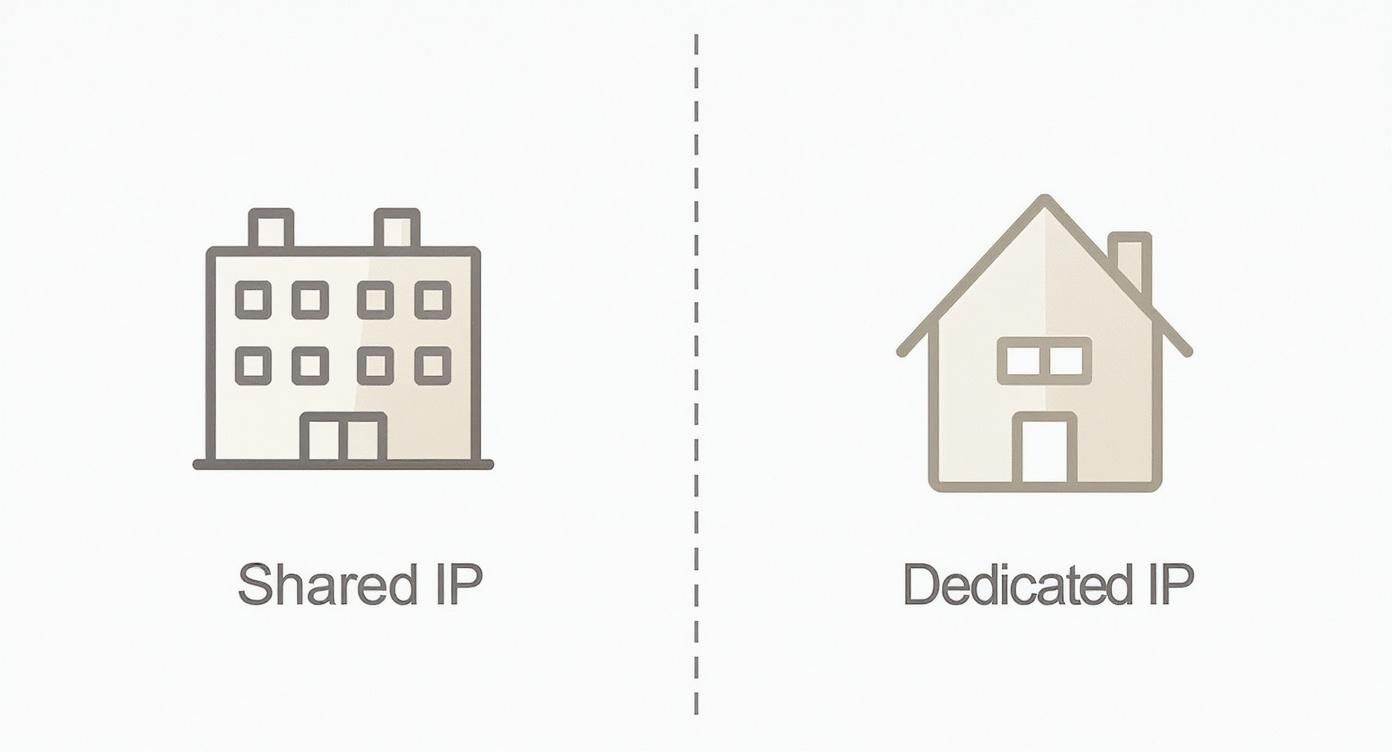
This image nails the difference. With a shared IP, you’re in an apartment building, and a noisy neighbor can cause problems for everyone. With a dedicated IP, you own the whole house—but that also means you’re solely responsible for building its reputation from the ground up.
Building Your Sending Cadence
The heart of your IP warming strategy is a schedule that slowly and steadily increases your daily sending volume. The two most important words here are consistency and patience. Trying to ramp up too fast is a massive red flag for ISPs and is the quickest way to get yourself blocked.
While every sender’s situation is a bit different, a typical warm-up period can last anywhere from two to eight weeks.
Here’s a conservative, four-week schedule to give you a solid starting point. Remember, the exact numbers aren’t as important as the pattern of slow, steady growth.
Crucial Pro-Tip: If you see bad numbers at any point—like high bounces or plummeting open rates—do not increase your volume. Stop, figure out what’s wrong, and consider dropping back to the previous day’s sending level until your metrics get healthy again.
Think of the following table as a blueprint, not a rigid set of rules.
Example 4-Week IP Warming Schedule
| Week | Day | Daily Send Volume | Target Audience |
|---|---|---|---|
| 1 | 1-2 | 50 - 100 | Most engaged (opened/clicked last 30 days) |
| 3-5 | 100 - 500 | Most engaged | |
| 6-7 | 500 - 1,000 | Most engaged | |
| 2 | 8-10 | 1,000 - 2,500 | Engaged (opened/clicked last 60 days) |
| 11-14 | 2,500 - 5,000 | Engaged | |
| 3 | 15-18 | 5,000 - 10,000 | Moderately engaged (opened last 90 days) |
| 19-21 | 10,000 - 20,000 | Moderately engaged | |
| 4 | 22-25 | 20,000 - 40,000 | Broader segments |
| 26-28 | 40,000 - 50,000 | Full active list |
This schedule demonstrates the core principle in action: start tiny with your best people, and then methodically grow both your volume and your audience. It’s this disciplined approach that builds deep-seated trust with mailbox providers, paving the way for long-term deliverability success.
Monitoring Your Reputation Health During Warming

Think of IP warming as a conversation you’re starting with mailbox providers. You send out an email, and they send back a reply in the form of data. This data is everything—it tells you whether they’re starting to trust you or if they’re seeing you as a potential problem.
Just sticking to a sending schedule isn’t enough. You have to actively listen to this feedback and be ready to adjust your strategy on the fly. Ignoring these signals is like driving past a speed trap and hoping for the best. It’s a surefire way to get your reputation into trouble.
Active monitoring lets you catch issues early, make the right corrections, and ensure your reputation gets stronger with every single send.
Decoding Key Performance Indicators
During the warming phase, a few key metrics become your vital signs. They show you exactly how Internet Service Providers (ISPs) are reacting to your new sending activity. Honestly, paying close attention to these numbers is the most critical part of a successful warm-up.
You need to get fluent in the language of this data to know what’s working and what needs immediate attention. Here are the core metrics to watch like a hawk:
- Open Rate: This is your first and best clue about inbox placement. If your open rates are tanking, it’s a huge red flag that your emails are landing in the spam folder, not the inbox.
- Click-Through Rate (CTR): This one takes it a step further. It shows that people not only got your email but actually found it interesting enough to click on something.
- Bounce Rate: This is a direct reflection of your list quality. A high bounce rate screams to ISPs that you aren’t managing your subscriber list well, which they see as a major sign of a spammer.
- Spam Complaint Rate: This is the most damaging metric of all. Every time someone hits that “spam” button, it sends a powerful negative signal to their provider and chips away at your hard-earned reputation.
Your main goal here is to keep negative signals as close to zero as possible. A sudden spike in bounces or even a single spam complaint has a much bigger impact during the warming period than it would for a sender with an established reputation.
Setting Your Performance Benchmarks
Knowing what to track is only half the battle. You also need to know what “good” actually looks like. While the exact numbers can shift a bit depending on your industry, there are some solid standards that signal a healthy warming process.
You’re aiming for a delivery rate above 95%, bounce rates below 2%, and spam complaint rates under 0.1%. If you can hit an inbox placement rate above 85% during the warm-up, you’re building a strong sender reputation that will pay off when you start sending larger campaigns.
Keeping your sender reputation pristine is the name of the game, and that includes following strict sending guidelines. For a good example, you can review Astonish Email’s Antispam Policy to see the kinds of practices that keep you in good standing with ISPs.
Ultimately, effective monitoring isn’t just about watching numbers on a screen—it’s about understanding the story they’re telling you. For a deeper dive into this topic, check out this guide on email deliverability monitoring. This continuous feedback loop—sending, measuring, and adjusting—is what turns a cold IP into a trusted, high-performing asset for your business.
Avoiding Common IP Warming Pitfalls
Think of IP warming as a marathon, not a sprint. But all too often, marketers get impatient and treat it like a race to the finish line. This eagerness is understandable, but it can lead to critical missteps that torpedo your sender reputation before it even gets off the ground.
Getting a handle on these common mistakes is the first real step toward building an email program that lasts.
The most common mistake? Pushing the accelerator too hard, too soon. It’s incredibly tempting to see a few days of good results and decide to double or triple your sending volume. But that sudden surge in activity looks suspiciously like a spammer who just bought a new list and is trying to blast it out. To an ISP, it’s a massive red flag.
The consequences are swift and painful. ISPs can start throttling your delivery, which means your emails get delayed or dropped. They might route your campaigns straight to the spam folder or, worst of all, slap your brand-new IP on a blocklist. Getting off one of those is a bureaucratic nightmare that can set you back weeks.
The Danger of a Neglected List
Another surefire way to derail your warming efforts is to use an old, unvetted email list. The entire point of the warm-up is to generate positive engagement signals, but a stale list creates the exact opposite effect. It’s almost guaranteed to be filled with invalid addresses, dormant users, and other hidden landmines.
When you send to a list like this, you’re asking for high bounce rates and dismal engagement. And that tells ISPs one thing: you don’t follow best practices. Even more dangerous is the presence of what is a spam trap, which are special email addresses designed by blocklist providers to catch spammers. Hitting just one can do serious, long-term damage to your new IP’s reputation.
Key Takeaway: List hygiene isn’t just a “nice-to-have” during a warm-up—it’s everything. Before you even think about hitting ‘send,’ you absolutely must validate your list to scrub out bad addresses and isolate your most engaged subscribers for the initial sends.
Ignoring the Warning Signs
Finally, one of the biggest mistakes is simply not paying attention to the data. Your email metrics are the ISPs talking to you directly. If you see negative trends bubbling up, you can’t afford to ignore them. You have to react, and fast.
Here’s a simple playbook for responding to feedback from the inbox:
- Seeing High Bounce Rates? Don’t send another email. Stop increasing volume and clean your list immediately. Anything creeping over 2% is a clear signal that your list quality is a problem.
- Noticing Low Open Rates? This is a classic sign that your emails are landing in the spam folder. Slow your roll, pull back on the volume, and focus only on your most enthusiastic, hyper-engaged subscribers to rebuild positive signals.
- Getting Spam Complaints? A complaint rate over 0.1% is a five-alarm fire. Pause your ramp-up completely. Take a hard look at your content and double-check that your opt-in process is crystal clear.
By sidestepping these common blunders—moving too fast, sending to a dirty list, and ignoring bad data—you can navigate the IP warming process like a pro. Patience and vigilance are your best friends here, helping you build a sender reputation that will pay dividends for years to come.
Frequently Asked Questions About IP Warming
Even with the best plan in hand, you’re going to have questions as you start warming up your new IP. That’s completely normal. This section is here to tackle some of the most common things that pop up, giving you straightforward answers to keep you on track.
Think of it as your go-to guide for those “what if” moments. We’ll cut through the confusion and make sure you have the confidence to build a stellar sender reputation right from the start.
How Long Does IP Warming Typically Take?
There’s no one-size-fits-all answer here, but most of the time you’re looking at a four to eight-week process. The real deciding factor is how many emails you eventually want to send each day.
If your goal is just a few thousand emails daily, you might be done in about four weeks. But if you’re a high-volume sender aiming for hundreds of thousands or even millions of messages a day, you’ll definitely need to stretch that timeline out, possibly even longer than eight weeks, to build trust with the ISPs gradually.
Remember, consistency and positive reactions from your subscribers are way more important than speed. Trying to rush this is the quickest way to wreck your new IP’s reputation before you even get started.
Do I Need to Warm a Shared IP Address?
Nope, you can usually cross this one off your list. When you use a shared IP, you’re using an address that’s already “warm.” Your Email Service Provider (ESP) is the one responsible for keeping that IP’s reputation in good shape.
Think of it like moving into a well-maintained apartment building. The building management (your ESP) keeps the whole place reputable. That said, you still have to be a good tenant. Your personal sending habits—like only emailing people who actually signed up—are critical. One bad actor can cause problems for everyone else in the building, so clean lists and good practices are still a must.
What Should I Do If My Metrics Look Bad During Warming?
If you start seeing red flags in your metrics, the very first thing you need to do is stop or drastically slow down your sending. Don’t just push through it. Pumping more email out when you see high bounce rates or a spike in spam complaints is like pouring gasoline on a fire.
Hit the pause button, take a breath, and start investigating what’s gone wrong.
- High Hard Bounces: This is a dead giveaway that your email list is full of invalid addresses. Before you send another email, you absolutely must clean your list with an email validation tool.
- High Spam Complaints: This tells you there’s a mismatch between what people expected and what you sent. Did they sign up for this? Is the content relevant? Go back and review your opt-in source and your messaging.
- Low Open Rates: This is often the first sign that your emails are being filtered straight to the spam folder. The best way to fix this is to dial your sending way back. Isolate a small segment of your most engaged subscribers—the people who always open and click—and send only to them for a bit. Their positive engagement will send the right signals to ISPs and help you get back on track.
Bad data is, without a doubt, the number one reason IP warming plans fail. Truelist helps you start on the right foot with a clean, validated list, which means you can get rid of bounces and protect your new sender reputation from the very first send. With unlimited validations, you can scrub every list without ever thinking about credits, ensuring your campaigns are set up for success. Learn more about how Truelist can safeguard your email program.