 Claude
  Perplexity
Why Was My Email Blocked? Causes and Fixes
Your email was blocked because of spam filters, poor sender reputation, or failed authentication. Learn the exact causes and how to fix each one.
Short answer: Your email was blocked because the receiving server rejected it — usually due to spam filter triggers, a poor sender reputation, or failed SPF/DKIM/DMARC authentication. Fix these three areas and most blocks disappear.
Your email was blocked because the receiving mail server decided it was too risky to deliver. Every message you send passes through automated security checks before it reaches the inbox. When one of those checks fails, the server rejects the email outright and sends you a bounce-back notification — or worse, silently discards it.
The three most common reasons behind a blocked email are spam filter triggers (suspicious content, formatting, or links), poor sender reputation (high bounce rates, spam complaints, or low engagement), and failed authentication (missing or misconfigured SPF, DKIM, or DMARC records). Regularly cleaning your list and verifying addresses in bulk before sending eliminates the bad data that causes most of these problems. Below, we break down each cause in detail and walk through the exact steps to fix it.
The Frustrating Mystery of a Blocked Email
That sinking feeling when a message disappears into the digital ether is something we’ve all experienced. You did everything right, but your email never made it. This guide is here to pull back the curtain on that frustrating moment and explore the hidden machinery of email delivery.
Think of the email system like a highly secure international postal service. Your message is a package that has to pass through multiple checkpoints and security screenings before it can be delivered. If it fails even one of these checks, it gets rejected and sent back.
Why Do Emails Get Blocked in the First Place?
Getting to the bottom of why your email was blocked is the first step toward fixing it. Most delivery failures can be traced back to a handful of common issues, each with its own set of red flags and solutions.
Content Triggers: Sometimes, the problem is right there in the email itself. Spam filters are trained to spot suspicious patterns, like a subject line in all caps, certain “spammy” keywords, or links that don’t look right. Even the type of attachments you send can set off alarms.
Sender Reputation: This one is huge. Every email provider, from Gmail to Outlook, keeps a kind of “credit score” on your sending domain and email address. If your emails are consistently marked as spam, sent to non-existent addresses, or get very little engagement from recipients, your reputation takes a hit. A low score can get your messages blocked automatically.
Technical Failures: This is the behind-the-scenes stuff that most people never think about. Every email needs to pass technical authentication checks—things called SPF, DKIM, and DMARC. In simple terms, these are digital passports that prove you are who you say you are. If your email fails these checks, it’s a massive red flag for receiving servers.
A blocked email isn’t just a minor annoyance. It’s a clear signal that something in your sending strategy or technical configuration needs attention. Ignoring these warnings can lead to serious, long-term deliverability problems that undermine your outreach and professional credibility.
To help you quickly diagnose the issue, we’ve put together a summary of the most common reasons an email might get blocked.
Quick Answers to Why Your Email Was Blocked
While the reasons can be complex, most blocked emails fall into one of these categories. This table provides a quick overview of the most common causes.
| Reason | What It Means | How to Investigate |
|---|---|---|
| Spammy Content | Your email’s text, subject line, or links triggered a spam filter. | Review your email for trigger words (e.g., “free,” “act now”). Check for excessive punctuation or capitalization. Tools like Mail-tester can score your content. |
| Poor Sender Reputation | Your domain or IP address has a history of sending emails that recipients mark as spam or don’t engage with. | Use a reputation checker like Google Postmaster Tools or SenderScore. Look at your bounce rates and spam complaint rates. |
| Authentication Failure | Your email failed a technical check (SPF, DKIM, or DMARC), so the recipient’s server couldn’t verify you as a legitimate sender. | Check your bounce-back message for mentions of SPF, DKIM, or DMARC failure. Consult your email provider’s help documentation on how to set these up. |
| Blacklisted Domain/IP | Your sending IP address or domain has been placed on a public blocklist, often due to spam complaints. | Use a tool like MXToolbox to see if your domain or IP is on any major blacklists. |
| Recipient’s Server Issues | The problem isn’t on your end. The recipient’s mailbox might be full, their server could be down, or they have a strict local filter. | The bounce-back message is your best clue here. It will usually state the specific reason, such as “Mailbox full” or “User unknown.” |
Think of this table as your initial diagnostic checklist. By understanding these core reasons, you’re already on the path to figuring out exactly what went wrong and how to fix it.
This guide will give you a clear roadmap to diagnose the specific reason your email was blocked and provide concrete steps to take back control, making sure your messages get delivered every single time.
How Email Providers Decide to Block Messages
Think of email providers like Google and Microsoft as highly-trained security guards standing watch over a fortress—your inbox. Their primary job isn’t just to sort mail; it’s to protect their users from a never-ending flood of unwanted, malicious, or deceptive messages. This security-first approach is the key to understanding why your email got blocked.
These providers have become incredibly strict, and for good reason. The threats have evolved way beyond simple spam. Today’s email attacks use sophisticated phishing schemes and clever social engineering to trick people, making the security guard’s job much tougher. Because of this, even perfectly legitimate emails can get caught in the crossfire if they accidentally trip one of these digital alarms.
The Shift from Malware to Deception
The nature of email threats has changed dramatically. Years ago, the biggest worry was an email attachment carrying a virus. Now, the danger is often far more subtle. Attackers have shifted their focus from trying to fool the machine to trying to fool the human on the other end.
This is exactly why providers now scrutinize behavioral signals and content cues so intensely. A 2026 email threat intelligence report from Fortra highlights this perfectly: while only 1% of malicious emails that land in an inbox contain actual malware, a staggering 99% rely on response-based tactics. These are your classic phishing links and deceptive requests that look innocent at first glance.
This focus on trickery explains why an email with no virus can still get blocked. The provider’s filters are looking for signs that a message is trying to manipulate the recipient, not just infect their computer.
Key Insight: Email providers are no longer just fighting spam. They’re waging a war against deception, meaning their filters are judging your message’s intent, not just its attachments.
How Filters Judge Your Email Content
The moment your email hits the receiving server, it goes through an instant, automated review. Filters analyze dozens of different factors to decide if it’s trustworthy. Think of it like a rapid-fire security checkpoint where every little detail gets a once-over.
These systems are on the lookout for red flags like:
- Suspicious Links: Are you using link shorteners or linking out to domains with a sketchy reputation? These are classic phishing tactics.
- Urgent or Demanding Language: Phrases like “Urgent Action Required” or “Your Account is Suspended” are textbook phishing bait and will set off alarm bells.
- Unusual Formatting: Over-the-top capitalization, weird fonts, or a bunch of images with hardly any text are common tricks spammers use to try and fool text-based filters.
Ultimately, your message gets an internal “risk score.” If that score goes above a certain hidden threshold, your email is blocked outright or banished to the junk folder. Your job is to craft messages that look and feel like genuine, one-to-one communication to keep that risk score as low as possible.
Why Your Sender Reputation Matters

Think of your sending domain and IP address as having a kind of “credit score” with inbox providers like Gmail and Outlook. This score is your sender reputation. A good score gives your messages a VIP pass straight to the inbox. A bad score? Your emails get stopped at the door, no matter how great the content is.
This reputation isn’t built overnight. It’s the sum of all your sending habits. When people open, click, and reply to your emails, your reputation gets a nice boost. But if your emails get marked as spam, are consistently deleted unopened, or hit a bunch of dead-end addresses, that score takes a serious nosedive.
The Key Metrics Shaping Your Reputation
So, how do email service providers (ESPs) actually calculate this score? They’re constantly watching a handful of key metrics to figure out if you’re a trustworthy sender. Getting a handle on these is the first step to understanding why your email might get blocked.
The most important metrics they track are:
- Spam Complaint Rate: This is the big one. It’s the percentage of people who hit the “spam” button on your email. Nothing hurts your reputation more.
- Bounce Rate: This tracks how many of your emails bounce back because the address is invalid. A high bounce rate is a huge red flag that you aren’t managing your list properly.
- Engagement Levels: Positive signs like opens, clicks, and forwards tell ESPs that people actually want to hear from you.
- Sending Volume and Consistency: Suddenly sending out a massive blast of emails looks suspicious. It’s much better to build up your volume gradually and send consistently.
Your sender reputation is a direct reflection of how recipients interact with your emails. A history of poor engagement or high complaints tells providers you are a risky sender, making them more likely to block future messages automatically.
The Problem with Shared IP Addresses
Sometimes, the reason your email gets blocked has nothing to do with you. If you’re using a popular email marketing service or a shared web host, you’re likely sending emails from a shared IP address.
Think of it like living in an apartment building. The reputation of the whole building can be affected by one bad tenant. If another sender on your shared IP is blasting out spam, their behavior can drag down the IP’s reputation for everyone. Your perfectly legitimate emails could end up blocked just because you’re in a “bad neighborhood.” This guilt-by-association problem is a very common source of email deliverability problems.
This issue is amplified by the staggering amount of spam flying around the internet. Consider the global scale of the problem:
Top Spam Emitting Countries and Daily Volume
This table shows the countries with the highest number of spam-emitting IP addresses and the approximate volume of spam emails sent daily, illustrating why location and IP reputation are critical factors in email deliverability.
| Country | Spam-Emitting IP Addresses | Daily Spam Emails Sent |
|---|---|---|
| China | 771,000 | ~160 Billion (Global Total) |
| U.S. | 677,000 | ~160 Billion (Global Total) |
With roughly 160 billion spam messages sent every single day, inbox providers have to be aggressive. A huge chunk of these messages originates from countries like China and the U.S., which have the highest number of spam-emitting IP addresses. If your shared IP is associated with one of these “bad neighborhoods,” you’re automatically starting at a disadvantage.
Passing Essential Technical Authentication Checks
Think of sending an email like sending a package through a high-security courier. Before it even gets close to its destination, it has to pass a series of checkpoints to prove it’s the real deal and not a counterfeit. In the email world, these “checkpoints” are technical authentications that verify your identity as a sender.
Without this digital proof, your email looks suspicious to receiving mail servers. It’s one of the most common—and immediate—reasons for getting blocked, as it screams “potential phisher!” to providers like Google and Yahoo.
The Three Pillars of Email Authentication
So, what are these technical checks? They boil down to three key protocols that work together to build a fortress of trust around your emails. Getting a handle on them is crucial to understanding why a technical block might happen.
SPF (Sender Policy Framework): This is basically a public guest list for your domain. It tells the world, “Only servers at these specific IP addresses are allowed to send email for us.” If an email arrives from an address not on the list, it’s immediately suspect.
DKIM (DomainKeys Identified Mail): Think of this as a digital, tamper-proof wax seal on your email. It adds a unique, encrypted signature to your message. If anyone tries to alter the email in transit, the seal is “broken,” and the receiving server knows something is wrong.
DMARC (Domain-based Message Authentication, Reporting & Conformance): DMARC is the rulebook you give to receiving servers. It tells them exactly what to do if an email claiming to be from you fails either the SPF or DKIM check. You can instruct them to quarantine the message, reject it outright, or just let it through. It puts you in control.
These three elements aren’t just technical jargon; they are the foundation of modern email deliverability.
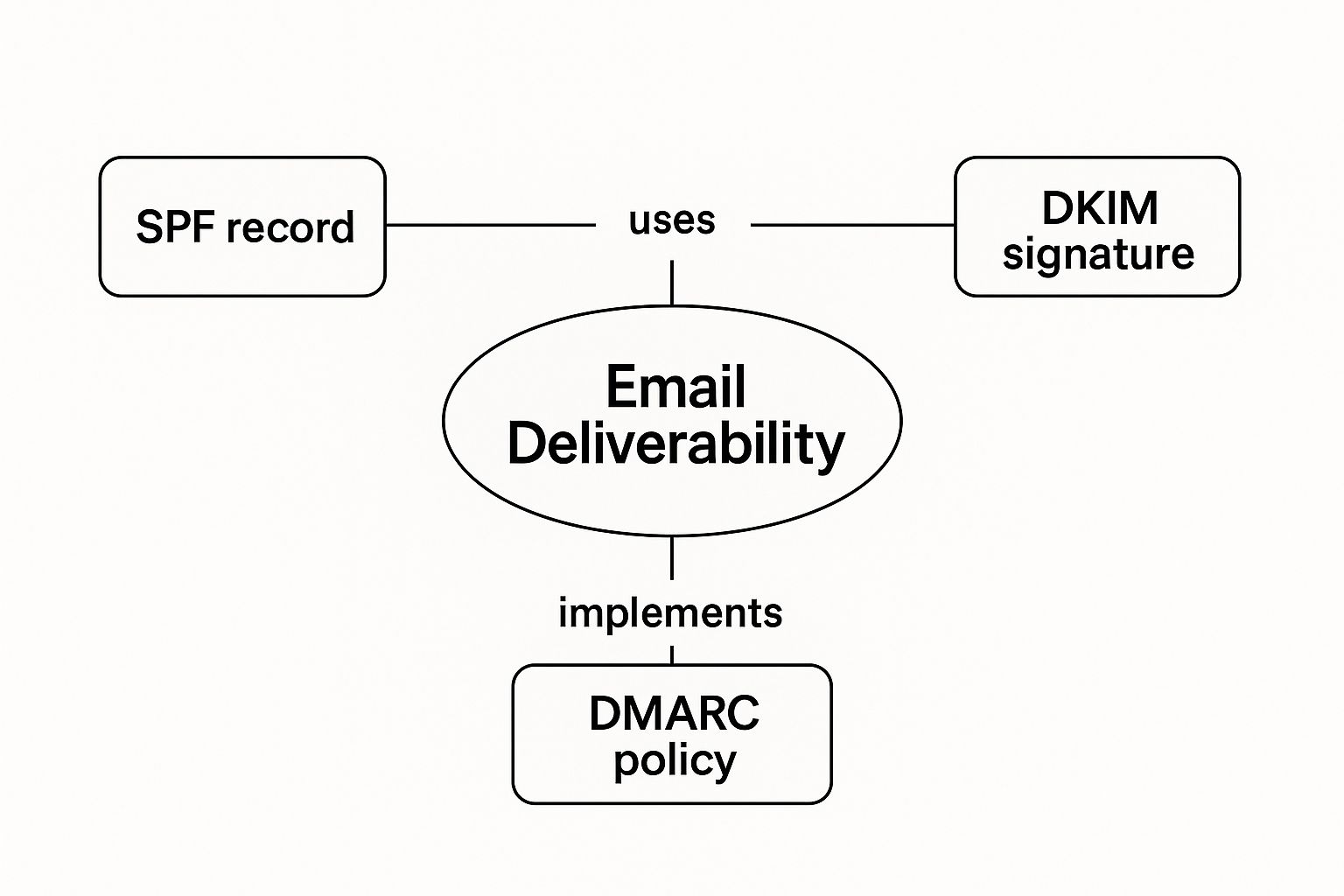
As you can see, SPF, DKIM, and DMARC aren’t just nice-to-haves. They’re the core infrastructure that proves your messages are trustworthy and deserve a spot in the inbox.
Why Authentication Is No Longer Optional
Not too long ago, setting up these records was considered a best practice—something the pros did. Today, it’s a non-negotiable requirement. The relentless flood of spam and phishing attacks has forced major inbox providers to draw a hard line in the sand.
For instance, if you send over 5,000 emails a day, you’re now under a microscope. Providers demand this authentication is in place, along with other good sending habits. If your setup isn’t up to snuff, you can expect your emails to get blocked. Period.
A failed authentication check is one of the loudest red flags you can wave at an inbox provider. It’s an automated signal that says, “This message might be an imposter.”
Getting these records configured correctly is step one. But even the best technical setup can’t save you if you’re sending to bad addresses. That’s why cleaning your lists is just as critical. Learning how to verify emails effectively ensures your hard work on the technical side pays off — and validating once isn’t enough, since addresses decay over time. By passing these essential checks, you give your emails a verifiable identity that helps them sail past automated defenses and into the inbox.
Actionable Steps to Improve Your Email Deliverability
Alright, so you know why your emails might be getting blocked. Now for the important part: what are you going to do about it? Moving from diagnosis to action is where you’ll see real results. The goal isn’t just to fix a single blocked email, but to build a rock-solid sender reputation so it doesn’t happen again.
Think of it like tending to a garden. You can’t just plant seeds and walk away; you need to water, weed, and prune regularly. A few smart habits can turn your email deliverability from a constant headache into one of your most reliable channels.
Start with a Squeaky-Clean Email List
The bedrock of great deliverability is a healthy, up-to-date email list. Honestly, nothing tanks a sender reputation faster than blasting emails to invalid, inactive, or flat-out fake addresses. To an internet service provider, that behavior screams “spammer.”
That’s why cleaning your list isn’t a one-and-done task—it’s an ongoing discipline. Setting up recurring validation automates this process so bad addresses never pile up. Before you even think about launching a big campaign, make these moves:
- Scrub the Hard Bounces: If an email comes back with a hard bounce, it’s a dead end. That address is permanently undeliverable. Delete it immediately and don’t look back.
- Segment Out the Ghosts: Got subscribers who haven’t opened an email in months? Continuing to send to them just drags down your engagement metrics. Try moving them to a re-engagement campaign, and if that doesn’t work, it’s time to let them go.
- Use a Verification Service: Before you hit send, run your list through a good email verification tool. It’s designed to catch things like typos, temporary addresses, and known spam traps that you’d never spot on your own.
Your email list is a living thing, not some dusty file you set and forget. Pruning bad contacts is the single best thing you can do to protect your reputation and actually land in the inbox.
Getting familiar with email verification best practices is a non-negotiable skill if you’re serious about outreach. If you use a platform like HubSpot or Mailchimp, you can streamline this with a direct integration. It’s your first line of defense against the high bounce rates that get senders blocked.
Craft Content That Engages, Not Alarms
Once your list is in good shape, your next focus is the message itself. Spam filters have become incredibly sophisticated, and they’re looking closely at the words you use and how you format your email. The key is to craft content that feels valuable and personal, not like a generic blast.
When it comes to outreach, using effective email lead generation techniques is crucial for making sure your carefully crafted messages actually get seen and drive results.
Here are a few simple ways to improve your content hygiene:
- Write an Honest Subject Line: Forget the ALL CAPS and the strings of exclamation points!!! Avoid spammy trigger words like “Free,” “Guaranteed,” or “Act Now.” Your subject line should be a clear, simple promise of what’s inside.
- Find a Text-to-Image Balance: An email that’s just one giant image is a massive red flag for spam filters. You need a good amount of plain text to balance it out. A 60/40 split in favor of text is a great starting point.
- Stick to Reputable Links: Link shorteners (like bit.ly) are a favorite tool of phishers, so email clients are naturally suspicious of them. Always link directly to the full, recognizable URL so people—and filters—know exactly where you’re sending them.
Nail Your Technical Setup
As we’ve covered, getting your technical authentication right is not optional. Sending an email without setting up SPF, DKIM, and DMARC is like showing up at airport security without your ID—you’re just not getting through.
Getting these records configured for your domain is a one-time setup that pays you back on every single email you send. It’s the digital handshake that proves to every receiving server that you are who you say you are, which drastically cuts your chances of getting blocked automatically. It’s the final, critical piece of the deliverability puzzle.
Frequently Asked Questions About Blocked Emails

Even after covering the usual suspects, you probably still have some specific questions about what’s happening with your emails. Getting to the bottom of why your email was blocked often means digging into the little details of your sending habits. Let’s tackle some of the most common questions that pop up.
We’ll clear up the confusion between a “blocked” message and one that landed in spam, talk about sending volume, and even figure out why a personal, one-on-one email can get rejected. These quick answers should give you a better idea of where to look next.
Blocked vs. Spam: How Can I Tell the Difference?
The biggest difference is whether you get a notification. A blocked email is flat-out rejected by the recipient’s server. You’ll almost always get an automated “bounce-back” message, sometimes called a Non-Delivery Report (NDR), telling you the message failed and usually giving a reason why.
On the other hand, an email that lands in the spam folder was actually delivered successfully. The recipient’s email service (like Gmail or Outlook) just thought it looked fishy and tucked it away from the main inbox. You won’t get any kind of notification for this. The only way you’ll know is if you ask the recipient to go check their junk folder.
Key Takeaway: A bounce-back message means you were blocked. No message means it was either delivered or went to spam—and only your recipient can tell you which one.
Can Sending Too Many Emails Get Me Blocked?
Yes, absolutely. A sudden, massive spike in the number of emails you send is a classic spammer move, and it’s a huge red flag for email providers. They are constantly monitoring sending patterns, and a huge, out-of-the-blue increase in volume can tank your sender reputation in a hurry.
When this happens, you can expect one of two things:
- Throttling: The receiving server might start accepting your emails much more slowly, essentially putting you in a “time out.”
- Blocking: If the volume spike is extreme or your reputation is already questionable, the server may just start rejecting your emails completely.
The professional way to handle this is to “warm up” your IP address. Start by sending a small number of emails and then gradually increase that number over days and weeks. This signals to providers that you’re a legitimate sender who is growing an audience organically.
Why Was My Personal Email Blocked?
This one can be really frustrating. It’s a common myth that only mass marketing emails get blocked, but even a simple, personal email from your own Gmail or Outlook account can be rejected.
It usually boils down to your message accidentally tripping a spam filter. Common triggers include:
- Suspicious links: Using URL shorteners (like bit.ly) or linking to a website with a bad reputation can get you flagged.
- Spammy words: Packing your email with words often found in scams, like “free,” “winner,” “urgent payment,” or “guaranteed,” is a surefire way to get unwanted attention.
- Weird attachments: Sending file types that aren’t very common can sometimes raise red flags with security filters.
There’s also a more serious possibility: your personal email account might have been hacked and used to send spam without you knowing it. That would quickly ruin its reputation, causing even your normal emails to get blocked. This is why regularly changing your password and turning on two-factor authentication is so important.
Stop validating once and hoping for the best. Truelist’s recurring validation automatically re-checks your lists on a schedule — catching new bounces, dead mailboxes, and risky addresses before they damage your sender reputation. Truelist offers pay-as-you-go credits that never expire, plus unlimited plans for high-volume senders.