 Claude
  Perplexity
How to Check if Email is Valid: Developer's Guide
Learn how to check if email is valid with our developer guide. Discover regex, DNS, and API methods to ensure reliable email validation.
TL;DR: Learn how to check if email is valid with our developer guide. Discover regex, DNS, and API methods to ensure reliable email validation.
Sending an email is easy. Making sure it actually lands in someone’s inbox? That’s a whole different ballgame. If you really want to check if an email is valid, you have to look beyond a simple format check. It takes a layered approach to confirm an address is deliverable without wrecking your sender reputation in the process.
Why Old-School Email Checks Just Don’t Cut It Anymore
Not too long ago, a quick once-over to see if an email address looked right was considered good enough. The main goal was just to avoid an instant hard bounce. But holding onto that mindset today is just plain dangerous. Failing to properly validate your email list has a ripple effect that hurts your bottom line, your brand, and your marketing efforts.
Poor email hygiene isn’t a minor technical hiccup anymore. It’s a direct threat to your business.
The Real Price of a Bad Email List
Every bad email address sitting on your list carries a hidden cost. It’s not just about the one message that goes nowhere. The fallout is far worse and can hit you where it hurts.
- Destroyed Sender Reputation: Mailbox providers like Gmail and Outlook are watching your bounce rates like a hawk. A high bounce rate tells them you’re a sloppy, low-quality sender. Before you know it, all your messages start getting routed to spam.
- Waking Up the Spam Filters: Invalid addresses are a massive red flag for spam filters. Keep sending to them, and you risk getting your domain or IP address blacklisted. That can paralyze your ability to talk to your customers.
- Killing Your Campaign ROI: You’re pouring marketing dollars into reaching contacts who will never see your message. This throws off all your analytics, making it impossible to know what’s actually working.
A huge part of the problem is that you need to actively improve email deliverability to make sure your messages get seen. With the sheer volume of email flying around, you can’t afford to be imprecise.
By 2025, experts predict we’ll see 347 billion emails sent and received every single day. The average person has almost two email accounts, so even a tiny percentage of bad addresses adds up to a mountain of wasted effort and lost opportunities.
A Smarter Way to Validate Emails
To sidestep these risks, you need a solid system. This guide will walk you through it, starting with the basics and moving up to the most reliable methods. We’ll kick off with simple syntax validation, then dig into more advanced domain-level checks. Finally, I’ll show you how to get near-perfect accuracy with real-time API verification.
Think of it less as a chore and more as a core strategy for building a communication channel you can actually count on.
Your First Line of Defense: The Regex Syntax Check
Before you even think about complex server handshakes or API calls, your fastest and most straightforward check is a simple syntax validation. I like to think of it as the bouncer at the front door of your database. It can’t tell you if the name is on the guest list, but it can instantly spot someone who isn’t following the basic dress code.
This initial screening is handled by what’s known as a Regular Expression, or Regex for short. It’s essentially a powerful search pattern—a sequence of characters that defines a specific format. When you apply a Regex pattern to an email address, it quickly confirms whether the text actually looks like a real email address should.

This process is incredibly quick and can run either in the user’s browser (client-side) or on your server. It’s your best tool for preventing obviously broken entries like “john.doe.com” or “jane@smith” from ever making it into your system. It’s an indispensable first pass that catches simple typos and formatting mistakes right on the spot.
Breaking Down an Email for Regex
So, how does a Regex actually work its magic? It starts by understanding the anatomy of an email address. Every valid email has three core components, and a well-crafted Regex pattern inspects each one.
- The Local-Part: This is everything that comes before the ”@” symbol. It can be a mix of letters, numbers, and certain special characters like dots, underscores, or hyphens.
- The ”@” Symbol: This is the non-negotiable separator. You need one, and only one.
- The Domain Part: This is what comes after the ”@” symbol. It includes the domain name (like
truelist) and the top-level domain or TLD (like.io).
A good Regex is built to validate this local-part@domain structure. It’s smart enough to check that the local-part doesn’t start or end with a dot, the domain uses valid characters, and a TLD of at least two characters is present. For a much deeper dive into these rules, our guide on the fundamentals of an email syntax check is a great resource.
A Look at Regex in Action: JavaScript and Python
Let’s get practical. Here’s how you can implement a basic syntax check in two of the most popular programming languages. These code snippets are perfect for giving users instant feedback on a web form or as a first-pass filter in your backend scripts.
When building a web form with JavaScript, you can test an email with a function like this:
function isValidEmail(email) {
  // A commonly used, though not exhaustive, regex pattern
  const pattern = /^[^s@]+@[^s@]+.[^s@]+$/;
  return pattern.test(email);
}

// Example Usage:
const email1 = "contact@truelist.io";
const email2 = "invalid-email";
console.log(isValidEmail(email1)); // Returns: true
console.log(isValidEmail(email2)); // Returns: false
And if you’re working on a server-side app with Python, the implementation is just as clean using the built-in re module:
import re

def is_valid_email(email):
    # This pattern is good for most standard use cases
    pattern = r"^[^s@]+@[^s@]+.[^s@]+$"
    if re.match(pattern, email):
        return True
    return False

# Example Usage:
email1 = "user.name+alias@example.com"
email2 = "user@domain-without-tld"
print(is_valid_email(email1))  # Outputs: True
print(is_valid_email(email2))  # Outputs: False
These patterns strike a great balance between accuracy and simplicity, catching the vast majority of common formatting errors without being overly strict.
To give you a clearer picture of what these patterns are doing, here’s a breakdown.
This table shows how each piece of the Regex puzzle contributes to ensuring the overall structure is correct.
The Hard Limits of Regex Validation
While Regex is a powerful and absolutely necessary first step, it has one major blind spot: it can only verify the format, not the existence.
A successful Regex check confirms an email could be real, but it has no way of knowing if it is real. The address
nobody@nonexistent-domain123.comwill pass a syntax check perfectly, but it will bounce every single time.
This is a critical distinction. A Regex can’t tell you if:
- The domain (
nonexistent-domain123.com) actually exists. - That domain has a mail server set up to receive email.
- The specific mailbox (
nobody) has been created on that server.
Relying only on Regex to validate an email is like approving a loan application just because the social security number is formatted correctly. You’ve skipped the most important part—verifying the identity behind the number.
So, while syntax validation is an essential filter, it’s truly just the beginning. To get a real picture of an email’s deliverability, we have to go deeper.
Verifying Domains with DNS and MX Records
So, you’ve confirmed an email address has the right format with a Regex check. That’s a great first step, but it only gets you part of the way there. An address like elon.musk@microsft.com sails through a syntax check, but it’s completely useless because the domain is misspelled. This is where the next layer of validation becomes absolutely essential.
To truly check if an email is valid, you need to confirm that the domain isn’t just formatted correctly but is a real, functioning domain set up to receive mail. For that, we turn to the Domain Name System (DNS) and its special Mail Exchange (MX) records.
Think of DNS as the internet’s phone book. When you type a domain name into your browser, DNS translates that human-friendly name into a server’s IP address. It does something similar for email but looks for a specific entry: the MX record.
What Are MX Records and Why Do They Matter?
An MX record is a special entry in a domain’s DNS settings that points to the mail servers designated to accept email on its behalf. If a domain doesn’t have any MX records, that’s a dead giveaway it’s not configured to handle incoming mail.
This check is a massive leap forward from a simple format validation. It answers a crucial question: “Does a mail server for this domain even exist?”
No MX Records Found: If a domain like
some-fake-company.nethas no MX records, you know with certainty that any email address using it (likecontact@some-fake-company.net) is undeliverable. You can immediately flag it as invalid.MX Records Are Present: Finding MX records for a domain like
truelist.ioconfirms its owners have set up servers to process email. This is a strong positive signal that the domain is legitimate and active.
This one step effectively weeds out addresses with domain typos, expired domains, or domains that simply aren’t used for email. Understanding the principles of email domain validation is fundamental to building a reliable verification process that protects your deliverability.
The Role of MX Records in Email Delivery
To appreciate how powerful this is, let’s trace the path of an email. When you hit “send,” your mail server doesn’t just guess where it’s going. It performs a quick series of lookups behind the scenes.
First, it takes the recipient’s domain (example.com). Then, it asks the DNS for the MX records tied to example.com. The DNS responds with a list of mail servers, often with priority numbers attached. Your server then connects to the highest-priority server to deliver your message.
By performing this MX lookup yourself during validation, you’re mimicking the very first step a real mail server takes. You’re checking to see if the destination even has a mailbox before you try to send a letter.
Verifying MX records bridges the gap between a superficial format check and a true deliverability assessment. It confirms the domain is not just a name but a destination equipped to handle email traffic, preventing a significant number of hard bounces.
The Limits of Domain Verification
While checking for MX records is a huge improvement, it still doesn’t give you the complete picture. It tells you the domain is ready to receive mail, but it tells you nothing about the specific user at that domain.
For instance, you can easily confirm that gmail.com has valid MX records. But that check alone can’t tell you if the mailbox this.is.a.totally.fake.address12345@gmail.com actually exists. The domain is valid, but the user is not.
To get that final level of certainty and know if a specific mailbox is active, you need to take one more step. This involves a more direct, real-time check with the mail server itself—a process best left to a dedicated verification service to protect your own sender reputation.
Alright, let’s talk about getting to near-100% certainty.
Getting Certainty with Real-Time API Verification
Syntax checks and DNS lookups are great for catching typos and obviously fake domains, but they can’t answer the most critical question: does this specific mailbox actually exist and can it receive my email? This is where we go from making an educated guess to getting a definitive answer. For the highest level of accuracy when you check if an email is valid, you need a dedicated, real-time API verification service like Truelist.
This is the industry-standard approach because it runs a comprehensive, multi-layered audit in seconds. It takes the syntax and DNS checks we’ve already covered and adds the final, decisive step: a direct, real-time handshake with the recipient’s mail server. Think of it like making a quick, harmless call to the server to ask, “Hey, is contact there?”—all without actually sending a full email.
The flow looks something like this, moving from a user’s initial input to the final server-side confirmation that only an API can provide.
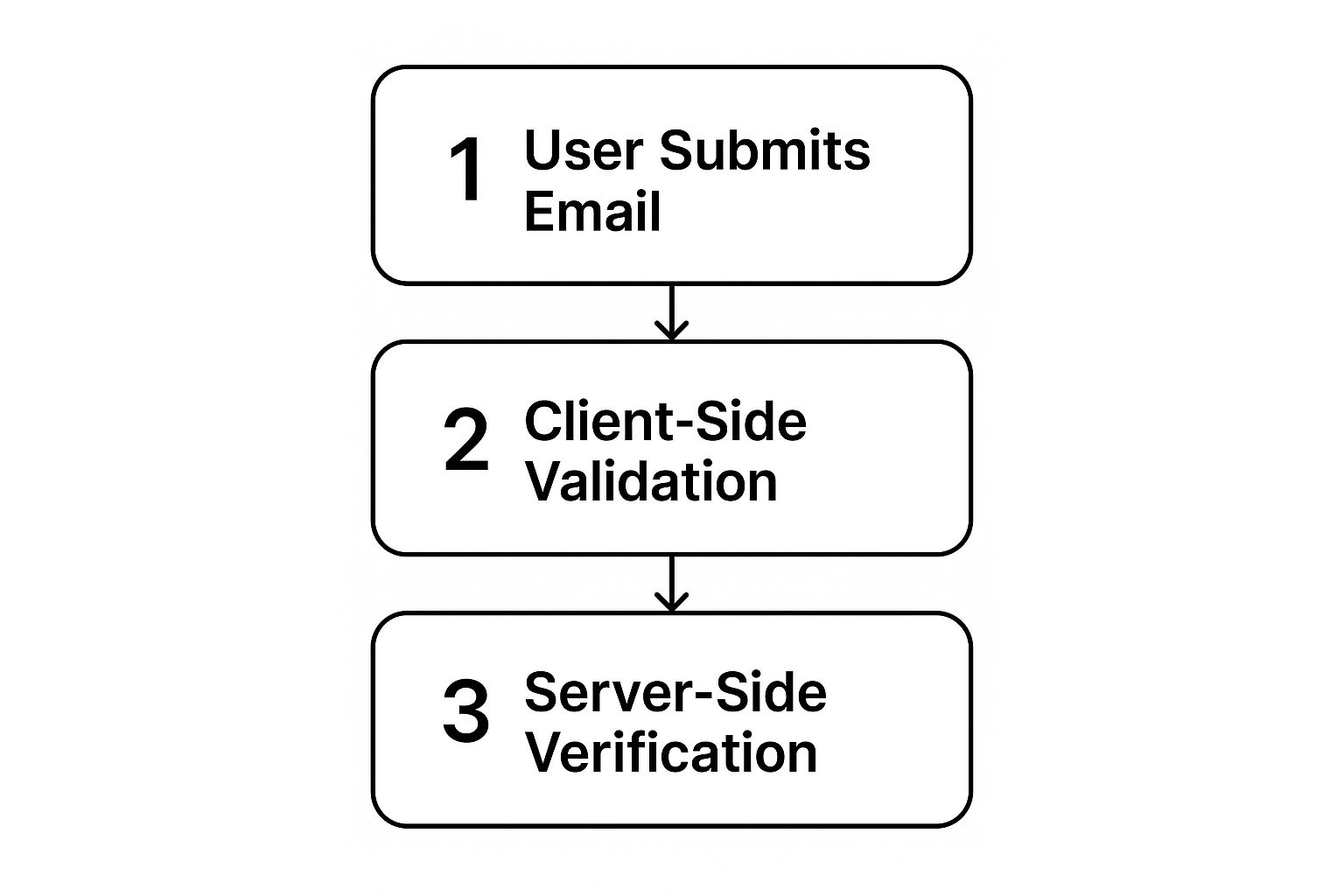
As you can see, this API-driven check adds that crucial layer of server validation, confirming real deliverability in a way client-side checks simply can’t.
Why Not Just Do It Yourself?
You might be thinking, “Can’t I just ping the server myself?” It’s a fair question, but the answer boils down to one critical thing: protecting your sender reputation. Mailbox providers have incredibly sophisticated systems for spotting and blocking suspicious activity. If your server’s IP address suddenly starts making a ton of verification checks without actually sending mail, you’re going to get flagged as a potential spammer and blacklisted—fast.
Key Takeaway: Attempting high-volume SMTP checks from your own server is a surefire way to damage your sender reputation and get your IP address blacklisted.
This is the problem an API service like Truelist solves. It uses a massive, distributed network of servers built specifically for this purpose. It shoulders all the risk, keeping your own server’s reputation pristine for legitimate email campaigns.
Getting Started with API Verification
Plugging an email validation API into your system is usually surprisingly simple. The general process is to sign up for an account, grab your unique API key, and then use that key to make requests and interpret the detailed responses you get back.
Let’s see what this looks like with Truelist. After signing up, you’ll find your API key right on your dashboard. This key is what proves to the service that you’re authorized to make requests.
This kind of clean, straightforward interface makes it easy to find your credentials and get started right away.
Actually making a request is often just a single line of code. For example, using a command-line tool like cURL, you’d simply call a specific URL:
curl ”https://api.truelist.io/v1/verify/email?address=contact@truelist.io” \ -H “Authorization: Bearer YOUR_API_KEY”
That one command sends the email contact@truelist.io to the API for a full checkup, authenticated with your key.
The real value, though, is in the rich JSON response you get back. It’s packed with data that gives you a complete picture of that email’s quality.
{
  "email": "contact@truelist.io",
  "status": "deliverable",
  "is_disposable": false,
  "is_role_based": true,
  "is_catch_all": false,
  "is_free": false,
  "did_you_mean": null
}
This doesn’t just tell you the email is deliverable; it gives you valuable context, like the fact that it’s a role-based address (e.g., contact@, info@, support@).
Interpreting the API Response
The most important field you’ll look at is status. This is what you’ll build your application’s logic around. With a service like Truelist, you’ll generally see a few key statuses:
- Deliverable: The green light. The API has confirmed the mailbox exists and is ready to receive mail. Keep these.
- Undeliverable: A hard “no.” The address is invalid, the domain doesn’t exist, or the server flat-out rejected it. You should remove these immediately to protect your sender score.
- Risky: This one is more nuanced. It often points to a “catch-all” server, which is set up to accept mail for any address at that domain, making it impossible to confirm a specific user. It can also flag temporary issues, like a full mailbox. Treat these with caution; they have a higher chance of bouncing.
- Unknown: This means the server didn’t respond in time or was inconclusive. It’s best to set these aside and try to re-verify them later.
Building Logic Around Validation Results
Armed with these detailed statuses, you can create a truly robust system. Imagine a new user signup form. You could use the API to provide instant feedback right on the form itself.
Here’s a simple Python function showing how you might handle these different outcomes:
import requests

def check_email_validity(email, api_key):
    url = f"https://api.truelist.io/v1/verify/email?address={email}"
    headers = {"Authorization": f"Bearer {api_key}"}

    try:
        response = requests.get(url, headers=headers)
        response.raise_for_status() # Raises an exception for bad status codes

        data = response.json()
        status = data.get("status")

        if status == "deliverable":
            print(f"{email} is valid and safe to send to.")
            # Action: Add to your main email list
        elif status == "undeliverable":
            print(f"{email} is invalid. Do not send.")
            # Action: Reject the signup or remove from list
        elif status == "risky":
            print(f"{email} is risky. Proceed with caution.")
            # Action: Add to a separate segment for lower-priority sends
        else: # "unknown" or other statuses
            print(f"Status for {email} is unknown.")
            # Action: Flag for re-verification later

    except requests.exceptions.RequestException as e:
        print(f"Error connecting to the API: {e}")
Example usage:
check_email_validity(”contact@truelist.io”, “YOUR_API_KEY”)
This kind of automated list hygiene ensures only high-quality, deliverable emails make it into your database. This level of precision is becoming non-negotiable. With global inbox placement rates dropping, every undeliverable address you send to hurts your chances of reaching the ones that matter. You can discover more about the 2024 deliverability benchmarks to see just how tough it’s getting. Using an API is one of the most effective ways to fight this trend and maximize the impact of every single email you send.
Putting It All Together: A Complete Email Validation Strategy
https://www.youtube.com/embed/hLoagOTd5Bs
Knowing the difference between a syntax check and an API call is great, but the real magic happens when you combine these techniques into a smart, resilient system. A truly effective email validation strategy isn’t about picking one method over another. It’s about layering them to create a robust defense against bad data.
Think of it like this: your first line of defense is on the front end. When a user is typing their email into a signup form, a quick client-side Regex check can catch obvious typos instantly. It’s a simple, user-friendly way to prevent “gamil.com” from ever hitting your server.
But the heavy lifting should always happen on the backend. After a user submits the form, your server should make a real-time call to a verification API. This gives you the definitive answer—is this address deliverable, risky, or just plain invalid? This step ensures only quality contacts make it into your system.
When and How Often Should You Validate?
Knowing how to validate is only half the equation; knowing when to do it is just as crucial. Timing is everything. There are two key moments where validation plays a vital role, and each requires a slightly different approach.
1. At the Point of Collection (Real-Time) This is your single most important checkpoint. Validating an email the moment it’s captured—whether on a newsletter form, a checkout page, or during app registration—is the best way to stop bad data at the source. An API check here acts as a gatekeeper, protecting your entire ecosystem.
2. For Existing Lists (Batch Cleaning) Email lists degrade. It’s a natural process. People switch jobs, abandon old inboxes, and create new accounts. That’s why it’s a best practice to clean your entire email list every three to six months. This routine maintenance weeds out the dead addresses, which is essential for keeping your deliverability rates high and your sender reputation pristine.
Key Takeaway: A solid strategy is never a “set it and forget it” task. It’s an ongoing cycle of real-time prevention at the entry point and periodic maintenance to account for natural list decay. This dual approach is fundamental to long-term success.
Comparison of Email Validation Methods
To help you decide which methods to layer, here’s a quick comparison of the common techniques we’ve discussed. Each has its own strengths and is best suited for different stages of the validation process.
| Validation Method | Accuracy | Implementation Speed | Best Use Case |
|---|---|---|---|
| Syntax (Regex) Check | Low | Very Fast | Instant feedback on website forms to catch typos. |
| Domain/DNS Check | Medium | Fast | A basic server-side check to confirm the domain exists. |
| SMTP Probing | High | Slow | Deep, server-to-server verification for high-value contacts. |
| Third-Party API | Very High | Fast | Real-time checks at signup and for bulk list cleaning. |
As you can see, relying on just one method leaves you exposed. A simple Regex check is fast but won’t catch fake emails on valid domains. An API, on the other hand, provides the comprehensive verification needed for reliable data.
Creating a Multi-Layered System
A durable strategy layers these methods for maximum effect. For instance, companies aiming for effective email follow-up automation know that starting with a clean list is non-negotiable. It ensures every automated message has the best possible chance of landing in a real inbox.
Here’s a practical flow you can implement:
- Layer 1 (Instant Feedback): Use Regex on your frontend forms for immediate syntax checks.
- Layer 2 (Definitive Verification): Implement a real-time API call on your backend for every new email submitted.
- Layer 3 (Ongoing Hygiene): Schedule quarterly or biannual bulk list cleanings using a verification service.
This layered approach is a cornerstone of modern email list management. To dive deeper into how these pieces fit together, check out our complete guide on how to verify emails for more tactical advice.
Common Questions About Email Validation

Even with a solid plan, a few questions always pop up when you get down to the nitty-gritty of email validation. Let’s dig into some of the most common things developers and marketers wonder about when they start to check if an email is valid.
Is Regex Enough to Check if an Email Is Valid?
In a word, no. Using a regex pattern is a good start, but it’s only a starting point. Think of it as a bouncer checking an ID for the right format—it ensures an address has an ”@” symbol and a domain that looks right. But that’s all it does. It’s just a syntax check.
A regex check has zero visibility into whether:
- The domain itself is real and registered.
- That domain has any mail servers set up to receive email.
- A specific mailbox, like
jane.doe, actually exists on that server.
For validation that actually means something, you have to go beyond syntax. That means layering in more robust checks, like DNS lookups and, ideally, a real-time verification API.
How Often Should I Validate My Email List?
This really comes down to how you’re collecting emails. For any new address coming in through a signup form, checkout page, or app registration, you should be validating it instantly with an API. This is your first line of defense, preventing bad data from ever making it into your database.
What about your existing lists? It’s a smart move to re-validate them at least every three to six months. People change jobs, switch providers, or just abandon old accounts. Email lists decay naturally, and regular cleanups are essential for maintaining high deliverability and protecting your all-important sender reputation.
What Is the Difference Between a Risky and an Undeliverable Email?
Understanding the difference here is key to making sense of API results. An “undeliverable” status is a dead end. It’s a definitive signal that the address is fake, the domain is bogus, or the mail server flat-out rejected it. These emails should be scrubbed from your list immediately. No exceptions.
A “risky” status, on the other hand, lives in a gray area. It can point to a few different situations:
- Catch-All Server: The domain is configured to accept email for any address, so it’s impossible to verify if your specific user exists without actually sending a message.
- Temporary Issue: The user’s inbox could be full and temporarily unable to receive new mail.
- Disposable Address: The API flags it as a potential throwaway email address, which is often used to abuse free trials or signups.
While some “risky” emails might get through, they have a much higher chance of bouncing. I always advise handling them with caution. You might segment them out or reduce how often you send to them.
Can I Perform SMTP Checks Myself Without an API?
Technically, yes, you can. But in practice, it’s a terrible idea, and I strongly advise against it. Mail servers run sophisticated anti-spam systems that are on constant lookout for suspicious activity. They can easily spot an IP address that’s probing for valid mailboxes without actually sending legitimate email.
Do this enough, and you’ll get your server’s IP address blacklisted. That’s a catastrophic outcome, as it would block you from sending any email—marketing or transactional. It’s just not worth the risk. Using a dedicated API service offloads this entire process to an infrastructure designed for this specific task, keeping your sender reputation safe and sound.
Ready to build a bulletproof validation system? With Truelist, you get unlimited, real-time email verification to protect your sender reputation and maximize your ROI. Stop guessing and start validating with confidence. Get started for free with Truelist and ensure every email you send has the best chance of landing in the inbox.