 Claude
  Perplexity
How to Avoid Emails Going into Spam
Tired of your emails landing in the spam folder? Learn how to avoid emails going into spam with our guide on authentication, content, and sender reputation.
TL;DR: Tired of your emails landing in the spam folder? Learn how to avoid emails going into spam with our guide on authentication, content, and sender reputation.
Getting your emails into the inbox isn’t about tricking filters; it’s about building a foundation of trust with email providers. You have to prove you’re a legitimate sender who provides real value. This means getting the technical stuff right (email authentication), keeping your subscriber list healthy and engaged, and sending content people actually want to read.
It’s a process of earning your spot in the inbox, not just demanding it.
Why Your Emails Land in Spam
We’ve all been there. You hit “send” on an important campaign, only to find out it went straight to spam. It’s frustrating, but the good news is that it’s almost always fixable.
Landing in spam isn’t usually the result of one big mistake. Instead, it’s a death by a thousand cuts—a collection of small signals you’re sending to providers like Gmail, Outlook, and Yahoo. Their main job is to protect their users from junk, so their algorithms are incredibly cautious. When your sending habits raise red flags, their filters do their job and route you away from the inbox.
Key Factors That Trigger Spam Filters
After years of dealing with this, I’ve seen the same core issues pop up again and again. If you’re having trouble with deliverability, it’s probably one of these culprits.
- A Battered Sender Reputation: Every sending domain has an invisible “credit score” with Internet Service Providers (ISPs). Things like high bounce rates, spam complaints from users, and a history of low engagement will tank that score fast.
- Missing Authentication: If you haven’t set up SPF, DKIM, and DMARC, ISPs have no way to verify you are who you say you are. From their perspective, an unauthenticated email looks shady and is a prime candidate for the spam folder.
- Spammy Content Signals: This is less about specific “trigger words” than it used to be, but certain patterns still cause problems. Think misleading subject lines, all-caps shouting, an abundance of exclamation points, and links to sketchy domains.
- Your Audience is Ignoring You: This is a big one. When people consistently delete your emails without opening them, or worse, never interact at all, ISPs take notice. It’s a powerful signal that your content isn’t wanted.
At the end of the day, it all boils down to this: Inbox providers want to deliver emails their users find valuable. Your entire email strategy should be built around proving your emails are wanted and welcomed by your audience.
If you’re dealing with consistent deliverability problems and need to dig deeper, this guide on why an email gets blocked is a great place to start.
For a quick-start approach, I’ve put together a table with the most impactful actions you can take right now to improve your inbox placement.
Quick Wins to Improve Email Deliverability
This table breaks down the most critical actions you can take immediately to see a real improvement and reduce the chances of your emails being flagged as spam.
| Action Area | Why It Matters | Immediate First Step |
|---|---|---|
| Authentication | Proves your identity and prevents spoofing, building foundational trust with ISPs. | Head to your domain’s DNS settings and check if you have an existing SPF record. |
| List Hygiene | Reduces bounces and spam complaints, which are major hits to your sender reputation. | Run your list through an email validation service to scrub out invalid addresses. |
| Engagement | Shows ISPs that recipients value your content, making future emails more deliverable. | Create a segment of your most active subscribers and send them a targeted campaign. |
Focusing on these three areas is the fastest way to diagnose and fix the most common reasons emails end up in spam. It’s all about building that trust, one send at a time.
Build Trust with Email Authentication
Think of email authentication as your digital passport. Without it, you’re an anonymous sender, and inbox providers like Gmail and Outlook have every reason to be suspicious. These authentication protocols are the technical foundation of good email deliverability, proving to receiving mail servers that you are who you say you are.
This isn’t just a nice-to-have technical detail; it’s an absolute must. When an email shows up without proper authentication, it looks an awful lot like a phishing attempt or a spoofed message to a spam filter. Getting this right from the start is fundamental to staying out of the junk folder.
The Authentication Trio: SPF, DKIM, and DMARC
If you want to understand how to keep your emails from landing in spam, you have to get familiar with this trio of acronyms. Each one plays a unique but complementary role in verifying your identity and protecting your domain’s reputation.
- Sender Policy Framework (SPF): I like to think of this as a verified guest list for your domain. Your SPF record is a public list of all the servers and services (like your email marketing platform) that are officially allowed to send emails on your behalf. If a message comes from a server that isn’t on this list, it’s immediately flagged as suspicious.
- DomainKeys Identified Mail (DKIM): Consider DKIM a tamper-proof digital seal on every email you send. It adds a unique cryptographic signature to the message header. The receiving server uses this signature to confirm that the email hasn’t been altered or forged in transit, which ensures its integrity all the way to the inbox.
- Domain-based Message Authentication Reporting and Conformance (DMARC): DMARC is the final piece that ties SPF and DKIM together. It’s the enforcer. It tells receiving servers exactly what to do if an email fails either the SPF or DKIM check. You can instruct them to do nothing (
p=none), send it to quarantine (p=quarantine), or reject it outright (p=reject). For a deeper look into how this works, you can learn more about what a DMARC policy is in our detailed guide.
This diagram breaks down how SPF, DKIM, and DMARC work together to create a solid authentication process.
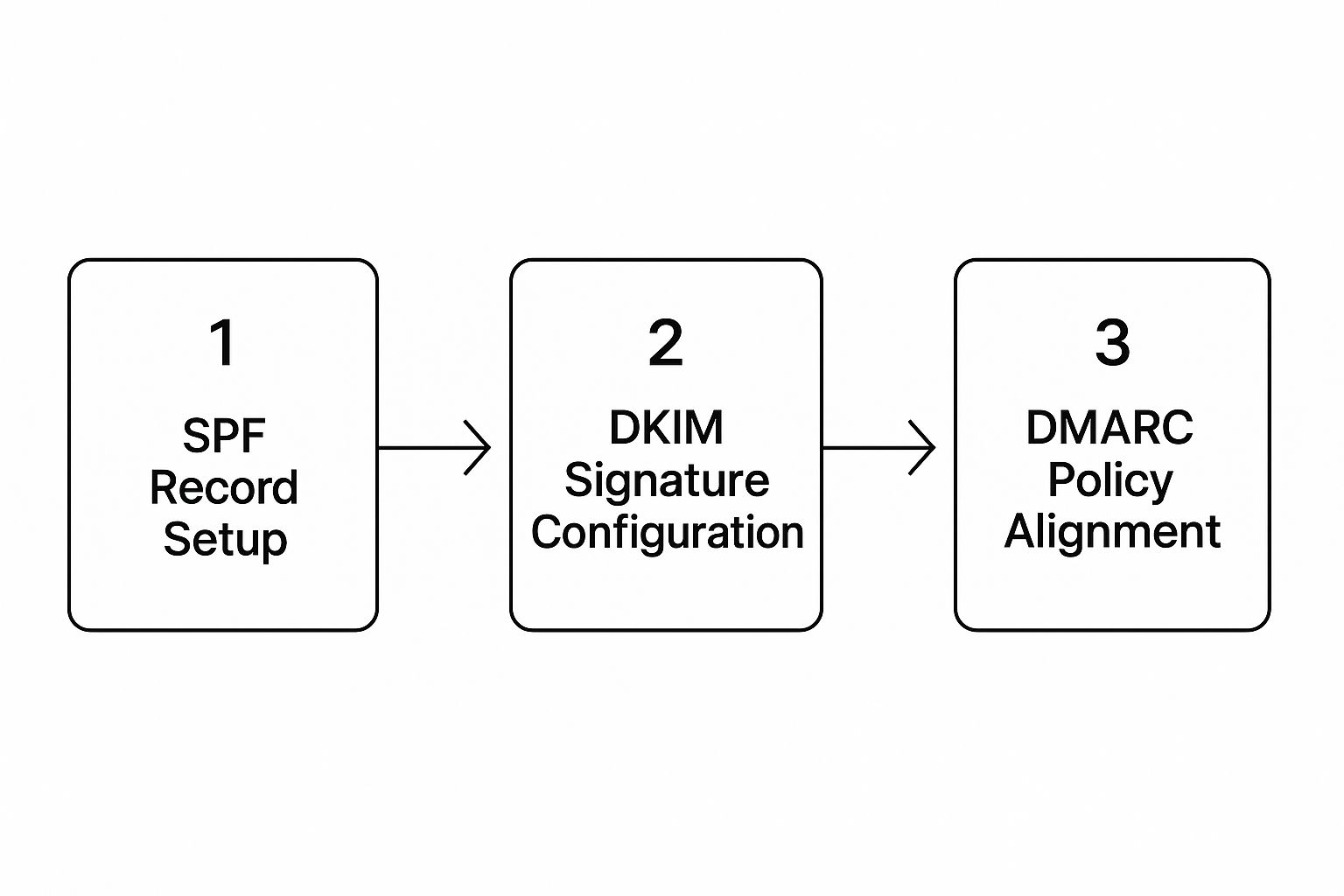
As you can see, each protocol builds on the last, creating layers of verification that are absolutely crucial for building trust with inbox providers.
Why Authentication Directly Impacts Inbox Placement
Setting up these protocols isn’t just about security—it has a direct, measurable impact on your deliverability. In fact, organizations with properly configured SPF, DKIM, and DMARC can see their emails marked as spam 20-30% less often. Domains that don’t bother to publish DMARC policies, for instance, are wide open to being spoofed, which is a massive red flag for spam filters.
The bottom line is simple: unauthenticated email is untrustworthy email. By setting up these records, you remove a huge element of doubt for inbox providers, giving your messages a much better shot at reaching their destination.
Craft Content That Resonates, Not Repels
 Once you’ve got your authentication sorted, the real battle begins: the content inside your email. Spam filters have evolved way beyond just flagging old-school trigger words like “free” or “guarantee.” They’re smarter now. They scrutinize everything—your formatting, your links, your images, and the overall feel of your message—to decide if you belong in the inbox.
Here’s the secret: write for people, not for robots. When your audience actually opens, clicks, and interacts with your emails, it sends a powerful message to providers like Gmail and Outlook that your content is wanted.
Find the Sweet Spot Between Text and Images
One of the most common traps I see marketers fall into is sending an email that’s essentially one giant image. It might look great, but it’s a classic spammer move used to hide shady text and links from filters. Naturally, they’re suspicious.
Your best bet is to aim for a healthy balance. I always shoot for a 60/40 text-to-image ratio. This shows you’re there to communicate something valuable, not just to flash a pretty picture. An email that’s mostly text with a few supporting images just feels more trustworthy.
Plus, many email clients block images by default. If your entire message and call-to-action are baked into a graphic, a huge chunk of your audience will never even see it.
Get Your Email’s Structure and Links Right
The technical guts of your email matter just as much as the visuals. Clean, responsive HTML is an absolute must. Messy code can break the layout in different email clients or contain elements that filters associate with phishing scams.
And be meticulous about your links. Here’s a quick checklist I run through before hitting send:
- Ditch the URL Shorteners: Services like Bitly are notorious for masking malicious links, so spam filters hate them. Always use the full, transparent URL so everyone knows exactly where they’re going.
- Keep Links Consistent: The text you use for a link should clearly describe its destination. If the display text says “Read Our Blog Post” but the URL goes to a product page, that’s a major red flag.
- Always Use Alt Text: For every image, add descriptive alt text. It gives context to users (and email clients) if the image doesn’t load, improving accessibility and the overall experience.
At the end of the day, it’s all about transparency. Spam filters are designed to reward senders who are clear and upfront. Hiding links or using sloppy code erodes the trust you worked so hard to build with your authentication records.
Ultimately, your subscribers’ engagement is the final judge. We’ve seen that emails with a balanced design and clean, personalized content can achieve up to 40% higher inbox placement rates. Why? Because high open and click-through rates tell inbox algorithms that people genuinely value what you’re sending. It’s a feedback loop. For a deeper dive into current email threats, the latest email threat report from Barracuda has some fascinating insights.
Master Your List Hygiene and Sending Habits

You can have the most impeccable authentication and brilliant content, but it all means nothing if your emails are going to the wrong people. Seriously, who you send to is just as important as what you send. Firing off emails to a stale, uninterested list is a surefire way to wreck your sender reputation. It’s like screaming into the void, and inbox providers take that as a sign that your messages are unwanted.
The bedrock of great deliverability is a permission-based list. This is non-negotiable. Every single person on that list needs to have explicitly told you they want to hear from you. Buying email lists? Don’t even think about it. It’s a one-way ticket to the spam folder, packed with dead addresses, spam traps, and people who will report you without a second thought.
Build a Healthy List From Day One
The smartest thing you can do for your email program is to start with a double opt-in process. When someone signs up, they get a confirmation email and have to click a link to officially join your list. It’s a simple but powerful step.
This little bit of friction verifies genuine interest and confirms the email address is actually valid, filtering out typos and bogus sign-ups before they ever contaminate your database. What you’re left with is a list of people who truly want your emails, which naturally leads to higher engagement—a massive green flag for spam filters. When you’re dealing with high-volume outreach, it’s crucial to understand strategies for successful cold email campaigns that keep you out of the spam folder.
A smaller, highly engaged list is infinitely more valuable than a massive, unengaged one. High open and click rates are powerful positive signals to ISPs, while a list full of bounces and inactive users will quickly destroy your sender reputation.
Maintain Your List With Regular Cleaning
Think of your email list as a garden, not a trophy case. It needs constant tending. People change jobs, abandon old email addresses, or just move on. Letting your list go untended is a recipe for deliverability disaster, so getting familiar with https://truelist.io/use-cases/email-list-cleaning is a game-changer.
Here are a few essential maintenance habits to get into:
- Remove Hard Bounces Immediately: A hard bounce means the email address is invalid. It’s a dead end. Keeping it on your list and repeatedly sending to it just tells inbox providers you’re not paying attention.
- Monitor Soft Bounces: A soft bounce points to a temporary problem, like a full inbox. But if an address soft-bounces a few times in a row, it’s a sign of a deeper issue. It’s best to cut it loose.
- Prune Inactive Subscribers: I like to segment out anyone who hasn’t opened or clicked an email in 90-120 days. You can try hitting them with one last re-engagement campaign, but if they still don’t bite, it’s time to say goodbye. This shows ISPs you’re committed to sending valuable content only to an interested audience.
Keep a Close Eye on Your Sender Reputation
Your sender reputation is the invisible force that decides whether your emails land in the inbox or get lost in the spam folder. Think of it as your email credit score. Internet Service Providers (ISPs) like Gmail and Yahoo are constantly grading you based on your sending habits, and that score determines your fate.
A good score is your golden ticket to the inbox. A bad one? You’ll be heading straight for the junk folder, no matter how amazing your content is. This single, unseen metric can make or break your entire email marketing effort.
What Goes Into Your Reputation Score?
Your reputation isn’t just one number; it’s a complex grade built from several data points. ISPs are always watching how people interact with your emails, and they use those signals to judge whether you’re a sender worth trusting.
Here’s a look at what they’re tracking:
- Spam Complaints: This one hurts the most. When someone manually flags your email as spam, it sends a powerful negative signal. You absolutely need to keep this rate below 0.1%, which translates to less than one complaint for every 1,000 emails you send.
- Bounce Rate: A high bounce rate, especially hard bounces from invalid addresses, tells ISPs you aren’t taking care of your email list. It looks sloppy and irresponsible.
- Engagement Metrics: Are people actually opening and clicking your emails? If your engagement is consistently low, inbox providers take it as a sign that your content is unwanted or irrelevant.
- Spam Trap Hits: Hitting a spam trap is like setting off a major alarm. These are email addresses set up specifically to catch spammers, and sending to one can instantly tank your reputation.
Your sender reputation is a living, breathing metric. It changes with every single campaign. Good habits build a strong, resilient reputation over time, but just a couple of missteps can cause damage that takes months to fix.
Tools for a Reputation Health Check
Thankfully, you’re not flying blind. While ISPs keep their exact scoring methods under wraps, a few fantastic tools can give you a clear picture of how they see you. Making these part of your regular routine is non-negotiable for a healthy email program.
Your first stop should always be Google Postmaster Tools. If a large chunk of your audience uses Gmail (and whose doesn’t?), this is a goldmine. It provides direct feedback from Google on your domain reputation, spam complaint rates, and authentication status.
Another must-have is Sender Score by Validity. It gives you a simple 0-100 score that acts as a summary of your reputation across the internet. You should aim for a score above 80. If you dip below 70, you’ve likely got some serious deliverability problems that need your immediate attention.
By keeping tabs on these resources, you can spot trouble before it spirals out of control. See your Sender Score drop or a spike in complaints in Postmaster Tools? That’s your cue to dig in, find the root cause, and fix it before you lose your precious access to the inbox.
Let’s be honest, trying to manually keep track of every single deliverability metric is a recipe for disaster. Following the best practices we’ve discussed is a fantastic start, but to truly get ahead, you need to bring in the right technology. This is where modern deliverability and email security platforms really shine, giving you an edge that manual effort just can’t match.
These aren’t your basic keyword-spotting tools. We’re talking about sophisticated systems that use machine learning and behavioral analysis to understand email in a much deeper way. They don’t just scan your outgoing campaigns for potential spam triggers; they can also act as a shield for your entire organization against inbound threats like phishing attacks.
Get a Clearer Picture and Tighter Control
Think of these platforms as the command center for your entire email operation. They offer a single dashboard that gives you a real-time, bird’s-eye view of your deliverability performance. This level of insight allows you to spot and fix problems before they get out of hand, which is key when you’re learning how to avoid emails going into spam.
- Granular Deliverability Reports: See exactly which campaigns are hitting the mark and which are falling flat. You can drill down into bounce rates, spam complaints, and engagement metrics for specific inbox providers like Gmail or Outlook, making it much easier to diagnose problems.
- Simplified Compliance: Staying on the right side of regulations like GDPR isn’t optional. Many advanced platforms have built-in tools for managing subscriber consent and handling reporting, taking a huge administrative headache off your plate.
- Proactive Threat Monitoring: These tools can alert you if your domain is being spoofed or used for malicious activity, protecting your brand’s hard-won reputation from being tarnished.
The real game-changer with these tools is their ability to turn mountains of data into clear, actionable advice. Instead of just guessing why your open rates suddenly dipped, you get a data-driven answer pointing you right to the source of the problem.
The Impact of Advanced Filtering
Modern, dedicated email spam filtering solutions are incredibly powerful, often boasting detection rates for spam and malware that exceed 99.9%. Their secret? They rely on intelligent, real-time analysis instead of just looking for a few “spammy” words.
I’ve seen organizations switch from basic, built-in inbox filters to a dedicated solution, and the difference is night and day. Not only does their email delivery success rate jump, but their IT team’s workload drops significantly. With centralized management and deep analytics, administrators can fine-tune their email policies with incredible precision. You can learn more about the specifics behind modern email spam filtering solutions.
At the end of the day, the winning strategy is a combination of smart sending habits and powerful technology. Mastering authentication and creating great content is non-negotiable, but the right tools provide the intelligence and automation to make sure your messages consistently land where they belong. They transform deliverability from a frustrating guessing game into a science you can actually measure and improve.
At Truelist, we believe clean, verified email lists are the bedrock of any successful email strategy. Our platform provides unlimited validations to scrub your lists of bounces, spam traps, and inactive addresses, ensuring you start every campaign with your best foot forward. Protect your sender reputation and boost your engagement by signing up for free at https://truelist.io.