 Claude
  Perplexity
What Is a Bounced Email and How Do You Fix It
Struggling to understand what is a bounced email? This guide explains hard vs. soft bounces, their impact on your sender score, and how to fix them for good.
TL;DR: Struggling to understand what is a bounced email? This guide explains hard vs. soft bounces, their impact on your sender score, and how to fix them for good.
Ever hit ‘send’ on an important email campaign, only to see a flood of “delivery failed” messages rush back into your inbox? That’s a bounced email, and it’s the digital world’s version of a “return to sender” stamp on a physical letter.
It’s an automated reply from a mail server letting you know that your message, for one reason or another, couldn’t make it to the intended recipient’s inbox.
Your Guide to Understanding Email Bounces
Think of the internet’s email infrastructure as a giant, incredibly fast postal service. When you send your message, it zips through various digital sorting centers—or servers—on its way to the final destination. A bounce happens when one of those servers hits a roadblock and can’t complete the delivery.
This is more than just a small hiccup. Bounces are a direct hit to your sender reputation, the success of your campaign, and your overall return on investment. If you’re not familiar with the fundamentals, it helps to understand what EDM marketing entails to see why every single delivery matters. Each bounced email is a lost chance to connect with a potential lead or a loyal customer.
The Two Main Types of Bounces
It’s crucial to know that not all bounces are the same. They’re split into two main categories, and each one tells a very different story about why your email failed to arrive.
Here’s a quick breakdown to see the difference at a glance.
Bounced Emails at a Glance
| Bounce Type | Delivery Status | Common Causes |
|---|---|---|
| Hard Bounce | Permanent Failure | Invalid or non-existent email address, recipient server blocked sender. |
| Soft Bounce | Temporary Failure | Recipient’s inbox is full, server is down, email is too large. |
Understanding this distinction is the first real step in diagnosing and fixing your email deliverability problems. Let’s dig a little deeper into what each type means for you.
Hard Bounces: These are the dead ends of email marketing—a permanent delivery failure. It means the email address is invalid, fake, or was shut down. Think of it like trying to mail a letter to a building that was torn down years ago. There’s no point in trying again.
Soft Bounces: These are temporary setbacks. The email address is valid, but something is preventing delivery right now. Maybe the recipient’s inbox is completely full, your email file size is too big, or their server is temporarily offline for maintenance. This is more like a mail carrier finding nobody home to sign for a package; they’ll likely try again later.
A high bounce rate—and by high, we mean anything over 2%—is a major red flag for Internet Service Providers (ISPs) like Gmail and Outlook. It screams “low-quality email list” and can get your future messages sent straight to the spam folder, or worse, blocked entirely.
With more than 361.6 billion emails sent and received every day, keeping your bounce rate low isn’t just a good idea—it’s essential for your marketing survival.
Hard Bounces vs. Soft Bounces

So, your email campaign just hit a snag. The first step in fixing it is figuring out what kind of roadblock you’ve actually run into. Bounces fall into two main buckets, and each one tells a different story about why your email didn’t make it.
Think of it this way: a hard bounce is a permanent, dead-end street. A soft bounce is more like a temporary traffic jam.
Knowing how to tell them apart is probably the most critical skill for managing your email deliverability. One requires you to take immediate action, while the other is more of a “wait and see” situation. Let’s break down exactly what separates them.
Decoding the Hard Bounce
A hard bounce is the digital equivalent of a “Return to Sender: Address Unknown” stamp. It’s a permanent, final failure. Imagine you’re a mail carrier trying to deliver a letter to a house that was torn down last year. No matter how many times you try, that address just doesn’t exist anymore.
That’s a hard bounce. It’s a clear message from the recipient’s mail server saying the email address is invalid and will never be reachable. This isn’t a temporary hiccup; it’s a final verdict.
If you keep sending emails to an address after it hard-bounces, you’re essentially signaling to providers like Gmail and Microsoft that you aren’t paying attention to your list quality. They take this seriously. A high hard bounce rate is a massive red flag that can tank your sender reputation, making it harder for all your emails to land in the inbox.
For a deeper dive, check out our guide on what a hard bounce email is and its specific impact.
Common reasons for a hard bounce include:
- Invalid Email Address: The email address simply never existed.
- Fake or Misspelled Address: Someone made a typo during signup (like “gnail.com” instead of “gmail.com”).
- Domain Does Not Exist: The entire domain name is fake or has expired.
- Server Blocked Delivery: The recipient’s email server has completely blocked you.
Understanding the Soft Bounce
If a hard bounce is a dead end, a soft bounce is just a temporary detour. The email address is perfectly valid, and the mailbox exists, but something is preventing the delivery right now. The recipient’s server is basically telling your server, “This is a bad time, try again later.”
This is a far less urgent problem. A single soft bounce isn’t usually cause for alarm, as most email service providers (ESPs) will automatically try to resend the message a few times over the next day or so.
A soft bounce is a temporary issue, indicating the recipient’s address is valid but currently unavailable. However, if an address consistently soft bounces across multiple campaigns, many email platforms will eventually treat it as a hard bounce and suppress it to protect your sender reputation.
So, what causes these temporary failures? The reasons are often straightforward and can resolve themselves without you having to do anything.
Common causes of a soft bounce:
- Mailbox Full: The recipient’s inbox is so crammed it can’t accept any new mail.
- Email Size Too Large: Your email, especially with attachments, is bigger than the recipient’s server allows.
- Server Is Temporarily Down: The recipient’s email server is offline for maintenance or just having a bad day.
Industry benchmarks show that what’s “normal” for hard bounces can vary. For example, non-profits often see a hard bounce rate around 0.21%, while the music industry might see just 0.18%. Interestingly, mobile-focused campaigns can hit 0.29%, which really shows how different audiences behave. These numbers, highlighted in email marketing statistics at Cognism.com, drive home why it’s so important to distinguish a temporary soft bounce from a permanent hard bounce. Keeping those hard bounces low is key to keeping your reputation high.
How to Read Bounce Codes and Error Messages
Every bounced email sends back an automated reply, usually a jumble of technical-sounding codes and messages. It’s easy to just glance at that gibberish and archive it, but you’d be missing the most important part. Those messages are diagnostic reports telling you exactly what went wrong.
Learning to read them is like a mechanic learning to listen to an engine’s hums and clunks. It lets you pinpoint the problem and apply the right fix, rather than just guessing.
Think of it as a secret language that mail servers use to talk to each other. The good news is, this language follows a pretty simple set of rules. The key is to focus on the numeric codes, known as Simple Mail Transfer Protocol (SMTP) codes, which are standardized across the internet. These codes are your first and best clue.
Decoding the 4xx and 5xx Code Series
When an email bounces, the error message almost always includes a three-digit code that starts with either a ‘4’ or a ‘5’. That first number instantly tells you whether the problem is temporary or permanent, which ties directly back to our soft vs. hard bounces.
4xx Codes (Temporary Failures): A code starting with a ‘4’ signals a soft bounce. The recipient’s server is essentially saying, “I can’t take this email right now, but feel free to try again later.” These are temporary hiccups that might just resolve themselves.
5xx Codes (Permanent Failures): A code starting with a ‘5’ signals a hard bounce. This is the server’s way of putting up a permanent roadblock: “Stop trying. This delivery is impossible and it’s never going to work.” These are permanent errors that need your immediate attention.
Just by looking at that first digit, you know what to do next. A 4xx code means you can probably let your email service provider (ESP) handle the re-try attempts. But a 5xx code is a red flag—you need to remove that address from your list immediately to protect your sender reputation.
A Quick Guide to Common SMTP Bounce Codes
Beyond the numbers, the bounce message also includes a short text explanation that gives you a bit more context. While the exact wording can vary from one mail server to another, the core messages are usually pretty standard.
To make this easier, here’s a quick reference table for some of the most common SMTP codes you’ll encounter.
| Common SMTP Bounce Codes and Their Meanings | |||
|---|---|---|---|
| SMTP Code Series | Bounce Type | What It Means | Example Message |
550 | Hard Bounce | The recipient’s address doesn’t exist or was rejected. | 550 User unknown or 550 No such user here |
553 | Hard Bounce | The domain name itself is invalid (e.g., a typo like gmil.com). | 553 Domain does not exist |
552 | Hard or Soft | Often a hard bounce if flagged as spam, but can be a soft bounce for a full mailbox. | 552 Mailbox unavailable (spam) or 552 Mailbox full |
421 | Soft Bounce | The recipient’s mail server is temporarily unavailable or overloaded. | 421 Service not available, closing transmission channel |
451 | Soft Bounce | A temporary issue on the recipient’s server prevented delivery. | 451 Requested action aborted: local error in processing |
This table covers the basics, but let’s break down a few real-world examples you’re likely to see.
Hard Bounce Examples (5xx Series)
“550 User unknown” or “550 No such user here” This is probably the most common hard bounce you’ll ever see. It’s a straightforward message: the email address you tried to reach doesn’t exist on that server. It could be a simple typo, or maybe the person left the company and their account was deleted.
Action: Remove this contact immediately. There is zero chance of a future delivery.
Other frequent 5xx messages include:
553 Domain does not exist: The entire domain name—the part after the ‘@’ symbol—is wrong. A classic example is sending an email tocontact@gmil.cominstead of the correctcontact@gmail.com.550 Recipient address rejected: This means the receiving server has a policy in place that blocked your email, perhaps because the user has specifically blocked your address.552 Mailbox unavailable (spam): Your message was flagged as spam by the recipient’s server and blocked before it ever had a chance to be delivered.
Soft Bounce Examples (4xx Series)
452 Mailbox full: The recipient’s inbox has hit its storage limit. They literally can’t receive any more mail until they clear some space. This is a classic temporary problem.421 Service not available: This is a generic “we’re busy” message. The recipient’s mail server might be down for maintenance, overloaded with traffic, or having connection issues.451 Requested action aborted: local error in processing: This points to another temporary snag on the recipient’s end. Your ESP will typically try to send the message again a few more times.
Getting comfortable with these codes is a game-changer for managing your email health. If you want to go deeper, you can review a full list of validation result codes and their meanings to become even more fluent in the language of email deliverability. Each code gives you the power to take precise, informed action instead of just guessing what went wrong.
How Bounces Wreck Your Sender Reputation
Think of your sender reputation like a credit score, but for your email domain. Every time you send a campaign, Internet Service Providers (ISPs) like Gmail, Outlook, and Yahoo Mail are watching. They’re the credit agencies of the email world, and they keep a detailed record of your sending habits.
In this system, a bounced email is like a defaulted loan on your credit report.
Each hard bounce leaves a nasty mark. It signals to ISPs that you’re not taking care of your email list. A few bounces might fly under the radar, but a steady stream tells them you might be a spammer or just a marketer with sloppy data practices. And that’s when the real trouble starts.
The Slippery Slope of a High Bounce Rate
ISPs have a simple mission: protect their users from junk mail. Your bounce rate is one of the first things they check to decide if you’re a legitimate sender. When that rate starts to creep up, it sets off a chain reaction that can be incredibly hard to stop.
It begins with your sender score. As more of your emails bounce, your score takes a nosedive. This low score is a red flag for mailbox providers, telling them to handle your messages with caution. Before you know it, your perfectly good emails are being routed straight to the spam folder, even for subscribers who actually want to hear from you.
If you don’t fix the problem, things get even worse.
- Throttling: ISPs might start to deliberately slow down the delivery of your emails, a practice known as throttling.
- Blocklisting: Your IP address or domain could land on a blocklist (what we used to call a blacklist). Once you’re on one of those, getting your emails delivered to anyone becomes a massive headache.
A high bounce rate isn’t just a delivery problem—it’s a trust problem. It tells ISPs you can’t be trusted, and they’ll systematically block your ability to reach anyone’s inbox.
This downward spiral can happen faster than you think. And once your reputation is shot, earning back that trust with ISPs is a long, uphill battle. Prevention really is the only cure.
So, What’s a “Good” Bounce Rate?
You need to know where the industry draws the line. Knowing these benchmarks helps you spot a problem before it turns into a full-blown crisis. While the numbers can shift a bit depending on your industry, deliverability experts all agree on a few key thresholds.
Here’s what to aim for:
- Excellent (Under 1%): This is the sweet spot. A bounce rate this low tells everyone you have a clean, healthy list.
- Good (1-2%): Totally acceptable. It’s not perfect, but it’s not going to get you in trouble with ISPs.
- Warning (2-5%): You’re heading into dangerous territory. A rate in this range is a clear sign your list is getting stale and your sender reputation is taking a hit.
- Critical (Over 5%): Red alert. A bounce rate over 5% needs to be fixed immediately. You’re risking serious delivery failures, getting booted by your ESP, and doing long-term damage to your domain.
Keeping your bounce rate under 2% is non-negotiable if you want to protect your deliverability. For sales teams doing cold outreach, a rate over 5% is a disaster. High bounce rates also tend to go hand-in-hand with a rise in unsubscribes, which have doubled recently thanks to tougher spam filters. For a deeper dive, check out these email marketing benchmarks at Mailerlite.com and see how you measure up.
Ultimately, keeping bounces low isn’t just a tech chore—it’s a core business function.
A Proactive Strategy to Prevent Email Bounces
Knowing how to handle bounces is one thing, but preventing them in the first place is the real game-changer. It’s all about shifting from a reactive cleanup crew to a proactive gatekeeper. This mindset is the key to protecting your sender reputation and making sure every single campaign has a fighting chance to succeed.
This proactive approach is built on a simple, powerful idea: email list hygiene. Think of it not as a one-time spring cleaning, but as a continuous commitment to quality. The goal is to build a system that only lets good, valid contacts in and consistently weeds out the ones that go stale over time.
Implement Double Opt-In for New Subscribers
Your first line of defense is right at the front door: your signup forms. A double opt-in process is your best friend here. It simply asks new subscribers to confirm their email by clicking a link in a verification message. It’s a small step that works wonders.
- It catches typos: If someone accidentally types “gamil.com” instead of “gmail.com,” they’ll never get the confirmation and won’t be added to your list. Problem solved.
- It blocks fake signups: Most automated bots can’t be bothered to open an email and click a link.
- It confirms real interest: This ensures you’re building a list of people who actually want to hear from you, which naturally boosts all your other metrics.
Sure, it adds one extra click for the user, but the leads you get are infinitely better, and your future hard bounce rate will thank you for it.
Never Purchase Email Lists
It’s tempting, I get it. A shortcut to instant list growth. But buying an email list is the fastest way to absolutely torpedo your sender reputation. These lists are almost always a cocktail of outdated addresses, invalid domains, and even hidden spam traps.
Sending to a purchased list is like shouting your message into an abandoned building. The echoes are the bounces coming back at you. ISPs see that massive, sudden bounce rate, flag your domain as a potential spammer, and might just shut the door on you completely.
Building your list the right way—organically, through genuine value and confirmed opt-ins—is the only path to sustainable success in email marketing.
Regularly Clean Your Existing Lists
Email lists have a shelf life. People switch jobs, abandon old inboxes, or just lose interest. In fact, industry data suggests that around 28% of a typical email list can go stale every single year. A perfectly healthy list from six months ago could be a bounce-heavy liability today.
This is why you have to “prune” your list regularly. Identify contacts who haven’t opened or clicked an email in a while (say, 90-180 days). You can either try one last re-engagement campaign or simply remove them. It keeps your list lean, engaged, and deliverable.
Use Real-Time Email Validation as Your Gatekeeper
By far, the most powerful proactive weapon in your arsenal is real-time email validation. Think of a service like Truelist as a bouncer at the door of your signup form. It checks every single email address the moment it’s typed in, long before it ever gets a chance to pollute your database.
This is critical, because high bounce rates set off a disastrous chain reaction.
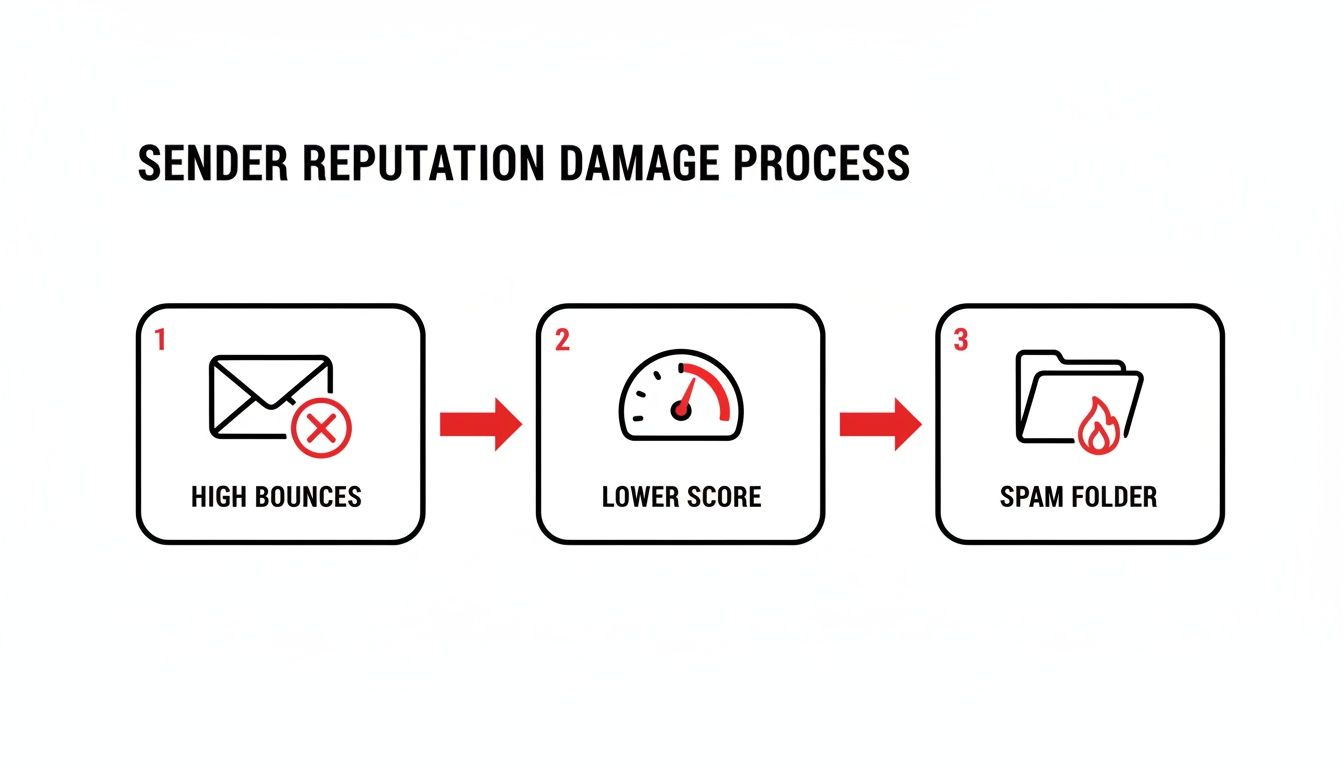
As you can see, a high bounce rate tanks your sender score, and a low sender score gets your emails a one-way ticket to the spam folder.
Real-time validation stops this entire domino effect before it starts. A good tool instantly checks for several things:
- Syntax and Formatting: Is it even a real email structure (
user@domain.com)? - Domain and MX Record Check: Does the domain exist and is it actually set up to receive email?
- Mailbox Existence: Does this specific user’s mailbox (
jane.doe@...) actually exist on the server? This is done without sending a single email. - Disposable Address Detection: It flags temporary, throwaway email addresses that are worthless for building relationships.
- Role-Based Account Detection: It can spot generic addresses like
info@orsupport@, which usually have very low engagement.
When you integrate an email validation API into your website forms and other lead capture points, you build an automated, impenetrable defense. It guarantees only valid, deliverable addresses enter your system. This keeps your lists pristine, your bounce rate near zero, and your reputation safe, making the question of what is a bounced email a problem you rarely have to think about.
Automating Your Email List Hygiene
Trying to keep your email list clean manually is a surefire way to get overwhelmed. You can’t be expected to vet every single address. This is where automation really shines—it turns a tedious chore into a continuous, background process that protects your sender reputation 24/7.
The whole point is to put your list cleaning on autopilot. Instead of getting a nasty surprise with a high bounce rate after a big campaign, you can stop bad emails right at the door. They never even make it into your CRM or marketing platform. This frees you up to focus on what actually matters: creating great content and connecting with your audience.
Connecting Validation to Your Tech Stack
Modern email validation services are built to plug right into the tools you’re already using every day. This creates a seamless, automated flow of clean data, whether you’re a marketer running campaigns, a sales rep chasing leads, or a developer building an app.
- For Marketers: You can link your validation tool directly to platforms like Mailchimp or ConvertKit. Before a big newsletter goes out, you can scrub the entire list automatically, making sure it lands in as many inboxes as possible.
- For SDRs and Sales Teams: Integrating with a CRM like HubSpot is a total game-changer. You can use a connector like Zapier to build a simple workflow that checks every new lead the moment it’s added. No more wasted time on emails that go nowhere.
- For Developers: A good API gives you the power to build custom solutions. You can integrate real-time validation directly into your website’s signup forms or app registration pages, blocking bogus emails at the point of entry.
This screenshot shows just a few examples of how these integrations work, creating an automated bridge between your tools.
By connecting validation tools directly to your CRM, marketing automation platforms, and outreach tools, you create an automated defense system.
Practical Use Cases for Automation
Automation gives you real-time protection and, frankly, peace of mind. To run a successful email program, you have to treat automated list hygiene as a critical part of your overall digital marketing for small businesses. It’s the only way to prevent the slow, silent damage that a high bounce rate inflicts on your sender reputation.
By automating email validation, you shift from periodically cleaning up a mess to preventing the mess from ever happening. This is the foundation of a healthy, high-performing email program.
Think about it: a company using an API on its signup form can prevent 100% of typos and fake email addresses from ever polluting its database. A sales team with a CRM integration can confidently reach out to every lead, knowing the contact info is good.
If you’re ready to get started, exploring different use cases for email list cleaning can give you a clear roadmap. Ultimately, automation just helps your team work smarter, ensuring every single email you send has the best possible chance of reaching the inbox.
Quick Answers to Common Bounce Questions
Even with a good grasp of the basics, some specific questions about bounces pop up all the time. Let’s tackle some of the most common ones with quick, straightforward answers.
How Often Should I Clean My Email List?
The golden rule is to give your entire list a thorough cleaning every three to six months. Think of it as preventative maintenance for your deliverability.
But if you’re constantly adding new subscribers—say, from a website form or an event—you can’t wait that long. The best practice is to use a real-time validation API to check each new email right at the point of capture. This stops bad addresses from ever making it onto your list in the first place.
Can a Soft Bounce Turn Into a Hard Bounce?
Absolutely, and it happens more often than you’d think. A one-off soft bounce isn’t a big deal; it’s just a temporary hiccup. But when the same address soft bounces campaign after campaign, it’s a major red flag.
A mailbox that stays full for weeks, for example, is effectively an abandoned account. To protect their network (and your sender reputation), most Email Service Providers (ESPs) will eventually give up and treat that address as a hard bounce, automatically suppressing it for good.
Is It Safe to Resend to a Soft Bounce Address?
For the most part, yes. Most email marketing platforms are smart enough to automatically retry sending to soft bounces a few times. If the issue was just a server being temporarily offline, your email will likely get through on the next attempt.
That said, keep an eye on addresses that soft bounce repeatedly. It could be a sign that the contact is no longer engaged or that the mailbox is on its way to becoming a hard bounce.
A high open rate is great, but it only tells half the story. That metric measures engagement from emails that actually made it to the inbox. Your bounce rate is a totally separate, critical signal that ISPs use to judge your list quality and trustworthiness. You have to watch both.
Does a High Open Rate Mean I Can Ignore Bounces?
Not at all. This is a dangerous assumption. Your open rate only measures engagement from the emails that were successfully delivered. Your bounce rate, on the other hand, tells you how many emails never even reached an inbox.
Internet Service Providers (ISPs) look at both. You could be getting fantastic open rates from a small, shrinking group of dedicated fans while a rising bounce rate is quietly destroying your sender reputation in the background.
Ready to stop bounces before they start? With Truelist, you get unlimited real-time email validations to keep your lists clean and your sender reputation pristine. Start validating for free today at truelist.io.