 Claude
  Perplexity
Top Transactional Email Examples to Boost Your Business
Discover key transactional email examples to enhance your customer engagement and grow your business in 2025. Learn how to optimize these vital emails.
TL;DR: Discover key transactional email examples to enhance your customer engagement and grow your business in 2025. Learn how to optimize these vital emails.
Unlocking the Power of Transactional Emails
This listicle provides seven transactional email examples to boost customer engagement and conversions. Learn how to optimize essential communications like order confirmations, welcome emails, password resets, shipping notifications, abandoned cart reminders, billing updates, and security alerts. Effective transactional emails build trust and improve the customer experience. Whether you’re a sales representative, marketer, developer, or small business owner, these examples will help you maximize the impact of every message. See how to use transactional emails to improve your bottom line.
Transactional vs Marketing Email: The Infrastructure Differences That Matter
Before diving into the examples, it’s worth understanding what actually distinguishes a transactional email from a marketing email — because the differences are not just regulatory, they’re technical. Get them wrong and your password reset emails end up in Promotions, your receipts get delayed by hours, and your overall sender reputation tanks.
Speed requirements are an order of magnitude apart. Marketing emails can arrive minutes or even hours after a campaign send and nobody notices. Transactional emails — especially password resets, magic links, and two-factor codes — need to land in well under two seconds. A reset link that takes 90 seconds to deliver feels like a bug to the user, who will request another one (and another) and then contact support. The infrastructure choices that make this possible (dedicated IPs, queue-skipping, separate ESPs) are the foundation of every example below.
Send them from a separate subdomain. This is the single most impactful change most small teams haven’t made. If you currently send marketing newsletters and password resets from the same example.com root, a spam complaint on a promotional email can degrade deliverability for your account confirmations. Use mail.example.com (or similar) for marketing and transactional.example.com (or notify.example.com) for transactional. Each subdomain builds its own reputation, isolated from the other. Some teams go further and use a separate ESP entirely for transactional traffic — Postmark or Amazon SES for receipts and resets, while Mailchimp or Customer.io handles marketing.
Authentication is non-negotiable. Since Google and Yahoo’s February 2024 sender requirements, every bulk sender — and that includes any transactional sender at meaningful volume — must have valid SPF, DKIM, and aligned DMARC. There is no transactional exemption. If your password reset domain isn’t authenticated, it will land in spam or get rejected outright. See our walkthrough of SMTP authentication for the practical setup, including why DMARC alignment (not just presence) is what Gmail checks.
Pick the right ESP for the job. The transactional-email ESP market is more specialized than marketing senders realize:
- Postmark — Optimized purely for transactional. Separate streams for transactional and broadcast. Known for fastest median delivery times and a strict policy against marketing content on transactional streams. Best for SaaS apps where reset and notification latency matters.
- Amazon SES — Cheapest at scale (around $0.10 per 1,000 emails). Requires more configuration and you manage your own templates and bounce handling. Good fit for engineering-heavy teams already on AWS.
- Resend — Newer, developer-friendly, React Email integration. Strong choice for Next.js or modern stacks where the team wants TypeScript SDKs and good DX.
- SendGrid / Mailgun — Generalist platforms that handle both transactional and marketing on one account. Convenient but easier to cross-contaminate streams if you’re not careful with subusers and IP pools.
The right answer depends on volume, latency sensitivity, and how engineering-heavy your team is. But the wrong answer — using your marketing ESP for password resets — is almost universally bad.
1. Order Confirmation Emails
Order confirmation emails are a cornerstone of transactional email examples. These automated messages are triggered immediately after a customer completes a purchase, providing essential transaction details, a summary of the order, and guidance on next steps. Serving as a digital receipt, they play a vital role in building customer confidence and reassuring buyers that their purchase has been successfully processed. This reassurance contributes significantly to a positive post-purchase experience, reducing anxiety and setting the stage for future interactions. Impressively, order confirmation emails boast the highest open rates among all email types, frequently reaching 70-80%, highlighting their importance in e-commerce communication.
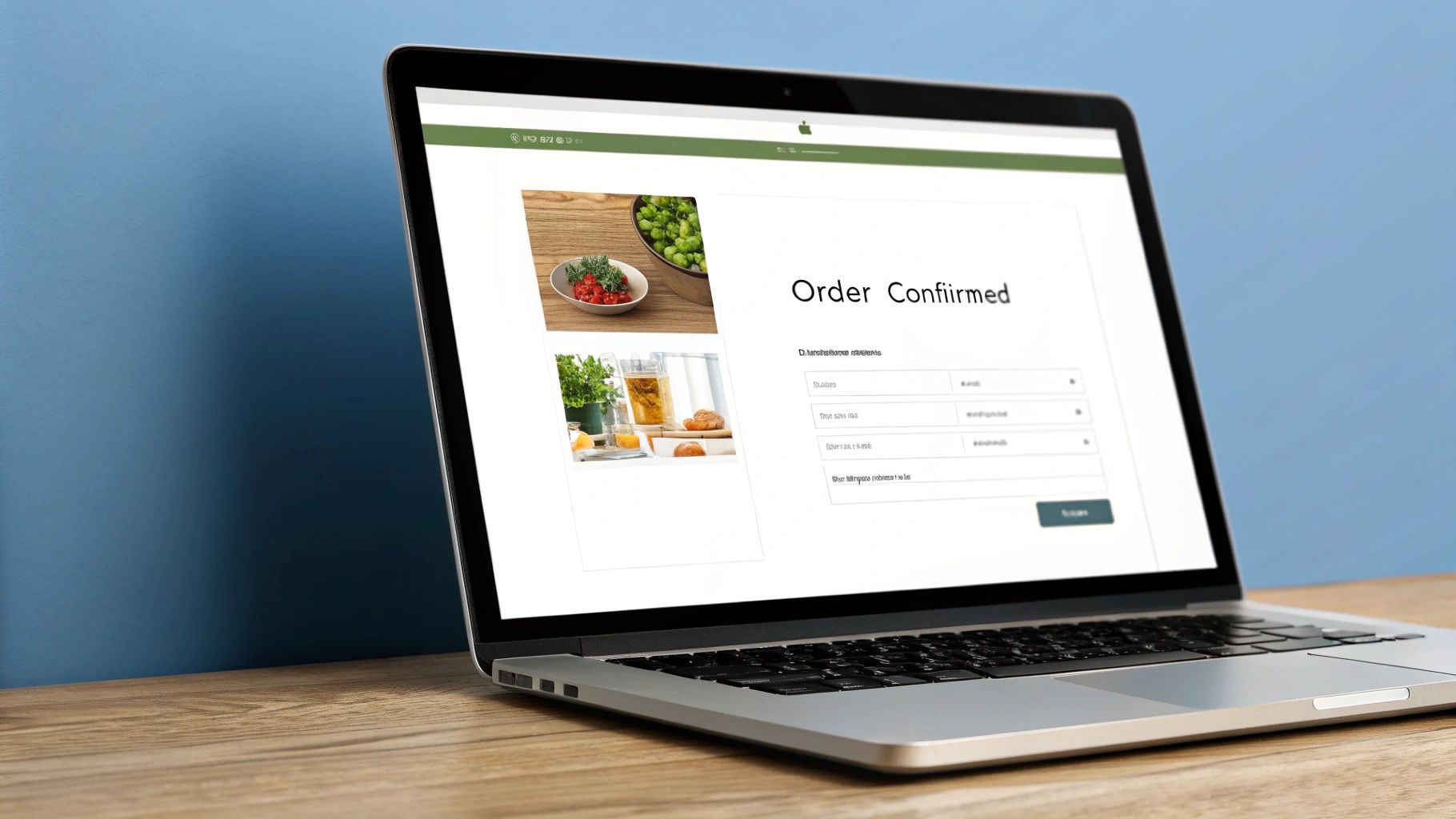
A well-crafted order confirmation email typically includes several key features. It starts with a clear order number, prominently displayed for easy reference. This is followed by an itemized product list, detailing each item purchased, its quantity, and individual price. A comprehensive breakdown of the total cost, including taxes and shipping charges, ensures transparency. Furthermore, an estimated delivery timeline manages customer expectations and reduces inquiries about shipping status. Finally, the email provides both the customer’s billing and shipping information for verification, along with helpful links to order tracking and customer support resources.
The benefits of implementing effective order confirmation emails are numerous. Besides their exceptionally high open rates, which offer a prime opportunity to engage with customers, they significantly reduce customer service inquiries by proactively providing necessary information. This immediate access to order details builds trust and confidence, reinforcing the customer’s purchase decision. Moreover, the high engagement rates present a valuable opportunity for cross-selling and upselling related products or services.
Crafting a great order confirmation email is crucial for reassuring customers and setting the stage for a positive post-purchase experience. For inspiration and best practices, explore these effective order confirmation email templates from Trace.
However, even with their many advantages, order confirmation emails have a few potential drawbacks. Personalization opportunities within these emails can be somewhat limited, as the primary focus is on conveying transactional information. This can lead to the emails being perceived as purely functional, lacking a personalized touch. Additionally, there’s always the risk of technical errors, such as incorrect order details or broken tracking links, which can negatively impact the customer experience.
Several companies exemplify best practices in order confirmation emails. Amazon’s detailed confirmations, complete with seamless tracking integration, provide customers with comprehensive information and real-time updates. Apple, known for its minimalist design, sends clean, branded confirmation emails with easily accessible support links. Shopify, a popular e-commerce platform, empowers its merchants with customizable order confirmation templates, allowing them to tailor the experience to their brand.
When structuring your transactional email examples, including order confirmation emails is paramount, especially for e-commerce and SaaS companies. They are essential for any business processing online transactions. The high open rates make them a valuable touchpoint in the customer journey, offering opportunities to build relationships and drive further engagement.
To optimize your order confirmation emails, consider these actionable tips: Always include clear order numbers prominently at the top of the email. Add estimated delivery dates to manage customer expectations and reduce uncertainty. Provide readily available customer service contact information to address any immediate concerns. Utilize branded design elements to reinforce company identity and create a cohesive brand experience. Finally, consider strategically adding related product recommendations to capitalize on the high open rates and potentially increase sales.
These automated emails, popularized by early e-commerce giants like Amazon and eBay, have become a standard practice and a prime example of effective transactional email communication. By focusing on clarity, accuracy, and a customer-centric approach, businesses can leverage order confirmation emails to build trust, enhance customer satisfaction, and drive positive business outcomes.
2. Welcome/Onboarding Email Series
A crucial component of effective transactional email strategy is the welcome/onboarding email series. This sequence of automated emails, triggered by a user signing up or creating an account, serves as a virtual handshake, introducing your brand, setting expectations, and guiding users through the initial setup process. These emails are paramount for user activation and driving long-term engagement, turning curious newcomers into loyal customers. They are a prime example of how transactional emails can be leveraged beyond simple confirmations to build relationships and encourage product adoption. This makes them an essential addition to any list of transactional email examples.
Welcome emails bridge the gap between signup and active usage. They capitalize on the high user intent present immediately after registration, providing timely and relevant information. By nurturing new users with personalized guidance and valuable resources, you can significantly increase their likelihood of experiencing the value your product offers and integrating it into their routine.
A well-crafted onboarding series includes several key features:
- Brand introduction and value proposition: Reinforce why the user signed up and highlight the core benefits they’ll receive.
- Account setup instructions and tutorials: Simplify the initial setup process with clear, step-by-step instructions and helpful visuals.
- Feature highlights and how-to guides: Showcase key product features and provide concise tutorials on how to use them effectively.
- Progressive disclosure of platform capabilities: Avoid overwhelming users by introducing features gradually, starting with the essentials and building complexity over time.
- Call-to-actions for key first steps: Encourage users to take specific actions, such as completing their profile, inviting team members, or exploring a particular feature.
Several successful companies have demonstrated the power of onboarding emails. Slack, for example, excels at progressively introducing team communication features, while Airbnb provides tailored welcome series for both hosts and guests, addressing their specific needs and expectations. Dropbox’s tutorial-focused onboarding helps users quickly grasp file storage and sharing functionalities. Similarly, LinkedIn guides new users through building their professional network. These transactional email examples illustrate how to leverage this approach for maximum impact.
Pros of implementing a welcome/onboarding email series:
- High engagement rates due to user intent: Users are most receptive to information immediately after signing up.
- Reduces time to first value for users: Clear guidance helps users quickly experience the benefits of your product.
- Decreases churn in early user lifecycle: By addressing potential roadblocks and providing support, you can reduce early drop-off rates.
- Opportunity to set brand tone and expectations: Establish a positive first impression and build a strong relationship with your users.
Cons to consider:
- Risk of overwhelming new users with information: Too much information too soon can lead to disengagement.
- Requires careful timing and sequencing: Emails must be delivered at the right intervals to maintain user interest.
- Can become outdated as products evolve: Regularly review and update your onboarding series to reflect changes in your product.
Tips for creating an effective welcome/onboarding email series:
- Space emails 1-3 days apart: This avoids overwhelming users and allows them time to digest the information.
- Include clear next steps in each email: Guide users towards specific actions and encourage continued engagement.
- Personalize based on user signup source or interests: Tailor the content to resonate with each user’s individual needs.
- Use progressive disclosure - start simple, add complexity: Introduce features gradually to prevent information overload.
- Include social proof and success stories: Showcase positive user experiences to build trust and credibility.
The welcome/onboarding email series has been popularized by SaaS companies like Slack and Dropbox, social platforms like LinkedIn and Facebook, and email marketing platforms like Mailchimp. These companies recognize the value of nurturing new users and providing them with the tools they need to succeed. By incorporating these strategies into your own transactional email approach, you can significantly improve user engagement, retention, and ultimately, the success of your product or service. This makes the welcome/onboarding email series not just a best practice but a critical element for leveraging the full potential of transactional email examples.
3. Password Reset Emails
Password reset emails are a critical type of transactional email, triggered when a user requests to regain access to their account after forgetting their password. These emails represent a delicate balancing act: they must adhere to stringent security requirements to protect user accounts while simultaneously offering a seamless and user-friendly experience. This delicate balance makes them a crucial element in any robust email marketing strategy and earns them a well-deserved spot on this list of transactional email examples. Effectively implemented password reset emails are essential for maintaining user trust and ensuring continued engagement with your platform or service.
These emails work by providing a secure, time-limited link that allows users to reset their password without directly revealing their old credentials. Upon requesting a password reset, the user receives an email containing this unique link. Clicking the link directs the user to a secure page where they can create a new password. This method avoids sending the user’s existing password via email, a significant security risk.
A well-designed password reset email should include clear and concise instructions guiding the user through the reset process. This involves explaining the purpose of the email, prominently displaying the reset link, and outlining the steps to follow. It’s also essential to include security warnings and breach notifications. If there’s a suspicion of unauthorized access, the email should clearly state this, prompting the user to take immediate action. Providing alternative authentication methods, such as security questions or two-factor authentication codes, offers additional layers of security and flexibility for users. Finally, including contact information for additional help ensures that users have a support channel if they encounter any issues during the reset process.
There are several advantages to using well-crafted password reset emails. They are, of course, essential for account security and ensuring user access. They also enjoy high open rates due to the immediate user need – a locked-out user is highly motivated to regain access. This presents a valuable opportunity to reinforce security best practices and educate users about phishing scams and other security threats. Furthermore, these emails can incorporate additional security features like promoting the adoption of two-factor authentication (2FA).
However, password reset emails are not without their drawbacks. They are a prime target for phishing and security attacks. Malicious actors often attempt to mimic these emails to steal user credentials. This necessitates a constant effort to enhance security measures and educate users. Striking the right balance between security and user convenience can also be challenging. Overly complex procedures can frustrate users and lead to abandonment, while overly simplified processes can compromise security. Finally, implementing robust password reset systems can involve technical complexities, requiring careful planning and development.
Examples of successful password reset email implementations abound. Google’s comprehensive security-focused reset emails provide detailed information about the time and location of the request, adding an extra layer of security. Microsoft employs a multi-step verification process, often involving secondary email addresses or phone numbers. Banking institutions utilize highly secure reset procedures, frequently incorporating one-time passwords and other advanced security measures. Social media platforms, on the other hand, often opt for streamlined reset flows to prioritize user convenience.
For optimal password reset email implementation, consider these actionable tips: Use time-limited links with a short expiration window (15-30 minutes). Include clear security warnings about phishing attempts, advising users to never enter their password into unsolicited emails or websites. Make the reset link prominent and easy to find within the email. Offer alternative recovery methods like security questions or backup email addresses. For enhanced security, include information about the timestamp and approximate location of the password reset request.
Password reset emails were popularized by major tech companies like Google, Microsoft, and Apple, as well as banking and financial institutions and other security-conscious platforms. They have become a standard security practice across the digital landscape. Learn more about Password Reset Emails to further improve your email health and deliverability.
Implementing these practices is crucial for businesses of all sizes. Whether you’re a Sales Development Representative using cold email outreach, a cost-conscious email marketing professional, a developer seeking automated validation, a startup managing high-volume email lists, or an e-commerce company optimizing transactional email deliverability, understanding the nuances of password reset emails is vital for maintaining security and a positive user experience. This makes password reset emails a prime example of the power and importance of well-executed transactional emails.
4. Shipping and Delivery Notifications
Shipping and delivery notifications are a crucial part of the transactional email ecosystem, acting as a virtual bridge between the warehouse and the customer’s doorstep. These automated emails keep customers informed about the progress of their order, minimizing anxiety and significantly reducing the need for customers to contact support with “Where is my order?” inquiries. This type of transactional email examples showcases how proactive communication can enhance the customer experience while streamlining business operations.

These notifications work by integrating with logistics systems and carrier APIs to pull real-time tracking information. As the order progresses through various stages – from processing and shipment to out-for-delivery and final delivery – automated emails are triggered to update the customer. These updates can include detailed tracking information, estimated delivery windows, carrier information, and even delivery instructions provided by the customer during checkout. This proactive approach not only keeps customers informed but also builds anticipation and excitement for the arrival of their purchase.
Successful implementation of shipping and delivery notifications is evident in industry giants like Amazon, whose detailed tracking system with map integration sets a high bar for customer expectations. Similarly, FedEx and UPS leverage their own robust tracking systems to provide comprehensive delivery notifications. E-commerce platforms like Shopify offer customizable templates, allowing merchants to personalize their shipping updates and maintain brand consistency. Even fashion retailers like ASOS have capitalized on these emails, using them not just for tracking but also to build excitement for delivery, creating a more engaging customer journey.
Features of Effective Shipping and Delivery Notifications:
- Real-time Tracking Information and Links: Direct links to carrier websites for detailed tracking updates.
- Estimated Delivery Windows: Providing a specific time window (e.g., 10 AM - 2 PM) instead of just a delivery date.
- Carrier Information and Contact Details: Clearly identifying the carrier and providing their contact information for any delivery-related issues.
- Delivery Instructions and Requirements: Reiteration of specific delivery instructions (e.g., “Leave at back door”) provided by the customer.
- Proactive Delay or Issue Notifications: In case of unforeseen delays or issues, proactively informing the customer and providing updates.
Pros of Utilizing Shipping and Delivery Notifications:
- Reduced Support Inquiries: Studies show a 60-80% reduction in “Where is my order?” support tickets.
- High Engagement Rates and Customer Satisfaction: These emails boast high open and click-through rates, indicating strong customer interest and satisfaction.
- Opportunity for Additional Marketing Messaging: Subtle inclusion of relevant product recommendations or promotions can drive additional sales.
- Builds Anticipation and Excitement for Delivery: Enhances the overall customer experience by creating a positive emotional connection with the purchase.
Cons to Consider:
- Dependent on Carrier Integration and Accuracy: The accuracy of the information relies heavily on the carrier’s data feed and integration.
- Potential for Customer Frustration: Incorrect or delayed information can lead to customer frustration and negative brand perception.
- Requires Robust Integration with Logistics Systems: Implementing this functionality requires seamless integration with existing logistics and order management systems.
Tips for Optimizing Shipping and Delivery Notifications:
- Integrate Real-Time Tracking Data from Carriers: Ensure up-to-the-minute accuracy for a reliable customer experience.
- Include Estimated Delivery Windows, Not Just Dates: Provide more precise delivery estimates to minimize customer anxiety.
- Provide Delivery Instruction Options: Allow customers to specify delivery preferences during checkout and reiterate these instructions in the notification emails.
- Add Preparation Tips for Delivery Day: For larger items or specific deliveries (e.g., furniture, appliances), offer helpful tips for delivery day preparation.
- Include Customer Service Contact for Issues: Provide easy access to customer support in case of problems or questions.
Shipping and delivery notifications are an essential component of modern e-commerce. They not only improve customer satisfaction and reduce support costs but also present opportunities for further engagement and brand building. By implementing these transactional email examples effectively, businesses can create a seamless and positive post-purchase experience that fosters customer loyalty and drives repeat business. They are particularly valuable for e-commerce and SaaS companies optimizing transactional email deliverability and for cost-conscious email marketing professionals looking for high-impact, low-cost engagement strategies.
5. Abandoned Cart Recovery Emails
Abandoned cart recovery emails are a crucial element of any successful e-commerce email marketing strategy. They are triggered email sequences sent to customers who add items to their shopping cart but leave without completing the purchase. These automated emails serve as gentle reminders and provide a seamless pathway back to the checkout process, effectively recovering potentially lost revenue and offering valuable insights into customer hesitation points. This makes them a powerful tool for businesses of all sizes, especially for e-commerce and SaaS companies optimizing transactional email deliverability, and definitely earns them a spot on this list of transactional email examples.
One of the key strengths of abandoned cart emails is their ability to re-engage customers at a critical point in the buying journey. By showcasing visually appealing product reminders, including saved cart contents with accurate pricing, and offering a convenient one-click return to the checkout, these emails minimize the friction associated with completing the purchase. Features like these contribute to the high conversion rates associated with abandoned cart emails, often averaging between 10-15%. Furthermore, they can recover a significant portion of revenue, sometimes up to 20% of total e-commerce revenue, making them highly cost-effective compared to acquiring new customers.
The effectiveness of abandoned cart emails stems from their ability to address common reasons for cart abandonment, such as unexpected shipping costs, website glitches, or simply a change of mind. By proactively addressing these concerns, businesses can nudge hesitant customers towards conversion. For instance, fashion retailers like ASOS send style-focused reminders, electronics retailers highlight product specifications, grocery delivery services emphasize the urgency of perishable items, and SaaS companies often use trial urgency messaging to encourage conversions.
However, like any marketing tactic, abandoned cart emails have potential downsides. Overuse can lead to customers perceiving them as pushy or annoying, requiring careful timing and frequency. There’s also the risk of training customers to expect discounts if incentives are offered too readily. Finding the right balance is key to maximizing their effectiveness.
To illustrate the typical flow of an abandoned cart recovery sequence, consider the infographic below:
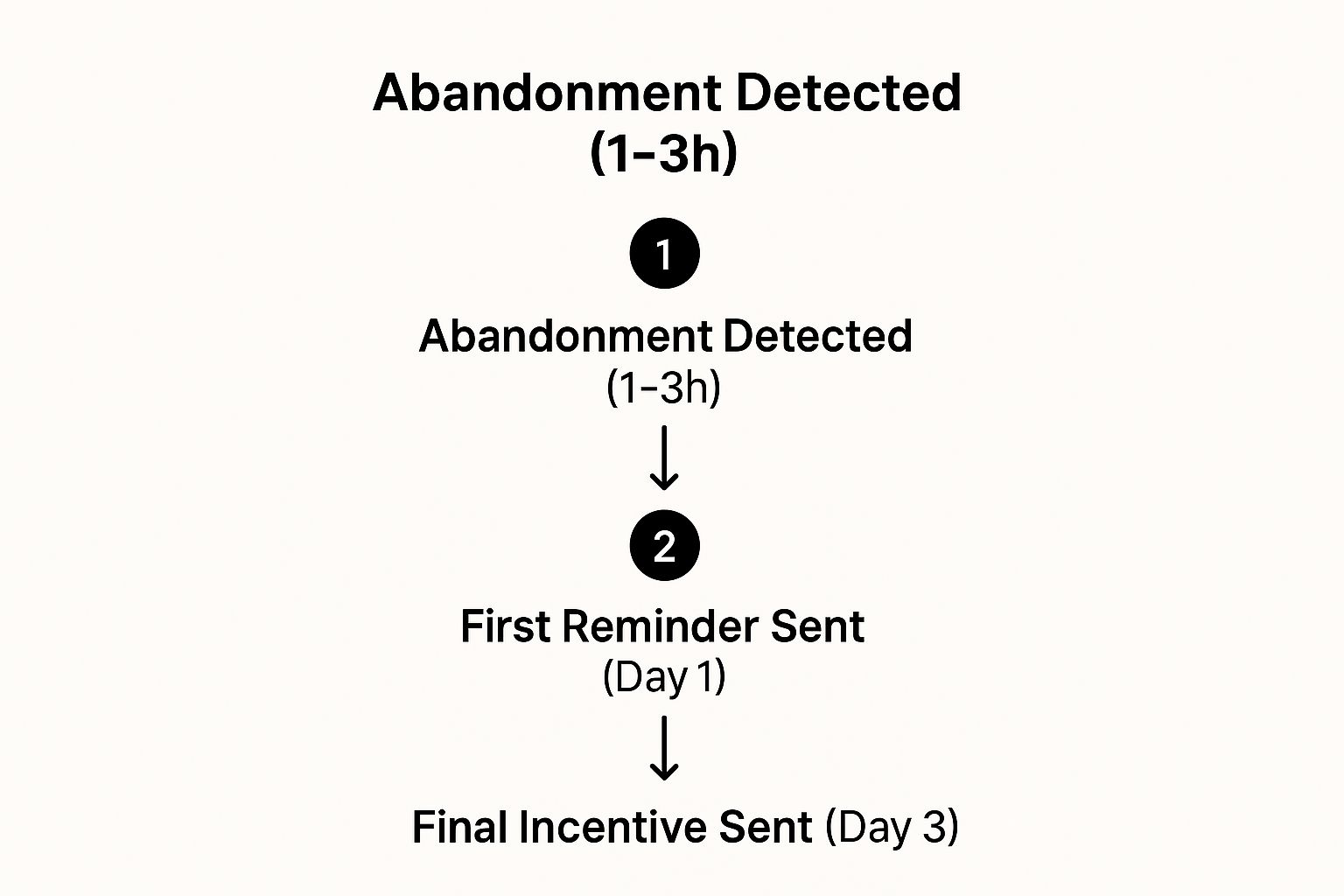
This infographic visualizes a simplified three-step abandoned cart recovery process. It starts with the detection of cart abandonment, ideally within 1-3 hours. The first reminder is sent on Day 1, and a final incentive, like a discount or free shipping, is offered on Day 3. The sequential nature of this process underscores the importance of timely follow-up and escalating incentives to recapture lost sales.
To effectively leverage abandoned cart recovery emails, consider these actionable tips: send the first email within 1-3 hours of abandonment, use a 3-email sequence spaced over 3-7 days, include high-quality product images, and strategically offer incentives in later emails, not immediately. A/B testing subject lines for urgency versus helpfulness can further optimize open and click-through rates. Platforms like Shopify and WooCommerce, along with email marketing tools like Klaviyo and Mailchimp, have popularized and streamlined the implementation of these strategies. Even major retailers like Target and Walmart utilize abandoned cart emails, demonstrating their widespread adoption and effectiveness.
For sales development representatives, cost-conscious email marketing professionals, developers, small businesses, and startups, understanding the nuances of abandoned cart recovery emails is critical. These automated messages offer a high return on investment and valuable insights into customer behavior. By strategically implementing these emails, businesses can significantly boost revenue and improve customer engagement. Learn more about Abandoned Cart Recovery Emails and refine your approach to this powerful transactional email example.
6. Payment and Billing Notifications
Payment and billing notifications are the cornerstone of transactional emails, especially crucial for businesses operating on subscription models, recurring payments, or offering any kind of billing updates. These emails serve the vital function of maintaining transparency in financial transactions between the business and its customers. This transparency, in turn, plays a significant role in preventing payment failures, reducing involuntary churn, and fostering trust. By providing clear and timely communication about billing activities, businesses can proactively address potential issues and maintain a positive customer experience. For businesses reliant on recurring revenue, optimizing these notifications is paramount to success.

These transactional email examples are not just good practice; they are often a legal requirement for many types of transactions. They typically achieve high open rates due to their inherent financial importance to the recipient. Consider the anxiety you might feel if you weren’t notified of a failed payment or an upcoming subscription renewal. These notifications give customers the control they need to manage their finances effectively, which contributes to a more positive relationship with your brand. Effective payment and billing notifications prevent involuntary churn by allowing customers to rectify payment issues promptly. They also build trust by showcasing financial transparency, reassuring customers about the security and clarity of their transactions.
Features of effective payment and billing notifications often include detailed invoice breakdowns with accessible payment history. They offer options for payment method updates and proactively warn about impending expirations. Clear information regarding billing cycles and upcoming payment dates is essential. Critically, they must include robust failed payment notifications with readily available recovery options. Finally, confirmations for account upgrades or downgrades should also be included in this category of transactional emails.
For example, Netflix sends clear and concise subscription renewal notifications, ensuring subscribers are aware of upcoming charges. Similarly, Spotify uses effective payment failure recovery sequences, guiding users through the steps to reinstate their service. Adobe’s Creative Cloud notifications regarding billing and upgrades offer another strong example, providing detailed information about changes to the subscription. SaaS platforms like Salesforce excel at providing detailed usage-based billing information, offering transparency into the cost drivers for their services.
While the benefits are undeniable, there are potential downsides to consider. Payment and billing notifications are particularly sensitive to design and timing. Poorly designed or untimely notifications can induce anxiety in recipients. Moreover, these emails must strictly comply with various financial regulations, adding a layer of complexity to their creation and deployment. Finally, integrating these notifications with payment systems can present technical challenges.
To maximize the effectiveness of your payment and billing notifications, consider the following tips: Send payment reminders 3-7 days before the due date to give customers ample time to prepare. Always include multiple payment recovery options in case of failures, making it easy for customers to rectify the situation. Invoice details should be clear, concise, and downloadable for record-keeping. Provide easily accessible links for account management, empowering customers to control their subscriptions. Finally, always use reassuring language around payment security to build trust and alleviate concerns. For more insights on ensuring optimal delivery of these critical emails, learn more about Payment and Billing Notifications.
The widespread adoption and optimization of these transactional email examples have been largely driven by the rise of subscription services like Netflix and Spotify, SaaS companies requiring recurring billing, and the evolution of payment processors like Stripe and PayPal. These businesses have recognized the critical role payment and billing notifications play in customer retention, revenue generation, and fostering a positive customer experience. These notifications are a prime example of how transactional emails can be far more than just confirmations; they can be powerful tools for building trust, improving customer relationships, and ultimately driving business success.
7. Account Activity and Security Alerts
Account Activity and Security Alerts are a crucial type of transactional email examples, focusing on protecting user accounts and sensitive data. These emails notify users about important account activities, login attempts, and potential security threats. In today’s digital landscape, where data breaches and phishing attacks are increasingly common, these alerts are paramount for maintaining user trust and ensuring account security. This category of transactional emails plays a vital role in proactively safeguarding users and deserves a prominent place in any discussion of effective email communication.
These emails go beyond simple confirmations and play a proactive role in security. They act as a real-time communication channel between the platform and the user, providing immediate notifications about potentially risky activities. By offering transparent insights into account access and modifications, these alerts empower users to take swift action if unauthorized access is suspected. This real-time feedback loop is essential for mitigating potential damage and maintaining the integrity of user accounts.
Several key features distinguish effective Account Activity and Security Alerts:
- Real-time login location and device information: Providing users with details about where and how their account was accessed allows them to quickly identify unusual logins. This might include the city, state, IP address, and type of device used.
- Suspicious activity pattern detection: Sophisticated algorithms analyze user behavior to identify unusual patterns that could indicate unauthorized access. For example, an alert might be triggered if a login occurs from a new location shortly after a login from a usual location.
- Password change and security setting modifications: Any changes to critical security settings, such as password updates, two-factor authentication adjustments, or recovery email changes, should trigger immediate notifications.
- New device authorization requests: If a new device attempts to access the account, the user should receive an alert requesting authorization. This prevents unauthorized access from unknown devices.
- Data breach and security incident notifications: In the event of a data breach or security incident, users should be promptly informed about the situation and any steps they should take to protect their accounts.
The benefits of implementing these alerts are substantial:
- Essential for user security and trust: By proactively protecting user accounts, these alerts build trust and demonstrate a commitment to security.
- High open rates due to security importance: Users understand the importance of these alerts and are more likely to open them promptly.
- Helps prevent account takeovers: Real-time notifications allow users to quickly identify and respond to unauthorized access attempts.
- Demonstrates company commitment to security: Implementing robust security alerts shows users that their security is a top priority.
However, there are potential downsides to consider:
- Can create user anxiety if too frequent: Overly sensitive alerts can lead to alert fatigue and anxiety. Finding the right balance is crucial.
- False positives can lead to alert fatigue: Inaccurate alerts can desensitize users and cause them to ignore legitimate security notifications.
- Must balance security with user convenience: Security measures shouldn’t create excessive hurdles for legitimate users. A seamless user experience should be maintained alongside robust security.
Many companies have successfully implemented these transactional email examples, including:
- Google: Google’s comprehensive location-based login alerts notify users when their account is accessed from a new location, providing details about the device and location used.
- Facebook: Facebook’s new device login notifications alert users when their account is accessed from an unrecognized device, giving them the option to review the login and secure their account.
- Banking Institutions: Transaction alert systems used by banks notify customers of every transaction, including purchases, withdrawals, and deposits, allowing them to quickly detect fraudulent activity.
- Apple: Apple’s two-factor authentication codes and alerts provide an extra layer of security, requiring users to verify their identity when logging in from a new device.
To optimize your Account Activity and Security Alerts, consider these tips:
- Include specific details: Provide users with as much relevant information as possible, including the time, date, location, and device used for the activity.
- Provide immediate action steps: Clearly outline the steps users should take if they suspect unauthorized access. This might include changing their password, reviewing recent activity, or contacting customer support.
- Use clear, non-technical language: Avoid technical jargon and explain security concepts in a way that is easy for everyone to understand.
- Include links to security settings and help: Provide direct links to account security settings and help resources so users can easily manage their security preferences.
- Send immediately when activity is detected: Time is of the essence when it comes to security alerts. Ensure that notifications are sent immediately upon detection of suspicious activity.
By following these best practices, you can leverage Account Activity and Security Alerts as a powerful tool for protecting your users and building trust in your platform. These transactional email examples are more than just notifications; they are essential components of a comprehensive security strategy in the digital age. These examples demonstrate the crucial role that transactional emails play in safeguarding users in an increasingly interconnected digital world.
Common Pitfalls That Break Transactional Email (And How to Avoid Them)
After looking at seven examples of what good transactional email looks like, it’s worth flagging the most common ways teams accidentally break the system. Most of these aren’t visible until something goes wrong — at which point the cost is real (lost signups, locked-out users, security incidents).
Marketing content sneaking into transactional templates. This is the most frequent rule violation. A product manager asks the engineering team to add a “Check out our new feature!” banner to the welcome email. Or the receipt template grows a “You might also like…” section that swells until it dominates the email. Most ESPs explicitly prohibit promotional content in transactional streams, and Postmark in particular will flag accounts that do this. The cleaner rule: if a customer would not have asked for this email in this moment, it doesn’t belong in the transactional template. Cross-sell belongs in a follow-up marketing message sent from your marketing domain.
Missing plaintext alternatives. Every transactional email should be sent as multipart/alternative with both an HTML and a plaintext version. Skipping the plaintext part is one of the easier ways to get filtered into spam — Gmail’s algorithms treat HTML-only mail as a soft signal of promotional or low-quality content. Most ESP SDKs auto-generate a plaintext fallback from your HTML; verify yours does, and check the rendered version makes sense.
Header injection from unsanitized user input. This one is a genuine security bug, not just a deliverability issue. If your reset email puts the user’s name in the subject line or a header without sanitization, an attacker can inject CRLF characters (\r\n) to add their own headers, including extra To: and Bcc: recipients. The fix is to strip newline characters from any user-controlled string before it touches an email header. Use a library that handles this for you (Mailer in Rails, nodemailer in Node, the official Postmark/SendGrid SDKs) rather than hand-building MIME envelopes.
A broken or no-reply Reply-To address. When users reply to your account-recovery email — and many do, especially older users — that reply needs to go somewhere a human reads. A noreply@example.com that bounces every incoming message feels hostile and trains users to ignore your transactional mail entirely. Either route replies to a real inbox or use a service like Postmark’s inbound parsing to capture them.
Mustache-style merge tags showing as raw text. Almost every team has shipped at least one transactional email that read Hi {{firstName}}, your order #{{orderId}} is confirmed. This happens when a template variable doesn’t get rendered — usually because the variable name doesn’t match the data payload, or someone tested with a non-empty fallback that hid the bug. Always test your templates with both populated and empty data, and configure your templating engine to throw on missing variables rather than rendering them as text.
Not validating email addresses at signup. A transactional email to an invalid address is worse than useless — it generates a bounce that hurts your sender reputation, and the user who typo’d their address never gets their confirmation. The fix is upstream: validate every email address as it’s entered, before the user finishes signup. For a server-side approach, see our writeup on using a validate email API or our JavaScript validation walkthrough for client-side checks. PHP teams can check our PHP verification guide and Python teams can use the Python email validation approach. The investment pays back the first time a critical password reset lands instead of bouncing.
Sending from a fresh, un-warmed domain. If you spin up transactional.yourcompany.com and immediately blast 50,000 emails through it, mailbox providers will rate-limit you or drop the mail entirely. New domains and IPs need a warm-up period of 4-6 weeks where volume gradually increases. Plan the cutover before you need the new domain, not after.
No monitoring on bounce rate or complaints. Transactional senders should be checking bounce rate, spam complaint rate, and inbox placement weekly. A bounce rate above 2% or a complaint rate above 0.1% will get your sending paused by most ESPs. Tools like an email bounce checker or running periodic list audits with the email address existence checker help catch the slow rot before it tips you over the edge. See why emails bounce back for the diagnostic categories you’ll need to act on.
Putting transactional through a marketing IP pool. Even if the templates are clean, sharing IPs with promotional sends pulls down your reputation for the transactional traffic. If your ESP supports IP pools, request a dedicated pool for transactional once you’re past ~50,000 sends/month. Below that volume, a shared transactional-only pool is usually fine. See our notes on improving your email sender reputation score and how to prevent emails from going to spam for the full picture.
Transactional Email Types Comparison
| Email Type | Implementation Complexity 🔄 | Resource Requirements 🔄 | Expected Outcomes 📊 | Ideal Use Cases 💡 | Key Advantages ⭐ |
|---|---|---|---|---|---|
| Order Confirmation Emails | Low to Medium | Basic automation, integration with purchase system | High open rates (70-80%), builds trust | Post-purchase communication | Highest open rates, reduces inquiries, builds trust |
| Welcome/Onboarding Email Series | Medium to High | Multi-email sequence, content creation | Increased user activation, reduced churn | New user onboarding, brand introduction | High engagement, sets brand tone, reduces churn |
| Password Reset Emails | Medium to High | Secure infrastructure, time-limited links | High open rates (60-80%), essential for security | User account access recovery | Critical for security, reinforces best practices |
| Shipping and Delivery Notifications | Medium | Carrier integration, real-time tracking | Reduces support tickets by 60-80%, customer satisfaction | Order tracking and delivery updates | Builds anticipation, reduces support tickets |
| Abandoned Cart Recovery Emails | Medium to High | Timed email sequences, product data integration | Conversion rate 10-15%, recovers lost revenue | Recovering lost sales from abandoned carts | High conversions, recovers significant revenue |
| Payment and Billing Notifications | Medium to High | Payment system integration, compliance adherence | Prevents churn (up to 40%), transparency | Subscription billing, payment updates | Legal compliance, reduces churn, builds trust |
| Account Activity and Security Alerts | High | Real-time monitoring, security analytics | Highest open rates (80-90%), prevents takeovers | Security alerts, suspicious account activity | Immediate security response, builds trust |
Elevating Your Email Strategy with Truelist
From order confirmations and shipping updates to password resets and account alerts, this article has explored a range of transactional email examples, highlighting best practices for each. We’ve seen how crafting clear, concise, and user-friendly emails for these crucial touchpoints can significantly impact customer experience, engagement, and ultimately, your bottom line. Mastering these approaches isn’t just about sending emails; it’s about building trust, reinforcing your brand, and fostering lasting customer relationships. These seemingly simple messages play a pivotal role in shaping the customer journey, impacting everything from conversion rates to customer lifetime value.
However, even the most perfectly crafted transactional email is useless if it doesn’t reach the intended recipient. This is where email verification becomes critical, and why understanding transactional email examples goes hand-in-hand with ensuring deliverability. A clean and verified email list is the foundation of a successful email program.
Don’t let your carefully crafted transactional emails get lost in spam folders or bounce back. Start validating your email list for free with Truelist and ensure your crucial communications, from order confirmations to security alerts, consistently land in your customers’ inboxes. Truelist integrates seamlessly into your email workflow, providing real-time verification and improving deliverability so you can maximize the impact of every transactional email example you implement. Truelist
Continue learning
If you found this useful, the following deep-dives expand on the deliverability and infrastructure side of transactional email:
- Authentication setup — What is SMTP authentication? covers SPF, DKIM, and DMARC.
- Validating addresses at signup — Start with the validate email API, JavaScript validate email, or Python email validation guide for your stack.
- Existence vs format checks — See the email address existence checker for why format-only validation isn’t enough.
- Deliverability monitoring — Track sender health with the email sender reputation score guide and watch bounces with an email bounce checker.