 Claude
  Perplexity
Guide to Webhooks: webhook vs rest api insights
Decide between webhook vs rest api with a clear, real-world comparison of triggers, latency, and maintenance to boost automation.
TL;DR: Decide between webhook vs rest api with a clear, real-world comparison of triggers, latency, and maintenance to boost automation.
The core difference between a webhook and a REST API really boils down to one simple concept: REST APIs pull data on demand, while webhooks push data automatically when a specific event happens. Think of it this way: your application has to actively ask a REST API for information, but a webhook will deliver that information to your doorstep in real-time, no questions asked. This “push vs. pull” dynamic is the key to figuring out which one you actually need.
Understanding the Core Difference Between Webhooks and REST APIs
When you’re building applications that need to talk to each other, deciding between a webhook and a REST API is a fundamental choice. It’s a decision that shapes how your systems exchange information, which in turn affects everything from server load to the user’s experience. The main distinction comes down to who starts the conversation.

The REST API Pull Model
Imagine a REST (Representational State Transfer) API like a massive, well-organized library. If you need a specific book or piece of information, you have to physically go to the library and ask the librarian for it. This is the essence of the pull model. Your application, the client, sends a request to another system’s server, and that server provides a response.
This approach gives you total control. You get to decide exactly when to ask for data and how often you check for updates. The whole request-response cycle is predictable and incredibly robust, making it perfect for situations where you need to fetch data on your own terms.
The Webhook Push Model
Now, picture a webhook as a magazine subscription. You tell the publisher, “Hey, send me the new issue the moment it’s released,” and give them your mailing address. You don’t have to keep running to the newsstand to check if it’s out yet; the magazine is automatically pushed to your mailbox as soon as it’s available.
In technical terms, you register a URL (an endpoint) with a service and tell it which event you care about. When that event occurs—like a new user signing up or a payment being processed—the service automatically sends a packet of data (the payload) to your URL. It’s instant and event-driven.
To get a quick sense of how these two stack up, let’s look at a high-level comparison.
Webhook vs REST API At a Glance
This table breaks down the fundamental differences between the two communication models, giving you a quick reference for when to choose one over the other.
| Attribute | Webhook (Push) | REST API (Pull) |
|---|---|---|
| Communication Model | Asynchronous, event-driven. Data is sent when ready. | Synchronous, request-driven. A request must be sent to get a response. |
| Who Starts It? | The server starts the conversation when an event happens. | The client always starts the conversation by making a request. |
| Primary Use Case | Perfect for real-time notifications and instant updates. | Ideal for fetching data on-demand or triggering specific user actions. |
As you can see, each has its own strengths depending on what you’re trying to accomplish.
Despite the efficiency of webhooks, REST APIs are still the dominant force in software development, with a staggering 93% adoption rate among developers. Webhooks, while powerful, are used by about 50%. This is why companies like Truelist power their core email validation service with a robust REST API, enabling solid, dependable integrations with major platforms like Zapier and Mailchimp. You can dive deeper into these figures by checking out various API usage reports that track industry trends.
REST APIs: Control and Predictability on Your Terms
When your application needs to fetch data, a REST API is the classic, reliable way to do it. The entire model is built on a simple premise: your application is in control. It “pulls” data when it wants, on its own schedule. Nothing happens until you make the first move.
This is all thanks to a straightforward, synchronous request-response cycle. Your app (the client) sends an HTTP request to a server endpoint. The server processes it and sends back a response. That’s it. Crucially, this interaction is stateless. Every request is a self-contained unit, holding all the information the server needs to do its job, which makes the whole system incredibly predictable.
A Step-by-Step Look at a REST API Call
Let’s say you’re using a service like Truelist to clean up a big email list. With a REST API, you have a very structured and controlled workflow.
Here’s how that plays out, step-by-step:
- Start the Job: Your application bundles up the email list and sends it in a
POSTrequest to the API’s validation endpoint. - Get Confirmation: The API server acknowledges your request, queues up the validation task, and immediately sends back a unique job ID. This is your receipt—it confirms the request was accepted.
- Poll for Status: Since validating thousands of emails isn’t instant, your app needs to check in. It periodically sends a
GETrequest to a status endpoint, using the job ID to ask, “Hey, is my job done yet?” - Fetch the Results: Once the status endpoint finally says the job is complete, your application makes one last
GETrequest to a results endpoint to pull down the clean, validated email data.
This “polling” method might feel less direct than a webhook, but it’s incredibly resilient. If your system goes down for a few minutes, no data is lost. You just resume polling for the status when you’re back online. The data will be waiting for you.
What a REST Call Actually Looks Like
Here’s the simplest possible REST call against Truelist’s inline verification endpoint. One request, one response, you control the timing:
curl -X POST "https://api.truelist.io/api/v1/verify_inline?email=alice@example.com"
  -H "Authorization: Bearer $TRUELIST_TOKEN"
The response comes back synchronously with the verdict:
{
  "emails": [
    {
      "address": "alice@example.com",
      "email_state": "ok",
      "email_sub_state": "deliverable"
    }
  ]
}
In Python that same call is just as terse:
import os, requests

resp = requests.post(
    "https://api.truelist.io/api/v1/verify_inline",
    params={"email": "alice@example.com"},
    headers={"Authorization": f"Bearer {os.environ['TRUELIST_TOKEN']}"},
    timeout=10,
)
result = resp.json()["emails"][0]
print(result["email_state"])  # "ok", "email_invalid", "risky", "accept_all", "unknown"
For deeper examples of consuming this endpoint from different languages, see our guides on validating email addresses with JavaScript, Python email validation, and PHP email verification. The pattern is the same everywhere: your code initiates, the server responds, you decide what’s next.
This client-driven approach is a key differentiator in the webhook vs REST API discussion. REST APIs shine when you need to orchestrate the timing, like for user-initiated actions or scheduled data syncs.
Securing Your API Requests
Since your application is the one making all the calls, securing the connection is pretty direct. The standard approach is to use an API key—a unique token that acts like a password for your application.
You simply include this key in the header of every request. The server receiving the call checks the key to confirm who you are and what you’re allowed to access. This is a simple but effective way to block unauthorized requests and keep sensitive data safe.
If you’re ready to get your hands dirty, good documentation is your best friend. For example, you can find guides on how to properly authenticate and format your requests in the official Truelist API documentation. This level of defined structure is what makes REST APIs a go-to for building robust, predictable integrations.
When to Stick with REST
The methodical nature of REST APIs makes them a perfect fit for a ton of common use cases, especially when real-time updates aren’t the top priority.
You’ll want to reach for a REST API when:
- You need to fetch data on demand, like pulling up a customer’s order history when they open their account page.
- You’re building an interface where users directly create, read, update, or delete their own information (CRUD operations).
- You’re running scheduled processes, like a nightly script that syncs customer data between your app and a third-party service.
In these situations, the control you get from the pull model is exactly what you need. It’s a deliberate choice that prioritizes stability and client-side command over the event-driven speed of a push system.
How Webhooks Power Real-Time, Event-Driven Automation
Where a REST API puts your application in control, constantly asking for updates, a webhook does the complete opposite. It lets the server take the lead. Instead of your app polling “Anything new yet?”, the server proactively tells you, “Hey, this just happened!” This fundamental shift from a “pull” to a “push” model is what makes modern, event-driven automation possible.

The concept is surprisingly straightforward. You give a service a URL—your webhook endpoint—which is just a public web address that your application can listen to. Then, you tell that service which specific events you’re interested in, effectively opening a direct line of communication from their server to yours.
The second one of those events happens, the service immediately shoots an HTTP POST request over to your URL. That request carries a payload, which is just a small chunk of data (typically formatted as JSON) explaining what occurred. This is why people often call webhooks “reverse APIs”—the server is the one initiating the conversation.
Breaking Down a Webhook Workflow
Let’s walk through a real-world example using a service like Truelist for email validation. Say you need to know the instant a high-value lead’s email gets verified so you can act on it immediately.
Here’s how that event-driven flow plays out:
- Registration: First, you give Truelist your application’s unique webhook URL and subscribe it to the “validation_complete” event.
- Event Trigger: A new user signs up on your website. Your system sends their email to the validation service using its REST API.
- Instant Push: As soon as Truelist finishes the check, its server bundles the results—like the status and risk score—into a JSON payload.
- Data Delivery: The server then sends that payload directly to your registered webhook URL via a POST request.
- Automated Action: Your application, which was just listening, receives the data and can kick off another process. Maybe it adds the valid lead to a priority sales funnel or flags a risky contact for manual review.
The whole thing happens in near real-time, and your application never had to waste a single cycle asking for a status update. It’s all asynchronous and incredibly efficient.
What a Webhook Receiver Actually Looks Like
A webhook endpoint is, at heart, just a normal POST route. The trick is what it does (and doesn’t do) before returning. Here’s a minimal Node/Express receiver that follows the two unwritten rules: acknowledge with 200 fast, then do the work asynchronously.
import express from 'express'
const app = express()
app.use(express.json())

app.post('/webhooks/truelist', (req, res) => {
  // 1. Acknowledge immediately so the sender doesn't time out
  res.status(200).send('ok')

  // 2. Hand the payload off to a queue — never block on it
  jobQueue.push({ type: 'validation_complete', payload: req.body })
})

app.listen(3000)
The equivalent in Python with FastAPI is the same shape:
from fastapi import FastAPI, Request, BackgroundTasks

app = FastAPI()

@app.post("/webhooks/truelist")
async def receive(req: Request, bg: BackgroundTasks):
    payload = await req.json()
    bg.add_task(process_validation, payload)
    return {"status": "ok"}
Two things to internalize: return 2xx within a few seconds (most providers time out at 5-10s and will retry), and never do slow work on the request thread. If you have to call your database, send an email, or hit another API in response, queue it. The webhook is a doorbell, not a workbench.
The real beauty of a webhook is its efficiency. Your server isn’t bogged down making constant, often empty, API calls. It just sits back and listens, only using resources when there’s actually something to process.
Where Event-Driven Automation Shines
The applications for webhooks go far beyond email validation. Their ability to instantly connect different systems makes them a cornerstone for building responsive, automated processes. For example, look at a template for webhook-driven trade notifications, which shows how financial platforms can push instant trade alerts to users.
You’ll find webhooks at the heart of countless other workflows:
- E-commerce: Instantly syncing inventory across Shopify, Amazon, and your warehouse system the moment an item sells.
- SaaS Integrations: Firing off complex workflows in tools like Zapier or Make when a user takes an action. To see this in action, check out our Truelist Zapier integration documentation.
- DevOps: Triggering a CI/CD pipeline to build and deploy code the instant a developer pushes a new commit to GitHub.
- Communication: Sending a real-time notification to a Slack channel the moment a customer creates a new support ticket in Zendesk.
In every case, the key is immediacy. A webhook closes the gap between when an event happens and when your system can react to it. This distinction is a massive factor in the webhook vs rest api debate, especially for any project that relies on timely information.
Webhook Security: Verifying the Sender Is Who They Say They Are
A webhook endpoint is, by definition, a publicly reachable URL. Anyone who finds it (or guesses it) can fire a POST at it. Without verification, an attacker could spoof “payment succeeded” or “email validated” events and trick your backend into doing real work on fake data. There are three controls every production webhook handler needs.
1. HMAC Signature Verification
Reputable webhook providers send a signature header — usually X-Signature or X-Hub-Signature-256 — computed by HMAC-hashing the raw body with a shared secret. Your job is to compute the same HMAC on your end and compare in constant time.
import crypto from 'crypto'

app.post('/webhooks/provider', express.raw({ type: 'application/json' }), (req, res) => {
  const signature = req.header('X-Signature')
  const expected = crypto
    .createHmac('sha256', process.env.WEBHOOK_SECRET)
    .update(req.body) // raw buffer, NOT JSON.parse'd
    .digest('hex')

  if (!crypto.timingSafeEqual(Buffer.from(signature), Buffer.from(expected))) {
    return res.status(401).send('invalid signature')
  }

  res.status(200).send('ok')
  jobQueue.push(JSON.parse(req.body))
})
Two non-obvious points: hash the raw bytes (parse only after verifying), and use timingSafeEqual so attackers can’t extract the secret via timing side-channels.
2. Replay-Attack Prevention
A signed payload that you already processed yesterday is still validly signed today. If someone captures it on the wire (or just resends an old delivery), your endpoint will happily reprocess it. Two defenses:
- Timestamp window. Most providers include a timestamp in the signed payload — reject anything older than ~5 minutes.
- Delivery ID deduplication. Every webhook includes a unique delivery ID (e.g., Stripe’s
idempotency-key, GitHub’sX-GitHub-Delivery). Store recent IDs in Redis with a TTL longer than the provider’s retry window and drop duplicates.
3. Secret Rotation and HTTPS
Webhook secrets eventually leak — into log files, error dumps, dev shares. Treat them like any other credential: rotate on a schedule, support two valid secrets during the cutover window, and obviously, your endpoint must only accept HTTPS. If your provider supports an IP allowlist, layer that in too.
For a deeper take on the broader API security picture, our guide on API management best practices covers rate limiting, versioning, and observability alongside auth.
Idempotency and Retries: Two Sides of the Same Coin
Webhooks retry. That’s a feature, not a bug — it’s how a sender guarantees delivery despite your server having a bad afternoon. But it means your handler will, at some point, receive the same event twice. Possibly five times. Possibly twenty.
The fix is idempotency: writing your handler so that processing the same event twice produces the same end state as processing it once. The simplest implementation is the same delivery-ID dedupe table from the security section above:
def handle_webhook(payload):
    delivery_id = payload["id"]
    if redis.set(f"webhook:{delivery_id}", "1", nx=True, ex=86400) is None:
        return  # already processed, skip silently
    do_the_actual_work(payload)
Compare this to REST retry semantics: when your code makes a REST call and it times out, you decide whether to retry, with what backoff, and how many times. The control is on the client side. With webhooks, the sender retries on its own schedule (usually exponential backoff over hours or days), and your only lever is whether to return 2xx or non-2xx.
This is why webhook providers strongly advise returning 200 even for events you intentionally ignore — a 4xx says “broken, please retry,” which floods you with redeliveries of events you don’t want.
When Webhooks Aren’t an Option (and REST Polling Wins)
The push model is elegant when it works, but there are real environments where it can’t:
- Behind a corporate firewall. Most enterprise networks won’t allow inbound HTTP from an external IP. No public endpoint means no webhook receiver. REST polling from inside the firewall outward works fine.
- Local development. Your laptop isn’t on the public internet. You either need a tunnel (more on that below) or you fall back to polling against a sandbox API.
- CLI tools and short-lived scripts. A script that runs for 30 seconds and exits has nothing to register as a webhook URL. Polling-with-timeout is the only sensible option.
- Mobile apps. Phones move networks, sleep, lose connectivity. Push notifications are the mobile equivalent of webhooks, but for arbitrary backend events, polling on app foreground is usually simpler.
Testing Webhooks Locally
When you do need to receive webhooks during development, you have two reliable options. Tunneling tools like ngrok, Cloudflare Tunnel, or cloudflared expose your localhost:3000 to a public HTTPS URL you can register with the provider. Inspection services like webhook.site and RequestBin give you a temporary URL that captures every incoming request so you can examine the exact payload shape before writing a single line of receiver code.
A typical dev loop looks like:
# 1. Start your local server
node server.js

# 2. Expose it
ngrok http 3000
# → forwards https://abc123.ngrok-free.app to localhost:3000

# 3. Register the ngrok URL with your provider as the webhook target
# 4. Trigger the event and watch your local logs
For the inspection-first approach, point the provider at webhook.site, copy the captured payload, and feed it to your handler as a fixture for unit tests. Combined with a simple curl-based check on a sample address, you can fully exercise both the REST and webhook code paths without ever deploying.
Reliability and Performance: What Happens in the Real World?
When you move an application into a live production environment, the theoretical tug-of-war between webhooks and REST APIs gets very real, very fast. It’s no longer just about “push vs. pull.” Now, you’re dealing with hard questions about reliability under pressure and performance when things scale. How each model handles a hiccup or consumes resources will directly hit your app’s stability—and your budget.
On the surface, REST APIs feel like the safer bet. Because your application is the one making the request, you know instantly if something goes wrong. If a request times out due to a network blip, the failure is immediate and obvious. This makes it straightforward to build in client-side retry logic—your app just waits a moment and tries again, ensuring the data eventually makes it across.
Webhooks work on a completely different premise. The sending service operates on a “fire and forget” basis. It sends the data payload and simply assumes your endpoint is online and ready to catch it. If your server happens to be down for a quick reboot or is swamped when that webhook arrives, that data is often gone for good.
Uptime and Retry Policies are Everything
The entire reliability of a webhook system hinges on two critical factors: the uptime of your receiving application and the retry policy of the service sending the data. While some platforms have robust retry systems with exponential backoff, many don’t. This puts the pressure squarely on you to maintain near-perfect availability.
A REST API fails loudly, giving you the immediate feedback needed to try again. A webhook can fail silently, leaving you unaware that you’ve missed a critical event until a customer complains or data becomes inconsistent.
This difference is massive when you’re talking about business-critical operations. Industry analysis often points to this vulnerability. With well-built, client-controlled retries, REST APIs can easily achieve over 99% delivery success. In contrast, webhooks can suffer missed event rates as high as 10-15% if the receiving endpoint is offline, a stark finding from recent DevOps Digest findings on the state of the API. For email marketers, this is a huge deal. With bounce rates often hitting 15% on unverified lists, the guaranteed polling of a REST API ensures validation checks are completed, which is crucial when 30% of senders risk getting blacklisted each year for poor list hygiene. You can dive deeper into these trends in the 2025 API strategy report.
The Performance and Resource Drain at Scale
While REST APIs might win on predictable reliability, that safety often comes at a steep performance price. The core mechanism, polling, involves repeatedly hitting an API endpoint just to see if anything new has happened. It’s fundamentally inefficient. Every single one of those calls eats up resources on your server and the provider’s server, even when the answer is “nope, nothing new.”
Let’s put that into perspective. Imagine you need to check for new user sign-ups every single second. Using a REST API, that means:
- You’re making 86,400 API calls every single day.
- The server has to process every one of those requests.
- You’re using network bandwidth for thousands of responses that are likely empty.
This constant chatter creates a ton of overhead, driving up server costs and potentially getting you rate-limited by the API provider.
Webhooks flip this script entirely. They use precisely zero resources until there’s an actual event to report. When a new user signs up, one simple, targeted HTTP request is sent to your endpoint. That’s it. This lean, event-driven approach leads to a dramatically lower server load and less network noise, making it a far more scalable and cost-effective way to get real-time updates.
Striking the Right Balance
So, which one is better? Neither. The best choice depends entirely on what your application needs to do. You have to balance these trade-offs carefully.
Here’s a quick breakdown of how they stack up:
| Consideration | REST API (Pull) | Webhook (Push) |
|---|---|---|
| Data Consistency | High. Your app controls retries, ensuring data is eventually fetched. | Variable. Reliability depends on your uptime and the sender’s retry policy. |
| Server Load | High. Constant polling burns resources even when there are no updates. | Low. Resources are only used when a real event happens. |
| Failure Detection | Immediate. A failed request gives you instant feedback. | Delayed or Silent. You might not know an event was missed without extra monitoring. |
| Real-Time Speed | Delayed. Data is only as fresh as your last poll. | Near-Instant. Data arrives the moment the event occurs. |
Ultimately, a REST API is your safety net. It gives you control, making it a great fit for processes where data integrity is the top priority and a slight delay is acceptable. A webhook gives you incredible efficiency and speed, which is perfect for workflows that need to react instantly but can handle the risk of a rare missed event or have other ways to mitigate it.
Choosing the Right Tool: Webhook vs. REST API
Knowing the technical difference between a webhook and a REST API is one thing, but applying that knowledge to a real-world project is where it really counts. The choice you make here has a direct line to your app’s performance, efficiency, and even its core architecture. It’s never about which one is “better” — it’s about picking the right tool for the job at hand.
The whole decision really boils down to a single question: do you need data the instant something happens, or do you need to be in control of when you get that data? Answering that one question will point you in the right direction almost every time.
This flowchart maps out that fundamental choice between real-time, event-driven updates and controlled, on-demand data fetching.
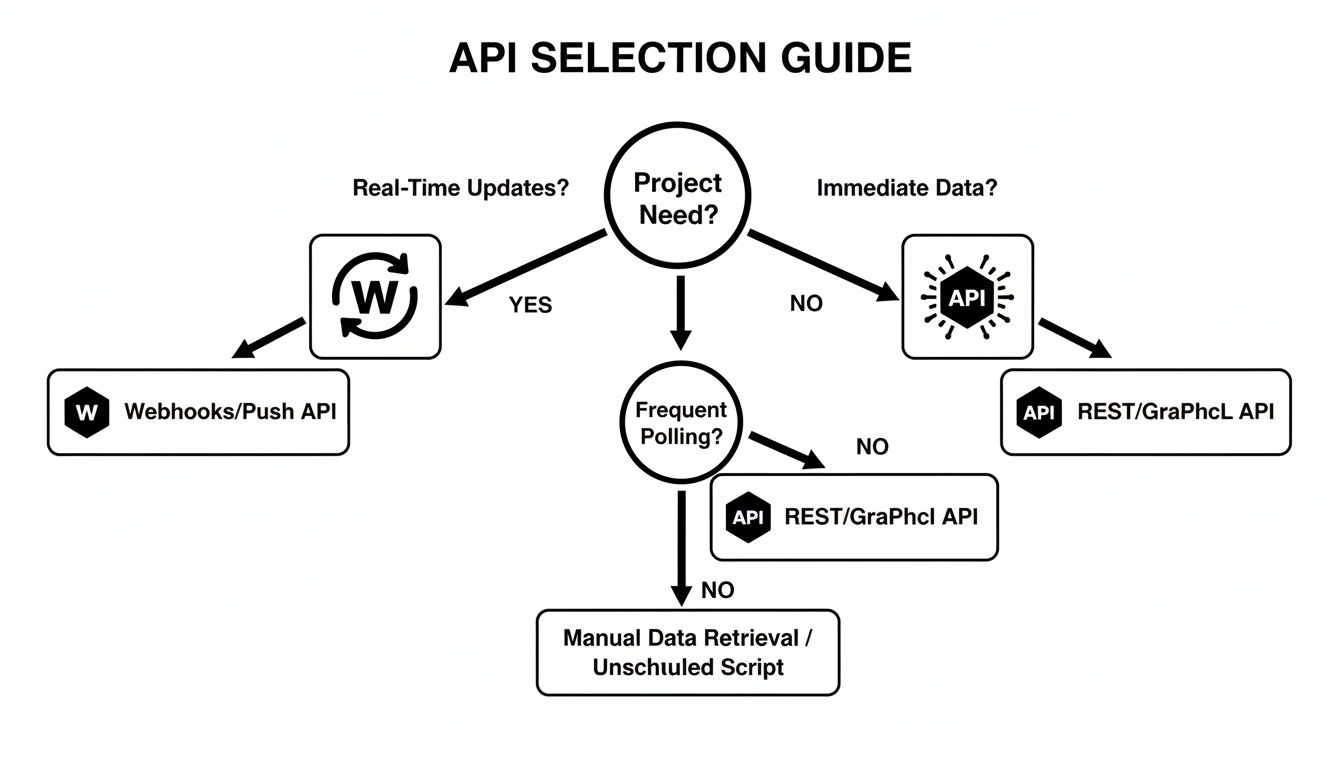
As you can see, if an external event is the trigger and your system needs to respond immediately, a webhook is the obvious winner. Otherwise, for anything that requires your application to initiate the action, a REST API gives you the control you need.
When a REST API is the Right Call
A REST API is your go-to when your application needs to be in the driver’s seat. It’s built for scenarios where your system or your users are the ones kicking off an action, giving you total command over the data flow.
You’ll want to use a REST API in situations like these:
- Building Interactive UIs: Think about a user dashboard. When a user clicks a button to view their order history, your application makes a REST API call to pull that specific data right then and there. The action is user-initiated and on-demand.
- Running Scheduled Data Syncs: Let’s say you need to sync your customer database with a CRM every night. A simple script that calls a REST API at 2 AM to fetch new records is a rock-solid, predictable way to handle a bulk operation.
- Performing On-Demand Lookups: When someone types an email into your sign-up form, you could use a service like Truelist to do a quick validation check (this is exactly what an email address existence checker is doing under the hood). The API call is a direct, immediate response to a user’s action.
In these cases, the predictability of the “pull” model is exactly what you need. You’re not sitting around waiting for something to happen—you’re making it happen on your own terms.
When to Go with a Webhook
Webhooks are designed for a world of instant reactions and automated workflows. They shine when your application needs to respond immediately to an event that happens in a completely different system, all without wasting resources checking for updates.
Lean on webhooks for scenarios that demand this kind of immediacy:
- Real-Time Notifications: Imagine sending a message to a Slack channel the second a new customer signs up or a high-priority support ticket is logged. The event in your app triggers an instant notification elsewhere.
- Instant Data Syncing: When a lead is marked “qualified” in your marketing tool, a webhook can instantly update their record in your CRM. This ensures your sales team is always working with the freshest data, no delays.
- CI/CD Pipelines: This is a classic. A developer pushes code to a GitHub repository, which fires off a webhook. That webhook tells a service like Jenkins to automatically kick off the build and deployment process.
These use cases are all about event-driven automation. A webhook acts like a digital nerve, connecting separate applications so they can react in unison as things happen.
The core difference comes down to intent. Use a REST API when your application needs to ask for information. Use a webhook when your application needs to be told about an event.
A Quick Decision-Making Checklist
Still on the fence? Run your specific scenario through this checklist. The more “yes” answers you have in one column, the clearer your choice will be.
| Check for REST API | Check for Webhook |
|---|---|
| Does the user need to kick off the action (e.g., click a button)? | Does my app need to react to an event from an external system? |
| Do I need to fetch, change, or delete specific data on command? | Is the data I need generated or updated at unpredictable times? |
| Is this a scheduled, repeatable task (like a nightly backup)? | Is minimizing server load and resource use a high priority? |
| Is it critical for my client-side app to control retries and errors? | Is near-instantaneous data delivery a must-have for the workflow? |
Let’s take a practical example. Say you’re using a service like Truelist to clean a large email list. You’d likely use their REST API to submit the list and then poll it periodically to check if the job is done—a controlled, on-demand process.
But what happens next? If you wanted to automatically push every newly validated contact into a real-time sales funnel the moment the job finishes, a webhook that fires on “job completion” would be the perfect, hyper-efficient solution. The most robust systems often use both, playing to the strengths of each technology.
Architecting a Smarter Integration Strategy
Deciding between a webhook and a REST API isn’t a zero-sum game. The goal is to build a smarter, more responsive system, and that often means using both. The most powerful integrations treat these two technologies not as rivals, but as partners. They solve different problems, and when you combine them, you can create workflows that are both rock-solid and incredibly efficient. The whole “webhook vs. REST API” debate often overlooks this reality—it’s not an either/or choice.
Your strategy should begin by drawing a line between foundational actions and event-driven automation. For core tasks—like grabbing customer data on demand, updating a record, or kicking off a scheduled job—a REST API gives you the control and reliability you need. Its synchronous nature means client-initiated operations are handled predictably and with total clarity.
But what happens after a core action finishes? That’s usually when the need for a real-time update kicks in, and it’s where webhooks shine. Let’s say your app uses a REST API to start a big job, like validating an email list with Truelist. You definitely don’t want to burn resources by constantly asking, “Are you done yet?” Instead, a webhook can instantly push the results back to you the moment they’re ready, triggering the next step in your workflow automatically.
Combining Push and Pull for the Best Results
This hybrid approach really does give you the best of both worlds. You get the stability of REST for actions your users initiate, plus the resource-saving speed of webhooks for server-to-server notifications.
The most mature integration architectures don’t choose between REST and webhooks. They use REST for predictable control and layer webhooks on top for real-time, event-driven efficiency.
By clearly defining the role of each technology, you can build systems that are resilient, scalable, and instantly responsive. Developing this kind of balanced architecture requires a solid grasp of both sides of the coin. For a deeper dive into structuring these systems, exploring API management best practices is a great next step. It gives you the framework to keep your integrations secure, easy to maintain, and performant as they inevitably grow more complex.
A Concrete Hybrid Example: Bulk Email Validation
To make this less abstract, here’s exactly how Truelist’s bulk validation API uses both models together. A customer uploading 50,000 emails for verification would never want to keep a synchronous HTTP connection open for the minutes it takes to process — and they don’t want to poll a status endpoint every two seconds either. So the flow combines both:
- REST POST — your code uploads the list. The server returns a job ID immediately and starts processing in the background.
- (Optional) REST GET — if you want a quick status snapshot, you can hit a status endpoint. Useful for dashboards.
- Webhook callback — the moment the job finishes, Truelist POSTs the full result set to the webhook URL you registered. No polling, no wasted requests.
That’s the same pattern you’ll find in Stripe (create a charge via REST, get notified of disputes via webhook), Shopify (place an order via REST, get fulfillment updates via webhook), and most modern SaaS APIs. The REST side handles the request, the webhook side handles “tell me when something changes.” If you’re evaluating tools, see how this compares to other bulk email verifiers and email list cleaning services — the API + webhook combination is what separates the modern tier from older batch-only services.
Frequently Asked Questions
When you’re trying to choose between a REST API and a webhook, a few common questions always seem to pop up. Let’s clear the air on some of the most frequent points of confusion.
Can Webhooks Replace REST APIs Entirely?
In a word, no. They’re built for completely different, though often complementary, jobs. Think of it this way: a REST API is for when your application needs to ask for something on its own schedule (a “pull” model), while a webhook is for when a server needs to tell your application something happened (a “push” model).
You can’t use a webhook to actively request or change data; you can only listen for it to arrive. The most effective systems often use both together—a REST API for the heavy lifting of core functions and webhooks to provide those instant, real-time notifications.
What Are the Main Security Concerns with Webhooks?
The biggest risk comes from the fact that your webhook endpoint is just a public URL, leaving it open to anyone who finds it. This opens the door to major concerns like spoofed requests from malicious actors or even Denial-of-Service (DoS) attacks designed to crash your server with junk data.
The golden rule for webhook security is to validate every single request that comes in. You absolutely must verify that the sender is who they say they are. Best practices include using signed requests (like an HMAC signature), always enforcing HTTPS, and, if the service supports it, restricting access with an IP address allowlist.
Is Polling a REST API Ever Better Than Using a Webhook?
Absolutely, there are definitely times when polling makes more sense. If your application needs total control over when it checks for new data, or if you know the data only changes at predictable intervals, polling can be a much simpler and more direct approach.
Polling also helps you avoid the risk of missing a critical webhook notification if your system happens to be down for a moment. But let’s be clear: for genuine real-time updates where every second counts, webhooks are king. They avoid the constant, wasteful overhead of polling an API just to get back an empty response. Polling is great when a small delay is acceptable, but webhooks are the answer when you need to know right now.
What Are the Most Common Webhook Pitfalls?
Three issues show up over and over in production webhook systems:
- Slow handlers that time out. Your receiver does database writes, sends a confirmation email, calls another API — and the request runs for 12 seconds. The sender times out at 5 and retries. Now you’re processing the same event twice. Fix: return 200 within ~1 second, queue the actual work.
- No deduplication. Retries are normal and expected. Without a delivery-ID check, your “user signed up” handler creates the same record three times. Fix: track delivery IDs in Redis or a small DB table with a TTL.
- Trusting the payload without verifying the signature. A public URL plus no signature check equals an open invitation. Fix: HMAC-verify every request before doing anything with the body, as shown in the security section above.
How Does Webhook Retry Logic Differ From REST Retry Logic?
It flips who’s in charge. With REST, your client code retries — you write the loop, you pick the backoff, you decide when to give up. With webhooks, the sending server retries on its own schedule (usually exponential backoff over hours), and your only signal back is the HTTP status code. Return 200 to say “got it,” return 5xx to say “please retry.” This is why a buggy webhook handler can cause a stampede: a transient 500 in your code triggers the provider to retry the same event for days.
Can I Use Webhooks From Behind a Corporate Firewall?
Not directly — most enterprise networks block inbound HTTP. The standard workarounds are: (a) stand up a relay in your DMZ or a cloud function that forwards events into your internal queue, (b) fall back to REST polling from inside the firewall outward, or (c) use a managed service like AWS EventBridge or Hookdeck as the public-facing receiver. For development, ngrok and similar tunneling tools handle this in seconds.
Ready to ensure your email lists are clean and your sender reputation is protected? Truelist offers email validations with a powerful REST API plus webhook callbacks for batch jobs, seamless integrations, and the data quality that keeps your sender reputation score healthy and your bounces low. Start validating for free today and see the difference clean data makes.