 Claude
  Perplexity
How to Prevent Emails from Going to Spam | Expert Tips
Learn how to prevent emails from going to spam with our expert tips on sender reputation, authentication, and list hygiene for better deliverability.
TL;DR: Learn how to prevent emails from going to spam with our expert tips on sender reputation, authentication, and list hygiene for better deliverability.
The key to keeping your emails out of the spam folder isn’t a single magic trick. It’s about building a solid reputation as a sender. This comes down to three things: properly authenticating your domain, keeping your email list squeaky clean, and sending content people actually want to read.
When you nail this combination of technical setup, list hygiene, and genuine audience engagement, you send all the right signals to providers like Gmail, proving you’re a sender they can trust.
Why Your Emails Are Landing in Spam
We’ve all been there. You pour time and effort into the perfect email campaign, hit send, and then discover it went straight to spam. It’s incredibly frustrating, and the cause is rarely just one thing.
Think of it less as a simple pass/fail test and more like a credit score for your sending behavior. Internet service providers (ISPs) are constantly tweaking their spam filters to protect users from junk mail, so when your email lands, it’s instantly scanned for dozens of signals. These signals help them decide if you’re a welcome guest or an unwanted intruder.
The 3 Pillars of Great Email Deliverability
To figure out how to stay in the inbox, you first need to understand what providers like Gmail, Outlook, and Yahoo are looking for. It really boils down to three core areas they analyze.
Pillar 1: Technical Trust
This is the foundation. Have you set up your sending domain correctly? Without authentication protocols like SPF and DKIM, you look like a stranger knocking on the door. It’s easy for spam filters to turn you away if they can’t verify who you are.
Pillar 2: Sender Reputation
What does your track record look like? High bounce rates, low open rates, and spam complaints are all dings against your reputation. They tell ISPs that your subscribers don’t find your emails valuable. A great reputation isn’t built overnight; it’s earned with consistently positive engagement.
Pillar 3: Content and Engagement
Does your email look like spam? Are people actually opening, clicking, and responding to your messages? Positive interactions are one of the strongest signals you can send that your emails belong in the primary inbox.
Common Spam Triggers and How to Fix Them
To help you troubleshoot, I’ve put together a quick-reference table that breaks down the most common reasons emails get flagged. Think of this as your cheat sheet for diagnosing deliverability issues.
| Spam Trigger | Why It Happens | Primary Solution |
|---|---|---|
| No Authentication | ISPs can’t verify you are who you claim to be, making your emails look suspicious and unsafe. | Set up SPF, DKIM, and DMARC records for your sending domain to establish a verifiable identity. |
| Poor Sender Reputation | A history of high bounce rates, spam complaints, or sending to inactive users has damaged your domain’s trust score. | Warm up your sending domain slowly and focus on sending to a highly engaged segment of your audience. |
| Bad List Hygiene | Your list contains invalid addresses, spam traps, or unengaged subscribers that generate negative signals. | Regularly clean your list with an email validation service like Truelist and implement a sunset policy. |
| Spammy Content | Your email uses trigger words, misleading subject lines, or has a poor image-to-text ratio. | Focus on creating valuable, personalized content and make your unsubscribe link easy to find. |
Each of these triggers has a direct solution, and we’ll dive into the specifics of how to fix them throughout the rest of this guide.
How Modern Spam Filters Actually Score Your Email
Spam filters in 2026 weigh signals across three buckets:
- Content signals. SpamAssassin-style rules score trigger words, suspicious headers, and weird formatting. Bayesian filters compare words to a corpus of known spam. Image-to-text ratio, link density, and HTML quality all feed into a content score.
- Reputation signals. Your sending IP and domain each carry a real-time reputation score. Public blocklists (Spamhaus, SURBL, URIBL), historical complaint rate, and bounce rate all feed in. Our domain spam rating checker shows how providers see you.
- Engagement signals. The most heavily weighted bucket today. Providers track read rates, reply rates, time-in-inbox before deletion, and—most damaging—who hits “report spam.”
The shift over the last five years is that engagement now outranks content. A technically clean email still lands in spam if recipients aren’t opening it. Build a reputation people want to read and the filters follow.
Establish Trust with Email Authentication
Think of email authentication as your digital passport. When you send an email, inbox providers like Gmail and Outlook are the border control agents. If your documents aren’t in order, you’re not getting through. Without proper authentication, you look like an imposter, making it far too easy for them to stamp your message “SPAM” and send it packing.
These protocols prove you are who you say you are. They build trust with mailbox providers, showing that an email from yourdomain.com was actually sent by you—not some scammer spoofing your address. If you’ve never set this up before, our primer on what SMTP authentication is walks through the basics.
The Technical Trio: SPF, DKIM, and DMARC
To get this right, you need to get familiar with three key acronyms. They all work together to protect your sender reputation and keep your emails out of the spam folder.
SPF (Sender Policy Framework): This is the most basic level of authentication. Essentially, it’s a public list of all the servers and services authorized to send email on behalf of your domain. If a message shows up from a server that isn’t on your list, mailbox providers immediately get suspicious.
DKIM (DomainKeys Identified Mail): This adds a digital signature to your emails, kind of like a tamper-proof seal on a package. When the email arrives, the receiving server checks this signature to make sure the message wasn’t messed with on its way over.
DMARC (Domain-based Message Authentication, Reporting & Conformance): This is the policy that ties SPF and DKIM together. It tells receiving servers what to do if an email fails either the SPF or DKIM check—whether to quarantine it, reject it flat out, or let it through anyway. DMARC also gives you incredibly valuable reports on who is sending email from your domain.
Getting these set up means adding specific records to your domain’s DNS settings. It sounds technical, I know, but it’s a one-time setup that pays off in deliverability for years to come.
Why Authentication Is No Longer Optional
Lately, the major email providers have really cracked down, making authentication mandatory for anyone sending emails in bulk. Without it, you’re not just risking the spam folder—your emails might not be delivered at all.
Putting SPF, DKIM, and DMARC in place is one of the most effective ways to stop your emails from being flagged. These protocols verify that you’re authorized to send from your domain, which is how providers tell your legitimate messages apart from phishing attacks. Big players like Google and Yahoo now require DMARC for high-volume senders, all part of a larger push to make email more secure and trustworthy.
The 2026 Bulk Sender Requirements You Cannot Ignore
In February 2024, Google and Yahoo turned on coordinated rules for domains sending more than 5,000 messages a day to Gmail or Yahoo addresses. Microsoft followed in May 2025. Missing any of these means rejection or spam-folder placement—no warning, no grace period.
| Requirement | What It Means | How To Comply |
|---|---|---|
| SPF and DKIM | Both must be configured for the sending domain. | Publish an SPF TXT record and a DKIM public key in DNS. Most ESPs provide the values. |
| DMARC alignment | At minimum a p=none DMARC policy with the From header aligning to SPF or DKIM. | Add a DMARC record at _dmarc.yourdomain.com and monitor the reports. |
| RFC 8058 one-click unsubscribe | Marketing mail must support a one-step List-Unsubscribe-Post header. | Enable one-click unsubscribe in your ESP and verify the header is present. |
| 0.3% spam complaint cap | Sustained complaint rates above 0.3% in Google Postmaster Tools trigger filtering. Keep below 0.1% to be safe. | Monitor weekly and prune sources pushing you near the threshold. |
| Valid PTR / reverse DNS | The sending IP must have a PTR record that resolves back to a matching A record. | Verify with an MX record lookup and a reverse DNS check. |
| TLS for transit | Connections must be encrypted with TLS. | Modern ESPs handle this automatically. |
The bright side: complying with the Big Three’s rules pulls you in line with every other provider. Solve for Gmail and Yahoo and you’re solving for Apple Mail, Outlook, and the rest by default.
Key Takeaway: Proper email authentication is your first line of defense. It’s the single most important technical step you can take to build a positive sender reputation and show inbox providers that your emails are the real deal.
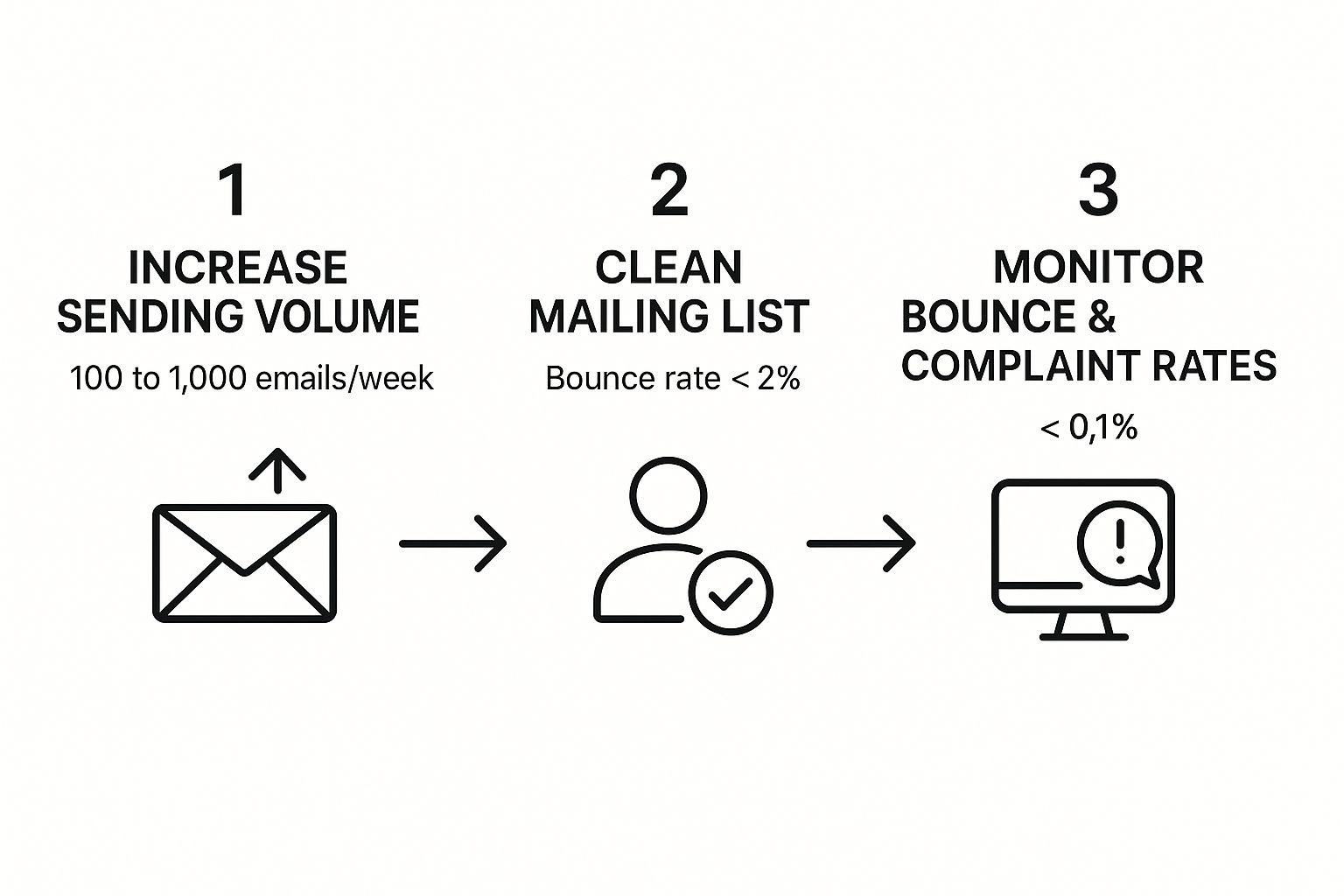
This process flow shows how gradual increases in sending volume, combined with proactive list cleaning and monitoring, help build that positive reputation. The key thing to notice is that building a good sender reputation is a methodical process, not an overnight fix. It demands careful attention to your key health metrics.
Getting Started with Your Authentication
For most people, the first step is setting up an SPF record. It’s a simple text record that you can create and add to your DNS fairly quickly. Most email service providers have guides to help you out, and you can easily generate the right record with a free tool like this SPF record generator.
Once SPF is in place, you can tackle DKIM and then, finally, implement a DMARC policy. A safe way to start is with a “monitoring” policy (p=none) for DMARC. This lets you get reports and see who’s sending on your behalf without accidentally blocking your own legitimate emails.
Think of it this way: SPF says you’re allowed in the building, DKIM confirms your ID badge is real, and DMARC is the security guard who checks both and follows a clear protocol. By implementing all three, you give mailbox providers every reason to trust your messages and deliver them right where they belong: the inbox.
Build a Strong Sender Reputation
 When it comes to email deliverability, your sender reputation is everything. Seriously. It’s the single biggest factor that decides whether you land in the inbox or get banished to the spam folder.
Think of it like a credit score for your email domain. A healthy score signals to providers like Gmail and Outlook that you’re a legitimate sender they can trust. A poor one, however, sets off immediate alarm bells.
Building a great reputation isn’t just about dodging negatives like spam complaints or high bounce rates. The real secret is to actively create positive signals. Every time someone opens, clicks, or replies to your email, you’re sending a powerful message to inbox providers: “People want this content.”
This positive history is your golden ticket. It’s what separates you from the mountains of junk mail out there. Globally, a staggering 45.56% of all emails are spam, so you can see why providers are so aggressive with their filtering. Your reputation is what helps them tell the good from the bad. If you want a concrete way to track your standing, our guide on the email sender reputation score shows you which tools to watch and what the numbers actually mean. For broader context, you can also browse the latest email security trends.
The Art of the Domain Warm-Up
You can’t just fire up a new domain and blast out 50,000 emails on day one. A sudden, massive spike in volume is classic spammer behavior, and it will get you flagged almost instantly. That’s why a proper domain “warm-up” is non-negotiable if you want to prevent emails from going to spam.
The strategy is straightforward: start small and gradually ramp up your sending volume over several weeks. This gives you a chance to build a positive sending history with inbox providers before you go big.
A solid warm-up schedule usually looks something like this:
- Week 1: Send just 50-100 emails a day. Only send them to your most engaged subscribers—the superfans who always open and click.
- Week 2: Bump it up to 250-500 emails per day, still focusing on that highly engaged group.
- Week 3: Now you can scale to 1,000-2,500 emails a day, slowly mixing in other active segments of your list.
- Week 4 & Beyond: Keep doubling your volume each week until you hit your goal, but watch your metrics like a hawk the entire time.
This slow, methodical approach proves to the internet service providers (ISPs) that you’re a real sender who values recipient engagement. It’s a foundational step you absolutely cannot skip.
Consistency Is Your Superpower
Once your domain is warmed up, the next challenge is maintaining consistency. Inbox providers love predictable, steady sending patterns. If your volume fluctuates wildly, it can damage the reputation you worked so hard to build.
For instance, sending 100,000 emails one week, going completely dark for the next three, then blasting out another huge campaign just looks suspicious. It’s far better to find a regular rhythm, whether that’s a daily newsletter, a weekly promotion, or a bi-weekly update.
Pro Tip: If you absolutely have to send a much larger campaign than usual, don’t send it all at once. Break the list into smaller chunks and send them out over a few hours or even a couple of days. This prevents those sudden volume spikes that can trigger spam filters.
A consistent schedule helps ISPs learn your sending habits and builds their confidence in your program over time.
Monitor Your Key Reputation Metrics
You can’t fix what you don’t measure. Keeping a close eye on your deliverability metrics is the only way to protect your sender reputation long-term. Catch a problem early, and you can fix it before it does real damage.
These are the numbers that matter most:
| Metric | Why It Matters | What to Aim For |
|---|---|---|
| Bounce Rate | The percentage of emails that failed to deliver. High numbers suggest a bad list. | Keep it below 2% |
| Spam Complaint Rate | The percentage of people who hit the “spam” button. This is a major red flag. | Keep it below 0.1% |
| Open Rate | The percentage of recipients who opened your email. Shows engagement. | Aim for 20% or higher (varies by industry) |
| Unsubscribe Rate | The percentage of people who opted out. A high rate might mean a content mismatch. | Keep it below 0.5% |
If you notice your bounce rate creeping up or get a sudden spike in spam complaints, it’s a clear sign something is off. It could be your list, your content, or even your sending frequency. By monitoring these metrics, you can diagnose issues quickly and make adjustments to keep your reputation intact.
Master Your Email List Hygiene

You can have perfect authentication and a stellar sender reputation, but none of it matters if you’re sending to a dirty email list. Poor list hygiene is like poison for your deliverability—it slowly degrades your standing with inbox providers until you find yourself stuck in the spam folder for good.
A clean list is so much more than just removing bounced emails. It’s a proactive strategy for managing who you send to and ensuring they’re genuinely engaged. When you hit invalid addresses, inactive users, or—even worse—hidden spam traps, you’re sending a stream of negative signals that tell providers your emails are unwanted junk.
The Hidden Dangers in an Unmanaged List
Here’s a hard truth: even the most carefully built email list will decay over time. It’s natural. People change jobs, abandon old email accounts, or just lose interest. Continuing to mail these addresses is one of the fastest ways I’ve seen sender reputations get tanked.
These are the main culprits lurking in a neglected list:
- Invalid Addresses: These cause hard bounces, which are a direct and damaging signal to ISPs. If your bounce rate creeps over 2%, you’re in the danger zone.
- Inactive Subscribers: Mailing people who haven’t opened an email in months tells providers your content isn’t valuable. This drags down your overall engagement metrics and hurts everyone on your list.
- Spam Traps: These are the landmines of email marketing. They’re email addresses used by blocklist operators to identify spammers. Hitting just one can get your entire domain or IP address blacklisted.
This all creates a nasty feedback loop. Low engagement and high bounces wreck your reputation, which causes more of your emails to land in spam, which then lowers your engagement even further.
Key Takeaway: The quality of your email list is infinitely more important than its quantity. A smaller, highly engaged list will always outperform a massive list filled with dead weight.
Proactive list management isn’t just a chore; it’s a core strategy for keeping your emails out of the spam folder.
Build a Healthier List From Day One
The best way to maintain a clean list is to build it with quality subscribers right from the start. That means prioritizing consent and engagement from the moment someone lands on your signup form.
One of the most effective tools in your arsenal is the double opt-in. When someone subscribes, they get a confirmation email and have to click a link to be officially added. This one simple step confirms their interest and, crucially, verifies that the email address is valid and accessible. Think of it as your first line of defense against typos, bots, and fake signups.
Another powerful tactic is using real-time validation right on your forms, as highlighted on the Truelist homepage.
By checking emails the instant they’re entered, you can block bad data before it ever pollutes your list. It’s about protecting your sender reputation from the very beginning.
Implement a Sunset Policy for Inactive Users
Even with a perfect double opt-in process, some subscribers will eventually go silent. I see it all the time. Holding onto these contacts, hoping they’ll magically re-engage, is a mistake that only hurts your deliverability. This is where a sunset policy becomes your best friend.
A sunset policy is just a simple, automated rule for gracefully removing inactive subscribers. It’s not as scary as it sounds.
Here’s a practical approach:
- Define “Inactive”: First, decide what inactivity means for your business. For most, it’s someone who hasn’t opened or clicked an email in 90 to 180 days.
- Launch a Re-Engagement Campaign: Before you cut them loose, try to win them back. Send a targeted campaign with a compelling subject line like “Is this goodbye?” or “We miss you.” Make them an offer they can’t refuse.
- Say Goodbye (For Now): If they don’t bite, it’s time to remove them from your active sending list. You aren’t losing a valuable contact; you’re shedding dead weight to protect your sender reputation.
Regularly pruning your list shows inbox providers you’re a responsible sender who respects their users’ time. For a deeper dive into these techniques, explore the benefits of routine email list cleaning and how it directly impacts your inbox placement. This isn’t just a best practice—it’s essential for maintaining high engagement and staying out of the spam folder.
Craft Content That Actually Lands in the Inbox
Let’s be honest: even if you nail all the technical stuff—authentication, reputation, everything—the content of your email is where the rubber really meets the road. Spam filters these days are incredibly smart. They scrutinize everything from your subject line and word choice to the nitty-gritty of your HTML code and how many images you’ve packed in.
Think of it like this: your stellar sender reputation gets your email delivered to the front door of the building. But it’s your content that has to convince the security guard at the front desk to let you up to the right office. One wrong move, like a shady subject line or an email that’s just one giant graphic, and you’re getting sent straight to the junk mailroom.
Steer Clear of Common Content Red Flags
First things first, you have to avoid the obvious traps. A lot of these are old-school spam tactics, but they still set off alarms with modern filters.
Having a solid process for creating your messages is a huge part of this. High-quality content is a direct contributor to better deliverability. If you need to button up your own process, this ultimate content creation workflow guide offers a fantastic framework to build on.
Here are the big red flags I always tell people to watch out for:
- Deceptive Subject Lines: Don’t even think about using “Re:” or “Fwd:” to fake a prior conversation. That’s a classic spammer move and an instant trust-breaker. Your subject lines need to be honest and give a clear idea of what’s inside.
- Spam Trigger Words: Sure, filters are more sophisticated now, but a message stuffed with words like “Free,” “Guaranteed,” ”$$$,” or “Act Now!” still looks suspicious. For a deeper list of phrases that tank inbox placement in 2026, see our email subject line best practices guide.
- Over-the-Top Formatting: SUBJECT LINES IN ALL CAPS or ending with a dozen exclamation points (!!!) just screams “spam.”
- Excessive Emojis and Special Characters: One well-placed emoji is fine. Five of them, or unicode tricks like zero-width spaces, will trip filters instantly. Spammers use these to dodge keyword detection.
- Link-to-Text Imbalance: A short email with five links and barely any body copy reads like a phishing attempt. Aim for at most one link per 100-150 words of real text.
- Mismatched Friendly-From and Return-Path: When the visible From address and the underlying envelope disagree, modern filters notice. Send from a real, monitored mailbox on the same domain as your authenticated sender.
The point isn’t to be boring. It’s to be genuine. Focus on delivering real value from the moment they see your email in their inbox.
Get the Image-to-Text Ratio Right
One of the most common mistakes I see people make is sending an email that’s basically just one big image. This is a favorite trick of spammers because it lets them hide sketchy text from filters. Because of this, emails with a lopsided image-to-text ratio are treated with a ton of suspicion.
You need a healthy balance. A great rule of thumb is to have at least 500 characters of real text for every single image in your email. This proves to the filters that you’re sharing legitimate content, not just hiding something behind a graphic.
And please, always use descriptive alt text for your images. This is non-negotiable for two huge reasons:
- It makes your email accessible to subscribers who use screen readers.
- It gives spam filters context for your images, which they see as a sign of a thoughtful, legitimate sender.
Pro Tip: Never, ever put your main call-to-action or headline inside an image. Many email clients block images by default. If they do, your entire message and reason for sending the email are completely lost.
Focus on Clean Design and Simple Code
How your email is built matters just as much as what it says. Messy, bloated HTML is another red flag for spam filters, signaling a potentially low-quality email. My advice? Stick to simple, clean layouts that you know will look good no matter where they’re opened.
Above all else, your email absolutely must be mobile-responsive. Over half of all emails are now opened on a phone. An email that forces someone to pinch and zoom is a terrible user experience. Inbox providers know this and will often penalize emails that aren’t optimized for mobile.
Cleanliness extends to your links, too. Avoid using URL shorteners (like from Bitly) in your email copy. Spammers use them constantly to mask malicious links, so they are frequently flagged. Instead, use clear, descriptive text linked directly to the full, legitimate URL.
Before hitting send, it’s always a good idea to run through a quick checklist to make sure your content and formatting are in good shape.
Content and Formatting Checklist for Better Deliverability
Here’s a simple checklist to review before you launch your next email campaign. It covers the small details that make a big difference in whether you land in the inbox or the spam folder.
| Checklist Item | Why It’s Important | Quick Tip |
|---|---|---|
| Clear, Honest Subject Line | This is your first impression. Deception gets you marked as spam. | Avoid “Re:”, “Fwd:”, and sensational claims. Clearly state the email’s purpose. |
| Balanced Image-to-Text Ratio | Image-only emails are a major spam filter red flag. | Aim for at least 500 characters of text. Never put your CTA in an image. |
| Descriptive Alt Text for Images | Improves accessibility and gives context to email clients and filters. | Describe the image’s content or function. ”Shop the new collection now” is better than ”image1.jpg“. |
| Clean, Simple HTML Code | Bloated or messy code can be seen as a sign of a low-quality sender. | Use a reputable email service provider (ESP) with clean, tested templates. |
| Mobile-Responsive Design | Ensures a good user experience for the majority of your audience. | Always send a test email to your phone and check the layout before sending. |
| No URL Shorteners | Often used by spammers to hide malicious links, making them a filter risk. | Link descriptive text directly to the full destination URL. |
| Easy-to-Find Unsubscribe Link | Hiding it leads to spam complaints, which are far worse for your reputation. | Place a clear “Unsubscribe” link in your email footer. Don’t make users log in to opt-out. |
Running through these points takes just a few minutes but can save you from a world of deliverability headaches.
Make It Easy to Say Goodbye
This might feel backward, but making your unsubscribe link prominent and dead simple to find is one of the best things you can do for your deliverability. Hiding it won’t stop people from leaving—it will just make them angry.
And what does a frustrated user do when they can’t find the unsubscribe link? They smash that “mark as spam” button.
That spam complaint is infinitely more damaging to your sender reputation than a simple unsubscribe ever will be. A straightforward opt-out process isn’t just a legal requirement under regulations like CAN-SPAM; it’s a sign of respect. It tells inbox providers you’re a trustworthy sender who plays by the rules.
A Pre-Send Anti-Spam Checklist
Before you hit send on any campaign, walk through this checklist. Five minutes here saves weeks of reputation repair on the back end.
- Verify auth records are live and aligned. SPF, DKIM, and DMARC should all return PASS when you send a test message and inspect the raw headers.
- Confirm the domain is warmed up. A brand-new domain or one quiet for 60+ days needs the warm-up cadence described earlier. Skip it and you’ll burn the domain’s reputation in a single campaign.
- Validate the entire list. Run your list through a verification service to remove invalid addresses, role accounts, and known spam traps. Never send to a list you haven’t verified in the last 30 days. Our roundup of the best free bulk email verifiers compares the credible ones.
- Check the spam score with Mail-Tester or GlockApps. Aim for a score of 9 out of 10 or higher before sending to real recipients.
- Preview on mobile and desktop. Roughly 60% of opens happen on mobile—a broken layout hurts engagement, and engagement hurts deliverability.
- Send to your engaged segment first. Leading with subscribers who opened or clicked in the last 30 days builds positive signals at the front of the campaign.
- Confirm one-click unsubscribe is in the header. Look for the
List-UnsubscribeandList-Unsubscribe-Postheaders in the raw source. Missing means non-compliant with the 2026 bulk sender rules.
Treat this list as a hard gate. If any item fails, fix it before the campaign goes out.
What to Do When Your Emails Are Already Going to Spam
When open rates collapse and complaints spike, work the diagnosis in this order:
- Check Google Postmaster Tools and Microsoft SNDS. Free dashboards that show domain and IP reputation, spam rate, and authentication results. A spam rate above 0.3% has crossed the Gmail enforcement threshold.
- Re-verify authentication. A DNS change or new ESP can break SPF or DKIM silently. Send a fresh test and inspect the headers—broken DKIM is the most common “why am I in spam now” cause.
- Check the major blocklists. Tools like our domain spam rating checker scan Spamhaus, SURBL, URIBL, and others at once. If listed, follow our email blacklist removal guide.
- Audit your list for damage. A sudden drop often traces to a bad acquisition source. Run the suspect segment through validation. Our check email address for spam guide walks through this.
- Segment hard by engagement. Cut your send list to subscribers who opened in the last 30 days for two to three campaigns. This rebuilds engagement signals fast.
- Reduce volume temporarily. A 70-80% reduction for one to two weeks tells providers you’re correcting course.
- Request blocklist removal where applicable. Be honest about what changed—repeat requests without genuine remediation get harder each time.
AI-Based Spam Classification in 2026
The filters are moving targets. Gmail’s spam classifier has used machine learning models built on TensorFlow for years, retrained continuously against new examples. Microsoft’s stack is more opaque but follows the same pattern: layered classifiers, real-time updates, and increasing reliance on engagement over content rules.
The practical implications: the same email can land in the inbox on Monday and in spam on Friday because the model has updated. Modern classifiers pick up on subtle patterns—timing across recipients, header anomalies, how your domain compares to known-bad neighbors. And when in doubt, the AI defaults to “what do this domain’s recipients usually do with it?” You can’t reverse-engineer the model. You can build a sending program the model has no reason to flag.
Frequently Asked Questions About Email Deliverability
Even when you think you’ve got a handle on your email strategy, a few tricky questions always seem to pop up. Here are some of the most common deliverability puzzles I see people wrestling with, along with some straight-to-the-point answers.
How Long Does It Take to Fix a Bad Sender Reputation?
This is the one question everyone asks, and the answer is always “longer than you’d like.” Repairing a tarnished sender reputation isn’t a quick fix; it’s a marathon of consistent, positive sending behavior.
From what I’ve seen, you’re looking at several weeks at a minimum, and sometimes a few months, to really turn things around. The process hinges on a careful “re-warming” of your sending domain. That means you have to pull back on your email volume and send only to your most engaged subscribers—the folks who are consistently opening and clicking.
This slow-and-steady approach proves to Internet Service Providers (ISPs) that you’re committed to sending content people actually want. Patience is key. One big blast to a cold list can set you right back to square one. If you’re stuck in a rut, it can be helpful to get a fresh perspective on how to solve email deliverability issues with a more structured plan.
Should I Use a Shared or Dedicated IP Address?
This is a classic debate, and the right choice really boils down to your sending volume and how much control you want.
Shared IP: If you send fewer than 100,000 emails a month, a shared IP from a solid email service provider (ESP) is usually the way to go. You get to benefit from the good reputation built by other responsible senders, and the ESP handles the heavy lifting of reputation management.
Dedicated IP: High-volume senders often graduate to a dedicated IP. This gives you total control over your reputation, which is a powerful advantage. But it’s a double-edged sword—you are 100% responsible for it. One sloppy campaign can do significant damage.
Think of a shared IP like living in a well-managed apartment complex. A dedicated IP is like owning your own house—more control, but also way more responsibility.
A dedicated IP is only as good as the sending practices behind it. If your list hygiene and engagement strategies aren’t solid, a dedicated IP can actually hurt you more than a shared one.
Should I Delete Inactive Subscribers or Re-Engage Them?
My rule is simple: always try to re-engage them first. These people gave you their permission at one point, so it’s worth the effort to see if you can win them back.
Run a targeted re-engagement campaign for anyone who hasn’t opened an email in the last 3-6 months. Use a subject line that grabs their attention, like “Is this goodbye?” or offer a compelling discount. It’s their final chance to signal they’re still interested.
If they don’t bite? It’s time to let them go. Regularly cleaning out inactive contacts is one of the best things you can do for your deliverability. It instantly boosts your engagement metrics and signals to ISPs that you’re a responsible sender. For a deeper dive into the tools and workflows that automate this, our roundup of email list cleaning services compares the major options.
Can Using Too Many Images Send My Email to Spam?
Absolutely. An email that’s mostly images (or one giant image) is a huge red flag for spam filters. It’s a common trick spammers use to hide shady links and trigger words from being scanned.
You need to find a healthy balance. I always recommend aiming for at least a 60/40 text-to-image ratio. Make sure there’s enough real text in the email to provide context.
And don’t forget alt text for every image. This isn’t just for accessibility; it gives spam filters more information about your content, helping to prove your email is legitimate.
Do I Really Need DMARC If I Already Have SPF and DKIM?
Yes—and as of February 2024 for Gmail and Yahoo (May 2025 for Microsoft), the providers require it for bulk senders. SPF tells receivers which servers are authorized; DKIM proves the message wasn’t altered; DMARC is the policy that ties them together and gives you reporting on every server claiming to send as you. Start with p=none to monitor, then move to p=quarantine and eventually p=reject once all legitimate sources are aligned.
Can a Single Bad Campaign Permanently Ruin My Sender Reputation?
“Permanently” is rare, but damage from a single bad campaign can take six to twelve weeks to recover from—and in extreme cases the cleanest move is to retire the domain. The worst offenders are purchased or scraped lists, mailing long-dormant lists without re-verification, and aggressive subject lines that spike complaints. The mistake I see most often is doubling down—sending another big campaign to “make up” for the bad one. That just buries the domain deeper.
How Do I Diagnose Whether the Problem Is Authentication, Reputation, or Content?
Work from easiest to verify to hardest. First, send a test to a Gmail address you control and “Show original” to confirm SPF, DKIM, and DMARC all say PASS. If they don’t, that’s your answer. Second, check Google Postmaster Tools for your domain’s reputation rating and scan major blocklists with MXToolbox or our domain spam rating checker. Third, run the message through Mail-Tester for a content spam score. Most senders assume it’s content; in our experience, broken authentication accounts for roughly half of “suddenly going to spam” cases.
How Often Should I Clean My Email List?
For active marketing lists, run validation at least every quarter, plus an immediate run before any large campaign. Lists that have been dormant for 90+ days should be fully revalidated—the address-decay rate is roughly 2-3% per month, so after a long gap a meaningful chunk of your list is already invalid or has been converted into a spam trap.
Ready to stop worrying about bad data and start landing in the inbox? Truelist offers pay-as-you-go credits that never expire, plus unlimited plans for high-volume senders, to keep your lists clean and your sender reputation pristine. Start validating for free today and see the difference a clean list makes.