Activity
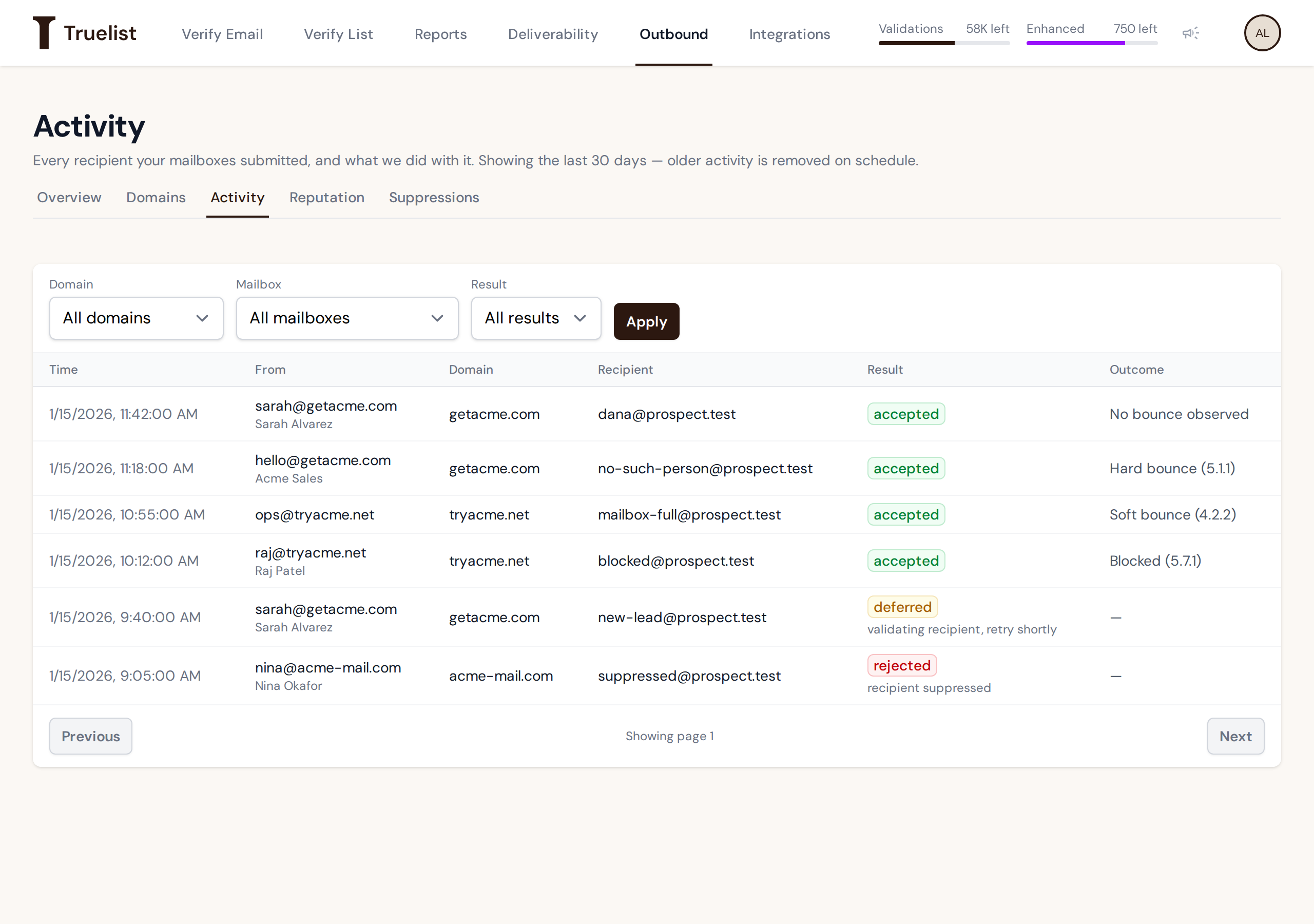
The Activity log (/outbound/activity) shows every recipient your mailboxes submitted, and what
Truelist did with it. There is one row per recipient — not per campaign or per sequencer run.
What’s logged
Each row shows:
| Column | What it shows |
|---|---|
| Time | When the recipient was submitted. |
| From | The sending mailbox’s address and display name. |
| Domain | The sending domain. |
| Recipient | The address that was sent to. |
| Result | accepted, deferred, or rejected — see below. |
| Outcome | A bounce label, or a dash if none applies yet — see below. |
A row is created at the moment a recipient is submitted, before any message content exists. Truelist never records a subject line or a message body — there is nothing to record, since sending policy is applied before the message body is formed.
Results
Result is Truelist’s own decision at the moment your sequencer submits a recipient — before any receiving server is contacted:
- accepted — Truelist’s mail server accepted the recipient and queued the message to go out. It doesn’t mean the receiving server accepted it; see Outcome.
- deferred — Truelist asked your sequencer to retry later, for example because the mailbox reached its daily cap, or because Truelist is still validating this recipient. Sequencers retry automatically.
- rejected — Truelist refused the recipient, for example because it’s suppressed, it’s known to be invalid or couldn’t be verified, or the mailbox or domain can’t send. The short reason under the result says why.
Recipients are checked before sending
Truelist validates each recipient before it goes out. A recipient it hasn’t checked yet is deferred briefly (“validating recipient, retry shortly”), and an invalid or unverifiable one is rejected.
Outcome labels
For an accepted recipient, the Outcome column shows what the receiving server reported after Truelist sent the message. Bounces include the server’s status code, for example “Hard bounce (5.1.1)“.
| Outcome | What it means |
|---|---|
| No bounce observed | Nothing further has been reported for this recipient. This is inferred, not confirmed — never read it as “delivered.” |
| Soft bounce | The receiving server reported a temporary delivery problem (for example, a full mailbox). |
| Hard bounce | The receiving server reported a permanent delivery failure. This address is added to your suppression list automatically. |
| Blocked | The receiving server refused the message, for example for a policy or reputation reason. |
Warning
“No bounce observed” is inferred: Truelist accepts a message and hands it to the queue, and no part of this system confirms delivery. Counts are an upper bound on RCPT evaluations (each accepted recipient, counted once — see The sending ramp), not a delivered-mail ledger. A day’s bounces can still change for up to seven days, so don’t treat a day’s totals as final right away.
Filtering activity
Use the filters above the table to narrow the log:
- Domain — restrict to one sending domain.
- Mailbox — restrict to one mailbox; this list narrows to the mailboxes on whichever domain you’ve selected.
- Result —
accepted,deferred, orrejected.
Click Apply to run the filter. Results page 50 rows at a time, with Previous and Next buttons at the bottom of the table.
How long history is kept
The page shows the current retention window at the top — currently 30 days. Rows older than that are removed on a schedule, so an address that doesn’t show up in the log isn’t necessarily something that went wrong; it may simply have aged out.