Truelist Outbound overview
Truelist Outbound is sending infrastructure for cold email. It gives you domains, mailboxes, and a reserved sending IP that you connect to a cold outbound sequencer — Instantly, Smartlead, lemlist, or any other tool that sends over SMTP. Truelist doesn’t run your campaigns or write your copy; your sequencer still does the sequencing. Truelist handles the sending infrastructure underneath it: registering domains in your name, configuring authentication, enforcing a daily sending ramp, watching blocklists, and keeping a permanent list of addresses you must never email again.
It’s for teams running cold outbound at volume who need dedicated domains and mailboxes that aren’t shared with anyone else’s sending, with the server-side discipline (ramp caps, suppressions) that helps protect a new domain’s reputation in its first weeks.
How it works, end to end
- Domains are registered in your name. When you register a domain through Outbound, SPF, DKIM, and DMARC are configured automatically. You don’t manage DNS records yourself.
- Mailboxes connect to your sequencer over SMTP and IMAP. Each mailbox gets its own SMTP and IMAP credentials, which you paste into your sequencer’s connection settings. See Connecting your sequencer.
- One sending IP is reserved for your account. It’s assigned when your first domain is set up, and it’s exclusively yours — not shared with other Truelist customers.
- Daily caps are enforced on our mail server, following the ramp. Each mailbox starts at a low daily cap and steps up over 21 days. This is enforced server-side regardless of what your sequencer sends — see The sending ramp.
- Every recipient is checked before Truelist sends to it. Truelist validates each recipient at the moment your sequencer submits it; one it hasn’t checked yet is deferred briefly, and one that’s invalid or unverifiable is rejected. See Activity.
- Suppressions are enforced on our mail server. Addresses that hard-bounce or complain are added automatically, and any attempt to send to a suppressed address is rejected before it leaves our servers. See Suppressions.
- Blocklist monitoring runs on a recurring, batched schedule, with automatic protective actions. Your domains and your IP are checked against blocklists in batches — a listing can take several hours to show up — and remediation (like pausing a domain or rotating to a clean IP) can happen automatically once something is found. See Reputation and blocklists.
What Outbound deliberately doesn’t do
Note
There is no warmup network or warmup service. What exists is the ramp: server-enforced daily caps that step up over 21 days (10 → 20 → 30 → 40 sends a day). Mailboxes that can send show the state label warming in the dashboard. It means the mailbox follows the ramp schedule, and the label stays the same after day 21. It isn’t a warmup service.
- No warmup network. Outbound doesn’t enroll your mailboxes in a shared warmup pool or exchange mail with other senders to build reputation. The ramp is a cap on your own sending volume, not a warmup service.
- No Reply-To setting. Truelist has no Reply-To field anywhere in the product. Set Reply-To in your sequencer instead — Instantly, Smartlead, lemlist, and others all support it.
- Truelist’s sending checks run at the envelope stage, before the message content exists, so they never look at your subject line or body, and the activity log records neither. We never see or alter your headers.
Plans
| Foundation | Dedicated | |
|---|---|---|
| Price | $149/month | $299/month |
| Charged upfront per 6-month term | $894 | $1,794 |
| Domains | 3 | 6 |
| Mailboxes per domain | 3 | 6 |
Both plans include a 6-month term charged upfront that renews automatically, 5,000 email validation credits a month that roll over, and one sending IP reserved exclusively for your account. See Billing and renewal for details.
How to get started
- Buy a plan — choose Foundation or Dedicated and check out through Stripe. Nothing is registered yet; you only pick the plan.
- Set up your account — save your registrant details, then register your first domain and mailbox.
- Connect your sequencer — generate SMTP/IMAP credentials for a mailbox and paste them into Instantly, Smartlead, lemlist, or whatever you use.
A tour of the Outbound tabs
Once your account is set up, the Outbound section has five tabs:
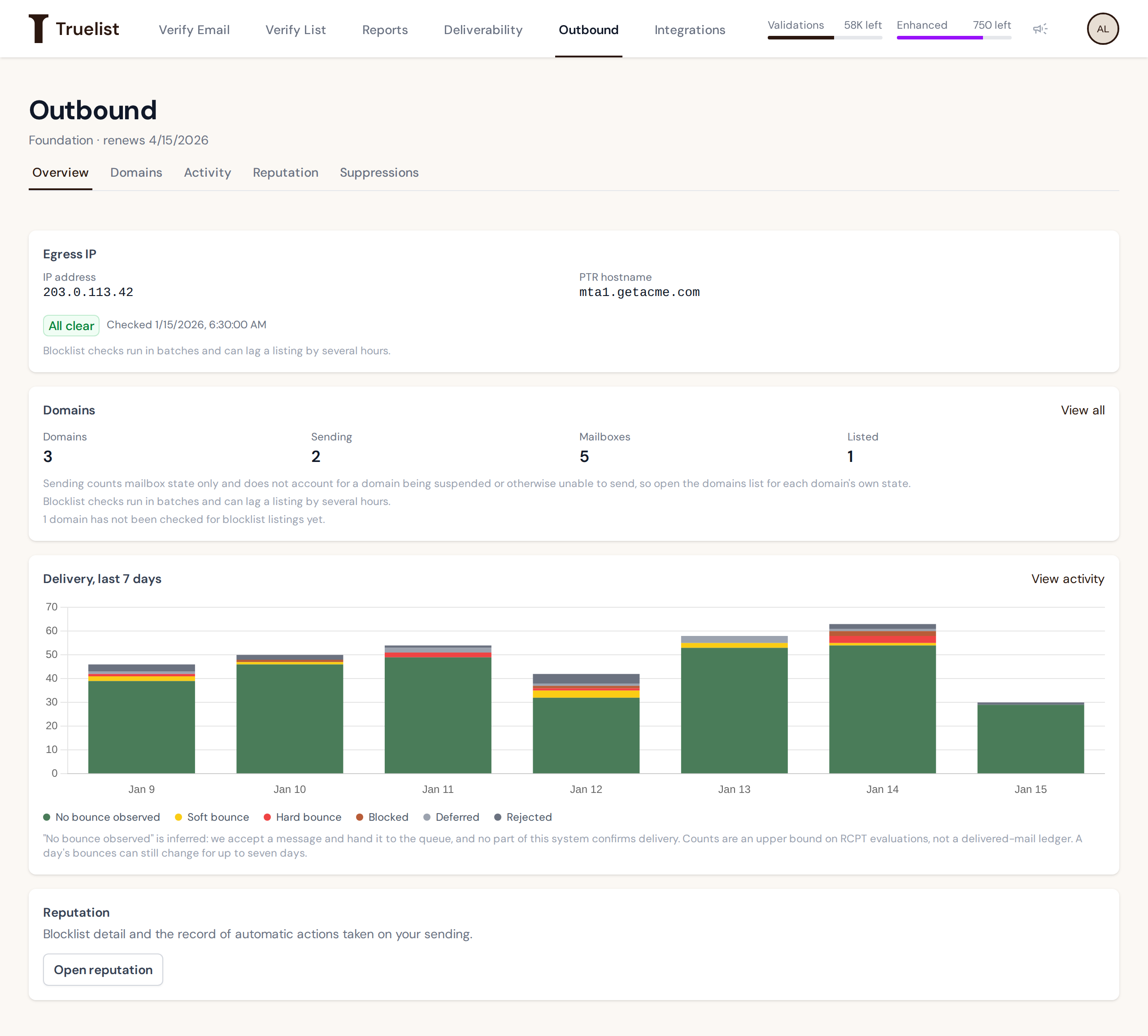
- Overview — your plan, renewal date, egress IP status, a domains summary, and a 7-day delivery chart. The egress IP is the IP address your mail is sent from; its PTR hostname is the name receiving servers see when they look up that IP.
- Domains and mailboxes — every domain you’ve registered, its state, and the mailboxes on it.
- Activity — a log of every recipient your mailboxes have submitted, and what happened to it.
- Reputation — blocklist status for your domains and IP, plus a timeline of automatic remediation actions.
- Suppressions — the permanent list of addresses your account must never send to again.