Reputation and blocklists
The Reputation page (/outbound/reputation) shows your sending IP’s and domains’ blocklist
status, and a timeline of what Truelist has done about any problems it has found.
Warning
Blocklist checks are batched and can lag a listing by several hours. A status here reflects the most recent completed check, not the current second.
Blocklist status
One card is shown for your sending IP and for each domain.
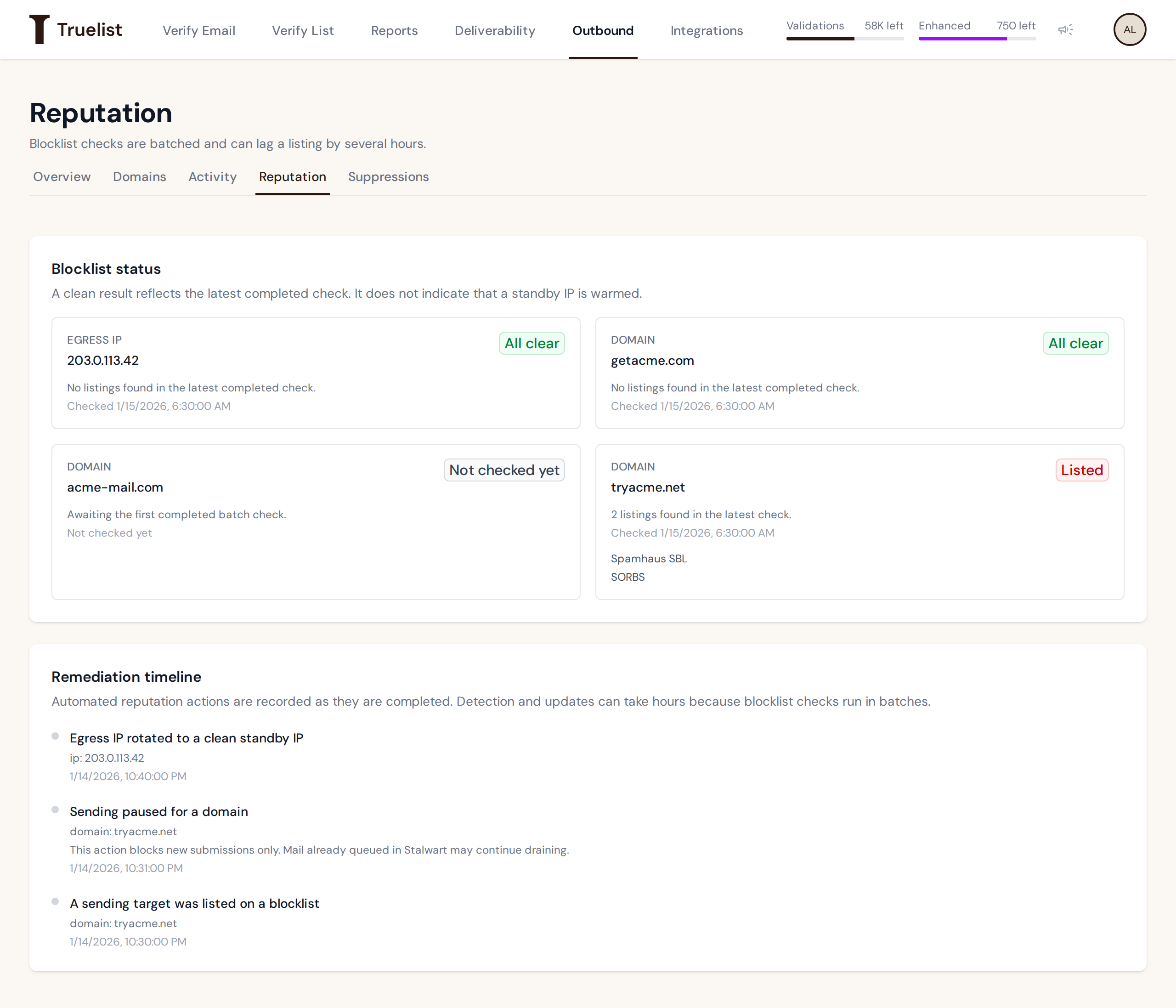
Each card shows a status:
| Status | What it means |
|---|---|
| All clear | No listings were found in the latest completed check. |
| Not checked yet | The first check hasn’t completed yet. This is not a clean bill of health — treat it as unknown, not clear. |
| Listed | N listings were found in the latest check. The names of the specific blocklists are shown on the card. |
Each card also shows when it was last checked, or “Not checked yet” if it hasn’t been checked at all.
Note
A clean result reflects the latest completed check only. It does not mean a standby IP has any sending history — a newly rotated IP starts clean, but with no sending history for you, same as any other IP.
Remediation timeline
Below the status cards, a chronological timeline shows the last 30 days (up to 50 events) of what’s happened in response to any reputation problems. Events you may see, using the exact on-screen labels:
| Event | What it means |
|---|---|
| A sending target was listed on a blocklist | Your IP or a domain was found on a blocklist in a check. |
| A sending target was removed from a blocklist | A prior listing cleared on a later check. |
| Egress IP rotated to a clean standby IP | Your sending moved to a clean standby IP. A new IP starts without any sending history of its own. |
| Sending paused for a domain | Truelist paused the domain in response to a problem. This blocks new submissions only — mail already queued may continue to go out. |
| Sending paused for a mailbox | Truelist paused the mailbox in response to a problem. This blocks new submissions only — mail already queued may continue to go out. |
| Sending limits adjusted | After repeated problems, Truelist took a further step on your account, such as a warning, lower daily caps, or suspended sending. |
| A receiver reported a sending reputation problem | A receiving mail server’s bounce response indicated a blocklist or reputation issue. |
| Automatic remediation needs attention | An automatic fix did not complete. If sending was paused, new submissions stay blocked; mail already queued may continue to go out. |
We email you when sending is paused for a domain.
Pausing and getting un-paused
A domain or mailbox can be paused automatically after a reputation problem, or paused by Truelist
support. Either way, pausing has the same effect: new submissions are blocked; mail already queued
may continue to go out. An automatically paused domain shows state suspended, and its mailboxes
show paused.
Important
There is no automatic un-pause. Once a domain or mailbox is paused, it stays paused until a human clears it. Contact support to get it resumed.
What Truelist doesn’t do automatically
Truelist does not file delisting requests with blocklist operators on your behalf. Moving your account to a clean standby IP after a listing can happen automatically; when it can’t, our team handles it.